Building a unidirectional edge layer for third-party connectivity removes a common trade-off. Enterprises need bidirectional service exchange with partners, vendors, and external platforms, without bidirectional network connectivity that broadens exposure. With Amazon VPC Lattice and AWS PrivateLink, you can exchange services for both ingress and egress, without creating a routed network path.
The traditional options (AWS Transit Gateway peering, AWS Cloud WAN attachments, AWS Site-to-Site VPN, and Amazon Virtual Private Cloud (Amazon VPC) peering) all establish bidirectional Layer 3 connectivity. That path requires additional controls to limit exposure. One misconfigured route table can expose internal workloads to a partner with inadvertent access. Exposure is bounded only by route tables, security group and network access control list (network ACL) configuration, and firewall rules (if present).
This post outlines these interconnection methods and their drawbacks, then describes an architecture that keeps third parties off your Layer 3 network entirely.
Prerequisites and assumed knowledge
This is an Advanced (300) level post. To follow along effectively, you need working knowledge of the following AWS services and networking concepts:
- Amazon VPC fundamentals.
- AWS Transit Gateway concepts.
- AWS Direct Connect and AWS Site-to-Site VPN, including virtual private gateways and transit virtual interfaces.
- Layer 3 (IP) routing principles, CIDR notation, and BGP fundamentals.
- AWS PrivateLink concepts.
- Amazon VPC Lattice concepts, including service networks, resource gateways, and resource configurations.
- Network security patterns such as east-west traffic inspection, centralized firewalling with AWS Network Firewall, and zero-trust architectures.
- For foundational context on multi-VPC networking patterns, refer to Building a Scalable and Secure Multi-VPC AWS Network Infrastructure.
Traditional approaches to third-party connectivity
Several established patterns can connect you to third parties on AWS. Each is designed for broad network connectivity, which is the right choice for many use cases. For third-party isolation, where you want to exchange specific services without extending your network, each one has trade-offs.
Option 1: Amazon VPC peering, Transit Gateway, or AWS Cloud WAN attachment
Peer VPCs directly using Amazon VPC peering, attach third-party VPCs to a shared Transit Gateway or AWS Cloud WAN, or peer with a third-party-managed Transit Gateway.
Considerations for this use case:
- Full Layer 3 reachability. Security depends on firewall, security group, and network ACL configuration.
- IP address overlap with the third party requires complex NAT workarounds.
- A user with inadvertent access gains Layer 3 visibility to scan and probe your environment.
Option 2: VPN or AWS Direct Connect with shared routing
Extend on-premises connectivity patterns using AWS Site-to-Site VPN or AWS Direct Connect.
Considerations for this use case:
- Bidirectional routing. The partner can reach anything advertised.
- Firewall inspection at the routing boundary adds cost and latency without removing the underlying exposure.
- IP address coordination burden across organizations.
- All-or-nothing at the network layer and hard to scope per service.
Option 3: Internet-based APIs with public endpoints
Expose services over the public internet with authentication and TLS.
Considerations for this use case:
- Distributed denial of service (DDoS) exposure and public internet traversal.
- Each endpoint requires certificate management, AWS WAF, and security hardening.
- Does not meet compliance requirements that mandate private connectivity.
The solution: Unidirectional service connectivity with Amazon VPC Lattice and AWS PrivateLink
With this architecture, you can eliminate Layer 3 exposure between your network and third parties, exposing only the required TCP or UDP ports per service through a centralized, unidirectional edge layer with optional inspection and policy enforcement.
Choosing between AWS PrivateLink and Amazon VPC Lattice
Both services eliminate Layer 3 exposure. Which one fits depends on your workload. The following guidance lists out when to use Amazon VPC Lattice or AWS Private Link.
Ingress (exposing your services to third parties)
VPC Lattice fits most ingress workloads. AWS PrivateLink fits workloads with either of the following requirements:
- The service runs on UDP (the VPC Lattice resource gateway supports only TCP), or
- The consumer’s VPC cannot allocate the required IP address space (at least one /28 contiguous block per Availability Zone for the service network VPC association) when a service network endpoint is used. This does not apply when only resource configurations are used.
In either case, publish the service as an AWS PrivateLink service instead.
Egress (consuming third-party services)
For providers outside AWS (another cloud or on premises), use VPC Lattice with a resource gateway and resource configuration targeting the provider’s IP address or fully qualified domain name (FQDN).
For providers on AWS, use VPC Lattice if the provider can expose their service through a VPC Lattice service (for HTTP or HTTPS services) or a resource configuration. You then associate it with a VPC Lattice service network that you manage, which reduces the number of endpoints in your VPC. If the provider only publishes an AWS PrivateLink service, consume it through an AWS PrivateLink endpoint instead.
Architecture overview
This architecture assumes you have an existing hybrid environment. Your VPCs connect to each other and to on-premises infrastructure using AWS Transit Gateway or AWS Cloud WAN. For implementation details, refer to the east-west centralized inspection section of Inspection Deployment Models with AWS Network Firewall reference architecture diagrams. Use the centralized inspection layer if Layer 3/4 inspection or an intrusion detection and prevention system (IDS/IPS) is required for some or all third-party traffic. Figure 1 shows a typical hybrid environment.
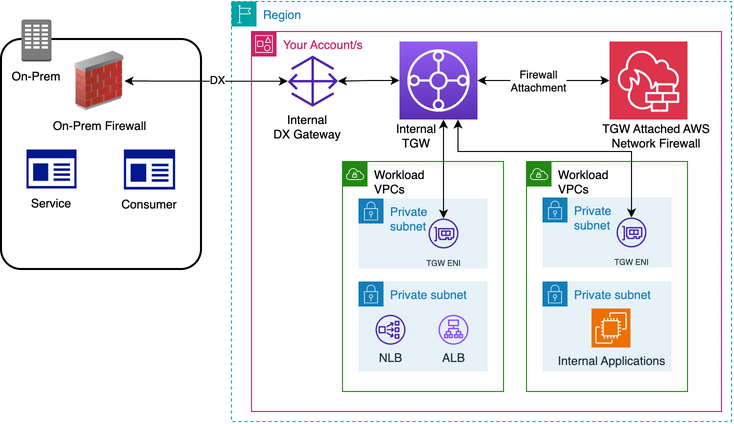
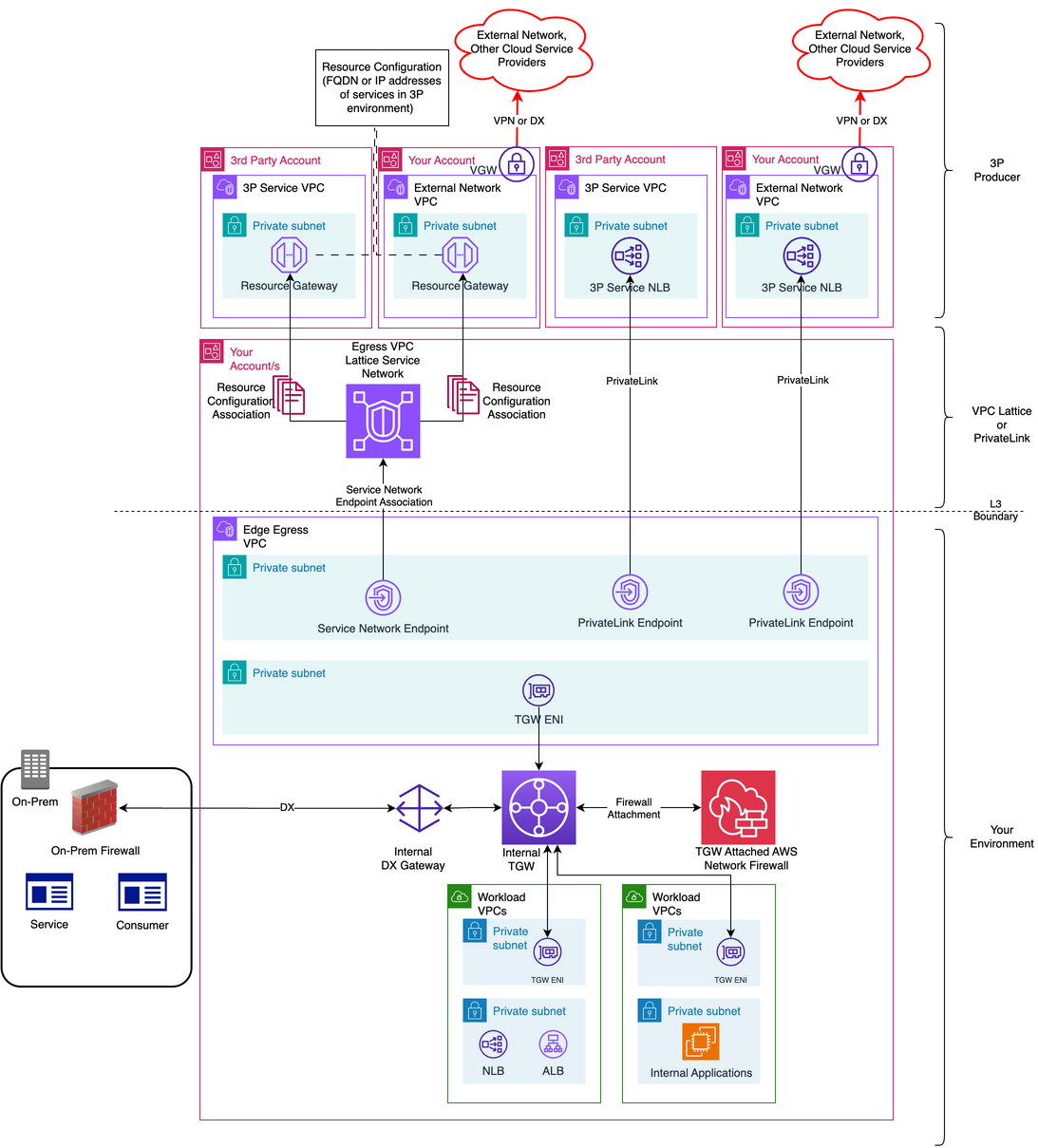
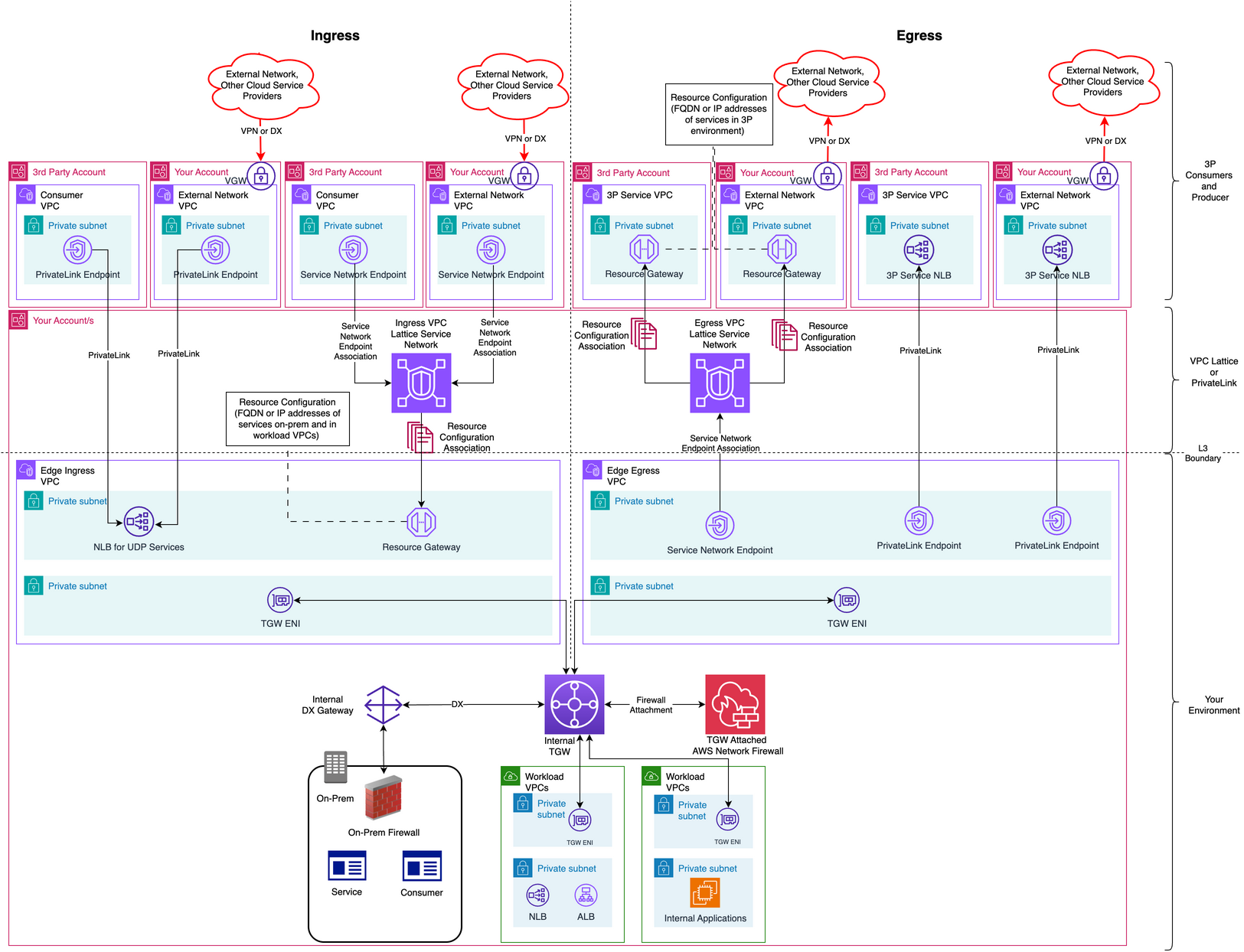
The architecture has three layers for both ingress and egress: the third-party consumers and producers, the VPC Lattice service networks and PrivateLink in the middle, and the Edge Ingress VPC and Edge Egress VPC at the bottom. These edge VPCs connect to your internal workloads through the internal Transit Gateway.
Ingress (third-party consumer to your services)
Figure 2 shows the ingress architecture, with each layer explained in the following sections. Inspection is optional: Traffic can traverse a TGW-attached AWS Network Firewall when Layer 3/4 inspection is required.
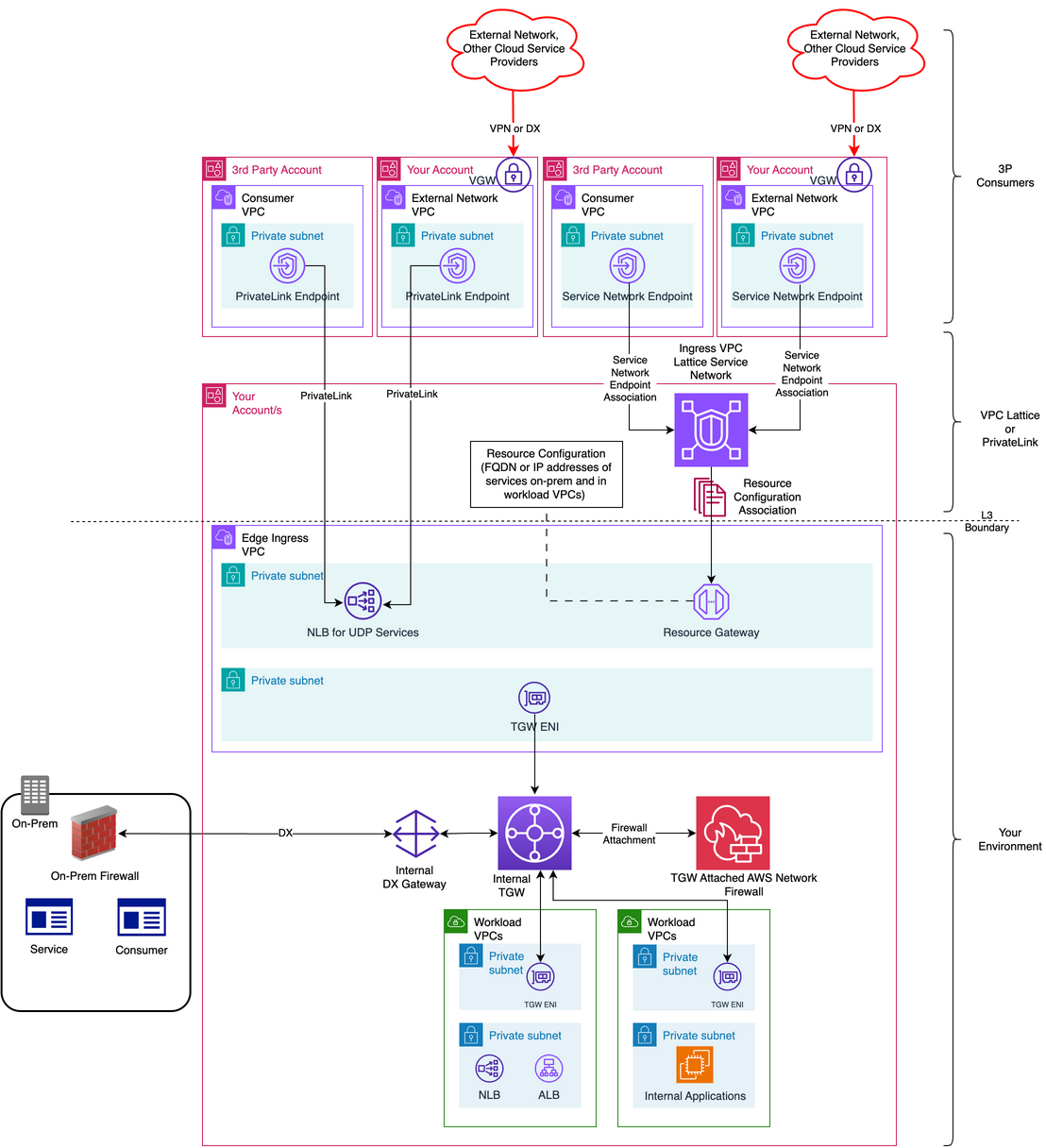
Edge Ingress VPC
The Edge Ingress VPC hosts the resources that expose your internal services to third parties. To set it up, complete the following steps:
- Configure resource configurations backed by a resource gateway pointing to the internal service FQDN or IP address.
- For services that can only be exposed using PrivateLink (see the preceding selection criteria), deploy a Network Load Balancer (NLB) for the internal services and publish it as an AWS PrivateLink service.
- Attach the internal TGW to this VPC and route accepted ingress traffic toward internal workload VPCs or on premises through the internal TGW.
- Optionally, configure TGW and VPC route tables so that inbound traffic from third-party networks traverses the firewall before reaching workload VPC targets or on-premises services.
VPC Lattice and PrivateLink layer
This layer connects third-party consumers to the services that you expose from the Edge Ingress VPC. To set it up, complete the following steps:
- Create a VPC Lattice service network and share it with the third-party AWS account using AWS Resource Access Manager (AWS RAM). Associate resource configurations backed by a resource gateway deployed in the Edge Ingress VPC.
- For services that can only be exposed using PrivateLink, ask the partner to create an AWS PrivateLink endpoint in their VPC for the PrivateLink service published earlier.
Third-party consumer layer
Consumers on AWS connect from their own VPCs, and consumers outside AWS connect through a dedicated VPC that you create for them. The following steps cover both cases:
- Third-party consumers on AWS likely already have VPCs in their own AWS accounts. They only need to create a service network endpoint for your service in their VPCs, or, for UDP services, a PrivateLink endpoint.
- For third-party consumers outside AWS, create a dedicated VPC using a CIDR block from the third party’s approved address space. This CIDR can overlap with other providers or your existing VPCs, because no routed path exists between these dedicated VPCs and the rest of your network. Connect the VPC’s virtual private gateway to the third party over AWS Site-to-Site VPN or AWS Direct Connect. Using one dedicated VPC per third party removes the IP address coordination burden across organizations.
- External consumers connect through a service network endpoint or PrivateLink endpoint exposed from your Edge Ingress VPC through a resource gateway and resource configuration or an NLB.
Ingress traffic flow
Ingress traffic follows one of four paths, depending on where the consumer runs and which service exposes your workload. The following sections describe each path.
Ingress from consumers on AWS
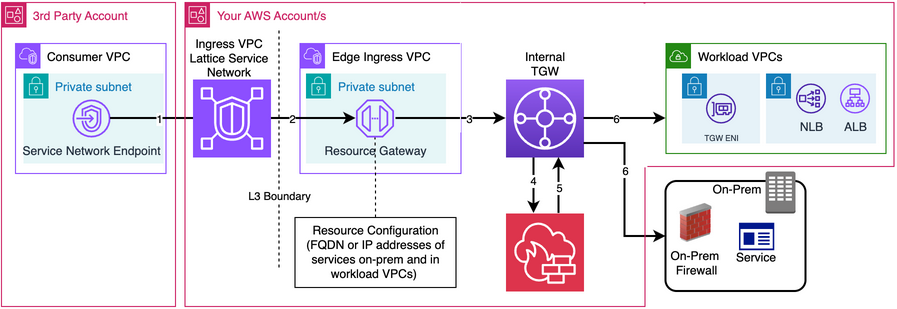
The consumer reaches the shared service through the VPC Lattice service network endpoint in its VPC. VPC Lattice forwards the request through the resource gateway to the targets defined in the resource configuration, by IP address or FQDN. The resource gateway sends this traffic from internal VPCs over Transit Gateway and from on premises over AWS Direct Connect or AWS Site-to-Site VPN. If inspection is required, traffic can be routed through TGW-attached AWS Network Firewall. Figure 3 illustrates this.
Ingress from consumers outside AWS (other cloud service providers or on premises)
The packet enters the service network endpoint in the consumer’s VPC over AWS Direct Connect or AWS Site-to-Site VPN and reaches the VPC Lattice service network. VPC Lattice forwards it through the resource gateway to the target in the resource configuration. If inspection is required, traffic can be routed through TGW and AWS Network Firewall. You can also insert a firewall endpoint (Network Firewall or Gateway Load Balancer) between the resource gateway and its targets. For on-premises targets, the path traverses the Transit Gateway and AWS Network Firewall before reaching the service through AWS Direct Connect. Figure 4 illustrates this.
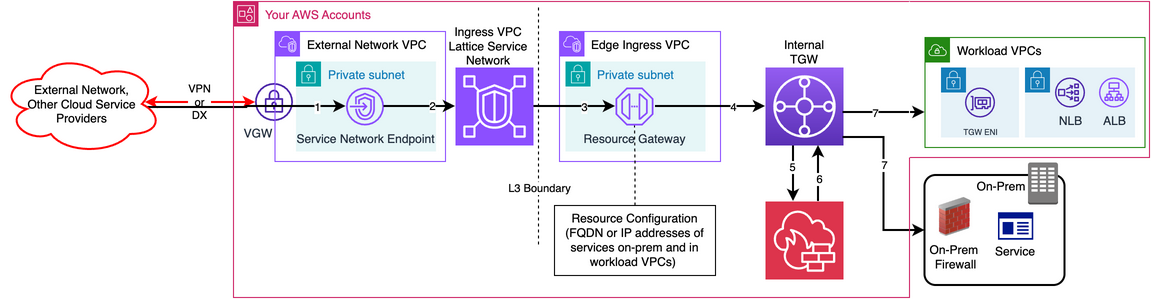
Figure 5 shows ingress from consumers on AWS through AWS PrivateLink. The consumer’s PrivateLink endpoint connects to the endpoint service you publish from the Edge Ingress VPC, where an NLB forwards to internal targets.
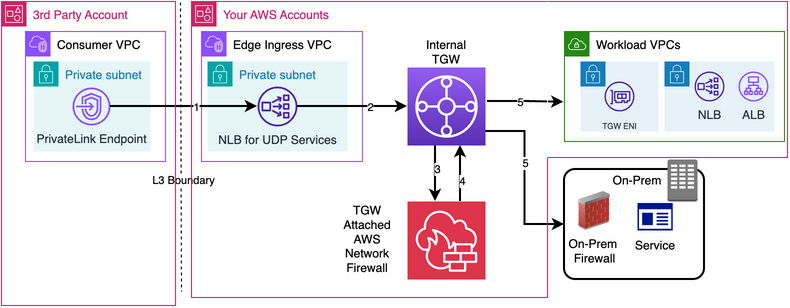
Figure 6 shows ingress from non-AWS consumers through AWS PrivateLink. The consumer’s PrivateLink endpoint sits in the dedicated VPC, reached over Direct Connect or Site-to-Site VPN, fronting the same NLB.
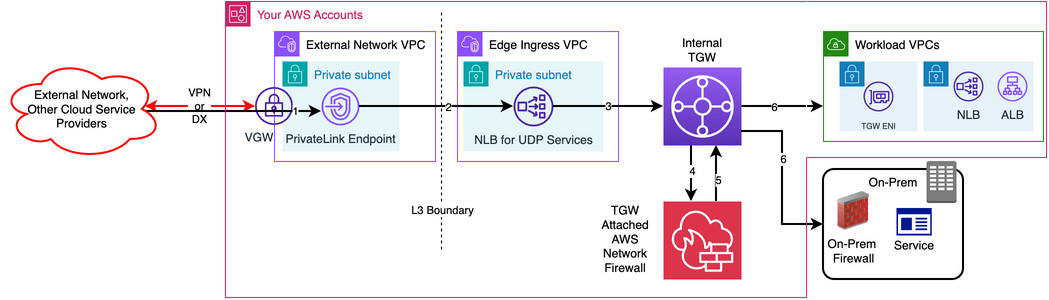
In both cases, consumers reach only the NLB behind your endpoint service, with no routed path into your internal network.
Egress (internal consumers to third-party services)
Figure 7 shows the egress architecture, with each layer explained in the following sections.
VPC Lattice and PrivateLink layer
Create a VPC Lattice service network for egress and share it with the third-party AWS account using AWS RAM. Owning the service network lets you control which third-party services can connect.
Third-party producer layer
Third-party producers connect to the egress service network in different ways, depending on where their services run. The following steps cover producers on AWS and producers outside AWS:
- Third-party producers on AWS manage the resources in their own accounts. They expose their service as a VPC Lattice service (for HTTP or HTTPS services) or through a resource gateway and resource configuration. They then associate it with the egress service network that you shared. If a producer publishes only an AWS PrivateLink service, consume it through a PrivateLink endpoint in your Edge Egress VPC.
- As with ingress, for third-party producers outside AWS, create one dedicated VPC per third party from the provider’s approved address space. This address space can overlap with other providers or your existing VPCs, because no routed path exists between the dedicated VPCs and the rest of your network. Connect each dedicated VPC to the third party over AWS Site-to-Site VPN or AWS Direct Connect. This removes the IP address space coordination burden across organizations.
- In each dedicated VPC, you own and manage the resources that expose the producer’s service. Deploy a resource gateway and a resource configuration that points at the producer’s FQDN or IP address, and associate the resource configuration with your egress service network. For UDP services, deploy an NLB that targets the producer’s IP addresses and publish it as an endpoint service. Consume it through a PrivateLink endpoint in your Edge Egress VPC.
Edge Egress VPC
The Edge Egress VPC hosts the endpoints that your internal consumers use to reach third-party services. To set it up, complete the following steps:
- Deploy a service network endpoint or AWS PrivateLink endpoint for the egress service network or PrivateLink service, respectively, giving workload VPCs and on-premises hosts access to third-party services.
- Attach the internal TGW to this VPC and route egress traffic from internal workload VPCs or on premises toward the Edge Egress endpoints described earlier through the internal TGW.
- Optionally, configure route tables so that outbound traffic from internal consumers to third-party networks traverses the firewall.
Egress traffic flow
The path that egress traffic takes depends on two factors: where the producer runs, and whether you consume the service through VPC Lattice or AWS PrivateLink. The following sections walk through each combination.
Egress to service providers on AWS
Traffic reaches the third-party service through the VPC Lattice service network endpoint in the Edge Egress VPC. Internal consumer traffic routes through the internal TGW. On-premises traffic arrives over AWS Direct Connect or AWS Site-to-Site VPN and then the TGW. The service network sends packets through the resource gateway to the targets in the resource configuration, by IP address or FQDN in the third-party network. If inspection is required, traffic can be routed through TGW-attached AWS Network Firewall.
Figure 8 shows egress to third-party services on AWS through the VPC Lattice service network.
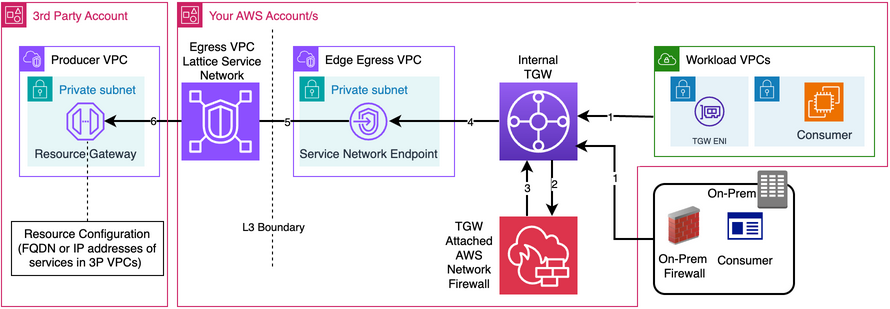
Figure 9 shows egress to third-party services outside AWS through the VPC Lattice service network. Traffic reaches the IP address or FQDN of the third-party service configured in the resource configuration through the resource gateway and Direct Connect or Site-to-Site VPN. If inspection is required, traffic can be routed through TGW-attached AWS Network Firewall.
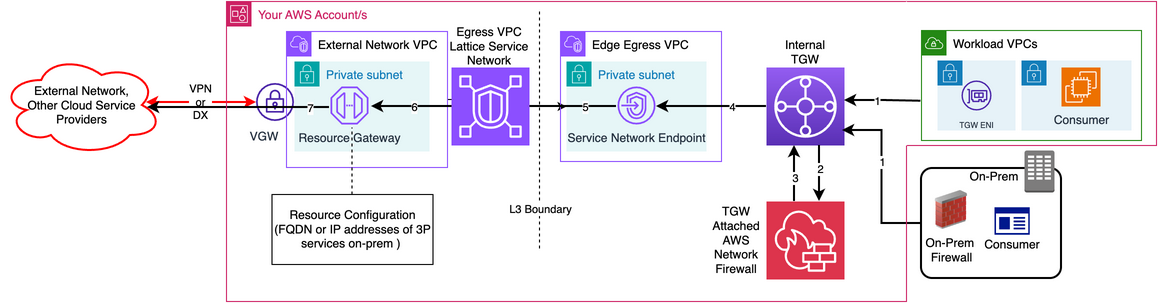
Figure 10 shows egress to third-party services on AWS through AWS PrivateLink. Internal consumers reach a PrivateLink endpoint in the Edge Egress VPC connecting to the provider’s endpoint service.
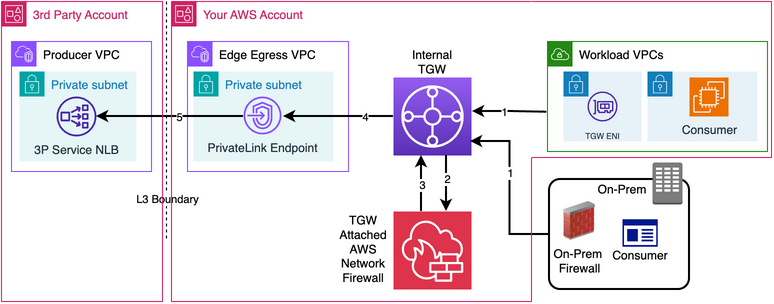
Figure 11 shows egress to non-AWS third-party services through AWS PrivateLink. The Edge Egress PrivateLink endpoint targets the NLB in the dedicated VPC. This NLB sends traffic to the intended targets over Direct Connect or Site-to-Site VPN.
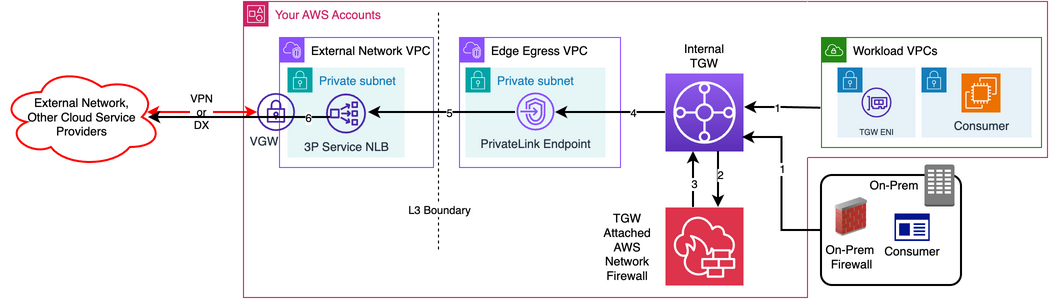
In both cases, internal consumers reach only the PrivateLink endpoint in the Edge Egress VPC, so the provider’s network stays separate from yours.
Figure 12 shows the complete architecture in three layers. At the top, third-party consumers and producers connect to the middle layer, which contains the ingress and egress VPC Lattice service networks and AWS PrivateLink connections. The bottom layer holds your internal network: the Edge Ingress and Edge Egress VPCs, the internal Transit Gateway, AWS Network Firewall, workload VPCs, and on-premises network. The Layer 3 boundary between the middle and bottom layers means that third parties exchange services without a routed path into your network.
Conclusion
Existing third-party connectivity models require a trade-off: support partner integration while accepting broader network exposure, or preserve isolation at the cost of business agility. The unidirectional edge layer described in this post avoids that trade-off. You expose only the specific services each party needs using Amazon VPC Lattice or AWS PrivateLink, without a routed path between networks. The result is minimal Layer 3 exposure, support for overlapping IP address ranges, and less cross-organization coordination. You can add inspection where your policy requires it, whether the third party runs on AWS, another cloud, or on premises.
To get started, identify third-party integrations in your environment, map their ingress and egress requirements, then build the edge layer incrementally using the patterns in this post. For deeper guidance, review the Amazon VPC Lattice Reference Architectures and Secure customer resource access in multi-tenant SaaS with Amazon VPC Lattice.


