I've been using aria2 for years, and I love it. It handles HTTP downloads and torrents, supports multiple connections and proxies, and gives me plenty of control over each transfer. But once I had a dozen links to download, I started missing Internet Download Manager, the Windows download manager I used for its queues and scheduling.
IDM looked dated, but it got a few things right. I could put files in a queue, decide when that queue should run, and trust that videos would end up with videos and archives with archives. With aria2, I kept making those decisions one download at a time. More than once, figuring out where a file went meant remembering which directory I'd run the command from.
I wanted that workflow in the terminal, without a separate GUI window open just to babysit downloads. So I built Ario, a terminal download manager for Linux, macOS, and Windows. When you open it, you see your queues, the files in each one, and how fast everything is downloading. aria2 still does the actual transfers.

From a clipboard full of links to an organized queue
Say I'm on a release page and want the documentation now and a couple of large disk images tonight. I copy the whole section and press v in Ario. It picks the URLs and magnet links out of the surrounding text, so I can select the ones I want and send them to a queue in one go. I can add .torrent files from disk, too.
I start the documentation download right away and put the images in an overnight queue. Each queue has its own schedule and defaults for things like connections and retries. If one download needs different settings, I can change just that item from the TUI. And because I assign destination folders by file type, everything lands where I expect it, no matter which directory I was in.
For the controls, I went with Vim-style keybindings and mouse support in every panel. A graph at the top shows total download speed across transfers. If I'm using an HTTP proxy, I can configure it for aria2 and check its live status from the same interface.
What happens after I press q?
Ario is written in Rust and split into two parts. A small daemon manages the queues and schedules, stores their state in SQLite, and talks to aria2 over JSON-RPC. The TUI, built with Ratatui, talks to the daemon over HTTP.
TUI (Ratatui) ──HTTP──▶ daemon ──JSON-RPC──▶ aria2 │ SQLite That separation means I can close the TUI and an overnight queue will still start and stop on time. I didn't reimplement the transfer engine because aria2 already does that well; Ario is the queue and workflow layer on top.
The daemon can also run a command on a queue event, like a checksum script once every file finishes successfully, or a notification when the queue reaches its scheduled stop. Since the API is plain HTTP, other clients can manage the same queues too. I'm building a browser extension on top of it.
Try it
Github link:
 peymanAzad / ario
A batteries-included terminal download manager powered by aria2.
Ario
A batteries-included terminal download manager powered by aria2.

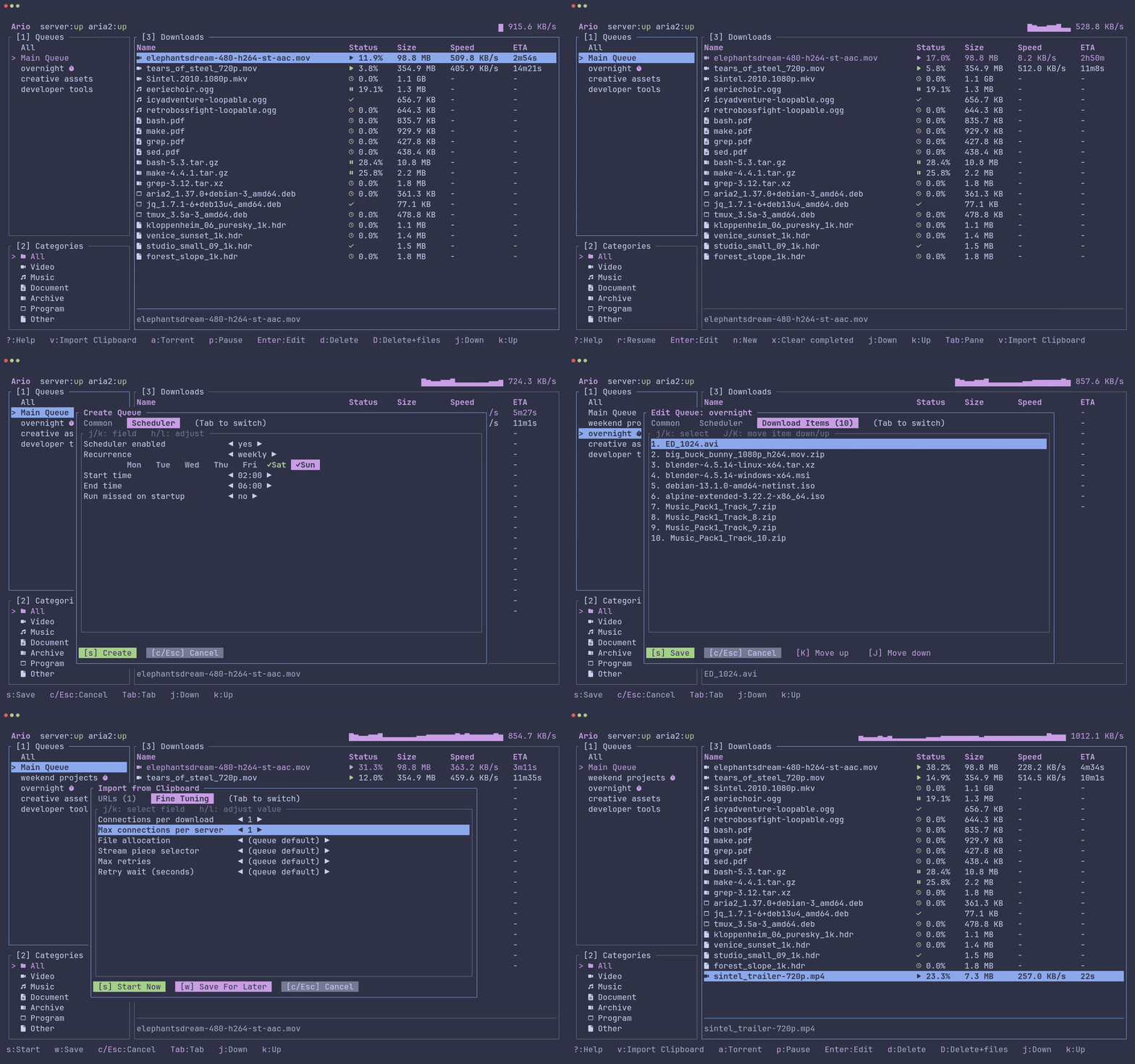
Like the look of the demo? Set theme = "catppuccin-frappe" in tui.toml.
Why Ario? · Features · Installation · Quick start · Configuration · Controls · Contributing · License
Why Ario?
Ario combines aria2 with a managed daemon, scheduled queues, and batch clipboard import in one terminal workflow. It offers a terminal alternative to web front-ends like AriaNg, supports HTTP/HTTPS alongside BitTorrent, and keeps downloads and schedules running after you close the interface. The TUI and daemon can also run on separate machines, connected through an SSH tunnel.
✨ Features
- 🌙 No extra window babysitting your downloads — Close the TUI and get on with your work. The separate daemon keeps your downloads and scheduled queues running in the background.
- 🗓️ Download on your schedule — Set one-time, daily, or weekly download windows, including overnight schedules with automatic start and…
It's still early, and I'd especially like feedback on how the TUI feels to use. Was there a key you pressed expecting something else to happen? A step that took more effort than it should? Tell me in the comments or open an issue on GitHub.


