When a user connects to your network, do you know whether their device meets your security requirements? With device posture assessment for AWS Client VPN, you can make device health a condition of tunnel access, so only users on compliant devices can connect. Until now, Client VPN could confirm who was connecting but not the state of their device. A contractor’s unmanaged laptop or a device with a stopped management agent would get the same tunnel as a fully managed device. The client connect handler could run your own AWS Lambda checks, but only once at connect time, and only on device data your code fetched itself. With device posture assessment, you register a device trust provider on your Client VPN endpoint and then write a Cedar policy that describes what a device has to look like. Client VPN then evaluates every connection against that policy, both at connect time and for as long as the session lasts.
Existing Client VPN documentation uses “posture assessment” for the client connect handler pattern. This post covers the new feature, which Client VPN evaluates itself. It also assumes you already run a Client VPN endpoint and know how authorization rules work.
How it works
Figure 1 shows how Client VPN evaluates a connection at connect time and for the life of the session.
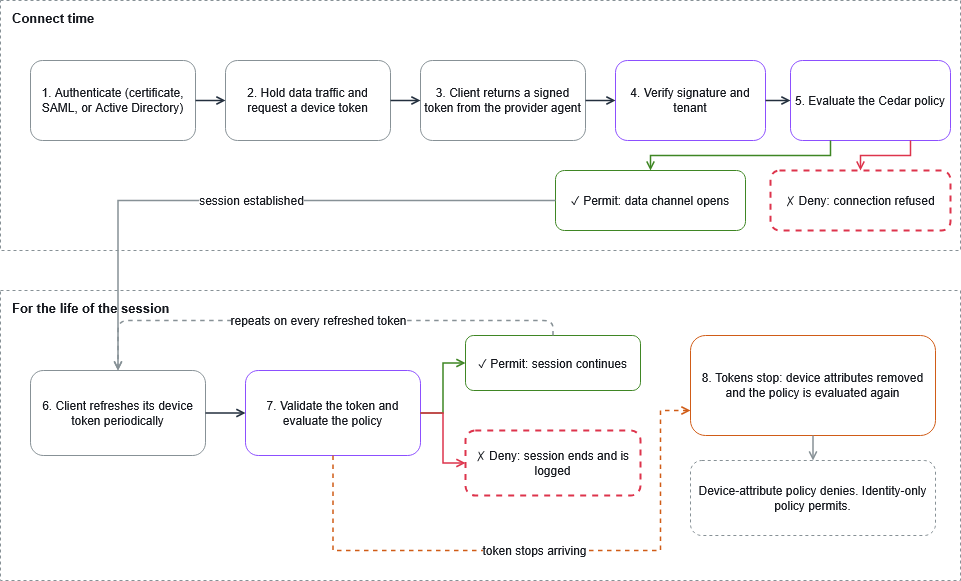
Figure 1: A connection is evaluated at connect time and again on every refreshed device token for the life of the session
Client VPN keeps VPN data traffic blocked until the policy permits the connection (steps 1–5 in Figure 1). From then on, it re-evaluates each refreshed device token, about every five minutes, for the life of the session (steps 6 and 7). A deny at either point refuses or ends the connection and writes a log record naming the evaluation. For the full sequence, refer to Device posture for AWS Client VPN.
What’s new
The feature has five parts, each covered in the following sections:
- Device trust providers supply signed device attributes from the security or management service that you already run.
- Cedar authorization policies state what a device and user must satisfy to connect.
- Continuous evaluation rechecks the policy on every refreshed device token for the life of the session.
- Shadow mode tests a policy against real connections without blocking anyone.
- Metrics and connection logs record every decision in Amazon CloudWatch.
Device trust providers on the endpoint
Device posture assessment gets its signals from a trust provider, which is the device management or endpoint security service that already tracks the health of your fleet. That provider’s agent runs on your devices, producing compliance results, security scores, and similar attributes. You register that provider on your Client VPN endpoint with a new --device-posture-options parameter, available on both create-client-vpn-endpoint and modify-client-vpn-endpoint. You supply the provider type, your tenant ID, and the URL of the public key it signs its tokens with. You can register more than one provider on an endpoint. At launch the supported providers are CrowdStrike on Windows and macOS, Jamf on macOS, and JumpCloud on Windows, macOS, and Ubuntu.
For example, the following AWS Command Line Interface (AWS CLI) command registers CrowdStrike on an existing endpoint.
If the provider agent is already on the device, nothing new needs to be deployed. The AWS VPN Client reads a signed token from the provider’s local agent and sends it with the connection request. Client VPN verifies the signature against the key URL you configured. It also confirms that the token’s tenant matches the endpoint’s before reading the contents (steps 3 and 4 in Figure 1). A token issued for another organization’s fleet is refused rather than evaluated.
Authorization policies written in Cedar
The attributes in that token become variables in a policy you write in Cedar, the same policy language used by AWS Verified Access. Each endpoint has one policy, managed through a new pair of APIs, and its decision determines whether a connection is allowed to carry traffic.
Cedar sees the device attributes and the authenticated identity in the same context, so a single expression can require both.
Which device attributes are available depends on the provider, and the three launch providers publish very different ones. CrowdStrike reports numeric scores from 1 to 100 for the device overall, its operating system settings, and its sensor configuration. Jamf provides a five-level risk rating and the groups a device belongs to. JumpCloud indicates only whether the device is under management. Almost nothing is common to all three, so a policy targets the provider you configured rather than porting between them.
One more distinction is worth noting before you write a policy. The authorization policy decides whether a connection can carry traffic at all, and your existing authorization rules decide which network destinations that connection can reach. They are separate layers and both still apply, as steps 1 and 2 in Figure 2 show.
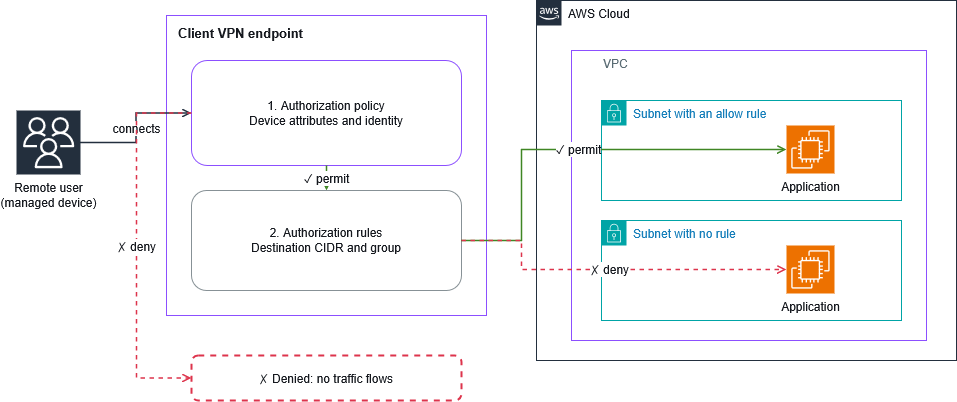
Figure 2: The authorization policy decides whether a connection carries traffic. Authorization rules decide which destinations it reaches
Evaluation that continues throughout the session
The policy is more than a one-time connection check. The AWS VPN Client sends a refreshed token periodically, and Client VPN evaluates each token as it arrives. When a device falls out of compliance mid-afternoon, Client VPN acts as soon as the provider reports the change. It doesn’t wait for a scheduled sweep. If the policy denies, the session is disconnected. For example, under the policy shown earlier, a laptop whose CrowdStrike score drops below 50 after a security setting is turned off loses its session at the next token refresh. You take no action. This is the part that is difficult to build yourself, and it’s the reason a policy is worth more than a connect-time check.
If the agent stops or the provider becomes unreachable, no fresh token arrives (step 8). Client VPN keeps using the claims it already holds for up to 15 minutes. That way, a session can ride out a transient failure. After that, rather than disconnecting, it removes the device attributes and evaluates your policy again. A policy that requires a device attribute then denies and ends the session, while an identity-only policy still permits. Your policy controls the outcome in both cases, whether device attributes are present or not.
Shadow mode
We recommend running every new or changed policy in shadow mode first. If you enforce a policy stricter than your fleet can satisfy, every connection is refused. Support tickets aren’t how you want to learn how many of your laptops have a stopped agent, and shadow mode is how you avoid it. With shadow mode enabled, Client VPN evaluates the policy on every connection and writes the decision to your connection logs without blocking anything.
Metrics and connection log detail
New metrics publish to the existing AWS/ClientVPN namespace in Amazon CloudWatch. For all Client VPN metrics, refer to Amazon CloudWatch metrics for AWS Client VPN.
AuthorizationPolicyEvaluationCountcounts the policy evaluations Client VPN performed.AuthorizationPolicyDeniedConnectionscounts the connections a policy refused.AuthorizationPolicyTerminatedConnectionscounts the sessions a later evaluation ended.
All three are per endpoint and need no setup, so you can alarm on a denial rate the day you enable a policy.
Connection logs carry a new authorization-policy-evaluation object on every evaluated connection. It records the decision, whether the decision came from the connection attempt or from a later evaluation, whether shadow mode was on, and the validation status of each device token. Setting IncludeAuthorizationPolicyContext adds the full context Cedar evaluated, which is what you want while you are writing policies and is probably more than you want at steady state.
Setting it up
Adoption takes four steps:
- Register the trust provider on the endpoint.
- Author a policy with shadow mode enabled.
- Read the decisions out of your connection logs until you are satisfied that the policy matches your fleet.
- Turn enforcement on.
Step 1 uses the command shown earlier in Device trust providers on the endpoint. The same parameter is available on create-client-vpn-endpoint for a new endpoint.
Turn on the context field in your connection logs at the same time, because the context is what tells you why a connection was refused.
Next, attach a policy with shadow mode enabled. Every connection is evaluated and logged, and nothing is blocked.
Read the policy back to confirm its state at any point. The response returns the policy document, the description, whether shadow mode is on, and the policy’s status.
Connections the policy would have refused appear in your log group with a result of deny and shadow mode enabled. The following record is a connection attempt that the policy would have refused at connect time. Because shadow mode is on, the connection succeeded. The context is included.
When the only denials left in your logs are the ones you expect, switch enforcement on.
Things to know
Keep these points in mind when you set up device posture assessment.
- Device posture assessment requires the AWS VPN Client, version 6.2.0 or later, on Windows, macOS, and Ubuntu. Other OpenVPN clients can still connect, but they are evaluated with no device attributes, so a policy that requires one refuses them. For details, refer to Setting up a device trust provider.
- Users need a client configuration (.ovpn) file that contains the device posture directive. Distribute the updated file before you enforce a policy.
- The device has to be enrolled with a provider you registered on the endpoint, and the provider’s agent has to be running. A device with no agent is evaluated with no device attributes.
- The attributes you can write conditions on depend on the provider, and the three launch providers publish different ones. Check what your provider makes available before you write a policy against it.
- Device posture assessment coexists with a client connect handler. Both are evaluated independently on a connection attempt and either one can refuse it. That means you can move checks from an AWS Lambda function into a policy a few at a time rather than all at once.
- The authenticated identity is captured once, at connect time, and doesn’t change for the life of the session. Device attributes refresh and identity doesn’t, so a policy whose decision turns only on user attributes will not re-evaluate to a different answer mid-session.
- An endpoint can carry more than one trust provider, and one policy can reference attributes from any of them.
- A policy document is limited to 10,000 characters.
Availability and pricing
Device posture assessment is available today in the AWS Regions where AWS Client VPN is offered, and requires AWS VPN Client version 6.2.0 or later for Windows, macOS, or Ubuntu. You can configure it from the Client VPN console, the AWS CLI, the AWS SDKs, and AWS CloudFormation. There’s no additional charge for device posture assessment and Client VPN endpoint and connection pricing is unchanged.
Conclusion
With device posture assessment, you can close the gap between who connects and what they connect from. You write one Cedar policy over the user’s identity and the signals your device trust provider already produces. Client VPN enforces it for the whole session, not only at connect time. With shadow mode, you can see how your fleet measures up before the policy blocks anyone. To get started, refer to Device posture for AWS Client VPN.


