A cloud data lake is a scalable, low-cost place to store data from many different sources. Over the years, data lakes built on Amazon Simple Storage Service (Amazon S3) have become a common home for enterprise data, used by teams who query it for analytics and machine learning. However, data lakes have historically made it hard to update and delete records, keep transactions isolated, and handle concurrent changes safely. Open table formats such as Apache Hudi, Delta Lake, and Apache Iceberg were created to solve these problems. They add ACID transactions and row-level updates and delete, along with snapshot history and schema enforcement that make data lakes easier to audit and govern.
As organizations’ data architectures mature and evolve, the need to migrate between these table formats becomes increasingly common. This transition is often driven by changing requirements, performance considerations, or the desire to use newer features. Among these migrations, the shift from Apache Hudi to Apache Iceberg has gained particular attention, as organizations seek to capitalize on Iceberg’s modern architecture and advanced capabilities.
In this post, we show how to convert Apache Hudi tables to Apache Iceberg, using a Jupyter notebook running on AWS Glue 5.1 interactive sessions.
Benefits of migration to Iceberg
Enhanced partition evolution
Iceberg supports dynamic changes to partitioning schemes without requiring complete data rewrites. This capability is valuable in evolving data environments where query patterns change over time. You can adjust your partitioning strategy to optimize performance, reducing the operational overhead traditionally associated with such changes. Your data lake can adapt to changing business requirements without costly reorganization efforts.
Hidden partitioning
In addition to standard partitioning on an existing column, Iceberg supports hidden partitioning, which decouples the physical partition layout from the columns that queries filter on. The table specification declares a partition transform, which is a rule that tells Iceberg how to derive the partition value from a source column, such as a time bucket or a hash of the column value. The transform is defined once at the table level, and Iceberg applies it automatically on every write. This removes a long-standing source of friction on both sides of the table: writers no longer need to extract and maintain a separate partition column alongside the real one at ingestion time, and queries no longer need to carry an extra predicate on that derived column to get good performance.
Openness with the Iceberg REST Catalog
The Iceberg REST Catalog specification defines a standard HTTP protocol for catalog operations. Any engine that speaks the protocol can talk to any catalog that implements it, without a catalog-specific client library or implementation JAR on the class path. Integration moves from a code and dependency problem to a configuration problem, making Iceberg a strong fit for multi-engine data architectures.
Deep integration with AWS services
Iceberg has native integration across the AWS analytics ecosystem. Amazon Athena, Amazon Redshift, Amazon EMR, and AWS Glue all read and write Iceberg tables directly. The AWS Glue Data Catalog provides catalog and metadata management for these tables, and Amazon SageMaker builds on the same open Lakehouse foundation, letting analytics and artificial intelligence and machine learning (AI/ML) workloads share a single copy of data across Amazon S3 data lakes (including Amazon S3 Tables), with SageMaker Feature Store supporting an Iceberg offline store for faster training dataset extraction. On the ingestion side, Amazon Data Firehose delivers data into Iceberg tables from sources such as Direct PUT, Amazon Kinesis Data Streams, Amazon Managed Streaming for Apache Kafka (Amazon MSK), Amazon CloudWatch Logs, and AWS IoT, with optional on-the-fly record transformation by using AWS Lambda. No-code Streaming Tables map a single Kinesis Data Streams stream or a single Amazon MSK (Express brokers) Kafka topic to a single Amazon S3 Tables Iceberg table, with the target table auto-created and partitioning configured on the delivery channel.
AWS managed features
AWS provides managed capabilities specifically designed for Iceberg. These managed features reduce operational overhead while maintaining performance and cost efficiency, so teams can focus on deriving insights rather than managing infrastructure.
- AWS Glue Iceberg table optimizer – Automated compaction, snapshot management, and orphan file cleanup without manual intervention on Iceberg tables in General S3 buckets.
- Amazon S3 Tables – Fully managed Iceberg tables with automatic optimization and maintenance.
- Zero-ETL integration – Managed, incremental replication from Amazon DynamoDB and third-party enterprise applications such as Salesforce, SAP, ServiceNow, and Zendesk into Iceberg tables in Amazon S3 (self-managed or Amazon S3 Tables), with no custom pipeline or connector code to maintain. Source changes are applied incrementally, so the target stays in sync without full reloads.
- Iceberg materialized views – SQL-defined views materialized as native Iceberg tables, refreshed on an automatic schedule and incrementally when the source tables allow it, with change detection handled for you. Well suited to consumption-layer tables that feed dashboards, APIs, and downstream pipelines, since the work shifts from query time to the managed refresh.
These benefits make Apache Iceberg a strong choice for modern data lake implementations, offering advantages in performance, manageability, and scalability compared to traditional table formats.
In the context of migrating data to Apache Iceberg, two primary approaches exist: in-place migration and full table migration. We previously covered both in the blog post “Migrate an existing data lake to a transactional data lake using Apache Iceberg” which walks through the methodology for traditional Hive-style tables, meaning partitioned Apache Parquet, Apache ORC, or Apache Avro datasets registered in a Hive-compatible catalog. The same two approaches apply when the starting point is an Apache Hudi data lake, which comes in two flavors, Copy-on-Write (CoW) and Merge-on-Read (MoR).
In-place migration
This approach generates fresh Iceberg metadata on top of the existing data files of the source table, without rewriting the data itself. The Parquet files of a Hive, Hudi, or Delta Lake table stay in place, and a new or existing Iceberg table is pointed at them with its own metadata layer. The main advantage is cost and speed: no data rewrite, so the migration is fast and cheap on both compute and storage. The main limitation is that the Iceberg table inherits the source table’s schema, partitioning, and physical file shape (file sizes, row groups, sort order), and none of these can be changed during the migration itself.
Full table migration
In this approach, the data itself is rewritten into a new Iceberg table, typically using a writeTo() call or a CREATE TABLE AS SELECT (CTAS) statement. It works for any source an engine can read from (Hive, Hudi, Delta Lake, relational databases, and others), and because the data is being rewritten anyway, the migration step is also where you can reshape it: change the schema, apply Iceberg hidden partitioning, resort the data for pruning, and target larger file sizes than the source has. The trade-offs are cost, time, and storage: higher compute spend, longer migration, and the dataset is effectively stored twice (source and target) until the migration completes, and the source is retired. For large historical tables, a single CTAS is usually impractical, so the common pattern is to seed the table with a small CTAS and then run INSERT INTO ... SELECT partition by partition, parallelizing and checkpointing across batches.
In this post we work through both approaches end-to-end. We first create a sample Hudi event table in each flavor, CoW and MoR, then migrate them in place to Iceberg using two techniques, the Spark Iceberg add_files procedure and the Apache XTable sync tool, covering the considerations and prerequisites of each. Finally, we walk through the full table migration path, where the source data is rewritten into a new Iceberg table from scratch.
Solution overview
The following diagram illustrates the architecture that you implement through this post.
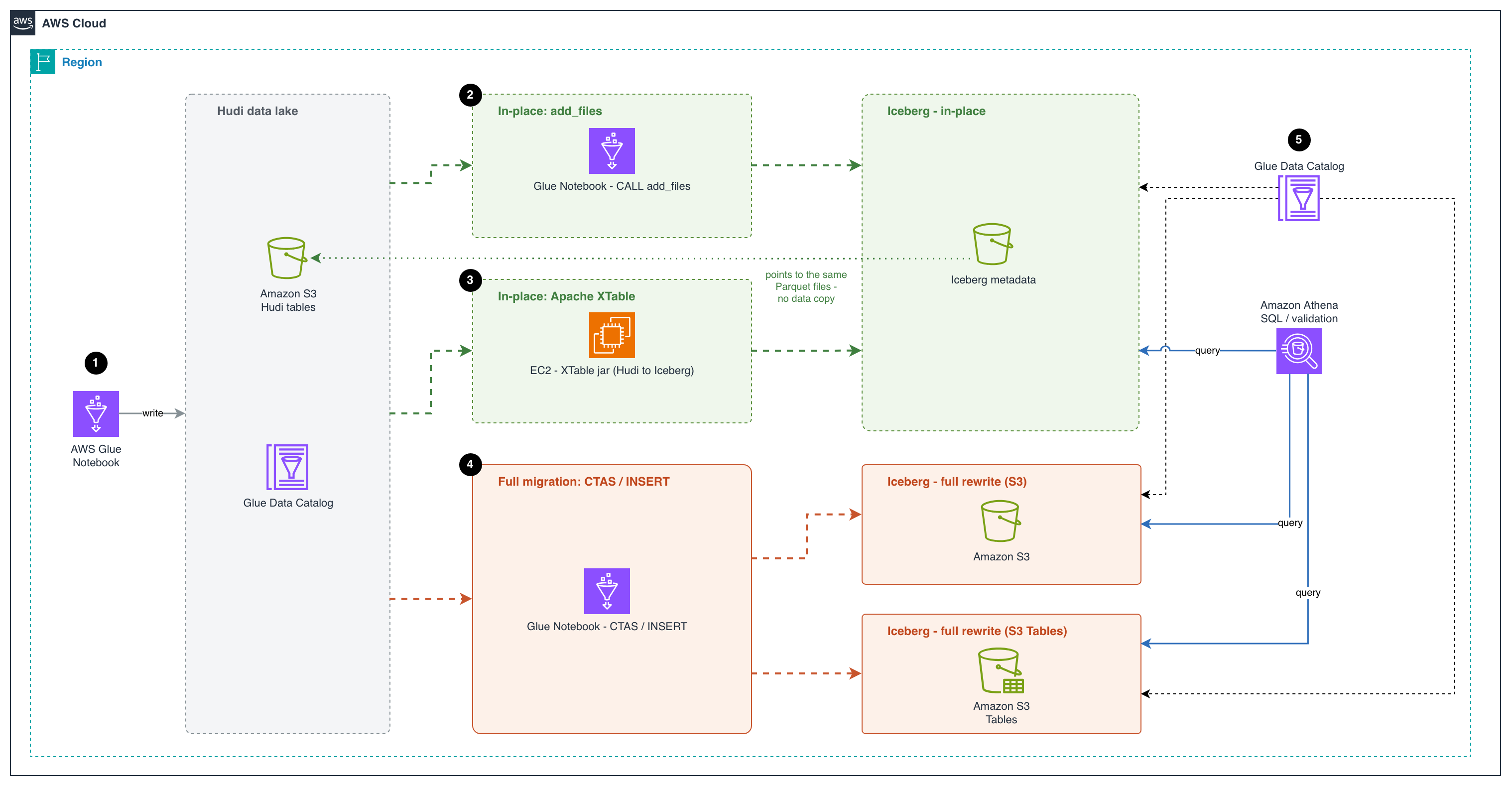
Figure 1: Migration architecture showing the in-place paths (add_files and Apache XTable) and the full-table paths (CTAS and INSERT) to Amazon S3 and Amazon S3 Tables, all registered in the AWS Glue Data Catalog and queried with Amazon Athena
The workflow consists of the following steps:
- An AWS Glue notebook writes the source data as Apache Hudi tables to an Amazon S3 bucket and registers them in the AWS Glue Data Catalog. This creates the existing Hudi data lake that the migration starts from.
- The first in-place migration approach uses an AWS Glue notebook to run the Apache Iceberg
add_filesprocedure. The procedure creates Iceberg metadata on top of the Parquet data files already in the Hudi table. The new Iceberg metadata points to the same Parquet files, so no data is copied or rewritten. This makes it a fast, low-cost migration path. - The second in-place migration approach runs Apache XTable on an Amazon Elastic Compute Cloud (Amazon EC2) instance to convert the Hudi table metadata into Iceberg metadata. XTable reads the Hudi commit timeline and creates matching Iceberg metadata that points to the same Parquet files. Both table formats can then share a single copy of the data.
- For a full migration, an AWS Glue notebook uses
CREATE TABLE AS SELECT(CTAS) orINSERT INTOstatements to read the Hudi data and rewrite it as new Iceberg tables. The tables can go in a general purpose S3 bucket or in Amazon S3 Tables. This approach fully separates the new tables from the Hudi source. S3 Tables also handle table maintenance for you, such as compaction and snapshot management. - The AWS Glue Data Catalog registers the Iceberg tables from all three approaches. Users can then use Amazon Athena, a serverless query service, to run SQL queries on these tables and validate the migrated data. Athena enables interactive SQL-based exploration of data directly in Amazon S3 without the need for complex infrastructure management.
Prerequisites
Before getting started, make sure you have the following:
- An AWS account with a role that has sufficient access to provision the required resources.
- This walkthrough uses AWS Region us-east-1.
- An AWS Identity and Access Management (IAM) role for your notebook as described in Set up IAM permissions for AWS Glue Studio and Amazon S3 read and write permission.
Launch an AWS Glue Studio notebook for processing
For this post, we use an AWS Glue Studio notebook. Follow the steps in Getting started with notebooks in AWS Glue Studio to set up the notebook environment.
- Sign in to the AWS Management Console and open the AWS Glue console.
- In the Region selector (top right), choose your preferred working Region.
- Choose ETL Jobs in the left pane.
- Choose Notebook under Author using an interactive code notebook, select Start fresh, choose your IAM role, and choose Create notebook.
- After a minute, the Jupyter notebook editor appears. Clear all the default cells.
Create Hudi Copy-on-Write (CoW) and Merge-on-Read (MoR) sample event tables
This notebook creates Hudi tables using both Copy-on-Write (CoW) and Merge-on-Read (MoR) table types with sample events. We perform inserts, updates, and deletes, then inspect the underlying file structures to understand the key differences:
- CoW: an update or delete fully rewrites every base Parquet file that contains an impacted row, producing a new file slice in the file group. Reads are cheap, and writes amplify with the fraction of files touched.
- MoR: an update or delete is appended to an Avro log file alongside the base file instead of rewriting the base, and base + logs are merged at read time (or compacted into a new base file later). Cheaper writes. Costlier reads until compaction.
- Execute the first cell with the following configuration to set up the Spark session with Hudi and Iceberg support:
Code:
- Initialize the session and configuration. Update the bucket_name, db_name and region variables with your configurations. Reusable helper –
list_table_files(table_name, label="", verbose=False)renders a table’s S3 layout as a directory tree so you can SEE how CLEAN, COMPACT andadd_fileschange the files underneath. It is reused before/after each of those steps instead of re-coding the listing.
Code:
Sample event data
We use a website clickstream events dataset, partitioned by year/month/day – a realistic pattern for event-driven architectures.
Note: In this example, we create the table with a preCombineField, which flips the default write operation of INSERT INTO from insert to upsert. You can override it explicitly with hoodie.spark.sql.insert.into.operation when you need a different behavior.
CoW table: create, upsert, and delete
We create a Hudi CoW table, insert records, apply an upsert, and delete a record, then inspect how the files change.
Create the Hudi CoW events table
Code:
Insert event records
Code:
Upsert: simulate late-arriving corrections
Code:
Delete: remove a record
Code:
Inspect the CoW file structure
CoW tables rewrite the entire Parquet file on every upsert/delete. You will see one base Parquet file per file group (no log files).
Code:
Output:
MoR table: create, upsert, and delete
We run the same create, upsert, and delete sequence on a Hudi MoR table.
Create the Hudi MoR events table
Code:
Insert initial event records
Code:
Upsert: simulate late-arriving corrections (creates delta log files)
Code:
Delete: remove a record
Code:
Inspect MoR: base Parquet and log files
MoR tables write updates as delta log files (.log.*) alongside the base Parquet files. This avoids full file rewrites for faster writes.
Code:
Output:
Query both Hudi tables
Code:
Output:
Migrate Hudi tables to Iceberg with in-place migration
In-place migration keeps the original Parquet data files where they are and only builds Iceberg metadata on top of them. There is no rewrite of the underlying data, which makes the migration fast and inexpensive even on large tables. Two tools cover the common cases on AWS:
- add_files (Iceberg built-in procedure). A Spark procedure shipped with Apache Iceberg that registers existing Parquet files into an Iceberg table by writing the corresponding manifests, without rewriting the data. It runs as a Spark job in which the source table’s partitions are distributed across Spark tasks, so file listing and column-statistics gathering happen in parallel on the cluster.
- Apache XTable (incubating). An open-source cross-format translation tool that can read the metadata of one lakehouse format (Hudi, Delta, or Iceberg) and write out the equivalent metadata for another, pointing at the same underlying Parquet files. XTable can run once to produce the initial Iceberg metadata, or run on a schedule to keep the Iceberg view continuously in sync with ongoing writes to the Hudi table.
Choosing between add_files and Apache XTable for in-place migration
When planning an in-place migration, it is important to understand the strengths of each approach:
add_filesis best suited for a one-time migration. It registers existing Hudi Parquet files into an Iceberg table in a single operation. After the migration is complete, the source Hudi table and target Iceberg table are independent, and any subsequent changes to the Hudi table are not reflected in Iceberg.- Apache XTable supports both an initial one-time conversion and ongoing incremental synchronization. This makes it ideal for transition periods where you need to keep both the source Hudi tables and the target Iceberg tables in sync while downstream consumers gradually migrate to Iceberg. After all workloads have been cut over, you can stop the sync process and decommission the Hudi tables.
Important notes
add_files/XTable register existing Parquet files as-is, so they rely on the column names baked into each file. Added and dropped columns are safe, but if the source table was renamed any column during its lifecycle, files written before the rename still hold the old name and reads against the new name return NULL for them. For tables with a history of column renames, prefer a full migration instead.
Iceberg version and column statistics (in-place add_files / snapshot): In Iceberg 1.9.0 through 1.10.0, the add_files and snapshot procedures don’t generate column stats in the Iceberg metadata. The cause is a NameMapping loss in ParquetUtil.footerMetrics. Without those column-level lower/upper bounds and null counts, the migrated Iceberg table loses most of its file-skipping ability at query planning time, which translates into more Parquet files being inspected, higher scan volume, and slower queries, especially for selective filters on non-partition columns. The issue is fixed in the Iceberg 1.10.1 release (#14617). Affected runtimes are AWS Glue 5.1 and Amazon EMR 7.11–7.13. We recommend AWS Glue 6.0+ or Amazon EMR 7.14+ for production migrations.
Shared data files during in-place migration: With both approaches, the in-place migration doesn’t copy data. The resulting Iceberg table points to the same underlying Parquet files as the source Hudi table. This means that until you perform a full cutover to Iceberg, you must avoid destructive operations on the Iceberg table that could delete or modify the shared data files. Specifically:
- Don’t drop the Iceberg table with the
PURGEoption. - Don’t run Iceberg maintenance tasks such as
expire_snapshotsorremove_orphan_files.
Running any of these before cutover can remove files that the source Hudi table still depends on, leading to data loss. Iceberg exposes a built-in guardrail against this: the gc.enabled table property. When set to false, Iceberg blocks the preceding destructive operations. How you apply this depends on which migration path you choose.
With add_files. Disable garbage collection immediately after the procedure finishes and keep it disabled until you have fully cut over to Iceberg.
Right after add_files:
After Hudi source is retired and the Iceberg table owns its own data, re-enable GC so maintenance can run normally:
With Apache XTable (incremental sync). The gc.enabled = false guardrail is only partially usable here, because XTable’s incremental sync needs GC to be enabled on the Iceberg table to operate normally. A practical pattern is:
- Run the initial full XTable sync.
- Temporarily set
gc.enabled = falseto run post-migration validation and consistency checks on the Iceberg table in a safe state. - Set
gc.enabled = trueagain before starting incremental sync and leave it on for the duration of the sync period.
Because the automatic guardrail is off during incremental sync, the burden shifts to operational discipline: as long as XTable is syncing and data files are shared with the Hudi table, don’t run any Iceberg operation that can delete source data files (no DROP TABLE ... PURGE, no expire_snapshots, no remove_orphan_files, no manual object deletion against the shared S3 prefix). Treat the Iceberg table as read-only in terms of file lifecycle until cutover is complete, and Hudi is decommissioned, at which point normal Iceberg maintenance can resume.
Don’t enable the AWS Glue Data Catalog table optimizer before cutover.
Glue-managed Iceberg maintenance (compaction, snapshot retention, orphan file cleanup) will rewrite or delete the Parquet files that the source Hudi table still depends on. Verify that no catalog-level optimizer applies to the migrated table and leave table-level optimization off until cutover is complete.
Prerequisites for in-place migration with add_files. The add_files procedure registers every Parquet file it finds under the source location into the target Iceberg table, with no awareness of Hudi’s file-group versioning. If more than one file version of the same record is present at migration time, each version is registered as a separate row, and the Iceberg table will contain duplicates. The source Hudi table must therefore expose exactly one file version per record before add_files runs:
- CoW tables: Run
CLEANto remove old file versions, keeping only the latest Parquet files. - MoR tables: Run COMPACTION (merge delta logs into base Parquet) + CLEAN before calling
add_files, sinceadd_filescan only register base Parquet files and cannot process Hudi delta log files.
Option 1: Migrate Hudi tables to Iceberg with the add_files Spark procedure
This option uses the Iceberg add_files procedure to register the existing Hudi Parquet files into new Iceberg tables. Run it once per table, after preparing the Hudi table so that only the current file versions remain.
Migrate CoW to Iceberg
We create the target Iceberg table, prepare the Hudi source so that only the current file versions remain, register those files, and validate the result.
Create the target Iceberg table with the same schema
Code:
Run Hudi CLEAN to keep only the latest file versions
Check files listing for the Hudi table before the CLEAN operation:
Code:
Output:
Run the CLEAN operation specifying to keep only the latest file slices:
Code:
Output:
Check files listing for the Hudi table after the CLEAN operation:
Code:
Output:
Register Hudi Parquet files into Iceberg with add_files
Code:
Source:https://aws.amazon.com/blogs/big-data/migrating-from-apache-hudi-based-data-lake-to-apache-iceberg-based-data-lake/


