The goal is light-build, not no-build
You npm install a package (e.g. vue), you write import { createApp } from "vue", and it works — as long as there is a bundler in between. Without one, the browser has no idea what "vue" is: it only understands URLs, and node_modules/ was never meant to be deployed. So even the simplest project ends up needing a bundler, only so it can use dependencies instead of reinventing the wheel.
But bundlers add a significant tax. They process every single file, introduce several layers of abstraction between source and deployment, and these abstractions often leak: things that work fine in the browser can break in the build.
Earlier this year, I published Web dependencies are broken: Can we fix them? that discusses this from a platform architecture perspective. Besides the architectural concerns, the complexity is an active developer pain point: in State of JS 2025, “Managing Dependencies” was the 3rd biggest pain point, and “Build tools” were 6th.
However, getting rid of build tools is not the goal. Some use cases should not be handled by the browser, so bundlers and build tools will always have a role to play. The goal is making them lighter, composable, and less essential.
In that vein…
Nudeps: Let your dependencies go nude (i.e. without a bundler around them)
Nudeps1 is a new kind of lightweight build tool that lets you continue using npm install to manage dependencies, vendor them locally, and import them via bare specifiers (package names like "vue" or @floating-ui/dom instead of URLs), without the bundler.

You set it up once, and then you can forget about it: you keep npm installing packages and importing them by name, and they work in the browser. And it only ever touches your dependencies, never your own code.
Since my apprentice Dmitry and I prototyped the initial MVP in February, we and others have tested it on a variety of projects, and at this point I’m confident that — while not perfect — it’s ready for prime time.
A core architectural difference between Nudeps and bundlers is that your own code remains untouched. In fact, it doesn’t even need a watcher that runs whenever you make edits! It only touches dependency files, and doesn’t rewrite anything, making it extremely lightweight in terms of complexity it adds.
This means it can complement any other tooling — or none. You write raw HTML, CSS, JS? This is for you. You use a templating engine, a CSS preprocessor, and TypeScript? This is also for you (though understandably you may have less use for it). This also makes it complement static site generators and island architectures particularly well.
Does it replace your build process? If all you needed it for was getting imports to work, it could. If you also compile your code (JSX, TypeScript, single-file components), you still need a tool for that, but it can be a much smaller one.
Bundlers make complex things possible. Nudeps is hoping to occupy the space on the left of the curve and make simple things easy.
How is it used?
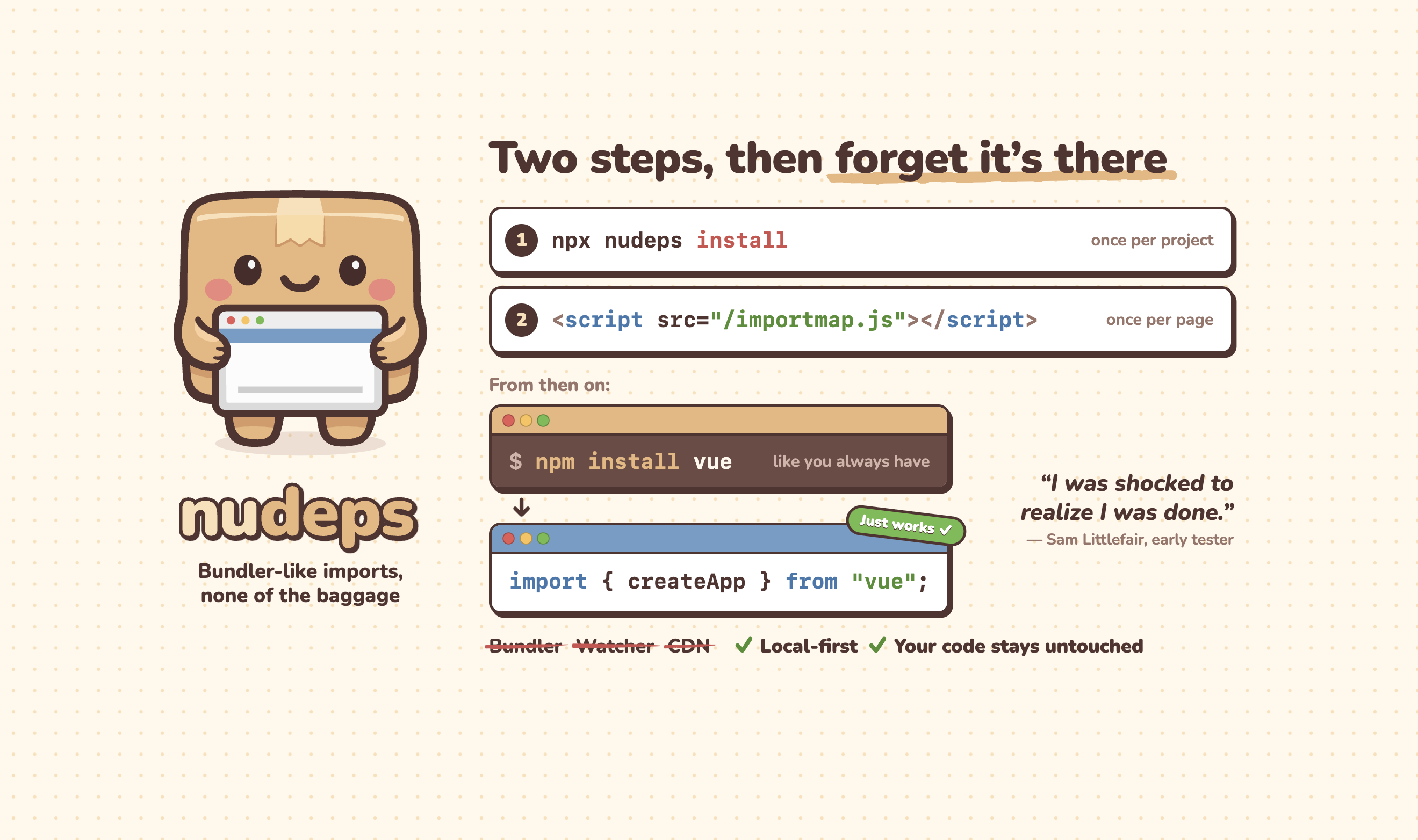
Assuming you don’t need to customize anything (e.g. using /importmap.js for the map, client_modules/ for the dependencies, all default settings) it goes like this:
- You run
npx nudeps installand it will set everything up for you. - You add
<script src="/importmap.js"></script>to your HTML through whatever mechanism you want, before any other scripts that import dependencies:
<script src="/importmap.js"></script> <script type="module"> import { createApp } from "vue"; // works! </script> That’s it. You’re done. You can now npm install and npm uninstall to your heart’s content, and start using packages right away in your code. Things Just Work™.
We have been so trained to expect friction and complexity, that some testers thought they were doing it wrong:
I ran the npx command and added the import map to my app, but I assumed that there was still a lot more work to do. I was shocked to realize I was done.
How does it work under the hood?
Most of the pieces were already there, and were just waiting for someone to put the puzzle together.
Import maps allow us to import bare specifiers (package names like "vue") instead of URLs in the browser and are Baseline Widely Available. JSPM is a library that traces a dependency graph and generates an import map. It focuses on CDN use cases, but its engine is exposed as a separate library that can be repurposed, which is what Nudeps uses under the hood (with a lot of tweaks).
Import maps currently have to be inline in the HTML of every page, which would require templating, but external import maps can be easily emulated via a small script that injects the map.
Package managers like npm already give you the file structure and let you manage versioning, that structure just can’t be deployed as-is to the web.
When you install Nudeps via npx nudeps install, it does two things:
- Adds Nudeps to your
devDependencies - Adds two
package.jsonscripts that runnpx nudeps:dependencies, so Nudeps re-runs itself every time younpm installornpm uninstall, andprepare, so a fresh clone is ready too.
Using dependencies as a hook means there is no Nudeps watcher or command to run when you start working on a project! In that sense, Nudeps actually gets you better DX than a bundler2.
Then, whenever npx nudeps runs, it…
- copies the necessary files from
node_modules/into aclient_modules/directory, which is meant to be deployed, but not committed: it is regenerated on everynpm install, and comes with its own.gitignore - flattens the directory structure by including the version number in the directory name (e.g.
vuebecomesvue@3.5.45) which gives you better deduplication and granular cache busting, - generates an import map injection script with all specifiers in your direct dependencies and the specifiers they actually use, using JSPM under the hood.
Here’s an example of what that script may look like.
In production, you can prune to only the specifiers actually used (via the prune option), and including them all in development means the import map only needs to change when your dependencies do, not whenever you write an import.
What can I do with it? Can I use frameworks?
Yes! Obviously some frameworks are compile-only (e.g. Svelte), but many have runtime-only imports. Even React can be used, though without JSX the ergonomics are poor. My personal go-to is Vue.
Most libraries also work fine, including D3, gsap, Lit, Three.js, Floating UI, interact.js, and Underscore.
Beyond common cases, Nudeps supports quite a few edge cases too:
- Dynamic
import() import.meta.resolve()- Local packages (
npm i ../foo) - npm aliases (
npm i vue2@npm:vue@2) - git dependencies (
npm i git+https://github.com/foo/bar.git) - npm workspaces (experimental)
Many CJS-only packages like lodash work too, via a tiny require() shim (that Nudeps handles), and the jQuery demo even loads two different jQuery versions side by side through npm aliases.
Can I use non-JS dependencies like icon libraries or CSS?
Yes! In fact the demos include two such dependencies: Open Props and Bootstrap Icons.
The catch is that since browsers currently have no way to include CSS stylesheets via specifiers, you need to use actual URLs (this is changing). This also means these packages cannot use other dependencies (unless they bundle them). Thankfully, that’s the case for most.
To make this easier, Nudeps creates symlinks (or redirects, where symlinks are not supported) so you can import versionless URLs like client_modules/open-props/.
Will my agent understand it?
From the very beginning of our testing (back in February), Claude understood it just fine, making only minor mistakes that were unnecessary, but ultimately harmless (Nudeps still worked fine), such as:
- Adding entries to
.gitignore(the generated files already ignore themselves) - Running
npx nudepsmanually, adding it as annpm run buildscript, or even runningnpm run dependenciesmanually because it thought it was a custom script. It wasn’t aware of thedependencieshook (and would in fact insist it doesn’t exist 😅) - Adding config file overrides that weren’t necessary
And the package now includes a SKILL.md file, which makes them go away entirely once the agent is instructed to actually use it.
Do all packages work?
Most packages work.
- Nudeps works much better with ESM packages. CJS support is very experimental.
- Some packages unfortunately assume that they are running in a Node.js environment and rely on Node.js-specific APIs like
process.env. For the most common ones, you can just stub them, but if it starts getting out of hand, you’re better off using a bundle for that particular package (you can add overrides via Nudeps’ config).
Also, since Nudeps doesn’t bundle, packages with a lot of tiny modules pulled together by ESM imports may be slower to load initially. If you’re a package author that wants to provide a Nudeps-friendly bundle, generating a bundle that consolidates them somewhat can improve performance. But there is a tradeoff to all bundling: the more files are bundled, the less granularly they can be loaded. There is typically a sweet spot, and that varies depending on the structure and usage patterns of your package. But please do not bundle your package’s dependencies in there as well — these need to remain separate, so they can be shared with other packages that use the same version of the same dependency.
What’s the catch?
Nudeps does one job, so there are things it doesn’t do, and things it doesn’t do yet:
- It doesn’t transform your code. Anything that needs compiling (JSX, TypeScript, Svelte) still needs its own tool, which Nudeps happily works alongside.
- npm only, for now. Supporting other package managers (pnpm, yarn, etc) is at the top of the roadmap, since many people today have moved away from npm.
- Non-JS dependencies need actual URLs, not specifiers.
- Workers also don’t do specifiers, see
whatwg/html#8173 - No benchmarks yet. Depending on the package structure and type of usage, bundlers may be significantly faster or even slightly slower. It would be nice to get some data on this.
What’s next?
Nudeps is just the beginning, and is far from perfect. There are certainly plenty of unknown unknowns, and many things we simply haven’t gotten around to.
Besides bugfixes and closing the gaps above, at the top of the roadmap is testing more packages to ensure compatibility and uncover edge cases.
Try it out!
If you want to give Nudeps a try, the easiest way is to head to your terminal and run npx nudeps install in your project directory — or just let your agent do it.
Get Nudeps Demos Nudeps on npm
I’m hoping that Nudeps is the first step towards a future of lighter, composable build tools. Try it and let us know how it went!
Thanks to the beta testers: @g12n, @jak2k, @lgarron, @beejunk. Thanks to Jordan Harband for his early feedback around package subsetting. And as always to my apprentice Dmitry for his help working out the kinks and making this a reality.
Which you can choose to read as either nude deps or nu (new) deps ↩︎
Of course if you need to start a server for development, that doesn’t make a ton of difference. But localhost is cheap. Your editor can start one. Your agent can start one. Heck, I even have one running at the root of all my cloned repos. ↩︎


