Amazon Managed Workflows for Apache Airflow (Amazon MWAA) is a managed service for Apache Airflow that you can use to set up and run data pipelines in the cloud at scale, without managing the underlying infrastructure. Amazon MWAA also helps simplify upgrading the Airflow version your environment runs on, with the managed offering including built-in upgrade functionality. Keeping your DAGs current is the harder part. As Airflow innovates, teams struggle to upgrade their DAGs at the same pace, and the work demands deep Airflow expertise and constant switching between tools. The result is a familiar cycle: upgrade efforts often yield broken code and bugs, and debugging them takes time to find and fix. Teams then postpone upgrades and fall further behind. The 2.x-to-3.x jump makes this especially painful, with breaking changes, a Python transition, and a required stepping-stone version.
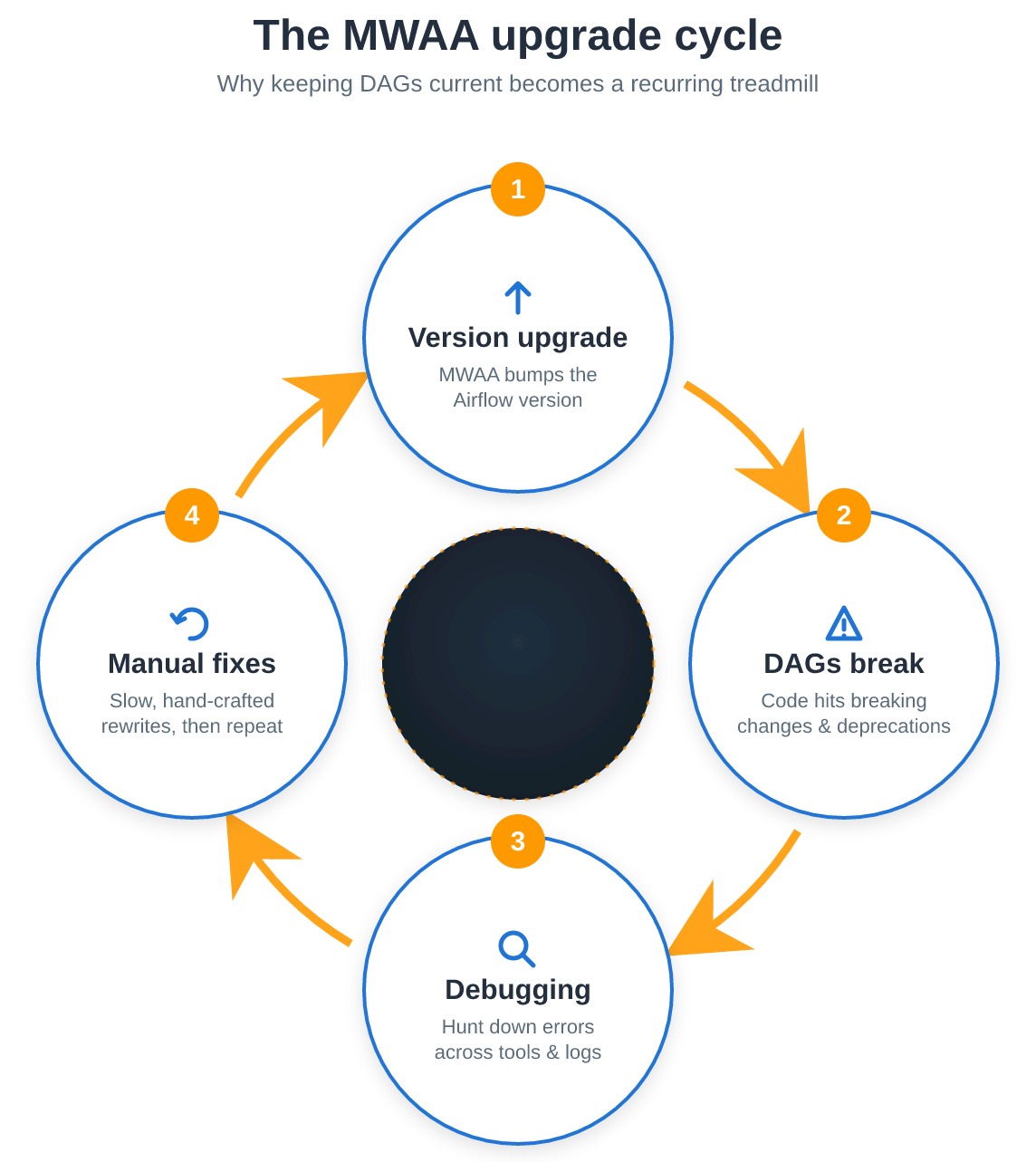
Figure 1: Apache Airflow version upgrade lifecycle
Automated tools promise to speed this up. But Airflow users quickly find that standard automation approaches often aren’t trained on the latest Airflow syntax or mix concepts between Airflow versions, producing code that fails in exactly the ways you’re trying to avoid.
AWS now publishes a set of MWAA agent skills as part of the open source AWS agent toolkit: skills authored by AWS that your coding assistant uses to better plan, execute, and debug MWAA version upgrades. In this post, you’ll learn what each MWAA skill does, how to install the skills, and how to start using them with sample prompts for upgrades, troubleshooting, and authoring. By the end, you’ll have a complete picture of what the MWAA agent skills are, how to install them in your Airflow project, and how to put them to work on real upgrade and troubleshooting tasks.
What are AWS agent skills?
An agent skill is an instruction package that guides a coding assistant through a specific task. The MWAA skills follow the open Agent Skills standard, so they work across assistants that support it, including Kiro, Claude Code, Cursor, and Codex. The assistant loads a skill authored by AWS and follows its steps, which keeps it current with Airflow and MWAA behavior.
The skills run AWS Command Line Interface (AWS CLI) commands to interact with your resources. The Agent Toolkit for AWS also provides the AWS Model Context Protocol (MCP) Server, and the plugin install bundles its configuration with the skills. The skills use it to fetch current AWS documentation at runtime and to run AWS CLI commands with sandboxed execution and audit logging.
The MWAA skills
The aws-data-analytics plugin ships four Amazon MWAA skills:
- authoring-mwaa-workflow: Authors and deploys Airflow DAGs for provisioned environments and YAML workflows for MWAA Serverless.
- testing-mwaa-workflow: Triggers a deployed DAG or workflow, monitors it to completion, and retests after fixes. It can also call the debugging and authoring skills when a run fails.
- debugging-mwaa-workflow: Finds the root cause of failed runs and tasks, DAGs that don’t appear, import errors, worker out-of-memory errors, and AWS Identity and Access Management (IAM) permission errors.
- upgrading-mwaa-environments: Upgrades a provisioned environment to a newer Airflow version, including 2.x to 3.x, using a blue/green or in-place strategy. It also updates and tests your DAG code so it runs on the new version. When the source is older than 2.11.x, it plans the route through the latest 2.11.x version on 2.x, which is a bridge for an in-place upgrade to Airflow 3 for provisioned environments.
Provisioned environments use Python DAGs and MWAA Serverless uses YAML files. All four skills work with provisioned environments, and the authoring, testing, and debugging skills also work with MWAA Serverless.
Note: agents using these skills make changes, not only recommendations. Depending on the task, they can edit and deploy DAG files. Try the skills on a development environment first, keep your DAGs under version control, and verify each proposed change.
Prerequisites
- An AWS account with an existing MWAA provisioned environment. This post starts from Airflow 2.11.x (see the following setup section).
- An AI coding assistant that supports the Agent Skills standard (for example, Kiro or Claude Code).
- IAM permissions for the MWAA action namespaces you use, scoped to your resources: the
airflownamespace for provisioned environments and the Apache Airflow REST API, and theairflow-serverlessnamespace for MWAA Serverless workflows and runs. - Least-privilege credentials for investigation steps. Grant write access only for the confirmed change steps.
Installing the MWAA skills
The MWAA skills are part of the aws-data-analytics plugin in the Agent Toolkit for AWS. How you install them depends on your assistant. There are two common paths.
Option A: Install the plugin (Claude Code, Codex)
Install the aws-data-analytics plugin from the claude-plugins-official marketplace. First update the marketplace so the latest plugin version is available, then install it. For example, in Claude Code:
If you install without updating the marketplace first, you may see an error such as “Plugin ‘aws-data-analytics’ not found in marketplace ‘claude-plugins-official’”. Running the preceding marketplace update command resolves it. The Anthropic plugin directory may still list an older version, so install from claude-plugins-official to get the MWAA skills. Codex and other plugin-based assistants follow the equivalent plugin install in Getting started.
Option B: AWS MCP Server, then add the skills (Kiro)
For Kiro, add the AWS MCP Server to your configuration (~/.kiro/settings/mcp.json). Copy the current configuration from the Kiro section of Getting started in the Agent Toolkit for AWS User Guide, and set AWS_REGION to the Region of your MWAA environment. Then add the skills from the repository:
Alternatively with AWS CLI, run aws configure agent-toolkit. It detects the AI coding assistants you have installed, installs default AWS skills and configures the AWS MCP Server.
After installation, the skills are selected automatically based on your prompt, so you don’t need to name a skill. For step by step setup instructions for each assistant, follow Getting started in the Agent Toolkit for AWS User Guide and Using agent skills in MWAA in the Amazon MWAA User Guide.
Sample prompts to check the setup
- What AWS Regions are available? – A list of regions means the AWS MCP Server is connected.
- What can MWAA Skills help me with? – This confirms your assistant can see the skills.
Setting up an example environment
To demonstrate the steps the skills take, we provide two walkthroughs with sample prompts to help you get started. Walkthrough 1 discusses the upgrade process from 2.x to 3.x and Walkthrough 2 shows how to troubleshoot a failed DAG.
Walkthrough 1: Upgrading a provisioned environment from Airflow 2.x to 3.x
Prompt the assistant in natural language, the upgrading-mwaa-environments skill then drives a structured, confirmation-gated process:
- Plan the version path. The skill computes an ordered list of version jumps from source to target, inserting the required 2.11.x stepping-stone and the Python-transition step when the path crosses the 2.x-to-3.x boundary.
- Choose a strategy. Based on whether run history and the same environment URL/ARN must be kept, the skill selects a new-environment (blue/green) upgrade, a rehearsed in-place upgrade validated on a test copy, or a direct in-place upgrade.
- Validate the DAGs. For 3.x moves, the skill runs Ruff scanning and deprecation-warning log scans, plus Docker validation, surfacing breaking changes.
- Deploy and switch over, saving a resumable plan so a multi-session upgrade can be paused and continued.
Safety is built in: the skill never creates an environment, changes an Airflow version, or modifies your current environment without per-action confirmation, and every version jump is confirmed individually.
Sample prompts that you can use
- Upgrade
<environment_name>from Airflow 2.7.2 to the latest 3.x. We don’t need the run history. - Upgrade
<environment_name>from 2.10.3 to 2.11.x. We must keep run history and the same URL. It has a large number of DAGs. - Upgrade
<environment_name>from 2.11.0 to 3.2.1 in place. Skip the test copy, we don’t have budget. Some DAGs import airflow.datasets and one runs ‘airflow db clean’ in a BashOperator.
Walkthrough 2: Troubleshooting a failed DAG
Upgrades surface failures, a DAG that no longer imports, or one that stops appearing in the Airflow UI. The debugging-mwaa-workflow skill walks through the common MWAA failure modes and identifies the root cause. Next, you can either manually fix the problem or ask the authoring skill to update your DAG.
Sample prompts that you can use
- DAG
<dag_name>on<environment_name>started failing this morning with ModuleNotFoundError: No module named ‘snowflake’. Nobody changed the DAG code. - My serverless workflow
arn:aws:airflow-serverless:<region>:<accountid>:workflow/<workflowname>failed on its last run. Why? - Task
<taskname>in DAG<dag_name>on<environment_name>fails with AccessDenied ons3://<s3_bucket>/inbound/. Fix the permissions.
Authoring and testing workflows
The MWAA skills cover both flavors of MWAA. While the upgrade skill applies to provisioned environments only, the authoring, testing, and debugging skills all work with MWAA Serverless, where you define workflows in YAML rather than Python DAGs. To show this, we use authoring-mwaa-workflow to build a YAML workflow, testing-mwaa-workflow to run it to completion, and the debugging skill if a run fails.
Sample prompts you can use
- Write a Python DAG for my MWAA environment
<environment_name>that runs an Athena query against<db>.<table>, writes results tos3://<s3bucket>/orders/, and sends an SNS alert on failure. Then deploy and test it. - Create an MWAA Serverless workflow that runs Glue job orders-clean, then a Python step that uses pyarrow to validate the Parquet output row count. Run it nightly. Deploy only, don’t run it yet.
- Smoke-test DAG
<dagname>on<environment_name>(Airflow 3.0.6). It was just uploaded and is still paused. - Run
arn:aws:airflow-serverless:<region>:<accountid>:workflow/<workflow_name>and confirm it succeeds. If it fails, fix it and retry up to 5 times.
Best practices
- Test in a development environment first. Before an in-place production upgrade, rehearse on a test copy, and prefer a new-environment (blue/green) upgrade when you don’t need to keep run history.
- Keep the assistant in a confirm-before-act posture for any environment-changing operation, and review each version jump.
- Use read-only credentials for investigation and troubleshooting; scope write access to the confirmed change steps, and scope IAM to the airflow / airflow-serverless namespaces you use.
- Install the AWS MCP Server alongside the skills so the assistant fetches current AWS docs at runtime and runs CLI commands with sandboxed execution and audit logging.
- Keep DAGs and requirements under version control so you can review and roll back any changes these skills makes.
Conclusion and next steps
- Install the skills from the Agent Toolkit for AWS and connect the AWS MCP Server, as described in Getting started.
- Try the sample prompts in this post against a development environment.
- For more example prompts, see Using agent skills with Amazon MWAA in the Amazon MWAA User Guide. If you’re planning a move to Airflow 3, also read Best practices for migrating from Apache Airflow 2.x to Apache Airflow 3.x on Amazon MWAA.
Cleanup
If the walkthrough created a new environment (blue/green), a rehearsal copy, or a Serverless workflow, delete those resources when you’re done to avoid ongoing charges.
About the authors

Kamen Sharlandjiev

Harshawardhan Kulkarni

Boyko Radulov

Aritra Ghosh