As enterprises move AI agents from pilot to production, networking and security often decide whether a deployment scales. Amazon Bedrock AgentCore is a platform to build, connect, and optimize agents at scale, with any framework or model. Your agents run in an AWS managed account, but the resources they need, such as Model Context Protocol (MCP) servers and internal APIs, stay in your Amazon Virtual Private Cloud (Amazon VPC). Each unique subnet and security group combination that agents connect through consumes a private IP address from your subnets and needs a security group rule on each resource it reaches. The number of these combinations grows, not the number of agents, until your subnets run out of IP addresses and new agents fail to launch.
AgentCore gives you two independent options, not stages you move through, and you can use either or both. With direct network access, you turn on VPC support for AgentCore runtime, a capability of Amazon Bedrock AgentCore, and the agent reaches resources itself. With AgentCore Gateway, another capability of Amazon Bedrock AgentCore, the agent calls Gateway over its public endpoint, and Gateway reaches resources through Amazon VPC Lattice, so the runtime doesn’t need VPC support. Which one fits depends on how you control access and how your resources are spread across VPCs and accounts, not on how many agents you run. This post compares how each option scales.
Scenario 1: Direct network access from AgentCore runtime
You have a small, fixed set of resources in one AWS Region and one AWS account, and each agent connects to one or two of them with as few hops as possible. For example, an internal automation agent queries a workload on an Amazon Elastic Compute Cloud (Amazon EC2) instance behind an internal Application Load Balancer (ALB).
Solution: AgentCore runtime with VPC support
When you turn on the runtime’s VPC support, AgentCore creates elastic network interfaces (ENIs) in your VPC using the service-linked role AWSServiceRoleForBedrockAgentCoreNetwork. Agents that use the same subnet and security group configuration share these ENIs. The ENIs are outbound only: the runtime initiates connections from them and they don’t accept inbound connections, so security groups control only what they can reach. ENIs persist for up to 8 hours after the last agent using them is deleted.
How traffic flows
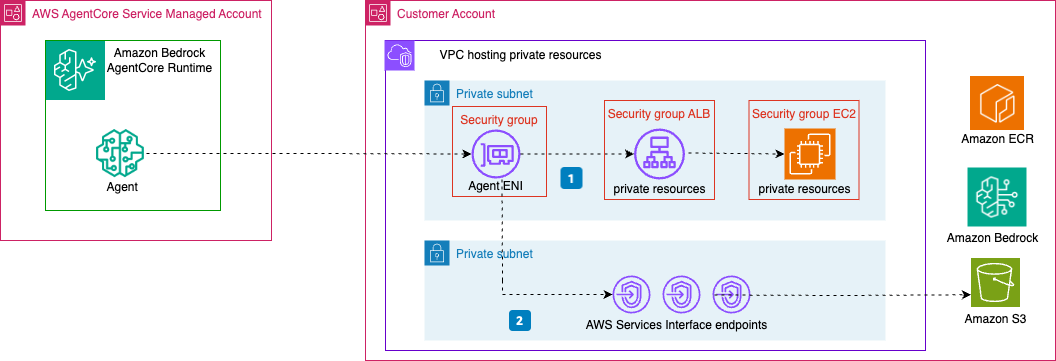
Figure 1: AgentCore runtime with VPC
In Figure 1:
- The agent calls the ALB DNS name, the ALB forwards the request to the EC2 instance, and the response comes back with no extra hop in between.
- This VPC has no NAT gateway or internet gateway, so the agent reaches AgentCore’s dependencies through VPC endpoints. Container image deployments need four:
ecr.apiandecr.dkrto pull the container image,s3as a gateway endpoint for Amazon Elastic Container Registry (Amazon ECR) layer storage, andlogsfor Amazon CloudWatch Logs. Addbedrock-runtimeif the agent calls foundation models, andbedrock-agentcoreif it uses AgentCore features such as Memory, Identity, Code Interpreter, or the Browser Tool.
How ENI and IP consumption scale
This design holds as long as your agents reach resources the same way. We refer to a unique subnet and security group configuration as an access pattern in this post. Agents that share an access pattern share an ENI, so adding more of them adds no ENIs.
The picture changes when agents need different access. Say Agent A reaches an internal workload, and you add Agent B for an internal REST API. Agent B needs different permissions, so it gets its own security group and a new ENI. Agent C, for inventory lookups against another resource, adds a third access pattern, security group, and ENI. ENI and IP consumption track access patterns, not agents. Figure 2 shows three access patterns.
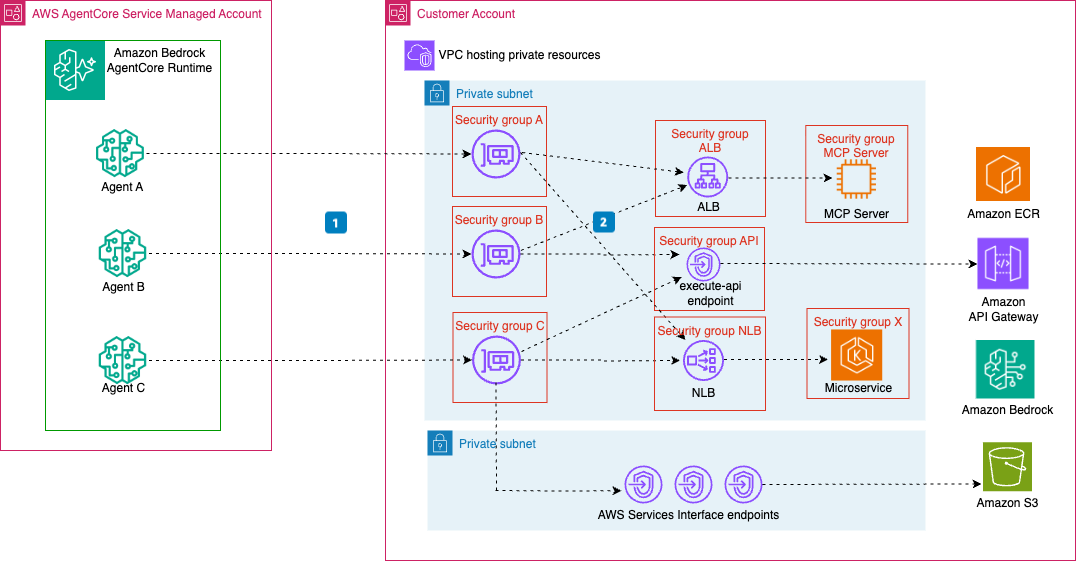
Figure 2: Each unique subnet and security group configuration creates a separate ENI
In Figure 2:
- Each access pattern gets its own ENI, and each ENI reaches two of the three resources: the ALB, the
execute-apiendpoint, and the NLB. - When an agent connects directly to a resource, that resource’s security group needs an inbound rule allowing the agent’s security group. Through a load balancer, the load balancer’s security group allows the agent’s security group, and the resource’s security group allows the load balancer’s. Resources shared by multiple agents accumulate rules from each one.
So two things grow at once: the IP addresses and ENIs in your subnets, and the security group rules on every resource your agents reach. At 10 to 20 access patterns, you’re managing dozens of rules, so the direct option fits best when that number stays small.
Scenario 2: Governed private tool access through AgentCore Gateway
Gateway fits when either of two independent things is true: your access patterns keep growing, or your resources span accounts your agents’ VPC can’t reach directly. At that point you want one place to control which agent can reach which resource, and the ability to revoke a single agent without editing shared network rules.
Solution: AgentCore Gateway with VPC Lattice resource gateways
With this option the agent does not talk to the resource directly. The agent calls AgentCore Gateway, Gateway applies its inbound authorizer, AWS Identity and Access Management (IAM) with Signature Version 4 (SigV4) in this architecture, to authorize the request, and reaches the resource through an Amazon VPC Lattice resource gateway in your VPC. Authentication and access control happen at Gateway instead of in security group rules.
In this scenario, the resources live in the same account as AgentCore Gateway. Gateway supports two configuration modes for the VPC Lattice resources in your VPC: managed and self-managed.
In managed mode, you give AgentCore your VPC, subnets, and security groups. It handles the resource gateway and resource configuration lifecycle for you, using the service-linked role AWSServiceRoleForBedrockAgentCoreGatewayNetwork. That role is created automatically the first time you create a gateway target with a managed private endpoint, if your IAM principal has iam:CreateServiceLinkedRole. AgentCore reuses a resource gateway for targets that share the same VPC, subnet, security group, and IP address type (IPv4 or IPv6, set through the endpointIpAddressType field). It creates a new one whenever any of those differ. Each resource gateway consumes one IP address per subnet, which isn’t configurable, so IP use grows with the number of distinct configurations. A resource gateway is deleted only when no targets use it. For current limits, see the VPC Lattice quotas and the AgentCore quotas.
In self-managed mode, you create the VPC Lattice resource gateway and resource configuration yourself, so targets that would land on separate resource gateways in managed mode can share a single one. A self-managed resource gateway has one VPC, subnet set, security group set, and IP address type, but it can front multiple resource configurations, including resources in other reachable subnets with different security groups. Used only with AgentCore, it also consumes one IP address per subnet.
This post covers the target types that use Gateway VPC egress through VPC Lattice: MCP server and OpenAPI targets. Gateway also supports other target types, such as AWS Lambda and Amazon API Gateway, but those use different connectivity. A resource that doesn’t natively expose an MCP or OpenAPI interface (a database, for example) needs a wrapper, typically an MCP server fronting it.
How traffic flows (single VPC)
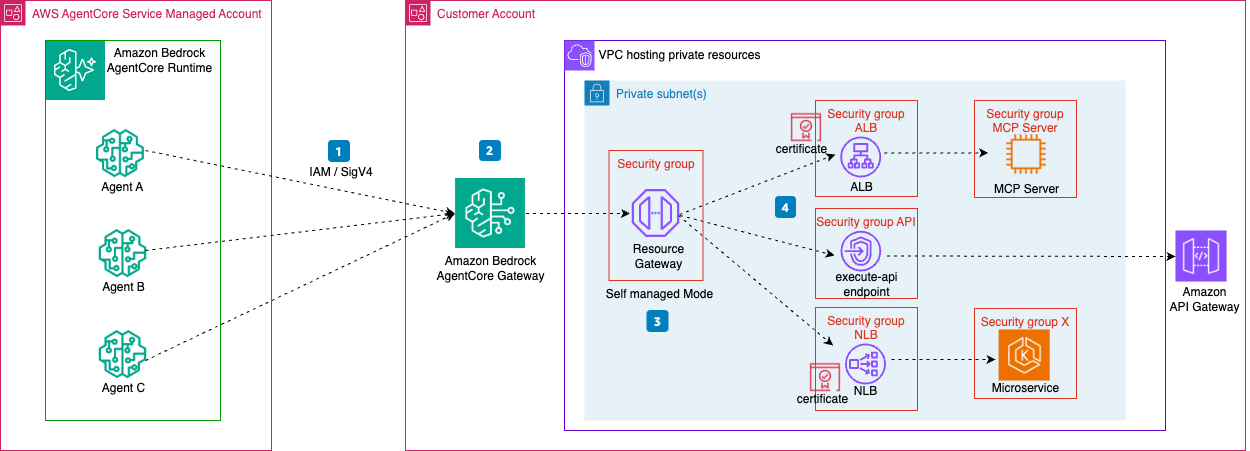
Figure 3: AgentCore Gateway with a single VPC Lattice resource gateway fronting multiple resources
In Figure 3:
- The agent (running in the AWS managed AgentCore runtime) calls Gateway’s Regional public endpoint, resolved through public DNS, across the AWS backbone. Gateway authenticates the caller, applies any access control policies you configured, and selects the target.
- AgentCore Gateway invokes the target through your VPC Lattice resource gateway. A single resource gateway that you create and manage fronts all three resources, and each Gateway target references a resource configuration attached to it. Adding resources adds resource configurations, not resource gateways, within quotas.
- The resource gateway forwards the request to the resource: an internal ALB, a Network Load Balancer (NLB) fronting a microservice, or a private API Gateway reached through an
execute-apiVPC endpoint. The resource’s security group must allow inbound from the resource gateway’s security group. - AgentCore Gateway requires a publicly trusted TLS certificate on the target endpoint. TLS terminates at whatever sits in front of the resource:
- Behind an ALB or NLB: The load balancer’s TLS listener terminates TLS with a public AWS Certificate Manager (ACM) certificate.
- Private API Gateway: With the standard
execute-api.amazonaws.comhostname, the AWS managed certificate on theexecute-apiVPC endpoint covers TLS, so you don’t need your own. To reach it privately, set the target URL to the private API hostname and use theexecute-apiVPC endpoint DNS name as theroutingDomain. Custom domains require a publicly trusted certificate. - MCP server: The target needs a publicly trusted certificate matching its hostname. If its certificate is from a private certificate authority, place an internal ALB with a public ACM certificate in front of it and use the ALB DNS name as the
routingDomain.
Adding more access patterns
As new agent use cases come online, they share the same resource gateway, as Figure 4 shows. The 1 marks each new agent connecting to AgentCore Gateway.
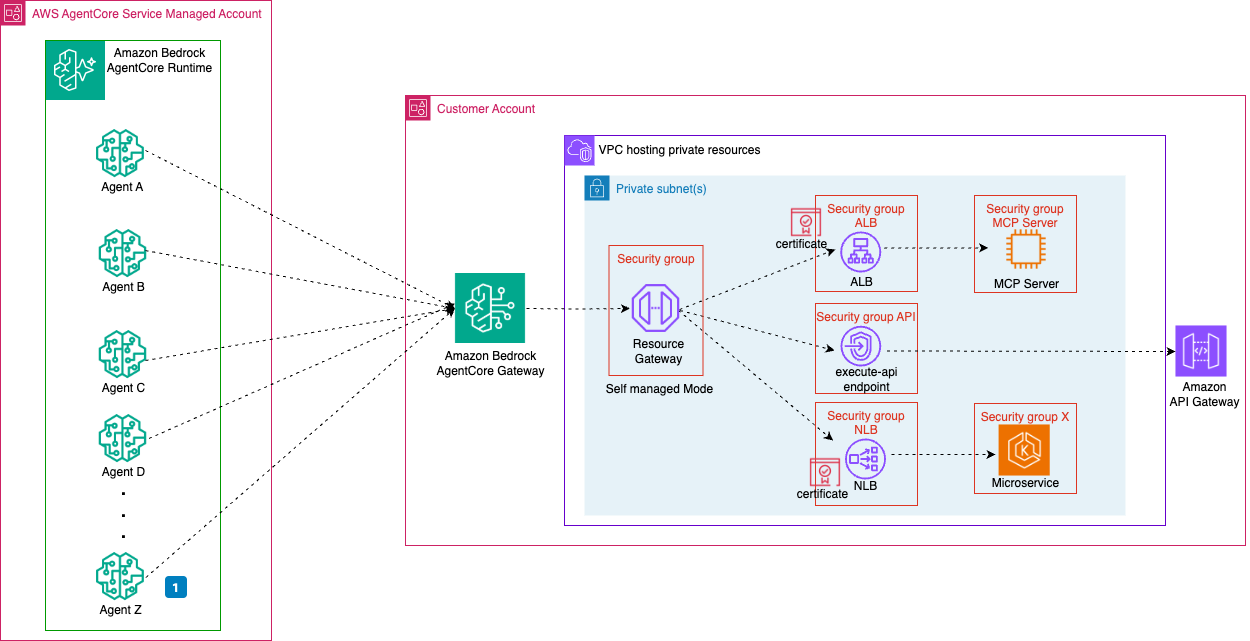
Figure 4: Adding more agents does not multiply resource gateways
Scaling out to multiple accounts
When resources live in different AWS accounts than AgentCore Gateway, you must use self-managed mode, because AgentCore can manage VPC Lattice resources only in Gateway’s own account.
Each resource-owning account creates its own resource gateway and resource configurations pointing at its resources. It then shares those resource configurations with the AgentCore Gateway account through AWS Resource Access Manager (AWS RAM). This works whether or not the accounts share an organization in AWS Organizations. Figure 5 shows the cross-account flow.
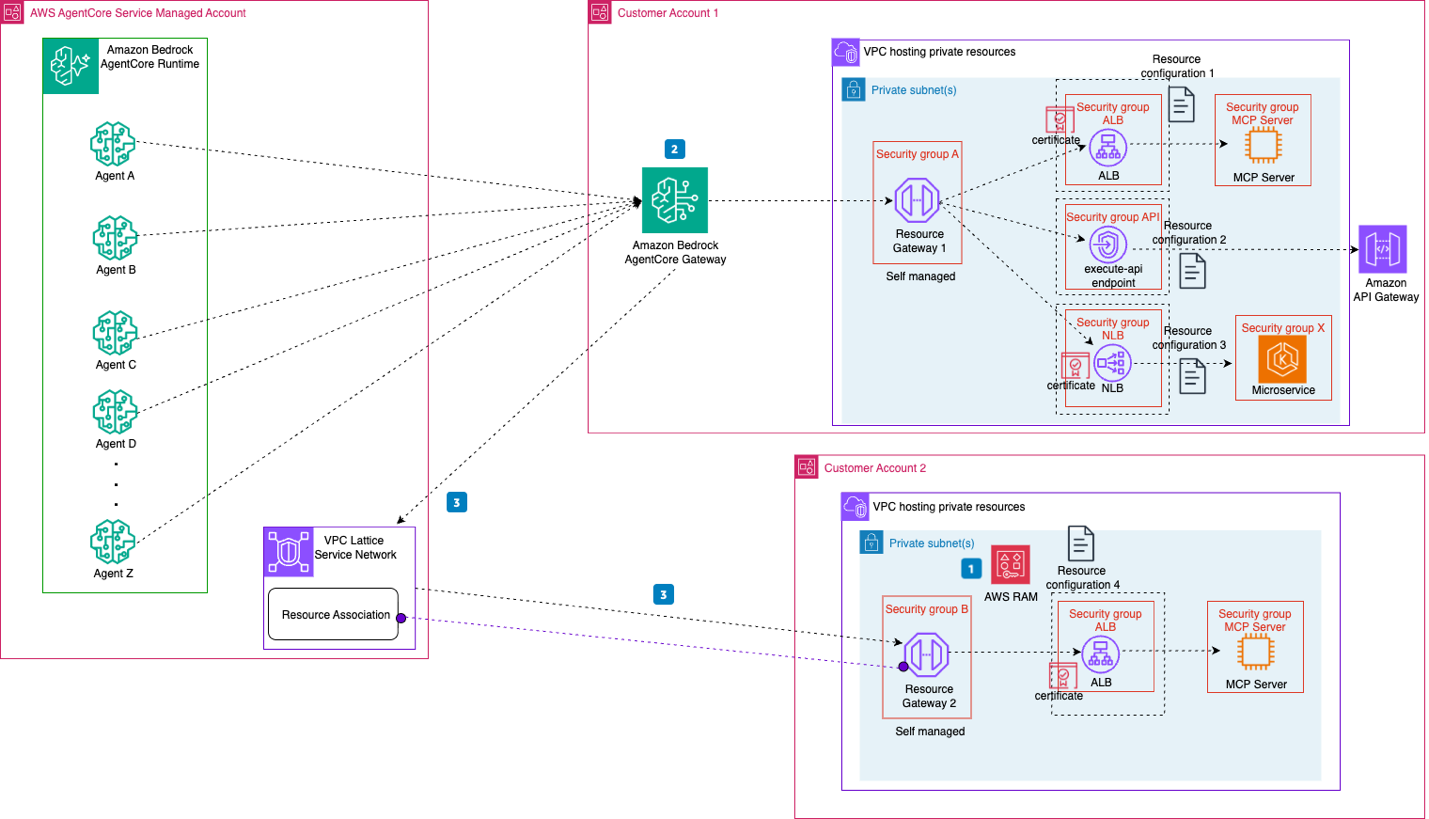
Figure 5: Cross-account access using AWS RAM to share resource configurations between accounts
In Figure 5:
- In account 2, you share the resource configurations with the AgentCore Gateway account through AWS RAM, adding the account 1 ID as a principal.
- When you create a target in AgentCore Gateway, you select the shared resource configuration, and the target references its ARN. AgentCore automatically associates it with the AgentCore VPC Lattice service network. You never create or manage the service network. AgentCore owns it.
- Agents invoke tools through the Gateway, which routes each request over the AgentCore-managed service network to the resource gateway in account 2, which forwards it to the resource. The same TLS requirement applies as in the single-VPC scenario.
The account that owns the shared resource can revoke access at any time by removing the resource configuration from the AWS RAM share, and traffic to those targets stops. To add another account, repeat these steps.
Decision framework
The following table compares the two options.
| Factor | AgentCore runtime VPC support | Gateway + VPC Lattice |
| When to use | A small, stable number of access patterns | Access patterns will grow, you want centralized access control, or you need multi-account access |
| Cross-account | Requires VPC peering or AWS Transit Gateway | Supported in self-managed mode through AWS RAM sharing |
| Access revocation | Security group changes | Access control at Gateway |
| Latency* | Fewer components in the data path | More components (auth, routing) |
| Initial complexity | Low | Higher |
| Complexity at scale** | Grows with each new access pattern | Centralized. Grows more slowly for repeated patterns |
* Benchmark both designs against your workload’s latency requirements.
** Gateway reduces distributed security group rule sprawl, but targets, resource configurations, policies, credentials, certificates, AWS RAM shares, and quotas still grow.
Conclusion
In this post, we compared two ways agents in Amazon Bedrock AgentCore reach private resources in your VPCs: AgentCore runtime VPC support, which connects agents directly through shared ENIs, and AgentCore Gateway with VPC Lattice, which places a policy layer in front of your resources through a resource gateway. The two options can coexist, so you can run both rather than migrating from one to the other.
To get started, see the Amazon Bedrock AgentCore documentation, Network connectivity patterns for agents deployed on Amazon Bedrock AgentCore, and Configuring Amazon Bedrock AgentCore Gateway for secure access to private resources.


