Most organizations run a multicloud estate, and so do the attackers targeting them. An adversary who compromises an identity in one provider follows that identity wherever it leads, including across a federated trust into a second cloud service provider. The signals enumerating this scenario are rarely missing; the problem is that they live in separate consoles, in different schemas, owned by different teams. No one has visibility into the whole picture, so no one can decide what to fix first.
AWS Security Hub addresses prioritization and triage with exposure findings. Security Hub correlates reachability, blast radius, vulnerabilities, misconfigurations, and effective permissions, providing a strong correlation layer with an attack-path visualization, providing the context needed to generate risks from findings. That analysis now extends to Microsoft Azure. Security Hub records and analyzes your Azure resources with the same correlation engine used for Amazon Web Services (AWS) resources. The resulting details and meta-data land in the same console, ranked in the same queue, providing holistic, multicloud visibility into your security risks.
In this blog post, you learn how to configure the Azure integration for Security Hub and use exposure findings to prioritize attack paths across both clouds from one console. We follow a realistic scenario: a compromised identity that threatens both an Azure and an AWS environment through a shared, federated identity plane. We show you how the critical exposures along that path are presented as ranked findings that you can triage together, and we map each one to the MITRE ATT&CK framework. We also cover the prerequisites that teams commonly overlook.
Why prioritizing multicloud risk is difficult
Consider an organization whose Microsoft Entra ID tenant is federated into an AWS account, so identities in the tenant can assume an AWS role. This is an ordinary and intentional configuration used to avoid having to manage a second set of credentials. It also means the two clouds share an identity plane: a single compromised Entra identity is both an Azure threat and—through the federation—an AWS threat.
An attacker exploits this, but the defensive signals land in different places:
| Where the risk lives | Traditionally visible in | Owned by |
| Weak Entra identity controls: over-privileged identities, no multi-factor authentication (MFA), vulnerable conditional access policies (CAP) | Entra ID and Microsoft Defender for Cloud | Identity team |
| Internet-reachable Azure host with admin rights | Defender for Cloud | Azure platform team |
| Federated trust into AWS | AWS Identity and Access Management (IAM) | Cloud security team |
| Sensitive data and over-exposed resources in AWS | AWS security tooling | Cloud security team |
Each team sees one fragment, and in isolation each fragment appears low severity. You see the risk only when you correlate all of it together and discover the same identity plane ties the attack path together. Exposure findings provide that severity within AWS; extending it to Azure closes the multicloud visibility gap.
How the Azure integration works
You create the Azure connector in the AWS Management Console for Security Hub. It authenticates to your Entra ID tenant through an application registration, records and evaluates your Azure resource configurations, and streams Microsoft Defender for Cloud alerts and Entra ID audit logs through an Azure Event Hubs namespace. Your Azure resources then flow into the same correlation engine that analyzes signals from AWS Security Hub Cloud Security Posture Management (CSPM), Amazon Inspector, Amazon Macie, and Amazon GuardDuty. That engine produces two kinds of findings:
- Control findings against standards such as the CIS Microsoft Azure Foundations Benchmark.
- Exposure findings, which are ranked, attack-path findings that correlate traits such as reachability, effective permissions, and misconfiguration, with a severity based on how discoverable and exploitable the risk is.
Both use the Open Cybersecurity Schema Framework (OCSF) and appear in the same console as your AWS findings. However, one filtering detail matters: because Security Hub produces the finding, its top-level cloud.provider is AWS, while the evaluated resource carries resources[].provider = Azure. Filter on resources.provider to scope to a single cloud.
Prerequisites
To follow along with this post, you need:
- An AWS account with Security Hub enabled. If you use a delegated administrator account for Security Hub, create the connector there, in the AWS Region where you aggregate findings.
- An Entra ID tenant with a Microsoft Azure subscription. You need privileges in Azure to create an application registration, assign roles at the tenant root management group, and create a subscription-level diagnostic setting.
- The Azure CLI, authenticated to the target subscription with
az logincommand. - Activity log export. Azure resource recordings are change-driven and depend on activity logs reaching the event hub that the connector reads. The onboarding process assigns an Azure policy to create the required diagnostic setting, but it only remediates existing subscriptions after you create a remediation task. If the connector reports healthy status but resources never appear, run
az monitor diagnostic-settings subscription listto confirm the export exists, and create a remediation task if the list is empty.
Configuration
The following steps detail how to connect your Azure environment to Security Hub v2: Registering the Azure application, establishing federated identity credentials, and assigning the roles required for AWS to evaluate your Azure resources.
Step 1: Create the Azure connector in Security Hub
The first step in this configuration is to create the Azure connector in Security Hub. The connector establishes trust with your Azure tenant and defines which subscriptions and regions Security Hub v2 will evaluate.
- Open the Security Hub console and choose Integrations.
- Choose Create Azure connector.
- Enter your Azure Tenant ID and the Application (client) ID of the application registration you created for the integration.
- For Subscriptions and Regions, select all. Attack paths cross subscription and Region boundaries, so partial coverage leaves blind spots where a compromised identity can pivot unseen. Scope to specific IDs or Regions only when data-residency rules require it.
- Run the generated setup script in your Azure environment, then choose Create connector.
Include the global region scope. Controls that evaluate Entra ID and Microsoft Graph resources require it, and those identity exposures are central to this scenario. If you also create an Amazon Inspector or Security Hub CSPM connector for the same tenant, keep its subscriptions and regions consistent with this one.
Step 2: Verify the connector and its recording activity
Health status alone doesn’t tell you whether recording is flowing. Confirm both.
AWS Command Line interface (AWS CLI) command 1: Verify connector health and recording state
Step 3: Query exposure findings for Azure resources
Scope to Azure by filtering on the resource provider.
AWS CLI command 2: Retrieve exposure findings for Azure resources
Step 4 (optional): Add Amazon Inspector for Azure vulnerability scanning
To add vulnerability findings for Azure virtual machines (VMs), function apps, or container registry images, create an Amazon Inspector connector for the same tenant. VM scanning requires each target VM to have a system-assigned managed identity, which you can enforce with an Azure Policy. Figure 1 shows a correctly configured Azure integration inside Security Hub, with vulnerability management and posture management deployed.
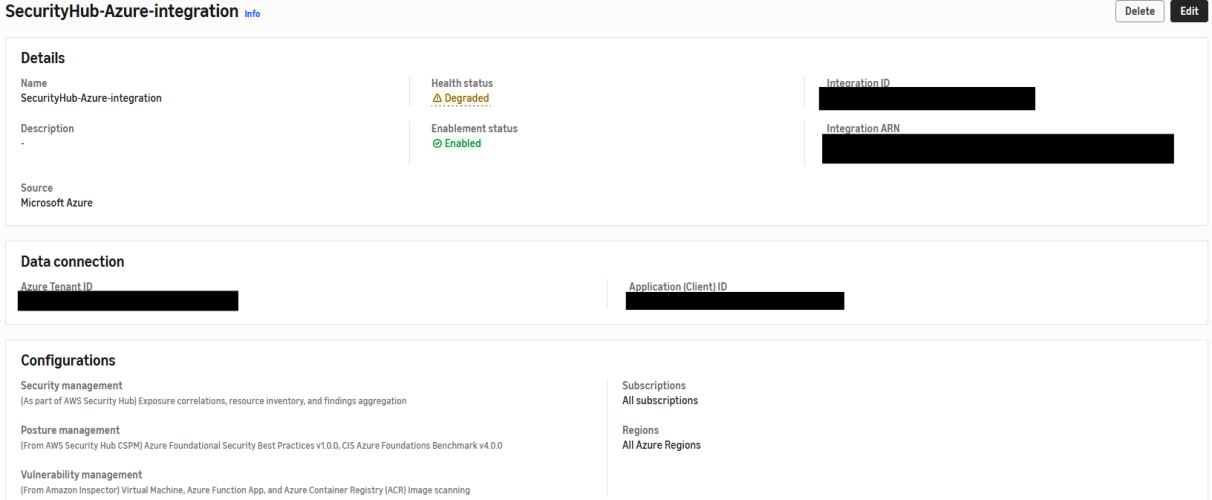
Figure 1: Successful configuration of the Azure integration with Security Hub
Step 5: Prerequisites for Microsoft Azure
See the AWS documentation for the prerequisites for Microsoft Azure.
Walk-through: Prioritizing a cross-cloud attack path
In this example, the organization has one identity plane across two clouds, comprising a Microsoft Entra ID tenant with a federated trust into an AWS account. An adversary who compromises the right Entra identity gains an initial foothold in Azure and a path into AWS, because both clouds trust the same identity plane. The following sections trace that path. Each step is a real, high-severity exposure finding that Security Hub ranked on its own. The point of the walk-through is to demonstrate a real-life scenario and examine all findings in one unified security console.
Phase 1: A compromised identity (Azure)
ATT&CK: Phishing (T1566), Valid Accounts: Cloud Accounts (T1078.004)
The path begins with an Entra identity that is both over-privileged and unprotected. You’ll find this in the Security Hub console under Exposures, where Security Hub raises it as an identity exposure finding and maps the attack path stemming from it:
Potential Unauthorized Access: Azure RBAC user with administrative access has MFA disabled (high). It correlates the user, the role assignment that grants administrative access, and the organization.
The tenant’s authorization policies let an attacker broaden that foothold, and Security Hub CSPM reports each policy as a failed control (high): Microsoft Entra ID authorization policies should prohibit default users from registering applications…should restrict user consent for applications, and Azure authorization policies should restrict guest invitations to admin roles only. Each finding expands what a single compromised, non-privileged identity can do without an administrator.
Phase 2: Foothold and privilege escalation (Azure)
ATT&CK: Exploit Public-Facing Application (T1190), Valid Accounts: Cloud Accounts (T1078.004)
The tenant contains an internet-reachable VM whose network security group allows inbound from any address, and whose attached identity holds administrative rights over the subscription. Security Hub surfaces this under Exposures, correlating reachability and effective permissions into one finding that shows why it matters: anyone reaching the VM inherits admin control of the subscription.:
Potential Initial Access: Potentially internet reachable Azure virtual machine with open network security group has administrative access (high). It correlates the VM, the role assignment, the network security group, and the public IP address.
The finding’s analysis reads like an attack path. The resource “may be reachable from the public internet,” “overly permissive network security group (NSG) rules allow unintended inbound access,” and “the Owner or Contributor role grants extensive permissions… enabling a threat actor to escalate privileges.” Security Hub evaluates this from configuration and network-path modeling, so it surfaces whether or not the VM is running. Figure 2 shows the correlated attack path for that virtual machine.
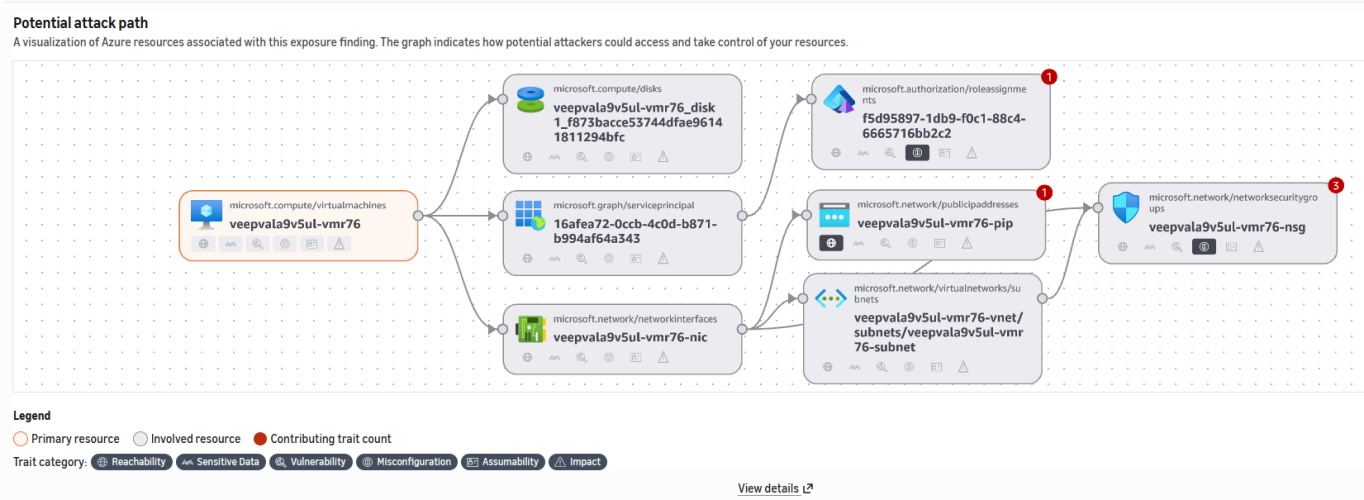
Figure 2: An Azure attack-path exposure, analyzed by the same correlation engine as AWS exposures
The cross-cloud bridge: Federation into AWS
The tenant from Phases 1 and 2 is federated into the AWS account through an IAM SAML identity provider. As shown in Figure 2, a role trusts that provider and grants read access to every bucket in Amazon Simple Storage Service (Amazon S3). This trust is what expands the risk across clouds from the same adversary: a compromised Entra identity can assume this role and reach AWS data.
This one hop lives in IAM rather than in Security Hub. Security Hub doesn’t not raise a finding for a role that trusts your own federated identity provider. Confirming it is a normal investigative pivot: the role trusts a SAML identity provider that represents your Entra tenant, the same tenant whose exposures you triaged when you added Amazon Inspector in Step 4.
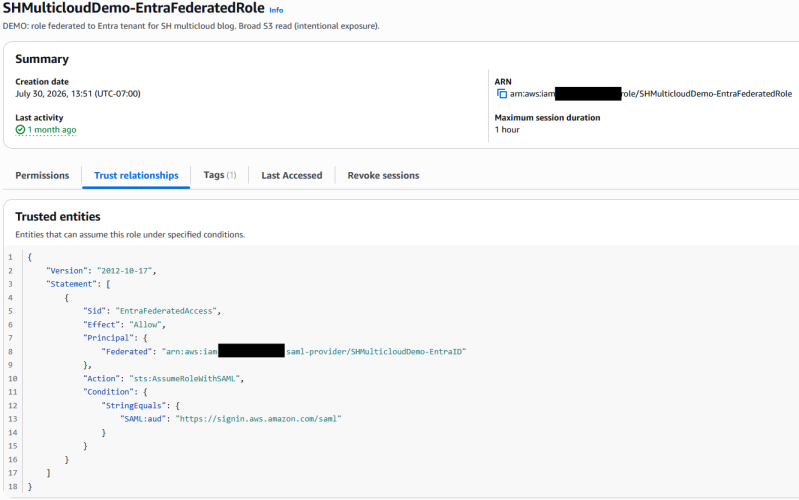
Figure 3: The federated trust that links the two clouds through a shared identity plane
Phase 3: The impact (AWS)
ATT&CK: Data from Cloud Storage (T1530), Transfer Data to Cloud Account (T1537)
On the AWS side, the correlation engine has already categorized the resources this identity can reach. Under Exposures in the Security Hub console, the sensitive-data objective surfaces this finding because that reachable set includes data at risk; a compromised identity could destroy it:
Potential Sensitive Data Destruction: S3 bucket has sensitive data and versioning disabled and Object Lock disabled and MFA delete disabled (high). A Macie finding, The S3 object contains personal information, is a contributing signal, and the control S3 general purpose buckets should be encrypted at rest with AWS KMS keys fails alongside it.
The same account carries related AWS attack-path exposures. Two examples are Potential Resource Hijacking: Internet reachable EC2 instance with open security group has software vulnerabilities with limited effective permissions and Potential Unauthorized Access: IAM user has weak password policies. In the exposure queue, these sit next to the Azure findings, ranked by the same severity model.
Prioritizing across both clouds in the console
Here is the operational benefit. An analyst is notified of generated exposure findings and opens the dashboard and filters to High severity. In one prioritized list, without switching tools or opening a ticket for another team, they see the Azure admin identity without MFA, the internet-reachable Azure VM with subscription-admin rights, and the AWS sensitive data exposure. Together, these show the full scope of what a single vector, sharing an identity plane, might target. The analyst confirms the connecting federation with one pivot into IAM. The multicloud triage that used to require two products and two teams now occurs in one place. Figure 4 shows that single ranked queue.
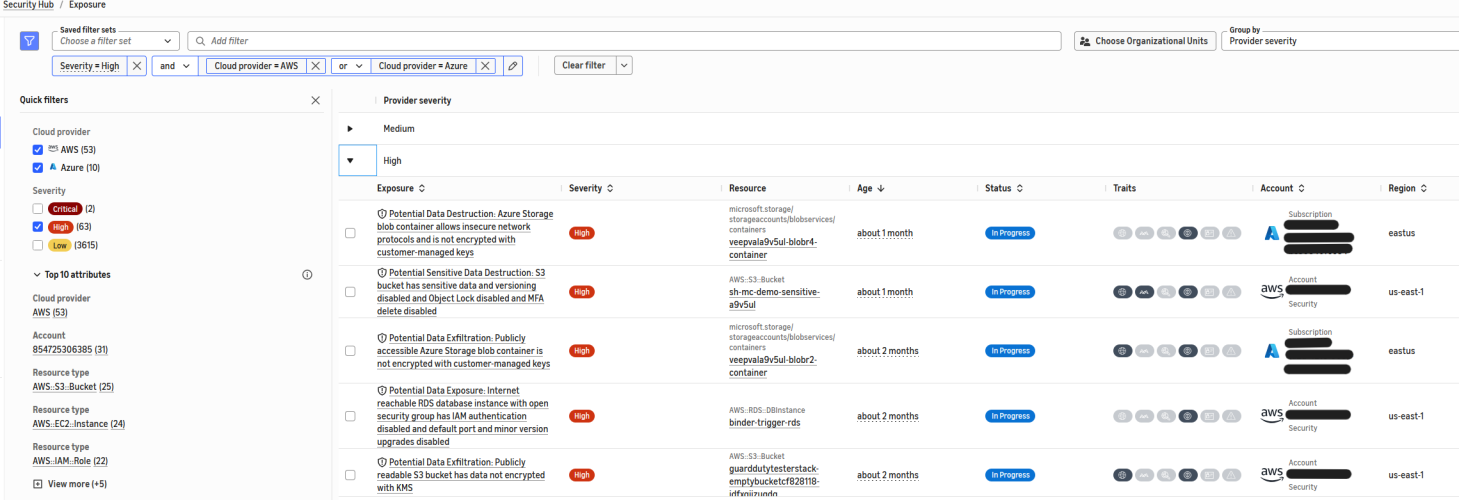
Figure 4: Cross-cloud exposure prioritization in a single console
Phase-to-exposure summary
The following table traces each phase of the attack path to its MITRE ATT&CK techniques, the cloud where it plays out, and the ranked Security Hub exposure that surfaces it — following the pivot from Azure into AWS across the shared identity plane.
| Phase | ATT&CK | Cloud | Ranked exposure in Security Hub |
| 1. Compromised identity | T1566, T1078.004 | Azure | Potential Unauthorized Access: Azure RBAC user with administrative access has MFA disabled (High) |
| 2. Foothold and privilege escalation | T1190, T1078.004 | Azure | Potential Initial Access: internet reachable Azure VM with open NSG has administrative access (High) |
| 2.1 Bridge | T1550 (Use Alternate Authentication Material) | Azure to AWS | Federated trust, confirmed in AWS IAM (shared identity plane) |
| 3. Data objective | T1530, T1537 | AWS | Potential Sensitive Data Destruction: S3 bucket has sensitive data… (High), plus Macie |
Conclusion
A cross-cloud attack is difficult to prioritize because signals are generated across separate consoles, schemas, and teams. In this post, you saw how the Azure integration for AWS Security Hub brings Azure resources into the same exposure engine and the same queue as your AWS resources. One analyst can prioritize an attack path that spans a compromised Microsoft Entra ID identity, across a federated trust, to sensitive data in Amazon S3, without leaving Security Hub.
To recap why this workflow is practical and effective:
- Security Hub records and analyzes your Azure security findings and displays them in the same unified console as your AWS resources, and produces ranked, attack-path exposure findings for both clouds.
- Findings from both clouds share the OCSF schema, so you filter, group, and prioritize them in one place. Filter on
resources.providerto scope an individual cloud. - Security Hub correlates signals into attack paths within each cloud. The analysis creates a cross-cloud narrative, such as a shared federated identity plane, while co-locating ranked correlation findings across both Azure and AWS, creating efficient scoping and remediations.
- Confirm your prerequisites. Include the global region scope for Entra ID controls, know that sign-in log signals require an Entra ID P1 or P2 license, and confirm that the subscription diagnostic setting that exports Activity Logs to the connector’s event hub is in place. A connector can report a healthy status while it records nothing.
To get started, see Enabling Microsoft Azure integration in Security Hub and Exposure findings in Security Hub.
If you have questions about this post, contact AWS Support or start a new thread on AWS re:Post.


