Every day, Zillow sends home shoppers more than 100 million personalized email and push notifications: saved search alerts, home recommendations, property updates, seller reports, and reminders. These messages are one of Zillow’s core ways to engage home shoppers, and Zillow delivers them on time with consistent behavior across every campaign. Today, each of those notifications runs as its own short-lived workflow execution on AWS Step Functions Express Workflows.
The underlying shape of this work isn’t unique to real estate. Many systems run the same kind of workflow at high volume: take an event, enrich it from several services, apply rules, assemble an output, and send it. This post shows how Zillow built one configuration-driven orchestration system to run that pattern at scale, and what teams across many domains can reuse from it.
Historically at Zillow a separate generator service produced each of these campaigns, and each service carried its own workflow, data models, and business rules. As the number of notification campaigns grew, so did duplicated engineering work, inconsistent behavior, and operational cost. Product teams needed to launch campaigns faster, reuse shared capabilities, and run consistent experiments without system-specific work.
To meet that need, the Zillow Comms Experience team, working with AWS, built two things. The first is the Campaign Orchestrator, which is a configuration-driven orchestration layer that runs each notification as a short-lived workflow execution on Step Functions Express Workflows. The second is the Universal Content Generator (UCG), a library of reusable, schema-driven content modules that those workflows call. Together they make campaign creation faster and more consistent, and they give AI-assisted tooling a declarative format to work with.
The challenge: why the original system needed replacing
The previous content generation model slowed product delivery. Zillow’s Comms Experience supported more than 20 email and push campaigns generated by more than 10 microservices. Each microservice owned its own workflow, models, business rules, and assembly logic.
Most campaigns followed the same pattern: receive a trigger, hydrate data, apply rules, assemble content, and send the message. Each campaign service implemented that pattern separately, creating duplicate engineering work and inconsistent behavior. It also added operational overhead across releases, monitoring, logs, dashboards, and on-call support.
Each campaign was built as its own service because, when these systems were first built, scale was the main challenge. As Zillow added more products, the tradeoff changed. Similar features ended up implemented differently across campaigns, so every new capability had to be rebuilt and retested in each service. That made it hard to roll out features across products and slowed development. The push to centralize came from that cost: we needed to move faster and stay consistent across every customer experience. With one shared implementation, a feature could be built once and reused everywhere, while each campaign kept the flexibility to tailor its experience. Before evaluating workflow engines, we first had to extract shared logic into reusable modules and move campaign decisions into configuration.
The following diagram shows the original architecture, where each campaign generator carries its own copy of the workflow, data models, and business rules.
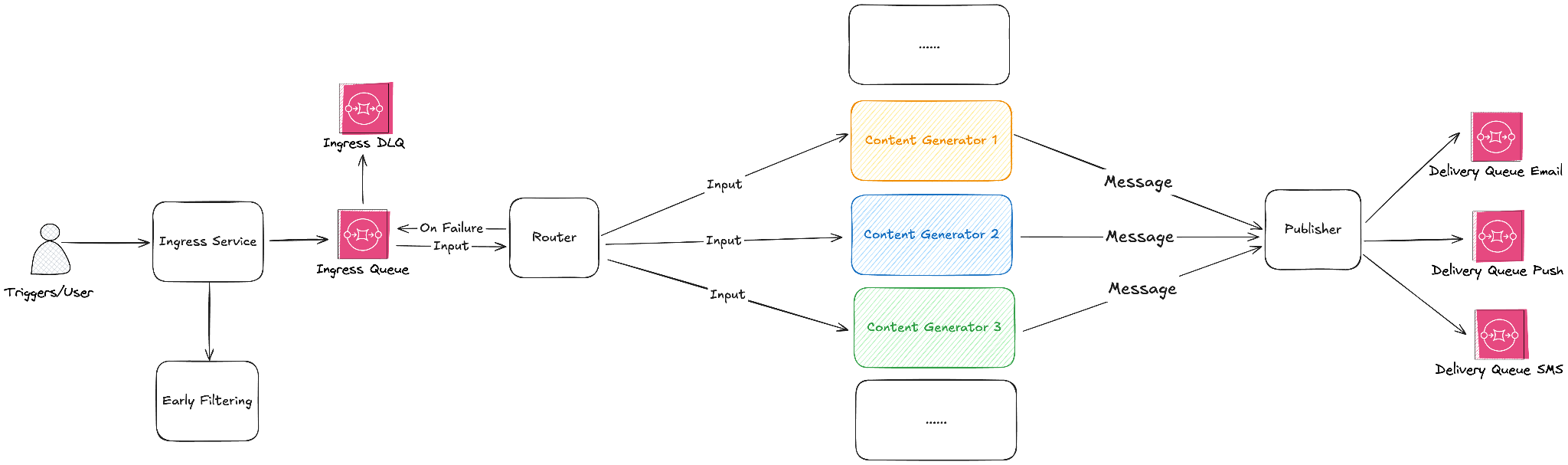
Figure 1: Original system
Competitive evaluation
We evaluated Temporal, Flowable, an in-house engine, and Step Functions Standard and Express Workflows against four criteria. Those criteria were reliability, total cost of ownership, development speed, and how well the service would scale across teams. The engine had to be managed, configuration-driven, and able to orchestrate both newer and older services. Pricing also had to fit our volume.
Temporal and Flowable would have added another infrastructure component to operate. That worked against two of our core goals: cutting the release, monitoring, and on-call overhead that the original system created, and getting pilot projects running quickly. Neither is available as a managed AWS service, so we would have had to run and scale them ourselves. Step Functions is serverless, so we had no servers or worker fleets to run, and a team could start a pilot without first setting up infrastructure. An in-house engine offered control but required custom lifecycle management, worker pools, queue integration, and monitoring. Step Functions met the core orchestration needs at roughly a quarter of the estimated build effort and a quarter of the ongoing maintenance effort. It was the clear choice for the minimum viable product (MVP).
Express mode compared with Standard mode
Our planning model assumed high-throughput, low-latency workflows. The MVP plan ramped from 14 million workflows per day to more than 100 million across all campaigns. At full scale that means several thousand executions per second at peak. Each workflow runs for only a few seconds, and a notification has to arrive while it’s still relevant. We evaluated both Step Functions execution modes, and for our use case Express Workflows were the better fit.
The following table shows how Standard and Express Workflows compared against our requirements for each key characteristic:
| Zillow need | Standard Workflows | Express Workflows |
| High workflow volume | Lower default start quota. | Higher default start quota. |
| Low latency | Optimized for durable, long-running workflows. | Optimized for short-running workflows. |
| Execution guarantees | Exactly once, which is stronger than needed. | At least once, sufficient with idempotent modules. |
Our workflows are high volume, short-lived, finish well within the five-minute Express limit, and are designed around idempotent module calls. We validated quota, latency, and operational behavior during the traffic ramp-up.
The architecture
Campaign Orchestrator is a configuration-driven workflow platform. Each message is input data combined with persisted campaign configuration. The configuration is relatively static for each workflow, while the input data stays flexible based on how the configured steps are assembled.
A shared orchestration layer reads queued campaign events, groups work where appropriate, and invokes the corresponding Step Functions Express Workflow for each campaign. Campaign metadata describes product constants, ownership, and Zillow environment features. Workflow configuration describes step topology, step-level configuration, mappings, branching, delay behavior, and send behavior.
The following JSON shows a simplified workflow input, combining the message payload with the platform, campaign, and configuration metadata that drive the workflow:
The following diagram shows the new architecture, where a single shared orchestration layer and one library of reusable modules serve every campaign. A message moves through the diagram from left to right. The ingress service queues it, and the router applies campaign controls and starts the workflow. Campaign Orchestrator runs the Step Functions steps, each step calls a UCG module, and the delivery service sends the result.
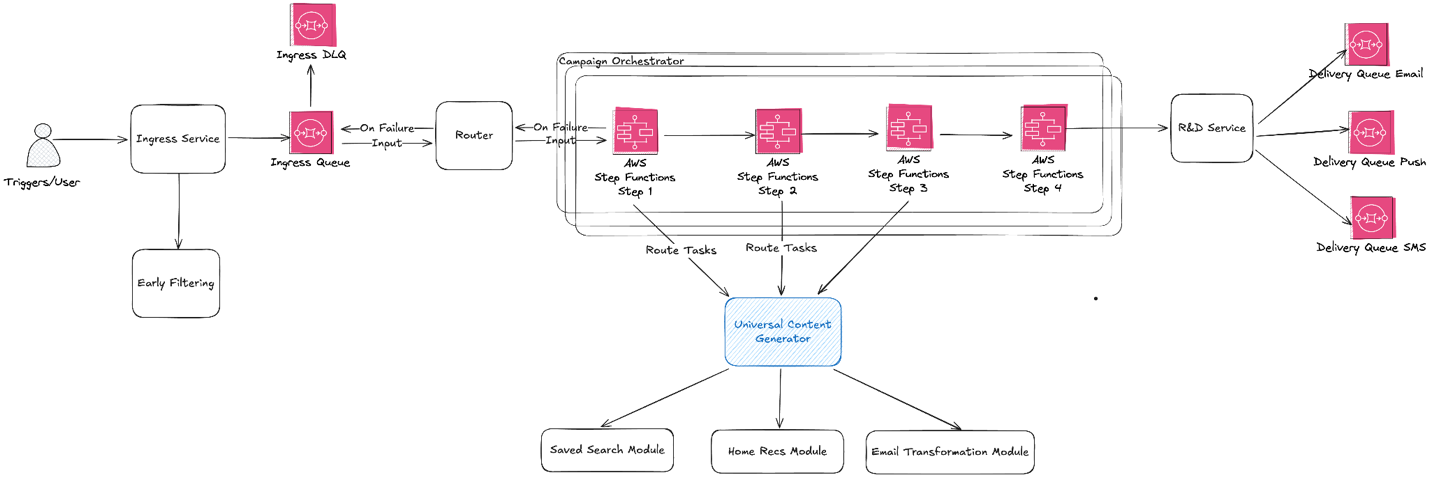
Figure 2: The new system
Router
Our campaigns need a set of controls applied before a workflow starts: queue polling, batching, idempotency checks, pause and resume behavior, replay coordination, speed control, and campaign routing decisions. Some of these controls are specific to how we order and throttle campaign sends, so they live outside Step Functions.
We centralized these controls in an in-house router service that reads from Amazon Simple Queue Service (Amazon SQS) and starts the right Step Functions workflow. Keeping them in one place gives us a single point to pause a campaign, replay a batch, or adjust send speed without changing any workflow definition.
Shared modules (UCG)
The Universal Content Generator is the modular content generation layer behind Campaign Orchestrator. Instead of each campaign owning a separate generator, UCG organizes shared capabilities into reusable modules. Before UCG, this logic was spread across more than 10 separate generators. Centralizing it in one service also smoothed its traffic. Some daily campaigns used to run for about four hours and leave their generator idle for the other 20. Now all campaigns share one fleet, so the load spreads across the day.
Modules handle capabilities such as property hydration (loading listing details such as price, photos, and address for each home in a message), hidden homes (listings a user has chosen to hide, which we filter out of notifications), common data (the subscriptions, saved homes, eligibility flags, and propensity scores every campaign loads for a recipient), recommendations, A/B testing, and content assembly. They are stateless and schema-driven.
Direct service invocation with HTTP Invoke
A key design choice was to call UCG directly through Step Functions HTTP Invoke. This fits the workload for two reasons. First, our content generation logic already ran as long-lived containerized services inside our private service environment, with network access, service discovery, and authentication established. Second, routing workflow steps to UCG added no new compute cost.
With Step Functions HTTP Invoke, we call UCG modules for data hydration, rule checks, and content assembly as they already run. Authentication runs through an Amazon EventBridge connection. Each HTTP Invoke task points to the connection with a ConnectionArn. The connection holds an API key, and UCG checks that key on every request. Amazon EventBridge keeps the key in AWS Secrets Manager and adds it to the request at call time. The workflow definition never contains the key, and neither does our application code. When the key rotates, we rotate it once in the connection and every workflow picks it up.
To avoid repeating the same HTTP Invoke settings in every workflow, we introduced component inheritance. Components are written in a slightly modified version of the Step Functions task definition we deploy through AWS CloudFormation. A base component holds the settings that many steps share, and other components extend it. The following base component, content_module_call, defines how every workflow step calls UCG services directly through HTTP Invoke: the resource, method, headers, and the ConnectionArn for the connection described earlier.
Business modules extend the shared HTTP component and supply only the module endpoint. Before deployment, our build script replaces each component with a standard Task state: it loads the component named in Extends, merges the step’s own fields on top, and writes the result into the Terraform we deploy. Workflow definitions stay focused on product intent rather than network plumbing:
Configuration abstraction layer
Step Functions state machine definitions, JSONata expressions, and infrastructure definitions are powerful, but they are not the right interface for every campaign owner. We added a higher-level configuration layer so campaign owners can define their own workflows without having to understand Step Functions CloudFormation configuration. Each campaign config describes a workflow: which modules run, in what order, and how data moves between them. The system translates that config into the Step Functions definition and CloudFormation template that gets deployed. Campaigns don’t share one generic workflow that picks modules at runtime. Each campaign gets its own workflow, built from the same shared modules and components. As a next step, we are considering a generic workflow that assembles modules in real time from config. Each campaign would still run its own copy of that workflow, so ownership stays isolated per campaign.
Campaign owners specify the modules needed for an email template or push notification. Each module exposes input, output, and configuration schemas. Campaign owners define module outputs to satisfy the template input schema. Module inputs define what triggers need to provide.
With this structure, campaign owners onboard through a declarative process. They work with configuration instead of raw workflow code or JSONata expressions. They can also run controlled experiments and give AI tools a format they can inspect, generate, and modify with appropriate validation.
The following simplified A/B test config is adapted from a real Campaign Orchestrator config. It injects an A/B test module before email transformation and maps the experiment result into the next step without directly touching Step Functions or CloudFormation definition.
Because a campaign is declared as schema-validated configuration, the same contracts that protect human changes also apply to AI-assisted tooling. Our internal assistants already draft module selections and mappings from a product brief, and the output must pass the same schema checks, JSONata tests, and Step Functions validation before it can be deployed.
Batch mode optimization
Campaign Orchestrator supports batching, which improves overall throughput while reducing cost. Instead of launching one workflow per message, the router can group messages and invoke one workflow for the batch.
For example, processing 100 messages individually could produce 100 workflow executions and 400 HTTP requests to UCG services. With batching, the same messages can be processed in one workflow with four HTTP requests, assuming each step supports bulk input and output. That matters at our volume for two reasons. Express Workflows charge for each request and for run time. Batching cuts the number of requests, but each batch runs longer. A rule of thumb: a batch of 10 messages costs less than 10 separate runs as long as it takes no more than 10 times as long as one run. In the preceding four-step example, one message takes about 1.2 seconds, so a batch of 10 saves money if it finishes within 12 seconds. In practice, a batch runs only 10 to 20 percent longer than a single message, about 1.4 seconds instead of 12. That makes a batch of 10 about 90 percent cheaper than 10 separate runs. The batched payload stays under the 256 KiB limit, so memory is still billed at the 64 MB minimum. Fewer executions and HTTP requests also use less of the StartExecution rate, HTTP Invoke concurrency, and logging throughput we size for. That leaves headroom to send more notifications on the same quotas.
The batching model appears in the Step Functions definition and JSONata expressions. This simplified example shapes a batched payload into a bulk UCG request while preserving each tracking ID:
Batching works only if every step in the workflow can handle a batch rather than a single message. For UCG, that requirement is built into the module API. Each module’s schemas define its input, output, and config models, and the module API accepts those models as a batch keyed by tracking ID. A module that doesn’t follow that API won’t build. Our JSONata mappings and upstream and downstream service contracts already accepted bulk input internally, so adding batching didn’t require reworking them.
Batching also can’t cost us visibility into individual messages. Because each batch is keyed by tracking ID, as the preceding example shows, UCG returns a result from each module for each tracking ID. The router uses those per-message results to deliver, retry, or drop each message individually, so one failed message doesn’t fail the whole batch.
The following diagram shows how the router groups messages into a single batched workflow execution.
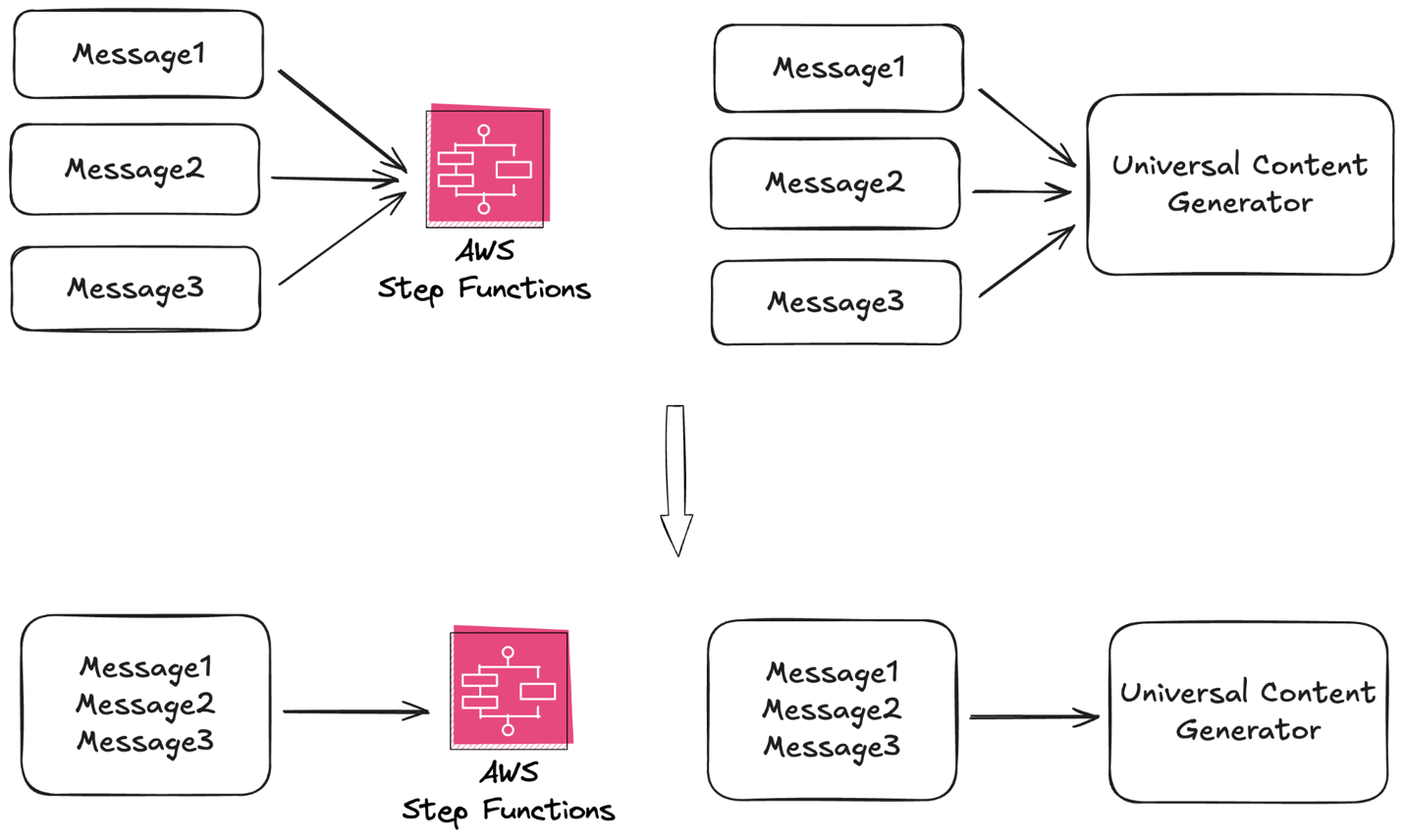
Figure 3: Batching mode
Scaling: Performance and organizational
At our target throughput, service quotas are part of the architecture. We reviewed Step Functions StartExecution rate limits, HTTP Invoke concurrency, and Amazon CloudWatch logging throughput before traffic ramped. HTTP Invoke concurrency needed attention first, because its default quota is lower than the rate at which Express Workflows can start. We sized the required concurrency from our capacity model and worked with AWS to raise the quota before each rollout phase, so throughput limits never gated the traffic ramp.
We planned the rollout in phases, from early traffic to more than 100 million daily executions. With this approach, we could validate cost, quotas, latency, and operations before full scale.
The architecture also supports organizational scaling. Product teams own campaign modules, steps, configuration, and the Step Functions cost tied to their traffic, so they can launch and change campaigns without waiting on the central team. Central teams own shared infrastructure such as the router service, Step Functions patterns, Amazon SQS integration, and deployment tooling, so one improvement reaches every campaign.
Shared code doesn’t mean shared failure. Every campaign’s Express state machine is generated from the same templates and modules, so isolation adds no duplicate code. Each campaign still runs its own state machine and its own Amazon SQS queue, and the router gives each queue its own polling threads, worker pool, and circuit breakers. When one campaign fails or backs up, only its own breaker trips, and we can pause its queue without touching the others. A traffic spike or downstream failure in one campaign doesn’t become a noisy neighbor for the rest.
Testing
Configuration-driven workflows require strong validation because much of the behavior lives in JSONata expressions and campaign configuration. We keep shared JSONata expressions in dedicated files and require unit tests for them. These tests are not offline string evaluations. The test runner builds a small Step Functions state and executes it through the Step Functions TestState API, validating expressions against the same runtime used by Step Functions.
For example, this shared user profile expression converts a batch of campaign messages into UCG module requests:
The workflow references the tested expression through our custom JSONata reference:
Every test case for the expressions we reference through @jsonata runs through the TestState API in continuous integration (CI), and a failing case blocks the deploy. With this approach, teams get reusable mappings and can reduce the risk of malformed payloads, runtime expression errors, or configuration changes that fail inside Step Functions.
Conclusion: Measured impact
The largest impact of the new architecture is product velocity. By replacing repeated custom engineering with reusable modules and configuration-driven workflows, Zillow shortened development cycles for new products and features, opened up greater self-service, and reduced cross-team dependencies. Teams now iterate through configuration, shared modules, and validated JSONata mappings instead of building or modifying a dedicated generator for each idea.
In the original system, testing a new variant or launching a campaign meant changing a dedicated generator service, and often several. Now a team edits a config, reuses modules other teams have already built, and validates the workflow before it reaches production.
The orchestration service also reduced workflow engine build and maintenance cost. Zillow’s internal engineering estimates put the build at 9 development weeks, down from 32 for a comparable in-house engine. Ongoing maintenance fell along the same lines, from roughly 8 hours per week to 2. We sized the system to scale from early traffic phases to more than 100 million workflows per day.
Most of what made this work can be reused by teams with high-volume, short-lived workflows: describe each message as input data plus configuration, keep modules stateless and tested, make every step accept batches, and plan service quotas before traffic ramps. Step Functions Express made those practices practical to run at Zillow’s scale.
To try this pattern yourself, start with the AWS Step Functions Developer Guide and the guidance on choosing between Standard and Express Workflows. You can also install the Agent Toolkit for your coding agent. For the direct service invocation described in this post, see calling third-party APIs with HTTP Task. To validate JSONata expressions the way we describe here, see the TestState API reference. Review Step Functions service quotas before you plan a traffic ramp.


