A PostgreSQL database holds logic as well as data, in functions, triggers and Row-Level Security (RLS) policies. On Supabase and Neon much of that logic can be reached straight from the browser. UnitAutogen for PostgreSQL generates three kinds of test for it, together with the mock data each test needs, so nothing is written by hand.
- Unit tests check that one function or trigger does what its code says.
- Integration tests check that routine together with everything it calls and fires.
- Data leakage tests check that no row or personal data reaches another tenant, another user or an error message.
1. Unit testing
1.1 What a unit test is
A unit test runs a single function or trigger with known rows in the tables it reads, and compares the result with an expected value. For a function that contains an IF statement, a useful suite has at least one test where the condition is true and one where it is false, because a branch that never runs in a test can hold a defect for years.
1.2 Deterministic, not AI-generated
The tests are not written by a language model. UnitAutogen derives each test from the code of the routine and the schema it runs against, and it reads every expected value by running the real routine in the database. A language model writes the text of a test from patterns, without running the function, so it has no way to check the value it expects.
- The same schema produces the same tests on every run, byte for byte, so a change in the suite can be reviewed as a diff.
- A test is kept only after it has passed against the real database.
- A branch that cannot be proven is reported with the reason, and it is never shown as a pass.
1.3 Mock data for each test
The basic requirement of any unit test is known data in the tables the routine reads, and UnitAutogen mocks that data itself. It reads each function and trigger in a schema and, for every branch, works out the rows and arguments that make the condition true and those that make it false. It then writes the tests, together with the mock rows each test needs, as standard pgTAP, which is the unit testing framework for PostgreSQL.
1.4 Function tests
The tests follow the code of each routine, so they differ from one routine to the next. For functions, the kinds of check are the same throughout.
- A run with valid inputs, and runs at the low and high boundary values
- One test for the true side and one for the false side of every branch
- A check on the shape of the result set and on the rows it returns
- A check that the routine touches only the tables it is expected to touch
The HTML report lists every function, and clicking a function name opens its detail. The sample below is the detail for a function named account_health, which classifies an account by its balance. The upper table lists each generated test with the tables it wrote to and the value the function returned, so each branch can be matched to its result, such as over_limit, overdrawn, low or ok. The lower part is the source of the function, where every line that ran is shown in green next to the number of times it ran.
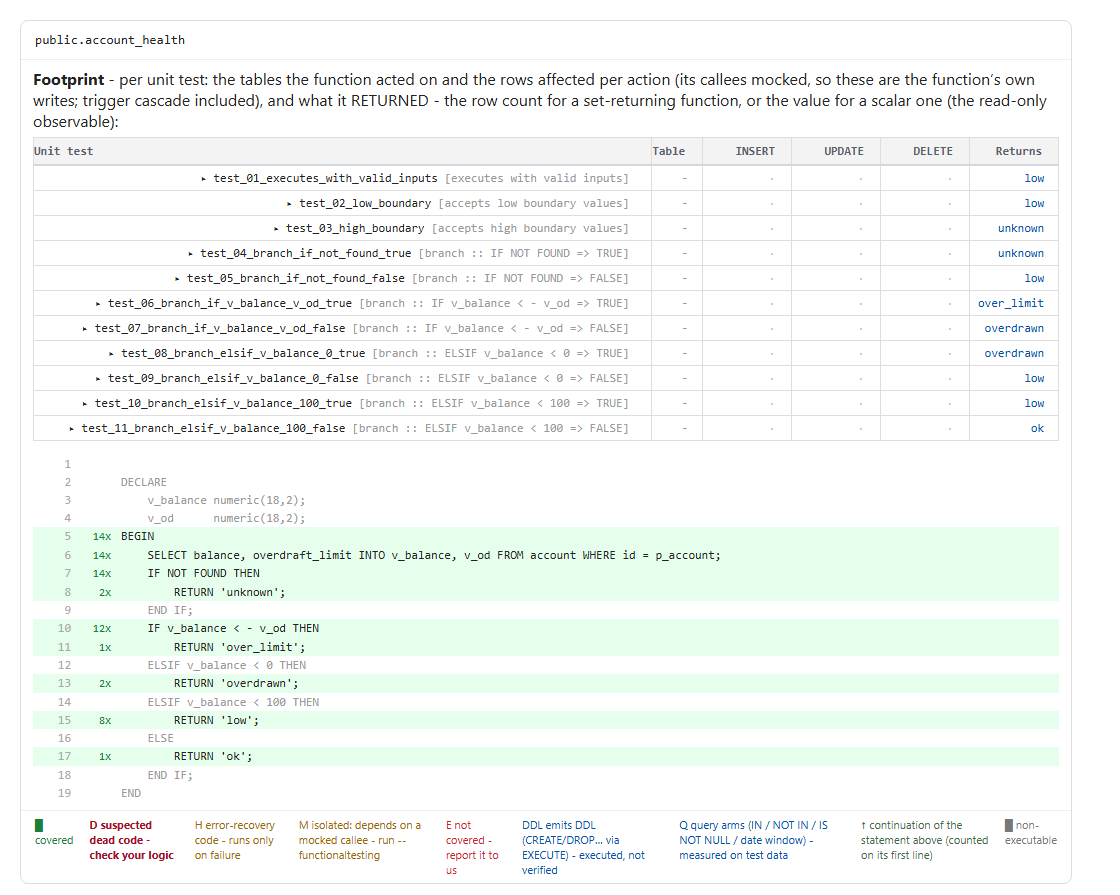
account_health, with one row per generated test above the annotated source.1.5 Trigger tests and side effects
A trigger needs a different kind of test, because it has no return value to compare. Everything a trigger does is a side effect of a write to its table. UnitAutogen therefore tests triggers by behaviour. The generated test performs the INSERT, UPDATE or DELETE that fires the trigger and then asserts what the trigger did, which is one of three things.
- The row itself, where the trigger changes the values being written
- The rows written to other tables, such as a record in an audit table
- The error raised, where the trigger rejects the change
For an audit trigger on an account table, the generated test updates a balance and checks the exact row the trigger wrote to the audit table.
-- generated: test_trg_account__audit_balance UPDATE public.account SET balance = 1; -- Act: fire the trigger RETURN NEXT is( (SELECT ... "action" FROM public.audit_log), '[{"action": "balance_change"}]'::jsonb, -- Assert: the row the trigger wrote 'audit_balance :: update write-effect on public.audit_log');Clicking a trigger name in the report opens the same kind of detail. The sample below is for the audit_balance trigger. The first test changes a balance, and the detail shows one row updated in account and one row inserted into audit_log, with the content of that row asserted. The second test performs an update that does not pass the condition inside the trigger, and it asserts that no audit row was written. Below the table are the call tree and the source of the trigger function, with a hit count on each line.
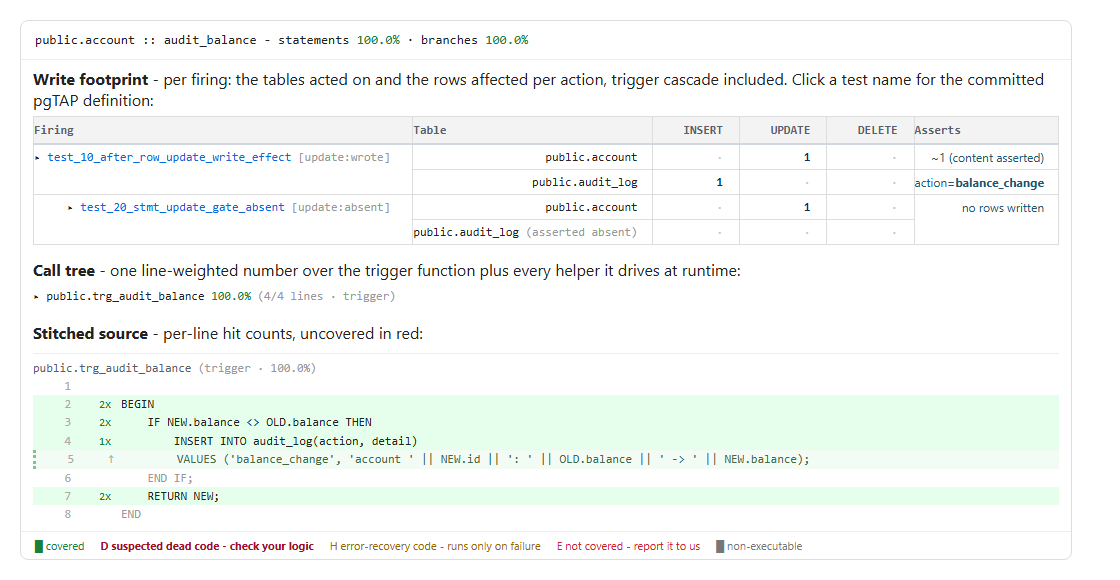
audit_balance, showing what each firing wrote and what it left alone.The report has one row per trigger with its timing, its events and the tables it writes, and the coverage includes the trigger function and every helper it calls. INSTEAD OF triggers on views are tested in the same way. A trigger whose behaviour cannot be proven is skipped and reported, and it is never given an empty assertion.
1.6 Coverage
The tests are then run, and coverage is measured by line and by branch, including code reached through dynamic SQL. The measurement uses plpgsql_check, a PostgreSQL extension that checks PL/pgSQL code. A line that no test reached is listed with the reason, which is either dead code, an error handler that valid data cannot reach, or a limit of the tool. A branch that cannot be tested reliably is reported as NOT_TESTABLE and is never counted as a pass.
1.7 How to run it
export DATABASE_URL=postgresql://user:pass@host:5432/mydb unitautogen --schema publicUnit testing and coverage are part of the free Community Edition.
1.8 What Supabase recommends
- Supabase encourages automated tests that check queries return the expected data. UnitAutogen generates those tests.
- Supabase names pgTAP as the unit testing framework for database structure, functions and procedures. UnitAutogen writes standard pgTAP.
- Supabase ships plpgsql_check for checking PL/pgSQL code. UnitAutogen uses it to measure line and branch coverage.
2. Integration testing
2.1 What an integration test is
Functions in a real schema seldom run alone. A function that places an order may call a second function to reserve stock, and its insert may fire a trigger that writes to a ledger. Each of the three can pass its own unit tests while the chain as a whole produces a wrong total, because each unit test checks one routine against inputs chosen for that routine and not against the values its caller actually passes.
2.2 The call map
An integration test starts at one function, called the root, and lets every function it calls and every trigger its writes fire run for real. UnitAutogen builds the call map for each root, generates the full set of tests for it, and measures coverage across the root, its callees and its triggers together. The report shows the call map in the order the calls happened, along with the tables each test wrote to.
Clicking a root in the report opens its call map. In the sample below the root function calls a helper and then inserts a row, and that insert fires a trigger. The upper table lists each integration test with the rows written anywhere in the map and the value the root returned. The call map beneath it shows the helper and the trigger under the root, each marked as real, which means that nothing was mocked. The last part is the source of all three routines, stitched together with a hit count on each line.
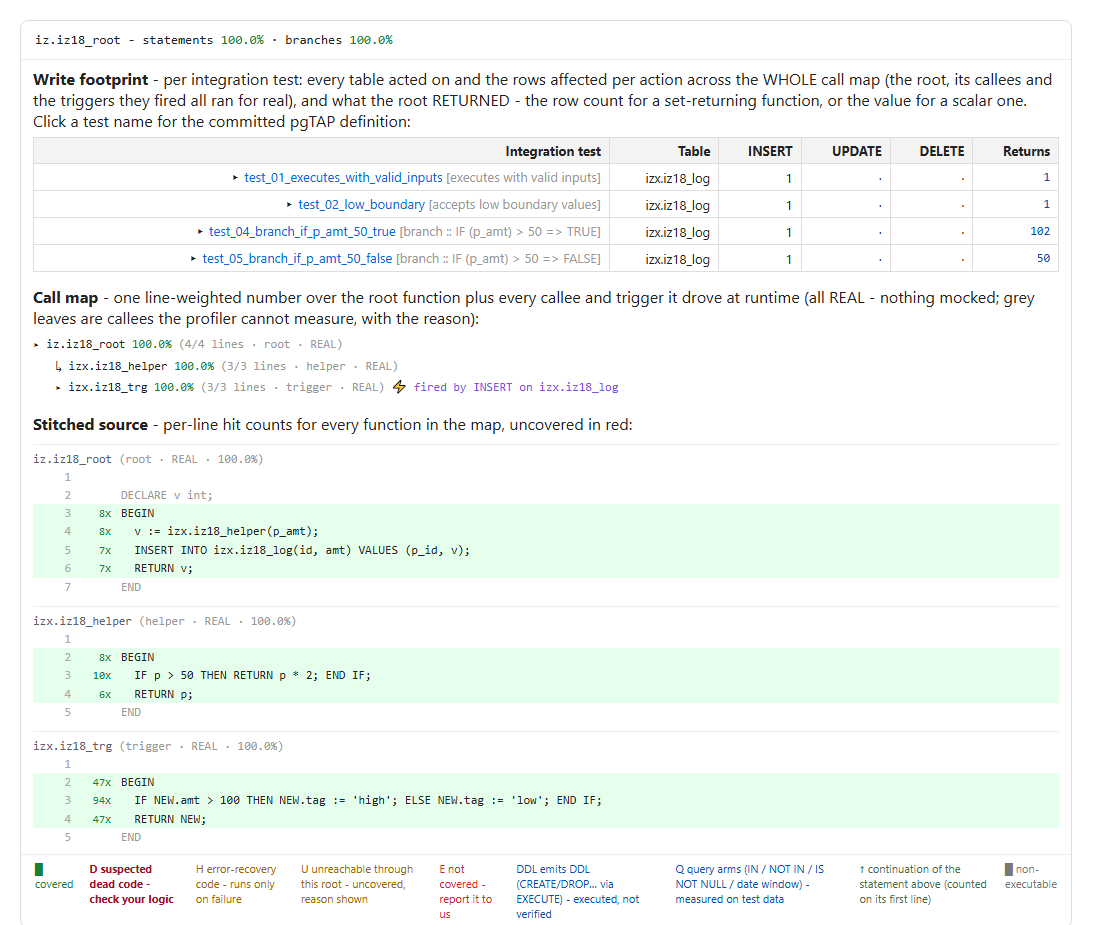
2.3 What an uncovered line means
An uncovered line in this report has a specific meaning. It says that no input to the root reached that line through the whole flow, even where the callee's own unit test covers it.
2.4 How to run it
unitautogen integration --schema publicIntegration testing is part of the Team edition.
2.5 What Supabase recommends
- Supabase describes testing as a critical part of database development, and it lists functions and procedures among the things to test. An integration test covers a function together with the functions and triggers behind it.
- The same guide sets up the database tests to run in a CI pipeline on every push and pull request. The integration tests are pgTAP files, so they run in that pipeline beside the unit tests.
3. Data leakage testing
The third kind of test is about who receives the data. A database that serves more than one customer, or more than one user, has boundaries inside it. It also holds personal data that should not appear anywhere outside the tables that store it. Data leakage testing covers three kinds of leak.
3.1 Multi-tenant leakage
In a multi-tenant application one database holds the rows of many customers, usually marked with a tenant id. A leak at this level means that a user of one customer can read or change rows that belong to another customer.
3.2 Multi-user leakage
The same problem exists between users, both inside a single tenant and in applications that have no tenants at all. A row may belong to one user, as a private note or an order does, or it may be limited to a role, as salary data is when only managers may read it. A leak at this level means that one signed-in user reaches another user's rows, or that an anonymous visitor or a lower role reaches rows meant for someone else.
3.3 PII leakage
PII stands for personally identifiable information, such as a name, an email address or a medical record number. It can leave the database through the text of an error message. A function that raises an exception often puts the offending value into the message, and that message goes back to the client and into the logs. When that value is PII, the error has disclosed data that the access rules were protecting. This kind of leak does not depend on a second tenant or a second user, because the data leaves through the message itself.
3.4 How tenant and user leaks are tested
Row-Level Security is the usual defence against multi-tenant and multi-user leakage. A policy filters direct access to a table by comparing each row with the identity of the caller. Some objects bypass those policies by design, so a passing policy test says nothing about them. UnitAutogen tests all of this with one command named seccover, which is short for security coverage. It tests the policies and each kind of object that bypasses them, as the topics below describe.
3.4.1 RLS policies
The security coverage run tests every policy per table, command and role. Each command is tried as a caller who is entitled to the rows, as a caller who is not, and as an anonymous caller. The report shows one matrix per table. Each cell is marked as enforced, as a hole where a caller can act but should not, or as too strict where an entitled caller is denied.
3.4.2 Column grants
A policy decides which rows a caller reaches, and the column grants decide which columns. The security coverage run checks the grants for columns that a broader grant exposes, and it writes the result to a separate column-level report.
3.4.3 SECURITY DEFINER functions
A SECURITY DEFINER function runs with the rights of its owner and not those of the caller, so it can read and write rows that the caller's policies would have filtered out. UnitAutogen calls every such function that a client role can reach as two different identities, with generated rows on both sides of the boundary. Each function is then marked as enforced or leaking for each role.
3.4.4 Views and security_invoker
By default PostgreSQL evaluates a view with the rights of the view owner. Only a view created with security_invoker is evaluated as the caller. A view over a protected table can therefore return rows that the caller's policies would have hidden. UnitAutogen reads and writes through each view as two identities and reports whether a caller can reach across the boundary through it.
3.4.5 Triggers
A trigger that is SECURITY DEFINER, or that runs as the table owner, reads and writes outside the caller's policies. UnitAutogen tests each trigger on a protected table per role and per command. Where a trigger leaks, the report names the exact tables the leak reaches, including tables that are written indirectly through dynamic SQL or a cascade.
3.4.6 How a leak is reported
Every finding carries the table, the command and the route the data took, together with the smallest database change that closes it. The findings are ranked in one list, and a run can be set to fail a CI pipeline when a leak is found.
3.5 How PII leaks are tested
The PII audit runs as part of the security coverage run, and it can also be run alone. It exercises every error and RAISE path in the schema and inspects the output for personal data. A finding is listed only when personal data actually appeared in the output during the run, so nothing is inferred from reading the source. Each finding names the routine, the path and the data that was exposed.
3.6 How to run it
The first command below runs security coverage, which includes the PII audit. The second runs the PII audit alone.
unitautogen seccover --schema public unitautogen pii --schema publicSecurity coverage and the PII audit are part of the Enterprise edition. For RLS policies alone, rlsautotest is a separate tool that is free and open source. Its policy tests are now also part of UnitAutogen, in an improved form, as the RLS policy testing inside security coverage.
3.7 The reports that come out
One security coverage run writes the generated tests and four reports. Each report is an HTML page with a JSON copy beside it for CI, and each one is dated so that a later run can be compared with it.
| Report | File | What it shows |
|---|---|---|
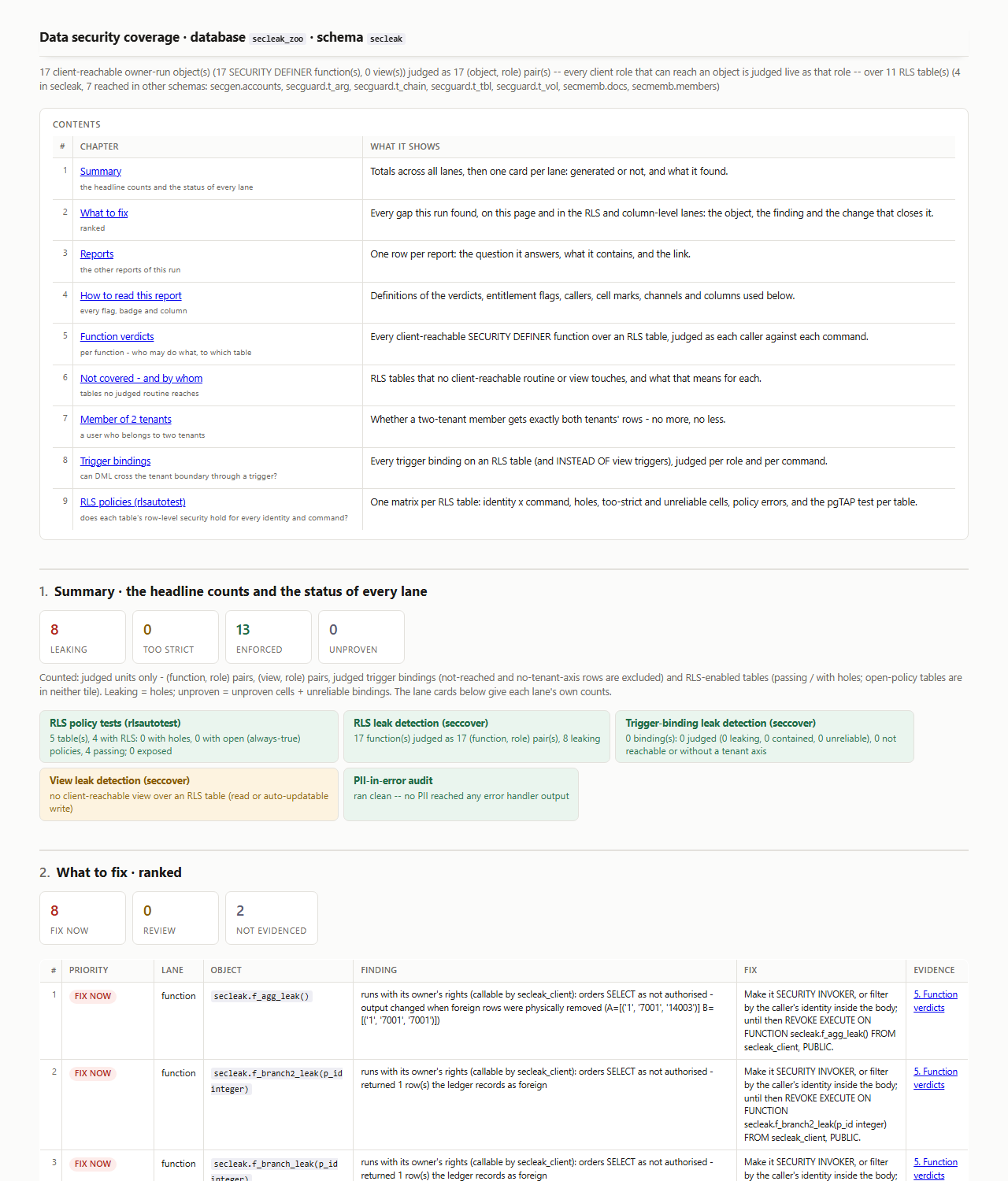
| Data security coverage report | sec_report.html | The main report. It has a contents index, totals for leaking, too strict, enforced and unproven, a ranked list of what to fix, and the verdict for every function, view and trigger. |
| RLS policy report | rls_report.html | One matrix per table that sets each identity against each command, with the holes and the cells that are too strict. |
| Column-level report | cls-report.html | The columns that a broader grant exposes to a role. |
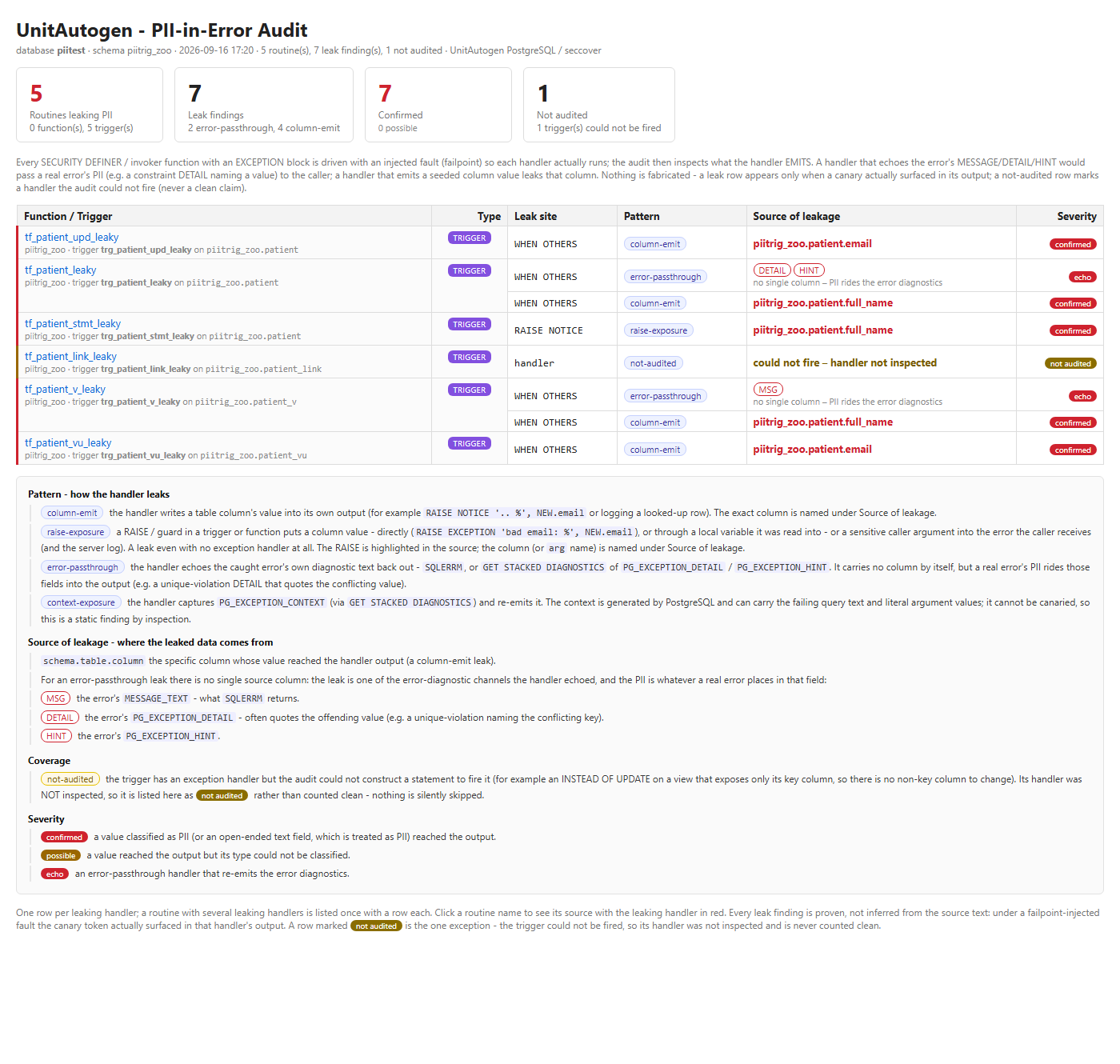
| PII report | pii_report.html | Each routine that leaks personal data through an error message, where it leaks and the column the data came from. The page is written only when something leaks. |
| Security tests | pgTAP files | The tests behind every verdict, for functions, triggers, views, RLS policies and column grants. They can be committed and run in CI. |
The main report links to the other three, and each finding in it links to the test that proves it. In the sample below, a run on a test schema found 8 leaking functions and listed each one under What to fix, with the change that closes it.
The PII report from another sample run is shown below. Each row names the routine, the place where it leaks and the column that the personal data came from.
3.8 What PostgreSQL and Supabase recommend
- PostgreSQL documents that superusers, roles with
BYPASSRLSand, normally, table owners bypass row security. This is why code that runs as its owner sits outside the policies, and the security coverage run calls each such object as two identities. - PostgreSQL warns that a
SECURITY DEFINERfunction runs with the privileges of its owner and has to be written with care. The security coverage run tests every such function that a client role can reach. - Supabase advises proving, with pgTAP tests on the local database, that each RLS policy permits and denies what its author meant. UnitAutogen generates those tests per table, command and role.
- The Supabase database linter flags views that run as their owner and bypass RLS, and the views guide gives
security_invokeras the setting that changes this. The security coverage run reads through each view to show whether data crosses.
4. Platforms
All three kinds of test work the same way on every platform. The differences are in how the extensions are enabled and where the tests are run.
4.1 PostgreSQL
UnitAutogen runs against PostgreSQL 14 to 18, whether self-hosted or on a managed service such as Amazon RDS, Aurora or Azure Database for PostgreSQL. The target database needs two extensions, pgTAP and plpgsql_check. The tool itself is a single binary that runs on a developer machine or a CI runner, and it sends no telemetry.
The run should point at a disposable copy of the database and never at production, because the generated statements do execute, even though each one is rolled back.
The output is ordinary pgTAP, with one file per function and one per trigger. The files can be committed next to the migrations and run with pg_prove or runtests(), and they keep working whether or not UnitAutogen is installed. Once committed they act as a regression suite. A later change that alters behaviour a test recorded, whether a person or an AI assistant made it, fails that test before the change reaches production.
4.2 Supabase
Supabase ships both pgTAP and plpgsql_check, and its testing guide covers automated pgTAP tests run with supabase test db. UnitAutogen fits into that workflow through the --supabase flag.
supabase start unitautogen --supabase --schema public supabase test dbWhen it is run from the project folder, the command connects to the local database reported by supabase status. That database is built from the migrations and holds no customer data. The generated tests are written under supabase/tests/seccover/, where supabase test db already looks. A second run replaces only the generated files and leaves hand-written tests alone.
The routines under test are the database functions and triggers, including the PL/pgSQL behind .rpc() calls. Edge Functions are outside its scope.
Data leakage testing carries particular weight on Supabase, because client applications query tables directly through the API and the RLS policies are the access control. A function that is exposed through .rpc() and marked SECURITY DEFINER runs outside those policies, and the security coverage run calls each such function as two different identities to show whether it returns only the rows its caller is entitled to.
4.3 Neon
Neon lists pgTAP and plpgsql_check among its supported extensions, so each prerequisite is a single CREATE EXTENSION statement. UnitAutogen connects to a Neon database as it does to any other PostgreSQL, through DATABASE_URL. A Neon branch is a convenient target for the run, since it is a separate copy of the database and the main branch is left untouched.
Neon's Data API has no permission system of its own. Every request is decided by the GRANT statements and RLS policies in the database, and Neon requires RLS on every table exposed through it. The policies therefore do the same job as on Supabase, and the same two layers need testing, which are the policies themselves and the functions, views and triggers that bypass them.
5. What the generated tests do not do
A generated test records what the code does today. If a function calculates a discount wrongly by design, the suite still passes, because the database does exactly what the code says. The value of the suite is that it holds current behaviour in place, so that an unintended change shows up as a failing test.
The security and PII reports are evidence that a team can show to a reviewer. They are not a certification, and they cover the database layer only. Application code, Edge Functions and network configuration need their own tests.
6. Where to get UnitAutogen
6.1 Download and first run
UnitAutogen for PostgreSQL is a single binary for Windows or Linux. It is downloaded from the releases page on GitHub, and nothing is installed on the database server.
- Download the binary from the releases page and put it on the
PATH. - Enable pgTAP and plpgsql_check in the database under test.
- Set
DATABASE_URLto a disposable copy of the database and run the command.
CREATE EXTENSION IF NOT EXISTS pgtap; CREATE EXTENSION IF NOT EXISTS plpgsql_check;unitautogen --schema publicThe get started page walks through these steps, and the documentation covers every command.
6.2 Editions and licences
The download needs no licence key and runs as the free Community Edition. The paid editions use the same binary with a licence file placed beside it.
- Community Edition is free and covers unit tests, trigger tests and coverage.
- Team adds integration testing.
- Enterprise adds security coverage and the PII audit.
Team and Enterprise licences are ordered from the pricing page, where a free trial of the Enterprise features can also be requested.


