Apache Airflow orchestrates data pipelines ranging from data ingestion and machine learning to SQL-based analytics. Some analytical workloads, such as daily rollups and usage reports, process bounded datasets and can run within the resources of a single worker. For these workloads, deploying a distributed query cluster can add unnecessary infrastructure and operational complexity.
DuckDB is an open source in-process analytical database that runs within an application without requiring a separate database server. Its columnar, vectorized execution engine supports analytical SQL operations, including scans, joins, and aggregations.
Amazon Managed Workflows for Apache Airflow (Amazon MWAA) runs Apache Airflow as a managed service, so you can schedule, run, and monitor workflows without managing the underlying Airflow infrastructure. Combined with DuckDB, you can add SQL transformations to your pipelines that run inside the Airflow task itself.
In this post, you learn how to run DuckDB with an Amazon MWAA Provisioned environment.
How DuckDB and Amazon MWAA work together
In Apache Airflow, a directed acyclic graph (DAG) defines tasks and their dependencies, along with scheduling, retry, and concurrency settings. Amazon MWAA runs the tasks on workers and publishes configured task logs to Amazon CloudWatch Logs.
DuckDB runs in the Airflow task process, using the CPU, memory, and local storage of the Amazon MWAA worker container. Amazon MWAA orchestrates the workflow, while DuckDB performs the SQL processing.
This walkthrough uses DuckDB 2.0.0, which includes asynchronous I/O for reading from object storage and first-class VARIANT support for semi-structured data. DuckDB 2.0.0 also supports a client-server mode through the Quack protocol, which lets other processes connect to a DuckDB database over the network. This walkthrough runs DuckDB in-process because each Airflow task performs a self-contained transformation.
Introducing the Apache Airflow DuckDB provider
The Apache Airflow DuckDB provider provides the DuckDBExecuteQueryOperator. The operator runs DuckDB locally in the worker container and executes SQL without starting a separate query service.
The DuckDB integration in the Amazon provider adds the AWS aware duckdb_aws connection type. On supported Amazon MWAA Provisioned environments, the DuckDB packages are preinstalled, and Amazon MWAA creates the default connection, as described later in this post.
Solution overview
An engineering team operates a shared inference service that product teams use for their applications. As usage grows, the team needs to understand which applications and teams are driving inference activity and the estimated cost of that usage. Showback provides an itemized view of usage and estimated cost without charging teams directly.
To build the showback pipeline without a separate analytics cluster, the team uses Amazon MWAA to orchestrate Airflow tasks that run DuckDB. DuckDB reads source files from Amazon Simple Storage Service (Amazon S3), performs SQL transformations, and publishes the results as Apache Iceberg tables in Amazon S3 Tables. This pattern suits bounded, SQL-oriented workloads that run reliably within the resources of a single worker.
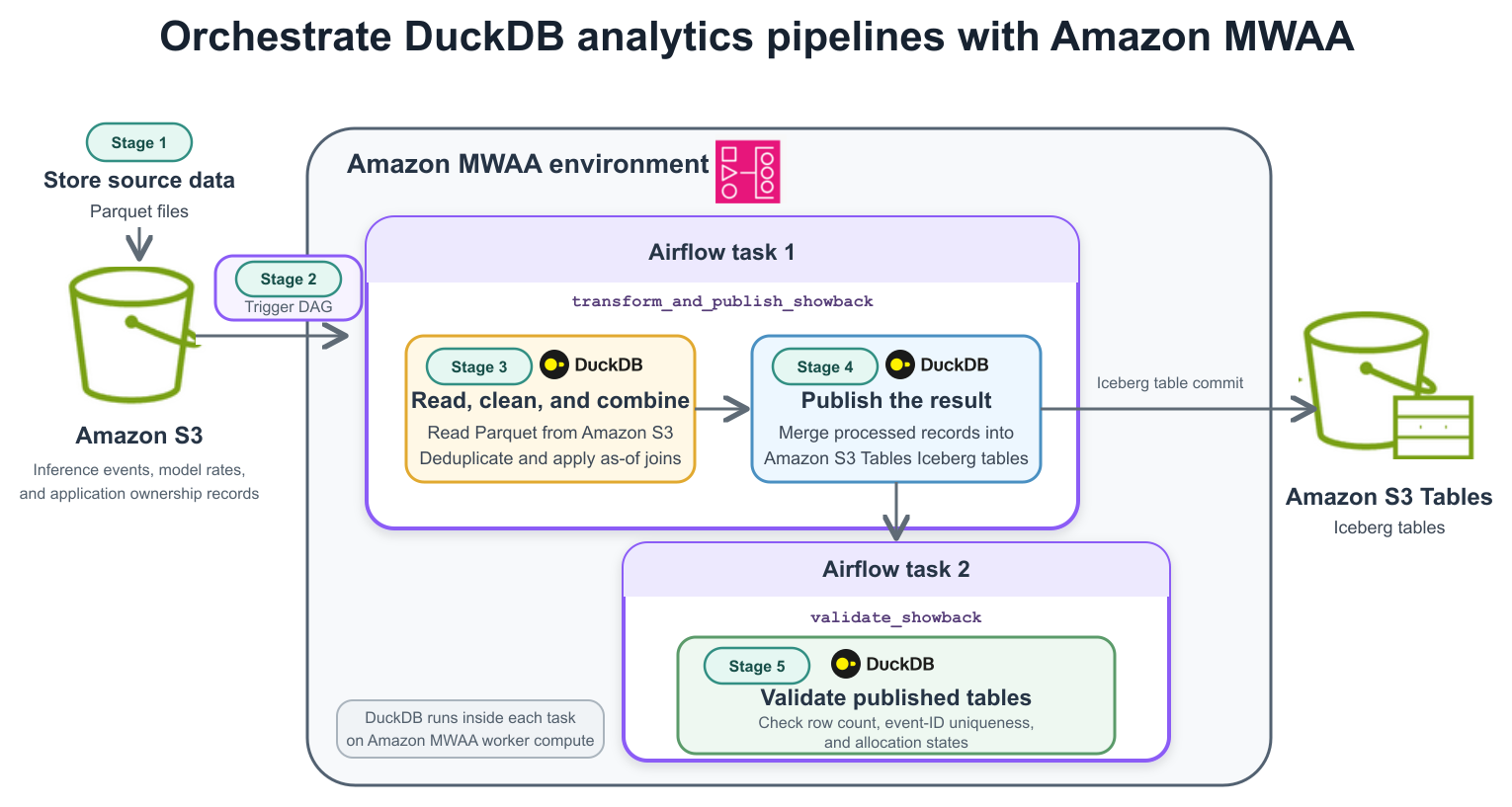
Figure 1: Amazon MWAA orchestrates two DuckDB tasks across five stages, from reading Parquet data in Amazon S3 through publishing and validating Iceberg tables in Amazon S3 Tables
The workflow has five logical stages, implemented by two Airflow tasks, as shown in Figure 1.
- Stage 1: Store the source data – An Amazon S3 bucket stores the Parquet files for inference events, model rates, and application ownership records.
- Stage 2: Trigger the DAG – A manual action starts this example DAG. Amazon MWAA orchestrates both tasks, tracks their status, and sends task logs to Amazon CloudWatch Logs. You can configure a schedule for recurring runs.
- Stage 3: Read, clean, and combine the records – The
transform_and_publish_showbacktask uses DuckDB to read the Parquet files directly from Amazon S3, deduplicate events, and apply the model rate and ownership record effective at each invocation timestamp. - Stage 4: Publish the result – In the same
transform_and_publish_showbacktask, DuckDB merges the processed records into thecosted_invocationsIceberg table in Amazon S3 Tables and commits the update. The task also creates thedaily_application_showbackandteam_budget_statussummary tables. - Stage 5: Validate published tables – After publication, the second Airflow task,
validate_showback, uses DuckDB to check the row count, confirm that event IDs are unique, and verify the expected allocation states.
The sample rates and cost_credits values are synthetic and are provided only to demonstrate allocation logic. They do not represent AWS pricing, Amazon Bedrock charges, or customer billing records.
Prerequisites
Before you begin, make sure you have the following resources and permissions:
- An Amazon MWAA Provisioned environment running Apache Airflow 3.3.1 with Python 3.12. See Apache Airflow versions on Amazon MWAA for the currently supported versions.
- An Amazon S3 bucket for the source Parquet files and an Amazon S3 Tables table bucket for the outputs.
- An Amazon MWAA execution role with read access to the source bucket and permissions to create, read, and update tables and table data in the target table bucket. For the required actions, see Accessing Amazon S3 Tables using open source applications. If the table bucket uses a customer managed AWS Key Management Service (AWS KMS) key, the role also needs permission to use that key.
- Network connectivity from the Amazon MWAA private subnets to Amazon S3 and Amazon S3 Tables. This sample installs the DuckDB Iceberg extension at runtime, so it also requires access to the official DuckDB extension repository unless the matching extension is already available.
- The sample bundle containing the DAG, SQL, and synthetic-data generator used in this walkthrough.
- Python 3, the dependencies listed in
generator-requirements.txt, and the AWS Command Line Interface (AWS CLI) configured on the workstation where you generate and upload the sample data.
In the test environment used for this post, Amazon MWAA included apache-airflow-providers-amazon 9.38.0, apache-airflow-providers-duckdb 0.2.0, and DuckDB 2.0.0. These versions might change in future Amazon MWAA releases.
Use the built-in DuckDB providers and connection
Amazon MWAA Provisioned environments running Apache Airflow 3.3.1 include DuckDB, the Apache Airflow DuckDB provider, and the DuckDB integration in the Amazon provider. Amazon MWAA also creates a connection named duckdb_default with the connection type duckdb_aws. You do not need to add packages to requirements.txt or create the connection manually.
To confirm that the connection exists, choose Admin, then Connections in the Airflow UI. Look for duckdb_default.
Note: When a DuckDBExecuteQueryOperator task doesn’t specify conn_id, it uses duckdb_default. The AWS aware hook obtains temporary credentials from the Amazon MWAA execution role and creates a DuckDB S3 secret for the task. Don’t put AWS access keys in the DAG or create a separate S3 secret in the SQL, because doing so can conflict with the secret the hook creates. If duckdb_default doesn’t appear under Admin, Connections, update your Amazon MWAA environment without changing any settings to apply the latest Amazon MWAA image.
Prepare the sample data
Use generate_ai_inference_data.py from the sample bundle to create Parquet files containing inference events, model rates, and application ownership records. A fixed random seed makes the input reproducible. The dataset includes duplicate events and changes to rates and ownership, allowing you to demonstrate deduplication and effective-dated attribution.
Run the generator and upload the resulting files to Amazon S3:
The default settings generate approximately 300,000 unique events across daily partitions. The generated manifest.json records the expected unique-event count for subsequent validation.
Build the DuckDB transformation
See publish_showback.sql in the sample bundle for the complete transformation SQL. The following excerpts highlight three operations used in the pipeline.
Read Parquet files and remove duplicates
The read_parquet function reads daily Parquet partitions directly from Amazon S3. The union_by_name option aligns columns across files with different schemas. A ROW_NUMBER window function retains the record with the most recent ingestion timestamp for each event ID.
Apply rates and ownership at the event time
Model rates and application ownership can change over time. Using only the current reference record would misattribute historical events. The DuckDB ASOF LEFT JOIN selects the latest reference record whose effective timestamp is no later than the event timestamp.
The full sample retains events without matching reference records and assigns an allocation status. This makes missing rate or ownership data visible during validation rather than excluding those events.
Publish retry-safe Iceberg output
Set the DuckDB session timezone to UTC, attach the Amazon S3 Tables table bucket as an Iceberg catalog, then merge the transformed records using a stable event ID:
For daily_application_showback, use every grouped dimension in the MERGE condition. Use null-safe comparisons for nullable dimensions so that a retry cannot match multiple grouped source rows to one target row:
The sample uses an unpartitioned tutorial table because support for update and delete operations can vary by DuckDB and Iceberg version. Validate table creation, the write pattern, partition design, partial-failure behavior, and reruns with the versions you deploy. An Iceberg snapshot commit is atomic for one table, but commits to the three output tables are not a single transaction.
Create the Amazon MWAA DAG
The duckdb_ai_inference_showback.py file in the sample bundle contains the complete Apache Airflow 3.3.1 DAG. It uses the public airflow.sdk import and a timezone-aware start date. Because schedule=None, you trigger it manually. You can add a schedule for recurring runs. The publication task runs before validation. Setting max_active_runs=1 prevents overlapping runs of this DAG. The detailed-table merge matches on event_id to avoid duplicate inserts during unchanged-input retries. Test partial failures, summary-table updates, and external concurrent writers separately.
Because the operators omit conn_id, they use the built-in duckdb_default connection. The hook_params settings only limit DuckDB memory and threads and select a local spill directory.
In duckdb_ai_inference_showback.py, replace the source bucket and table bucket ARN placeholders, then upload the file to the Amazon S3 DAG folder configured for your Amazon MWAA environment.
Run and validate the pipeline
See validate_showback.sql in the sample bundle for the complete validation SQL. In the Airflow user interface, unpause duckdb_ai_inference_showback and trigger the DAG manually. The graph should show transform_and_publish_showback running before validate_showback.
The validation checks the row count and logical-key uniqueness of both summary tables in addition to the detailed-table manifest, event-ID uniqueness, and allocation-state checks. These assertions make an unchanged-input rerun fail if it creates duplicate summary rows.
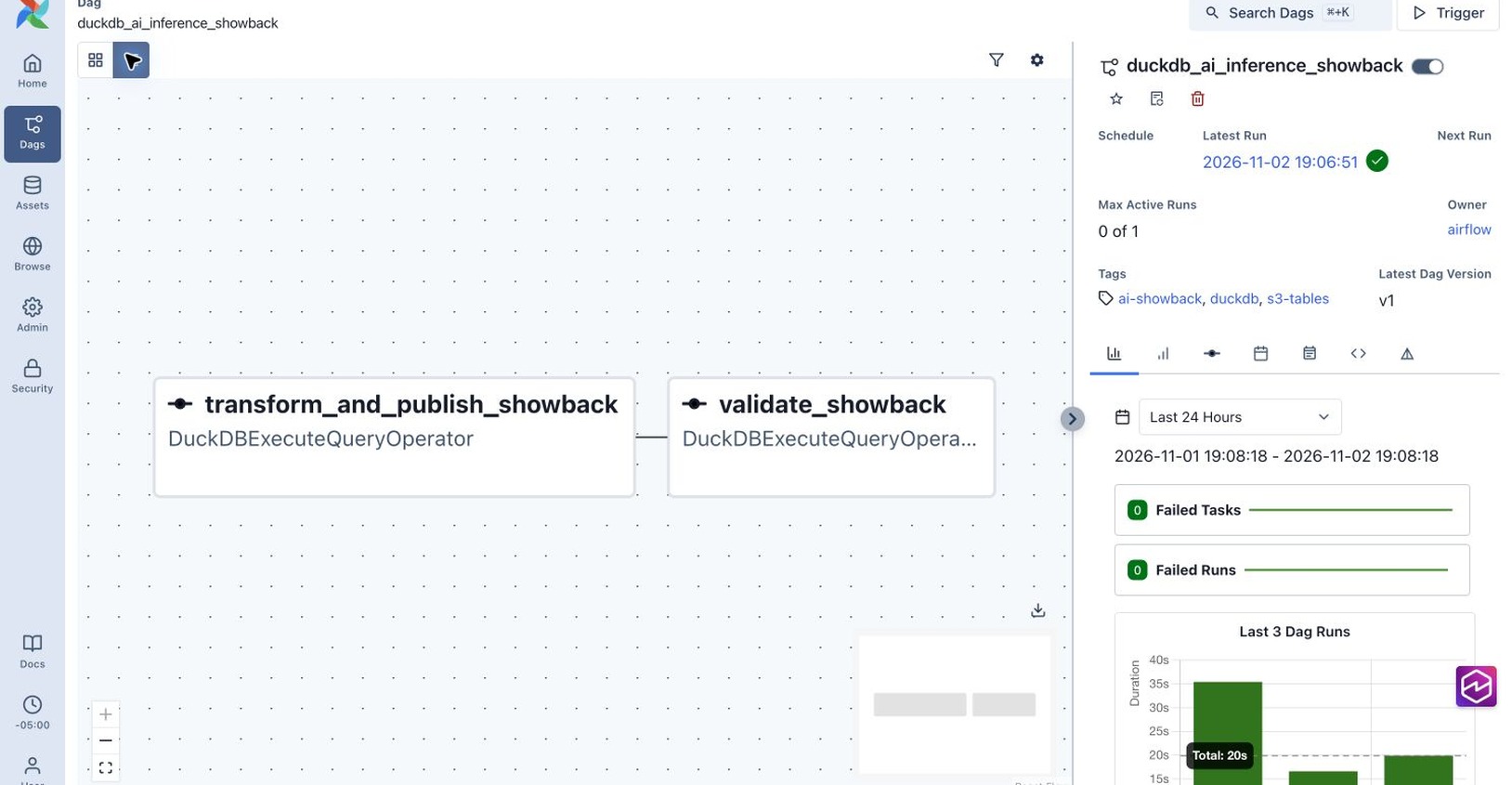
Figure 2: The Airflow DAG runs transformation and publication before validation
We tested the walkthrough on a new mw1.small Amazon MWAA Provisioned environment in the Canada (Central) Region. The environment had no requirements or plugins file. In the representative run, the pipeline processed 303,543 source rows, removed 3,543 later-arriving duplicates, and published 300,000 unique events. The transform-and-publish task completed in about 11 seconds, and validation completed in about 6 seconds. These measurements describe this test run. Performance varies with worker capacity, data layout, and concurrent workloads.
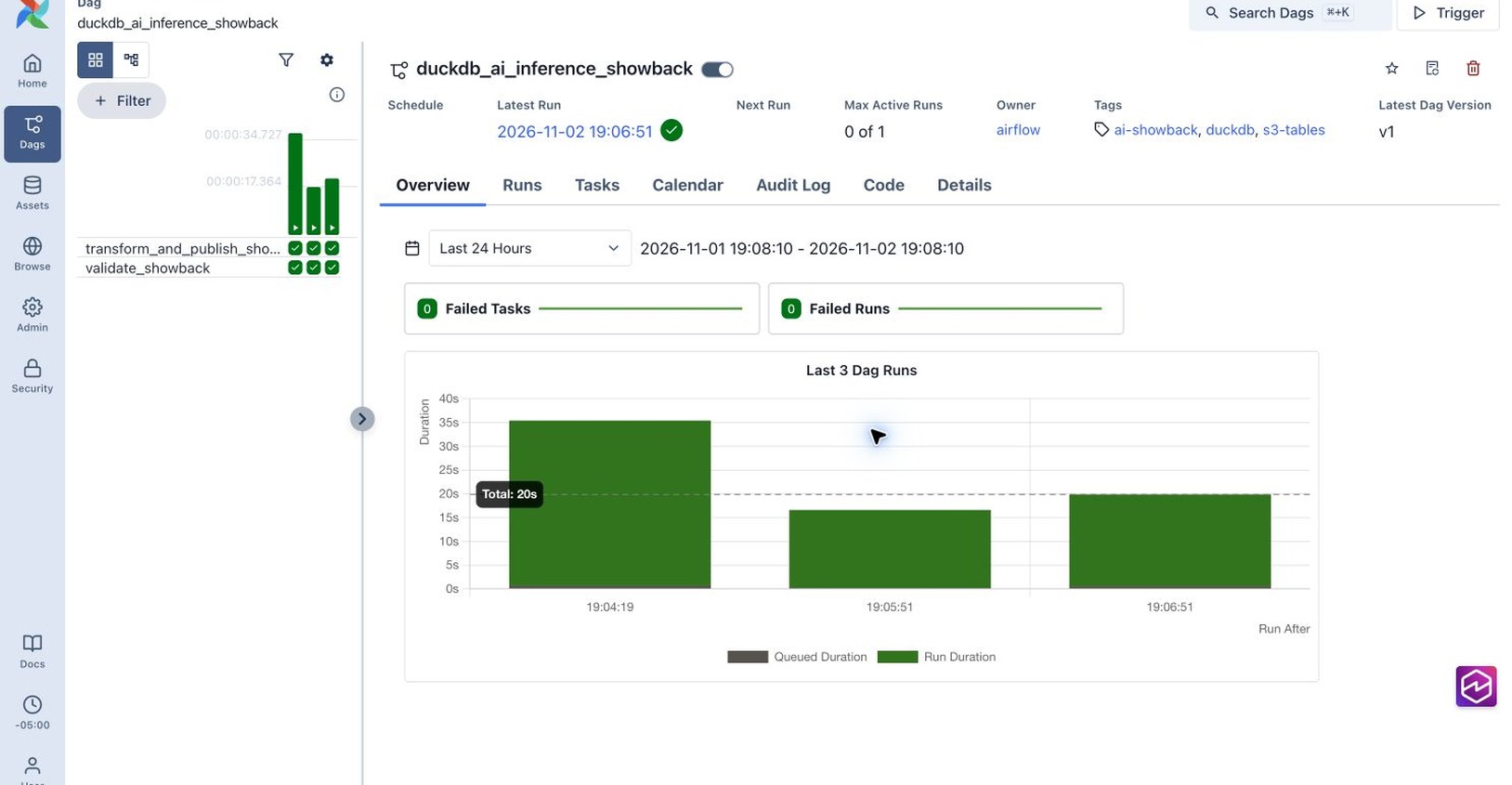
Figure 3: The representative run and two unchanged-input reruns completed successfully
Review the transform-and-publish task log to confirm that DuckDB loaded the required extensions, read the inputs, and committed the Iceberg tables.
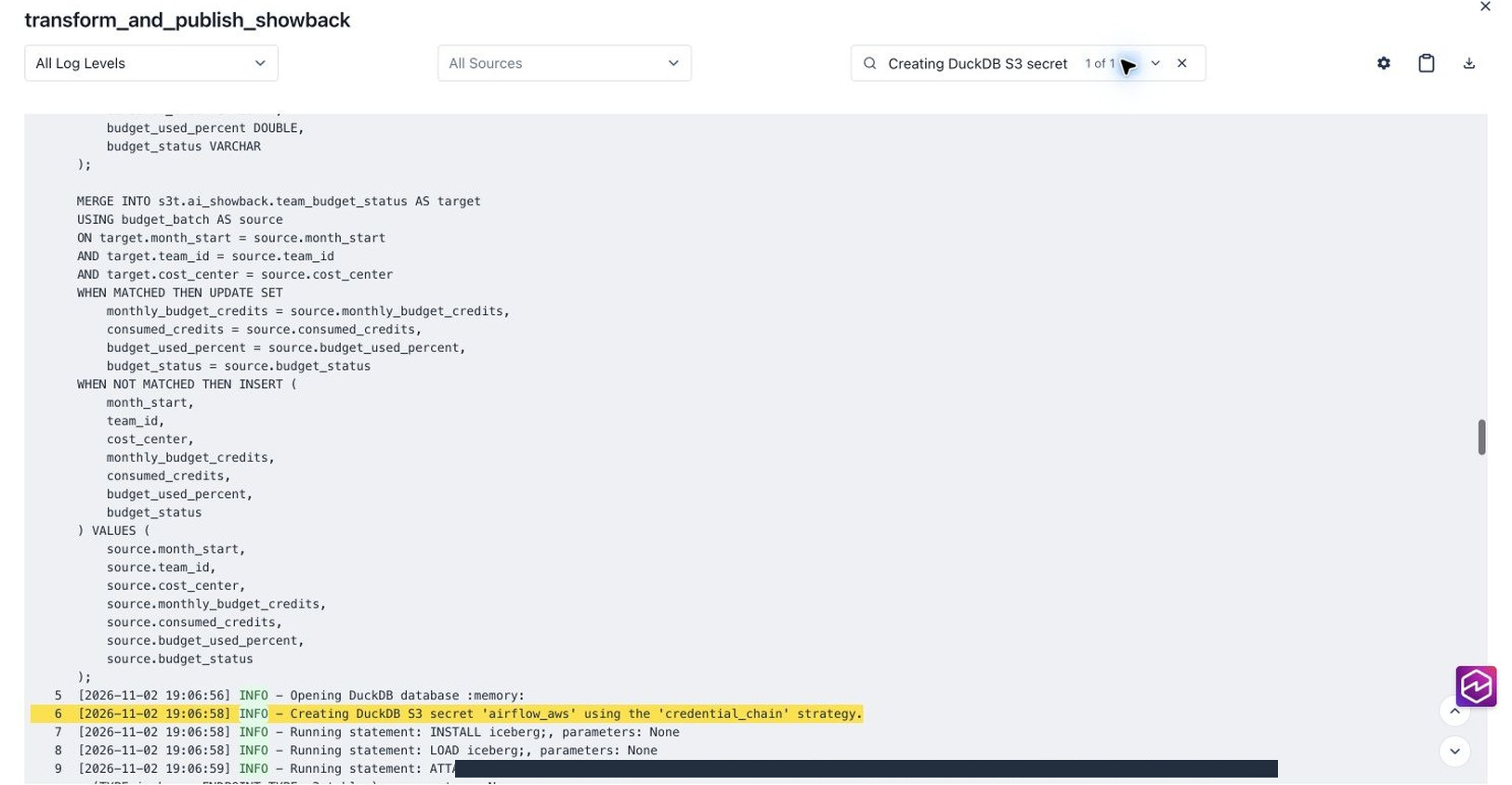
Figure 4: The AWS aware hook creates the DuckDB S3 secret from temporary Amazon MWAA execution-role credentials before publication
The validation task confirmed unique event IDs, a detailed row count matching the generator manifest, all expected allocation states, and unique logical keys in both summary tables. The result contained 272,728 allocated events, 3,683 events missing a rate, 5,522 events missing ownership, and 18,067 non-success events. The summary tables contained 8,949 daily application rows and 9 team budget rows.
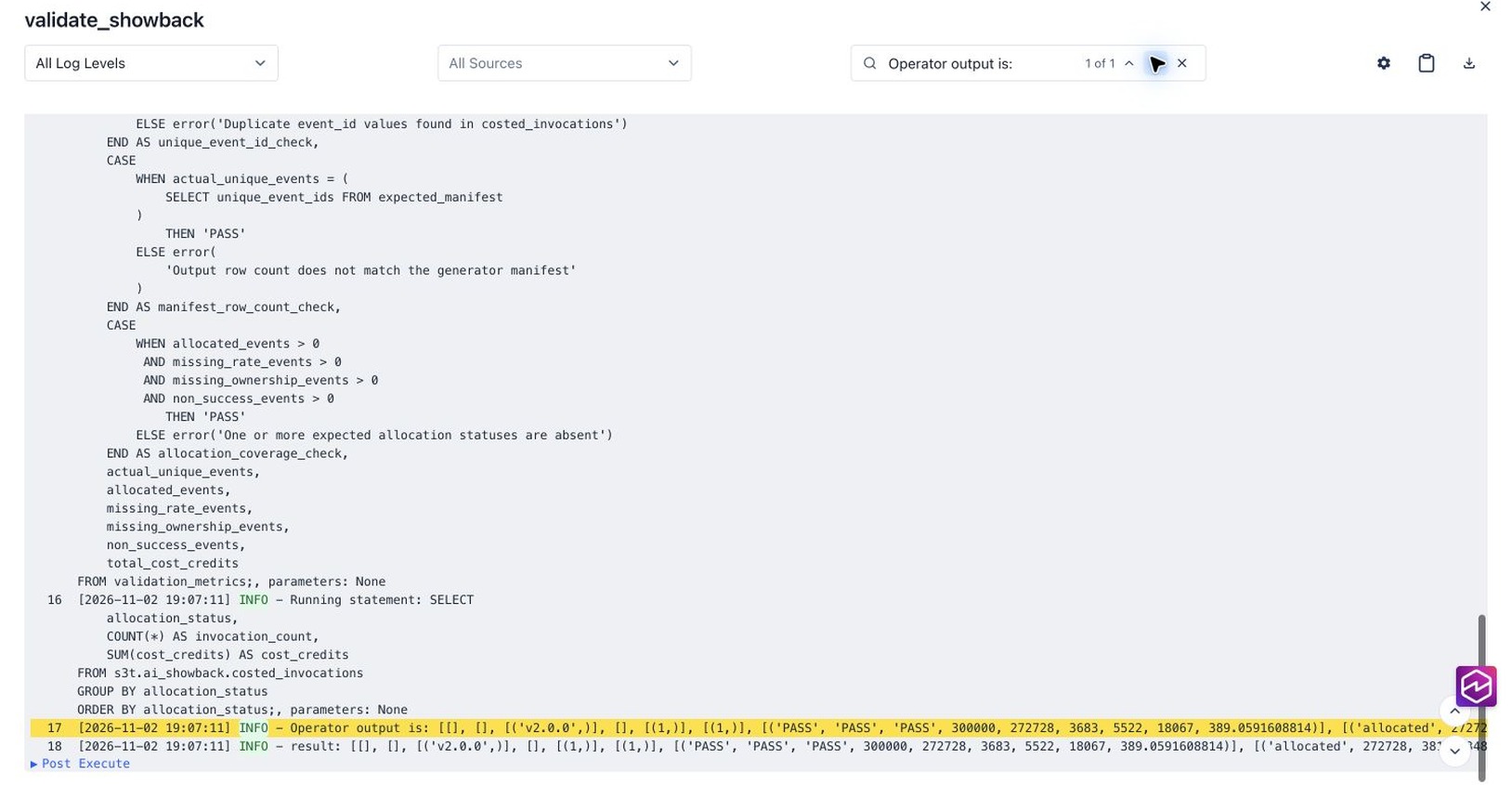
Figure 5: The validation task reports PASS for uniqueness, row count, and allocation coverage
Trigger the DAG twice more without changing the source files. In our test, all three runs retained 300,000 unique events, 8,949 daily application rows, 9 team budget rows, the same allocation counts, and zero duplicate logical keys. This demonstrates repeatability for unchanged input, but does not establish recovery from partial failures or concurrent external writes.
The pipeline published a detailed costed_invocations table and two summary tables, daily_application_showback and team_budget_status, in the ai_showback namespace.
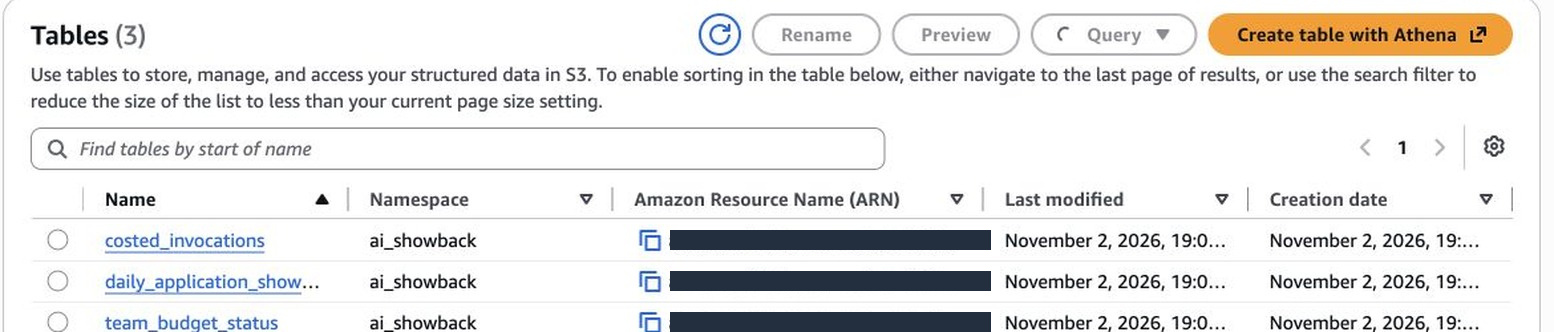
Figure 6: Amazon S3 Tables contains the detailed output and two summary tables
If you configure Amazon S3 Tables integration with AWS analytics services, you can query the output from Amazon Athena. Because the output is stored as Iceberg tables, other Iceberg-compatible engines can read it.
Considerations
When you run DuckDB with Amazon MWAA, each task runs in an Amazon MWAA worker container whose CPU and memory depend on the environment class. Because Amazon MWAA uses the Celery executor, a single worker can run multiple Airflow tasks concurrently. Keep the following in mind:
- Worker capacity: Set the DuckDB memory limit, thread count, and temporary spill space, then test with representative data. Joins, sorting, and data skew can affect peak resource use more than compressed input size alone.
- Concurrency: Concurrent tasks on a worker share its CPU and memory, and each DuckDB task can also use multiple threads. Use Airflow pools and
max_active_runsto limit how many DuckDB tasks run together and to prevent overlapping writes to the same tables. - Processing boundary: Use this pattern when SQL processing completes reliably within one worker. If a step needs horizontal scaling, high write concurrency, or more resources than one worker provides, run it with AWS Glue or Amazon EMR. Amazon MWAA can continue to orchestrate it.
For operational and security best practices, see the Amazon MWAA shared responsibility model.
Clean up
To avoid ongoing charges, pause the DAG and remove its file from the Amazon MWAA DAG folder. Delete the synthetic source data and drop the tutorial Iceberg tables. Remove the table bucket, source bucket, and Amazon MWAA environment only if you created them exclusively for this walkthrough. Remove any tutorial-specific permissions that are no longer needed.
Conclusion
In this post, you used Amazon MWAA to orchestrate an embedded DuckDB analytics pipeline. DuckDB ran inside the Airflow tasks to transform Parquet data from Amazon S3, publish the results as Apache Iceberg tables in Amazon S3 Tables, and validate the output. The DAG defined the task dependencies, while Amazon MWAA ran and monitored the tasks.
This pattern suits bounded, SQL-oriented transformations that fit within one worker. Start with representative data, set DuckDB memory and thread limits, and test retries, concurrency, and multi-table write behavior. If a task outgrows one worker, Amazon MWAA can continue orchestrating the workflow while a distributed service performs that step.
We thank Kamen Sharlandjiev (Principal Specialist Solutions Architect) and Aritra Ghosh (Senior Product Manager) for their contributions to this post.