AI agents amplify the impact of every inference decision. While chatting with a bot might mean a single model call per conversational turn, an agent might make 5–30 calls to search for plans, choose tools, parse results, retry failures, and create the answer. Small differences between inference providers, therefore, become large differences at the task level.
If you’re trying to choose an inference provider for AI agents, time-to-first-token latency, tool-calling reliability, and structured-output guarantees all matter far more than raw token price or throughput benchmarks. The appropriate unit of evaluation is not price per token. It is the price per completed task.
This tutorial defines that metric and includes a benchmark for comparing DigitalOcean AI Platform, Together AI, Fireworks AI, and OpenAI along four dimensions.
Why agent workloads break chatbot-era provider comparisons
Most traditional LLM benchmarking and provider comparisons pit providers against one another based on tokens-per-second output rates, price-per-million tokens, or general reasoning benchmark scores. Those metrics still apply, but they do not capture the entire behavior of an agent. Consider a research agent with this workflow:
- Interpret the request.
- Create a research plan.
- Choose a search tool.
- Generate search arguments.
- Interpret the search results.
- Decide whether more evidence is required.
- Perform another search.
- Extract relevant facts.
- Call a calculator.
- Validate the calculation.
- Compose the answer.
- Check the final response.
This could take 12 sequential calls to your model.
A subsequent call can’t even be started until you’ve received the previous model’s response or tool output. Latency therefore, accumulates along the critical path.
Assuming Provider A has a median of 400 ms to the first token and Provider B has 900 ms. If each call incurs ~100 ms of app/network overhead, the low-latency task requires: 12×(0.4+0.1)=6 seconds. For Provider B, TTFT alone adds up to: 12×0.9=10.8 seconds. Let’s add 100 milliseconds of orchestration and network overhead to each of those 12 steps. The new total time looks like this: 12×(0.9+0.1)=12 seconds.
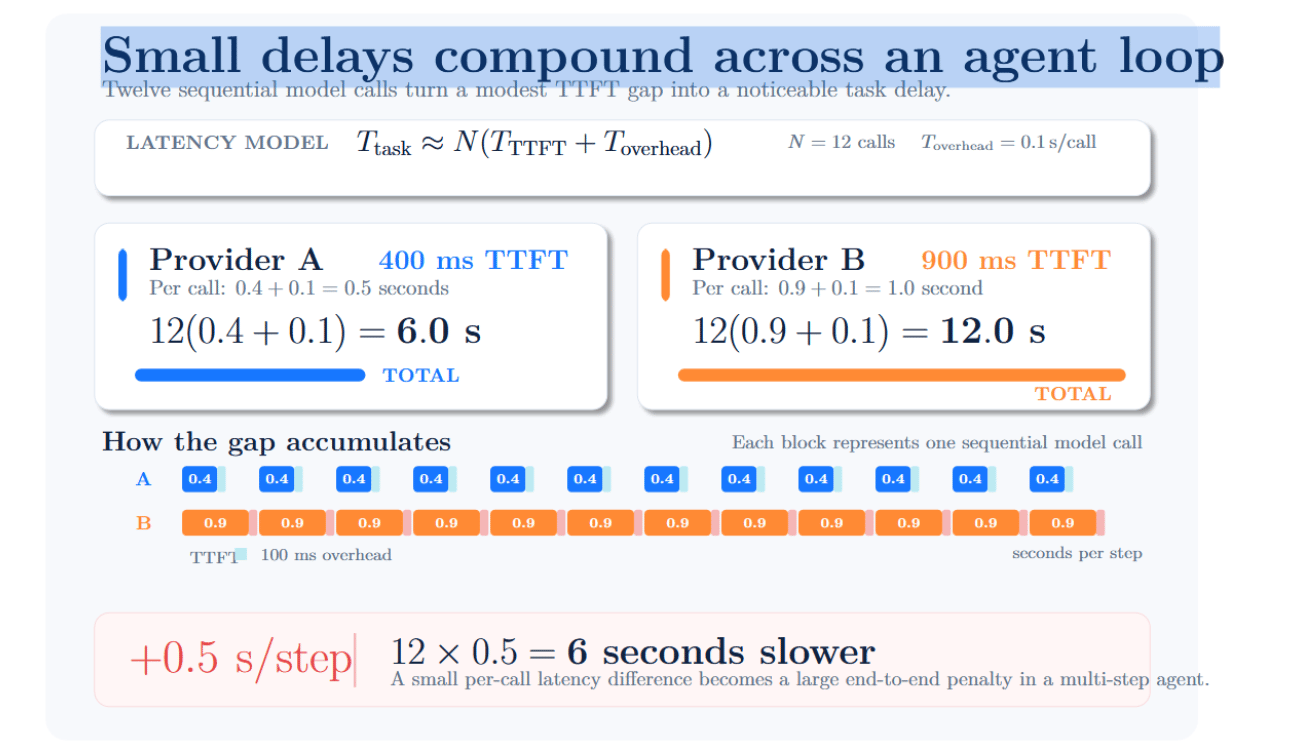
Small differences in latency can add up over the course of an agent’s work. For example, an extra 500 milliseconds may not be noticeable for a single chatbot response. However, adding 500 ms to each step of a 12-step agent loop increases the task’s total completion time by six seconds.
Tool failures can compound across an agent’s trajectory: malformed arguments must be validated, repaired, or retried. These consume additional tokens, latency, and potential tool costs and introduce more chances for failure. Hence, the right unit of evaluation for agent economics is not the token or the individual model call but the successfully completed task.
The four criteria that actually matter
Benchmarking inference providers should go beyond comparing token price or advertised throughput. An AI agent issues many sequential model calls, makes calls to external tools, and often must produce outputs that follow an exact schema. Therefore, providers should be evaluated on four applicable metrics: interactive latency, tool calling reliability, structured-output guarantees, and cost per completed task.
Time-to-first-token and inter-token latency (not throughput)
Time to first token is the time elapsed between issuing a request and the arrival of the first generated token. Inter-token latency measures the time between consecutive output tokens. Throughput is typically measured in tokens/sec and reflects the total amount of work achieved by a serving system. Throughput is often important for high-volume systems but can misrepresent interactive agent latency issues.
Imagine two providers:
- Provider A begins responding after 300 milliseconds and generates 70 tokens per second.
- Provider B begins after 900 milliseconds and generates 130 tokens per second.
The infographic below separates TTFT from token-generation time and shows why Provider A wins for the 20-token response:
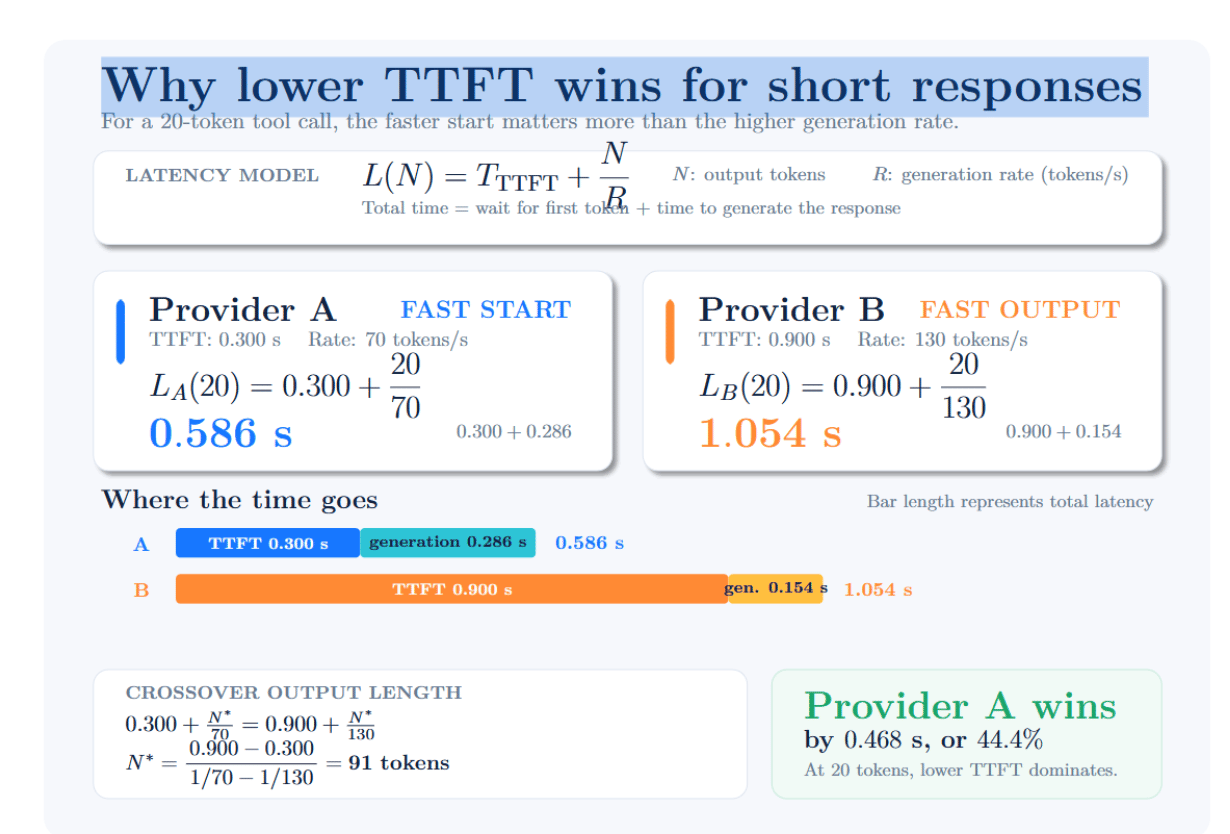
This is important because agent tool calls are usually short. A model may only need to produce a function name and several JSON arguments. The wait time for the first token can exceed the time spent to generate the entire response. So if provider A has a lower TTFT than provider B, it could enable faster agent execution despite having lower generation throughput.
Tool/function calling reliability
Tool calling allows a model to select a function and produce its arguments. For example, a weather agent might return:
{
 "name": "get_weather",
 "arguments": {
   "city": "Douala",
   "unit": "celsius"
 }
}
Whether a response is useful depends entirely on the called tool existing and the arguments passing the schema. Typical failures include malformed JSON, missing required fields, invalid enum values, wrong data type, imaginary tools, unnecessary tool calls, or natural-language text embedded in arguments.
Each invalid tool call can cost you a paid retry. Reliability should be quantified rather than assumed based on a provider’s “function calling supported” label. A basic tool-call validity metric is given below:
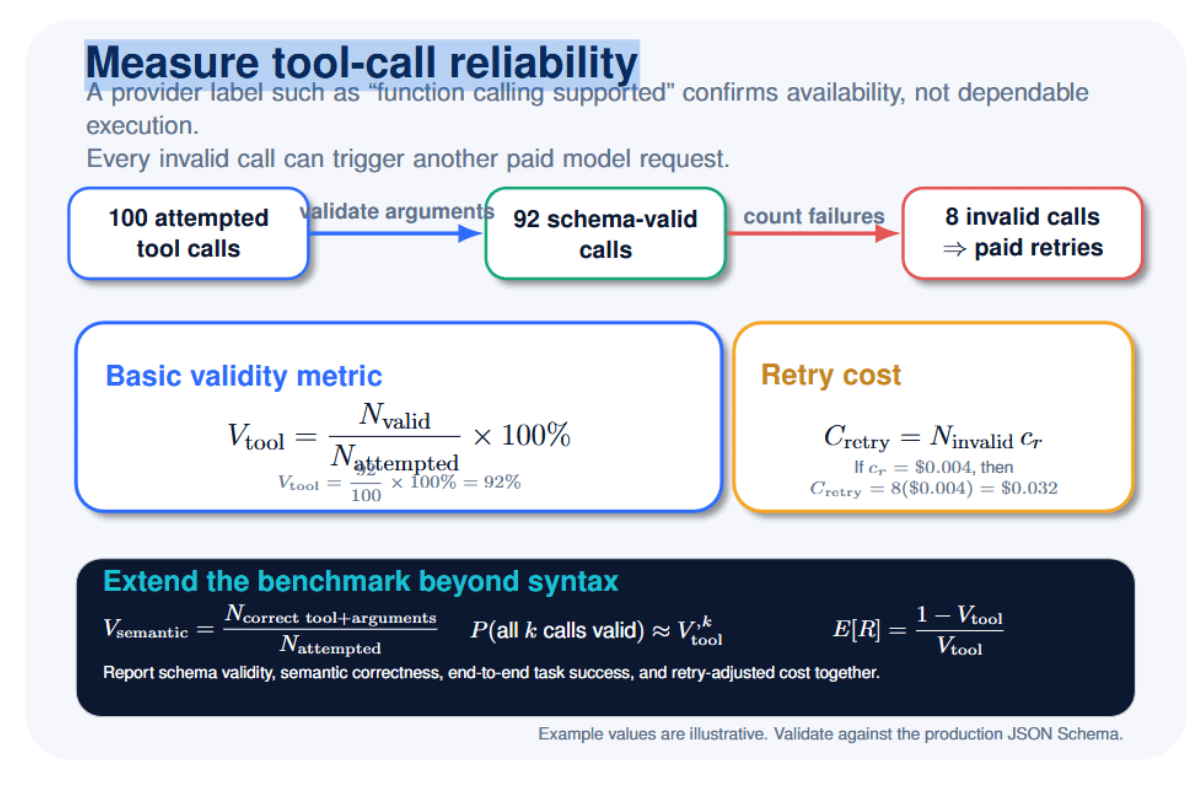
Launch at least 50 runs for each model and scenario. Testing 100–500 runs will give you a more stable result. Test using easy, ambiguous, and adversarial prompts. Validate tool calls with the same JSON Schema you use in production instead of just validating if the output is valid JSON.
DigitalOcean’s current list of Inference models highlights tool-calling support at the model level. Individual agent documentation describes how functions query APIs, databases, and other external systems. Tool-calling support can vary by model and endpoint, so confirm that your intended model ID supports tool usage. You can reference DigitalOcean’s supported-model catalog and functions routing documentation.
Both Together and Fireworks offer tool calling using OpenAI-compatible request formats. Anthropic offers native tool-use functionality, including strict tool schemas. OpenAI allows strict function definitions via its structured-output feature.
The model you choose heavily influences tool selection. Schema design, prompt, sampling settings, and the number of available tools also impact tool selection.
Structured output guarantees
There are three main ways to make an LLM produce JSON. They provide different levels of reliability.
1. Prompted JSON
You tell the model to output JSON:
Return the answer as valid JSON only.
The model will likely comply with this instruction, but there’s nothing technically enforcing it. The model may choose to include additional explanatory text, omit required fields, output the wrong data type, or even output invalid JSON.
2. JSON mode
JSON mode can enforce that the response is valid JSON which your app can parse. For instance:
{
 "amount": "50",
 "currency": "USD"
}
However, valid JSON may not adhere to your application’s desired structure. In this case, amount was provided as a string even if the application expected a number.
3. Schema-constrained decoding
Schema-constrained decoding forces the model’s output to adhere to a provided JSON Schema or grammar. In this case, the schema could require:
- amount to be a number
- currency to be a string
- both fields to be present
- no additional fields to be included
A compliant response would be:
{
 "amount": 50,
 "currency": "USD"
}
Schema-constrained decoding is one of the most reliable methods for agent workflows for preventing many formatting and data-type errors. The schema cannot, however, ensure the response contains correct data. It can verify that amount is a number, but not that $50 is the right amount to refund.
Together includes both json_object and preferred json_schema format in its documentation for Structured Outputs. Fireworks claims support for JSON Schema and user-defined grammars in their Structured Outputs documentation. Anthropic documents that schema compliance is guaranteed and strict tools are used.
Note that Anthropic’s compatibility layer with the OpenAI SDK ignores the strict parameter when calling functions. If strict adherence to schema is required, use Anthropic’s native API directly. Include deep objects, optional fields, enums, lists, Unicode, escaped characters, and invalid user inputs in your tests for structured outputs.
Capture failure to comply with schema separately from refusal or truncation; an output can conform to a schema but still fail to complete the intended task. The following table compares how leading inference providers support JSON generation, function calling, and schema enforcement.
| Provider | Tool calling | JSON mode | Schema-constrained output | Important qualification |
|---|---|---|---|---|
| DigitalOcean | Model-dependent | Model/endpoint-dependent | Supported models listed | Verify the exact model and API capability columns in the current model catalog. |
| Together AI | Model-dependent | Yes | JSON Schema | Function-calling and structured-output support are reported separately for each model. |
| Fireworks AI | Yes | Yes | JSON Schema + grammar | Availability and behavior may vary according to the selected model and deployment type. |
| OpenAI | Yes | Yes | Strict schemas | Use strict: true with supported models and API features when exact schema adherence is required. |
| Anthropic | Yes | Yes | Structured output + strict tools | Use the native Claude API when guaranteed schema conformance is required. |
Cost per completed task (the metric that decides)
The figure below shows how token usage, the number of model calls, and the task success rate combine to determine the true cost of a completed agent task:
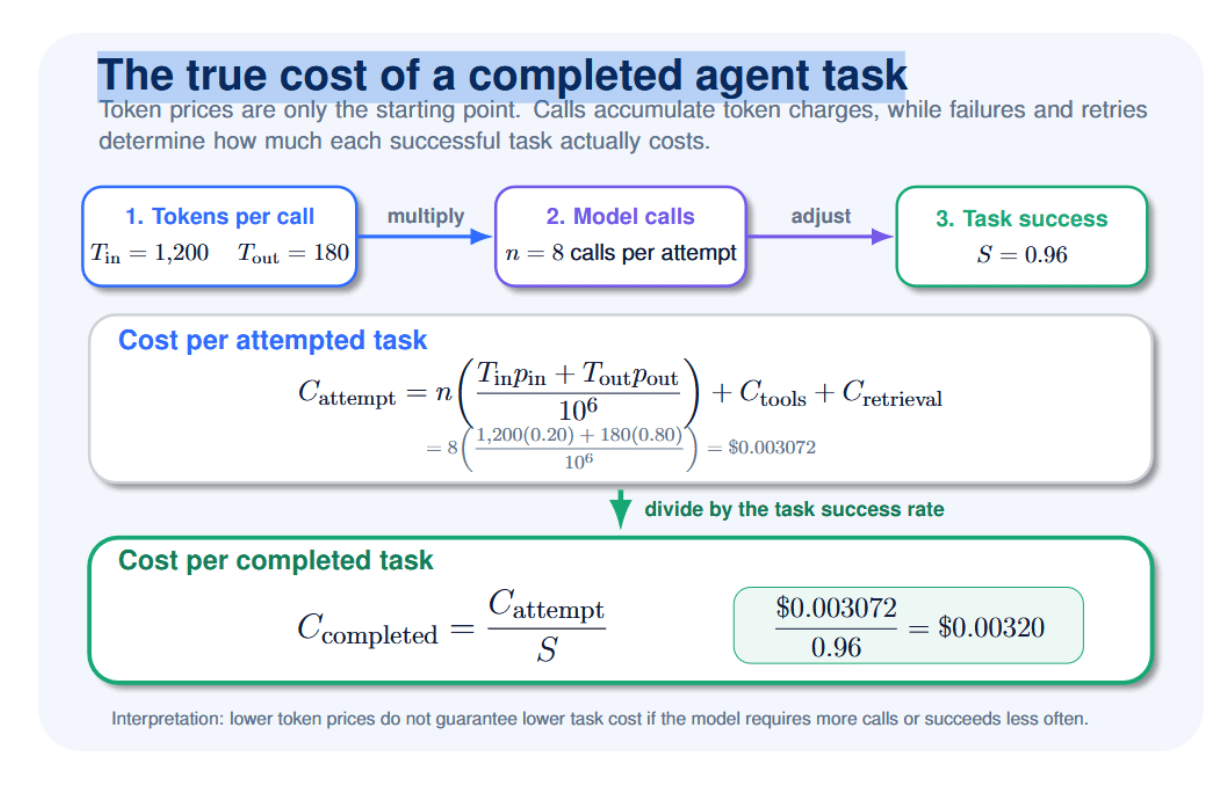
For example, suppose model A charges $0.20 / million input tokens and $0.80 / million output tokens. Further, imagine that A makes eight calls per task attempt. Each call uses 1,200 input tokens and generates 180 output tokens. Then each attempt will cost $0.0030 72. Finally, assume that model A can complete a task successfully 96% of the time. Its expected cost per successful task is $0.00320.
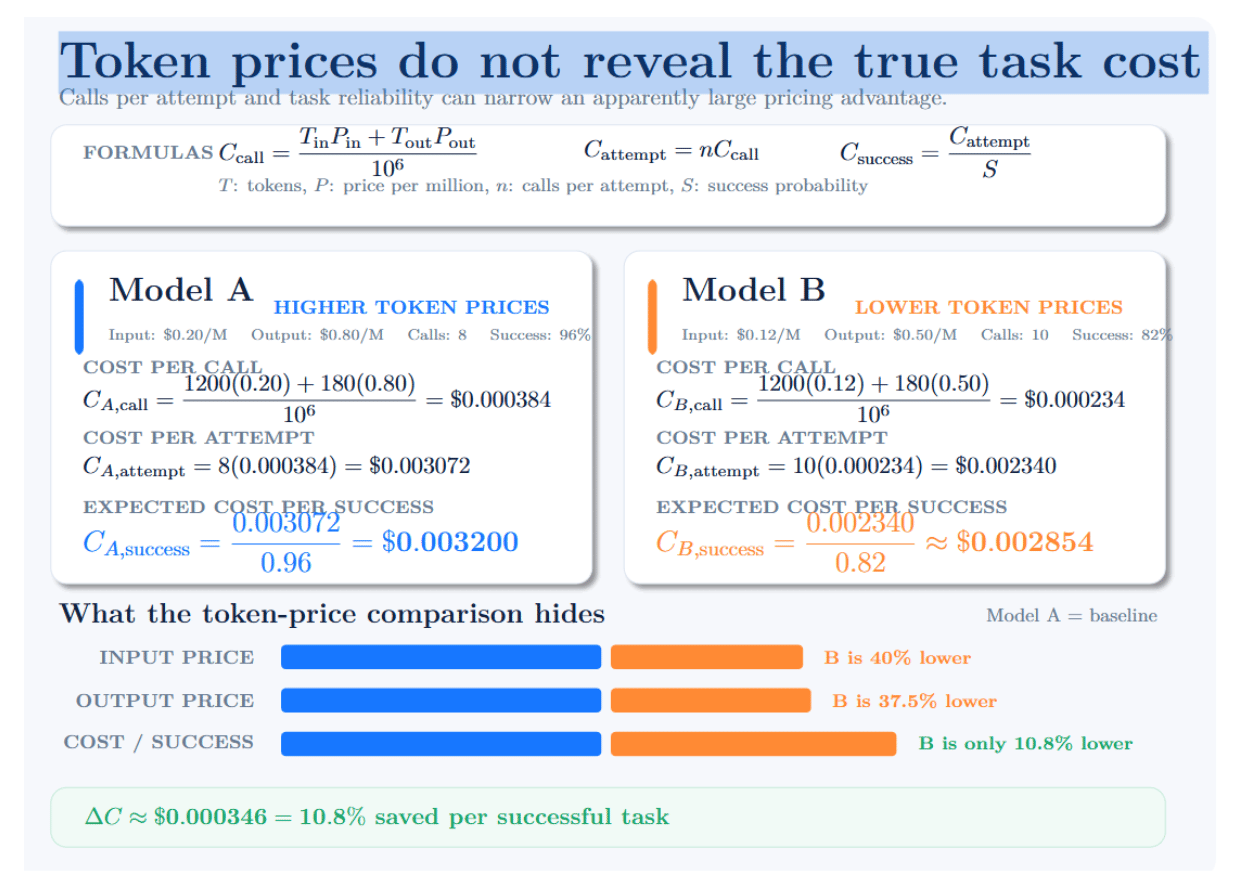
Suppose another model B charges lower token prices ($0.12 per million input tokens, $0.50 per million output tokens). However, model B averages ten calls. In addition, it only succeeds 82% of the time. Each attempt costs $0.00 23 40, and we should expect to pay around $0.00 285 per completed task. Model B is cheaper, but not substantially so – it saves only about $0.00035 per successful task. That’s roughly a 10.8% discount. This discount is much smaller than we would expect if we only looked at token prices.
When building and running models in production, the total cost will also include the price of using the model, calling external tools, retrieval, retries, infrastructure, human escalation, and much more. The central lesson is simple: compare inference providers using the cost of successful end-to-end tasks, not token prices in isolation.
Benchmark: one agent loop, four providers
To fairly compare providers, benchmark every provider using the same conditions. Use the same task, tool definitions, temperature, max output length, and success criteria. Always use models with similar capabilities when comparing providers. Keep in mind that the goal is not to find the “best provider” across all models. The goal is to find the best provider + model combination for your agent. The same provider may give excellent results with one model and weaker results with another. For this benchmark, use a research-and-summarize task that requires two tools:
- web_search(query, max_results) searches for relevant evidence.
- calculator(expression) performs the required calculation.
A task is considered successful only when the agent:
- Selects both required tools.
- The agent supplies valid arguments for each tool;
- uses the returned evidence correctly;
- calculates the correct result and
- produces a final response that follows the required JSON schema.
This task’s success will prevent a fluent but incomplete answer from being considered successful.
Step 1: Configure each inference provider
A fair benchmark will separate provider-specific configuration data from the benchmark logic itself. Configuration for each provider should only include that provider’s API endpoint, authentication credentials, and precise model identifier. The benchmark logic can then reuse prompts, tools, schemas, retry rules, and measurement code across providers.
Assuming each service exposes an API compatible with OpenAI’s, here’s how that looks in practice:
import os
from dataclasses import dataclass
from openai import OpenAI
@dataclass(frozen=True)
class ProviderConfig:
   """Connection settings for one provider-model combination."""

   name: str
   base_url: str
   api_key: str
   model: str

def require_env(variable_name: str) -> str:
   """
   Return an environment variable or raise a clear configuration error.

   Failing early is preferable to discovering a missing API key after
   hundreds of benchmark tasks have already been scheduled.
   """
   value = os.getenv(variable_name)

   if not value:
       raise RuntimeError(
           f"Missing required environment variable: {variable_name}"
       )

   return value
PROVIDERS = {
   "digitalocean": ProviderConfig(
       name="digitalocean",
       base_url="https://inference.do-ai.run/v1",
       api_key=require_env("DIGITALOCEAN_INFERENCE_KEY"),
       model=require_env("DO_MODEL"),
   ),
   "together": ProviderConfig(
       name="together",
       base_url="https://api.together.xyz/v1",
       api_key=require_env("TOGETHER_API_KEY"),
       model=require_env("TOGETHER_MODEL"),
   ),
   "fireworks": ProviderConfig(
       name="fireworks",
       base_url="https://api.fireworks.ai/inference/v1",
       api_key=require_env("FIREWORKS_API_KEY"),
       model=require_env("FIREWORKS_MODEL"),
   ),
   "openai": ProviderConfig(
       name="openai",
       base_url="https://api.openai.com/v1",
       api_key=require_env("OPENAI_API_KEY"),
       model=require_env("OPENAI_MODEL"),
   ),
}

def get_client(config: ProviderConfig) -> OpenAI:
   """Create an OpenAI-compatible client for one provider."""

   return OpenAI(
       api_key=config.api_key,
       base_url=config.base_url,
       timeout=60.0,
       max_retries=0,
   )
Setting max_retries=0 is intentional. We don’t want SDK retries masking failures from our providers and distorts latency results. If retries are enabled in your production app, implement and explicitly record them so the benchmark can distinguish between first-try performance and retry-assisted performance.
Store credentials outside the source code
PI keys and model identifiers should be loaded from environment variables and not hard-coded into the benchmark. This protects credentials and allows users to evaluate different models without changing the benchmark’s underlying evaluation logic.
On Linux or macOS, configure DigitalOcean AI Platform as follows:
export DIGITALOCEAN_INFERENCE_KEY="your-api-key"
export DO_MODEL="your-exact-model-id"
Configure the other providers in the same way:
export TOGETHER_API_KEY="your-api-key"
export TOGETHER_MODEL="your-exact-model-id"
export FIREWORKS_API_KEY="your-api-key"
export FIREWORKS_MODEL="your-exact-model-id"
export OPENAI_API_KEY="your-api-key"
export OPENAI_MODEL="your-exact-model-id"
Ensure you are using the full model identifier exactly as returned or documented by each provider. Don’t compare models based only on a family name such as “Llama 70B”. Different providers can serve distinct revisions, quantizations, context limits, or decoding configurations under similar names.
Hold the following settings constant to ensure reproducible comparison across providers wherever possible, and provider support allows:
- System prompt and user prompt
- Tool definitions and JSON Schemas
- Temperature and sampling parameters
- Maximum output-token limit
- Timeout policy
- Retry policy
- Success evaluator
- Maximum number of agent steps
If a provider does not support one of these controls, document the difference instead of silently substituting another configuration.
Step 2: Record every benchmark attempt
Aggregated averages are not enough to audit a benchmark. There should be a record produced for every attempted task with its identity, result, token consumption, latency, and cost. At a minimum, the record should conform to this schema:
result = {
   # Experiment identity
   "run_id": run_id,
   "timestamp_utc": timestamp_utc,
   "provider": provider_name,
   "model": model_name,
   "task_id": task_id,
   "scenario": scenario_name,
   # Quality and reliability
   "success": success,
   "tool_calls_expected": expected_calls,
   "tool_calls_attempted": attempted_calls,
   "tool_calls_valid": valid_calls,
   "error_type": error_type,
   # Retry and transport behavior
   "retry_count": retry_count,
   "http_status": http_status,
   # Token consumption
   "input_tokens": input_tokens,
   "output_tokens": output_tokens,
   # Performance
   "ttft_ms": ttft_ms,
   "model_latency_ms": model_latency_ms,
   "tool_latency_ms": tool_latency_ms,
   "task_latency_ms": task_latency_ms,
   # Cost
   "model_cost_usd": model_cost,
   "tool_cost_usd": tool_cost,
}
The above fields answer different questions. You must store results in JSON Lines format, with one JSON object per line. This allows us to append new results without rewriting the entire file, which can be convenient for large experiments.
| Category | Field | Question answered |
|---|---|---|
| ID Identification | provider |
Which inference provider executed the task? |
model |
Which exact model handled the request? | |
task_id |
Which evaluation task produced this result? | |
| ✓ Quality and reliability | success |
Did the agent complete the task correctly? |
tool_calls_expected |
How many tool calls should the trajectory contain? | |
tool_calls_valid |
How many tool calls used the correct tool and valid arguments? | |
error_type |
Why did the task or tool call fail? | |
| T Token consumption | input_tokens |
How many tokens were sent to the model? |
output_tokens |
How many tokens did the model generate? | |
| ⚡ Performance | ttft_ms |
How long did the provider take to produce the first token? |
task_latency_ms |
How long did the complete agent task take? | |
| $ Cost | model_cost_usd |
How much did model inference cost? |
tool_cost_usd |
How much did external tool execution cost? |
Define success before running the benchmark
Evaluation success criteria should come from an executable evaluator instead of from subjective inspection. Consider research- and calculation-based tasks: we might only judge a prediction successful if the agent:
- Calls the appropriate search tool.
- Provides schema-valid and semantically correct arguments.
- Calls the calculator with the correct expression.
- Incorporates retrieved evidence into its answer.
- Returns an output that passes the final response schema.
- Calculates the expected answer (within some tolerance).
Simply having valid JSON isn’t enough to determine whether tool calls are correct. The call may pass validation but select the wrong tool for information, search for the wrong information, or supply an incorrect calculation.
Use explicit error categories
Having a controlled taxonomy of failures also makes different types of failures easier to compare:
ERROR_TYPES = {
   "timeout",
   "rate_limit",
   "authentication",
   "provider_error",
   "malformed_tool_call",
   "schema_validation",
   "wrong_tool",
   "incorrect_arguments",
   "tool_execution",
   "incorrect_answer",
   "max_steps_exceeded",
   "unknown",
}
Record failed attempts instead of deleting them. Removing failures artificially boosts success, latency, and cost metrics.
Save results in JSON Lines format.
JSON Lines stores one JSON object per line. It supports incremental writes, works well for large experiments, and preserves completed runs if the benchmark is interrupted.
import json
from pathlib import Path
from typing import Any

def append_jsonl(
   file_path: str,
   record: dict[str, Any],
) -> None:
   """Append one benchmark record to a JSON Lines file."""

   path = Path(file_path)

   with path.open("a", encoding="utf-8") as file:
       file.write(
           json.dumps(
               record,
               ensure_ascii=False,
               allow_nan=False,
           )
           + "\n"
       )
import json
from pathlib import Path
from typing import Any

def append_jsonl(
   file_path: str,
   record: dict[str, Any],
) -> None:
   """Append one benchmark record to a JSON Lines file."""

   path = Path(file_path)

   with path.open("a", encoding="utf-8") as file:
       file.write(
           json.dumps(
               record,
               ensure_ascii=False,
               allow_nan=False,
           )
           + "\n"
       )
Use it after every attempt:
append_jsonl("raw_results.jsonl", result)
Writing after each run is safer than retaining all observations in memory and saving only when the entire experiment finishes.
Step 3: Validate the dataset before aggregation
Before producing rankings, ensure that the dataset has the required columns and that numeric columns contain plausible values.
import pandas as pd
df = pd.read_json("raw_results.jsonl", lines=True)
required_columns = {
   "provider",
   "model",
   "task_id",
   "success",
   "tool_calls_expected",
   "tool_calls_valid",
   "input_tokens",
   "output_tokens",
   "ttft_ms",
   "task_latency_ms",
   "model_cost_usd",
   "tool_cost_usd",
}

missing_columns = required_columns.difference(df.columns)

if missing_columns:
   raise ValueError(
       f"Missing required columns: {sorted(missing_columns)}"
   )

numeric_columns = [
   "tool_calls_expected",
   "tool_calls_valid",
   "input_tokens",
   "output_tokens",
   "ttft_ms",
   "task_latency_ms",
   "model_cost_usd",
   "tool_cost_usd",
]

if df[numeric_columns].isna().any().any():
   raise ValueError("One or more required numeric values are missing.")
non_negative_columns = [
   "tool_calls_expected",
   "tool_calls_valid",
   "input_tokens",
   "output_tokens",
   "ttft_ms",
   "task_latency_ms",
   "model_cost_usd",
   "tool_cost_usd",
]

if (df[non_negative_columns] < 0).any().any():
   raise ValueError("Negative token, latency, call, or cost value detected.")
if (df["tool_calls_valid"] > df["tool_calls_expected"]).any():
   raise ValueError(
       "Valid tool calls cannot exceed expected tool calls."
   )
df["success"] = df["success"].astype(bool)
Validation prevents a malformed record from silently corrupting the final comparison.
Step 4: Aggregate provider-level results
Group results by both provider and model. Provider by itself should not be used as the comparison unit because results can vary greatly by model under the same platform.
summary = (
   df.groupby(["provider", "model"], as_index=False)
     .agg(
         runs=("task_id", "size"),
         completed_tasks=("success", "sum"),
         success_rate=("success", "mean"),
         valid_tool_calls=("tool_calls_valid", "sum"),
         expected_tool_calls=("tool_calls_expected", "sum"),
         input_tokens=("input_tokens", "sum"),
         output_tokens=("output_tokens", "sum"),
         model_cost_usd=("model_cost_usd", "sum"),
         tool_cost_usd=("tool_cost_usd", "sum"),
     )
)
Calculate task success rate
For example, if 94 of 100 attempts pass the complete evaluator:
Sp=100/94=0.94=94%. A task should count as successful only when the complete trajectory meets the predefined requirements.
Calculate tool-call validity
summary["tool_validity_rate"] = (
   summary["valid_tool_calls"]
   .div(summary["expected_tool_calls"])
   .where(summary["expected_tool_calls"] > 0)
)
Suppose the agent produces 194 valid tool calls when 200 are expected:
Vp=200/194=0.97=97%
This is different from task success. An agent can emit two valid tool calls and still produce an incorrect final answer. It can also complete some tasks despite requiring a retry after an invalid call. Report both metrics.
Calculate total token consumption
summary["total_tokens"] = (
   summary["input_tokens"]
   + summary["output_tokens"]
)
Separate columns for input/output tokens should be maintained because many providers charge different rates for each. Cached inputs/reasoning tokens or batch prices should be separated if applicable to your billing.
Step 5: Calculate cost per completed task
First, combine inference and external-tool expenses:
summary["total_cost_usd"] = (
   summary["model_cost_usd"]
   + summary["tool_cost_usd"]
)
Then divide the cost of every attempt—including failures—by the number of completed tasks:
summary["cost_per_completed_task_usd"] = (
   summary["total_cost_usd"]
   .div(summary["completed_tasks"])
   .where(summary["completed_tasks"] > 0)
)
Let’s look at an example provider that completes 100 attempts worth $.40 but only successfully completes 80:
Cattempt=100/$0.40=$0.004
That number reflects the cost of making an attempt, but we care about the cost of a useful result. The correct calculation is: 80/$0.40=$0.005
The 20 failed attempts still consumed tokens, tools, and infrastructure. Dividing by all 100 attempts understates the effective cost of completed work by 20%.
Step 6: Report median and tail latency
A small number of extreme observations can distort average latency. Median latency describes the typical task, while P95 and P99 show how slow the tail becomes. Calculate percentiles for both time to first token and end-to-end task latency:
def calculate_percentiles(
   dataframe: pd.DataFrame,
   metric: str,
   prefix: str,
) -> pd.DataFrame:
   """Calculate P50, P95, and P99 for a latency metric."""

   return (
       dataframe
       .groupby(["provider", "model"])[metric]
       .quantile([0.50, 0.95, 0.99])
       .unstack()
       .reset_index()
       .rename(
           columns={
               0.50: f"p50_{prefix}_ms",
               0.95: f"p95_{prefix}_ms",
               0.99: f"p99_{prefix}_ms",
           }
       )
   )


ttft_percentiles = calculate_percentiles(
   df,
   metric="ttft_ms",
   prefix="ttft",
)

task_latency_percentiles = calculate_percentiles(
   df,
   metric="task_latency_ms",
   prefix="task_latency",
)

summary = (
   summary
   .merge(
       ttft_percentiles,
       on=["provider", "model"],
       how="left",
   )
   .merge(
       task_latency_percentiles,
       on=["provider", "model"],
       how="left",
   )
)
A provider may have a six-second P50 task latency but a P99 of 25 seconds. The median would lead you to believe that a typical request finishes fairly quickly; however, the P99 exposes that about 1 in 100 requests/tasks will take 25 seconds or more to complete. Tail latency matters for agents because a single slow inference can block the entire multi-step trajectory.
Report successful and failed latency separately
A single latency distribution can conceal timeout behavior. For example, failed requests may terminate quickly, making an unreliable provider appear faster.
successful_runs = df[df["success"]]
failed_runs = df[~df["success"]]

successful_latency = calculate_percentiles(
   successful_runs,
   metric="task_latency_ms",
   prefix="successful_task_latency",
)

failed_latency = calculate_percentiles(
   failed_runs,
   metric="task_latency_ms",
   prefix="failed_task_latency",
)
Use successful-task latency for the primary performance comparison, but separately disclose latency and error distributions across all attempts.
Step 7: Produce the final report
Convert proportions to percentages and milliseconds to seconds only when preparing the presentation layer. Preserve the underlying raw units in the dataset.
summary["success_rate_pct"] = (
   summary["success_rate"] * 100
)
summary["tool_validity_rate_pct"] = (
   summary["tool_validity_rate"] * 100
)
summary["p50_task_latency_s"] = (
   summary["p50_task_latency_ms"] / 1000
)
summary["p95_task_latency_s"] = (
   summary["p95_task_latency_ms"] / 1000
)
summary["p99_task_latency_s"] = (
   summary["p99_task_latency_ms"] / 1000
)

report_columns = [
   "provider",
   "model",
   "runs",
   "completed_tasks",
   "success_rate_pct",
   "tool_validity_rate_pct",
   "total_tokens",
   "p50_task_latency_s",
   "p95_task_latency_s",
   "p99_task_latency_s",
   "total_cost_usd",
   "cost_per_completed_task_usd",
]

report = summary[report_columns].sort_values(
   by="cost_per_completed_task_usd"
)
print(report.to_string(index=False))
Do not assign one universal “winner” unless a single metric genuinely captures the deployment objective. A provider can lead on latency, while another leads on reliability or effective cost.
The table containing synthetic values is simply a placeholder/reporting format template, not an actual measured provider ranking. Replace synthetic results with at least 50 live runs for each provider-model combo before publishing. 100 or more runs will give you better estimates of success rates and tail latency.
| Provider | Runs | Median task latency | Valid tool calls | Total tokens | Task success | Cost per completed task |
|---|---|---|---|---|---|---|
| DigitalOcean AI Platform | 100 | 6.8 s | 97.0% | 612,000 | 94% | $0.0041 |
| Together AI | 100 | 5.9 s | 95.5% | 628,000 | 92% | $0.0044 |
| Fireworks AI Best value | 100 | 5.2 s Lowest latency | 96.5% | 604,000 | 93% | $0.0039 Lowest cost |
| OpenAI Most reliable | 100 | 6.1 s | 99.0% | 571,000 Fewest tokens | 98% | $0.0068 |
Those synthetic scores help explain why the winner changes based on your goal. Relative to the example numbers above, Fireworks has the lowest cost and latency. OpenAI has the highest tool validity and task success. To make the published benchmark credible:
- Publish prompts, schemas, raw JSONL results, and aggregation script.
- Pin model identifiers and SDK versions.
- Timestamp and disclose the benchmark region and date.
- Execute providers in randomized order.
- Warm up each endpoint before measurement.
- Execute during multiple time windows.
- Differentiate between transport, model, and tool latency.
- Publish failures instead of silently removing them.
- Re-run the benchmark quarterly.
Cutting agent costs with batch inference
Batch inference is not well-suited to an agent eagerly awaiting a response from a human user. However, many agentic workloads can be asynchronous:
- nightly regression tests;
- tool-calling evaluations;
- synthetic trajectory generation;
- document enrichment;
- offline research jobs;
- quality auditing;
- long-running back-office automation.
DigitalOcean documents an asynchronous batch workflow using uploading input -> creating job -> polling -> downloading results. Fireworks claims 50% savings over serverless per-token pricing for supported batch workloads, which they describe as including large-scale evaluations. Anthropic documents a batch discount of 50%.
Imagine a nightly batch of 1,000 evaluations, each completing 12 calls, 800 input tokens, and producing 120 output tokens per call. At our illustrative rates of $0.15/million input tokens and $0.60/million output tokens:
- Input tokens=1,000×12×800=9.6 million.
- Output tokens=1,000×12×120=1.44 million.
- Real-time inference would cost: (9.6×$0.15)+(1.44×$0.60)=$2.304
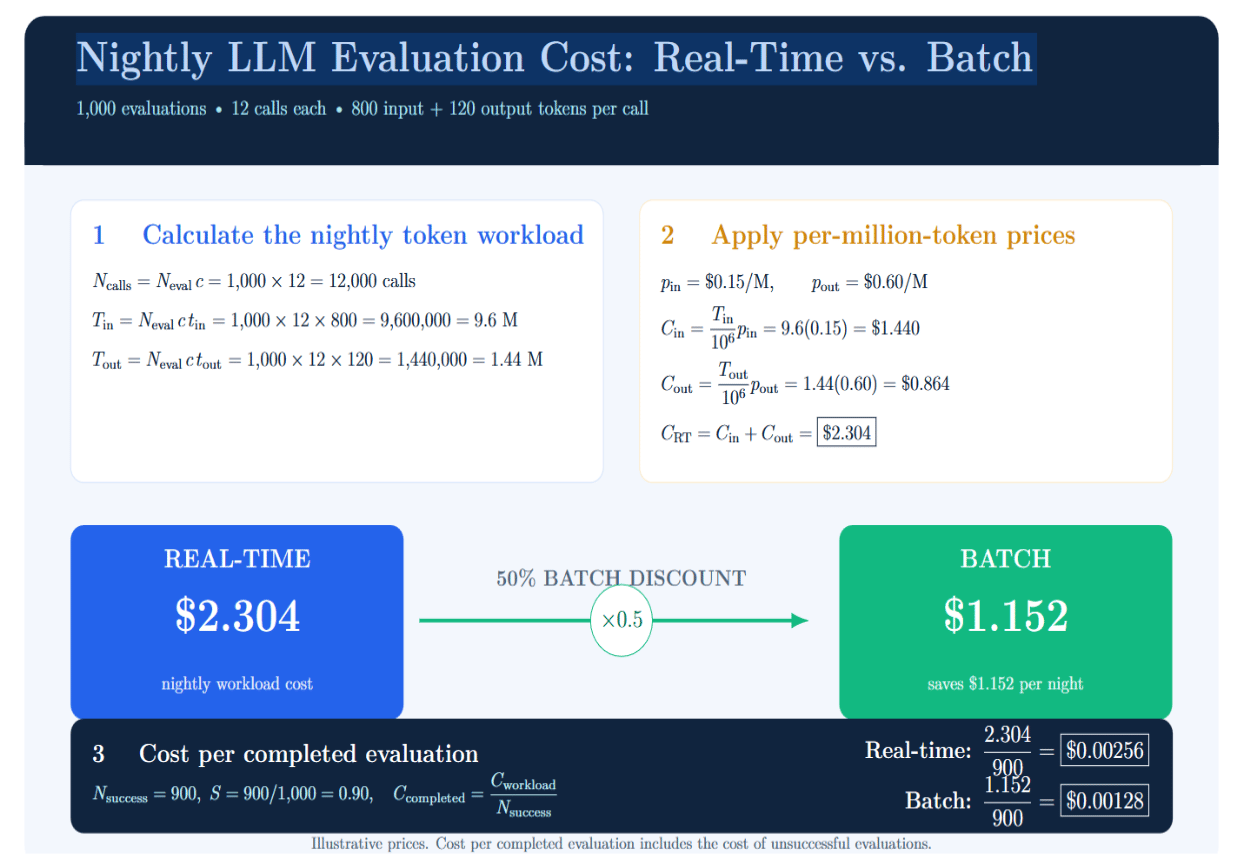
With a 50% discount for batching, the same token workload would cost ~$1.152. If of those 1,000 evaluations, 900 succeed, the costs per completed evaluation would be approximately $0.00256 and $0.00128, respectively.
These figures are illustrative, but the method is general. Batch mode can reduce inference costs; it doesn’t inherently reduce search costs, tooling fees, retries, or orchestration overhead. Agents with multiple batch steps also require explicit state management because each stage may rely on outputs from the previous batch.
RAG-powered agents: where retrieval fits in the loop
Retrieval-augmented generation and agents address related but distinct problems. RAG provides access to external knowledge. An agent determines when, why, and how to acquire and utilize that knowledge. A typical RAG-powered agent follows this path:
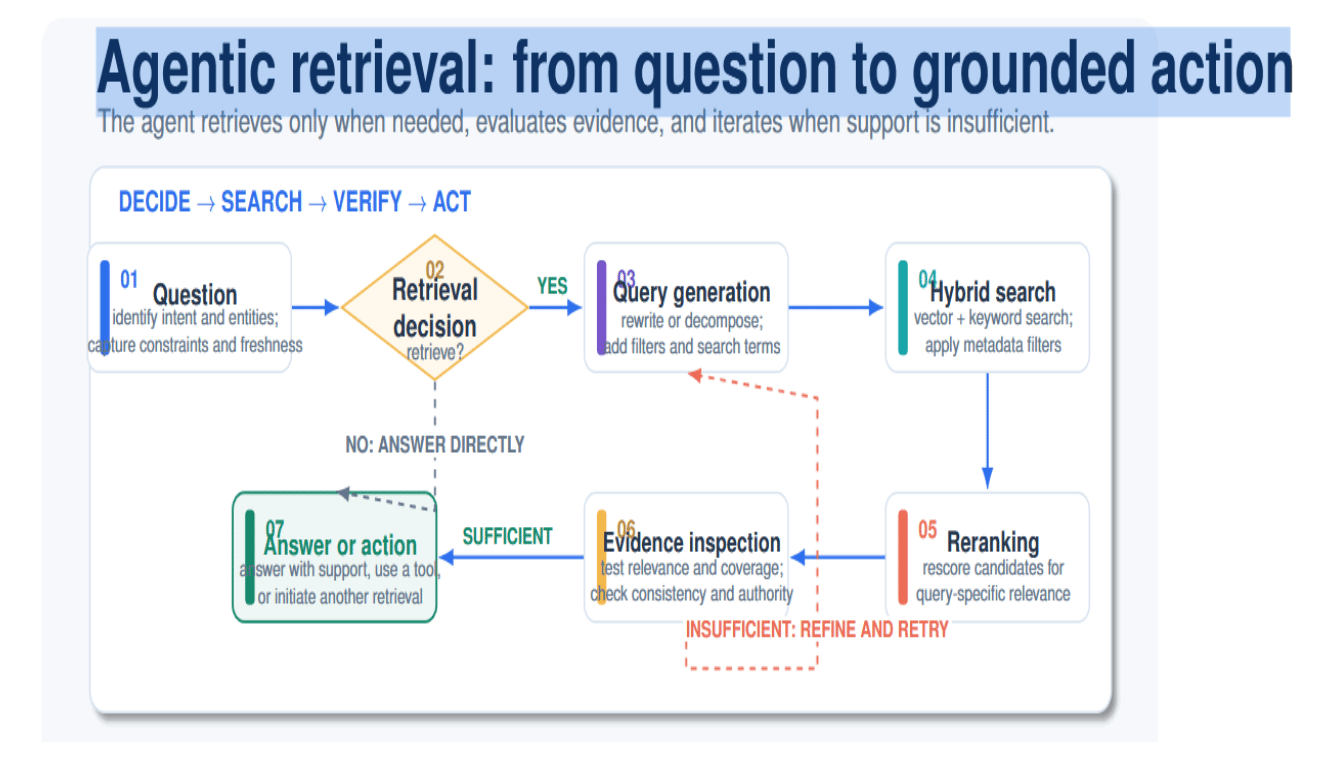
Retrieval affects the cost-per-task primarily in four ways:
- Embedding, vector-db, reranking, and external search operations may incur additional costs.
- Retrieved passages increase the input token count of subsequent calls.
- Relevant evidence can increase the likelihood of success and reduce hallucination.
- Incorrect retrieval can lead to repeated searches and/or unnecessarily longer trajectories.
You can break down how all agent-pipeline expenses combine into cost per attempted task, then translate that into the more useful cost per successfully completed task.
Pricing of generation alone isn’t enough to determine the cost of a RAG-powered agent. A provider might offer inexpensive model inference but end up costing more per completed task if contexts take a long time to retrieve (slow prefill), prompt caching isn’t effective, retrieval quality is bad, or failed searches trigger extra agent loops. Providers should therefore be evaluated with the entire RAG-agent pipeline and a realistic set of documents -– not a standalone model endpoint.
Decision checklist for choosing an inference provider
Use this checklist before committing an agent workload to a provider: The best provider is the one that meets your quality and reliability threshold at the lowest completed-task cost and acceptable tail latency—not necessarily the one advertising the lowest token price.
| Evaluation criterion | Recommended action |
|---|---|
| 01 — Successful completion | Define success with an executable evaluator instead of relying on subjective impressions. |
| 02 — Complete trajectories | Benchmark the entire agent task, including model calls, tools, retries, and the final response. |
| 03 — Token distribution | Use representative input and output token volumes; do not assume an artificial 50:50 distribution. |
| 04 — TTFT and tail latency | Measure median, p95, and p99 latency under the expected concurrency level—not only the overall average. |
| 05 — Tool semantics | Verify that the agent selects the correct tool and supplies semantically correct arguments; valid JSON alone is insufficient. |
| 06 — Schema enforcement | Confirm structured-output support for each model because provider-level feature labels may conceal model-specific differences. |
| 07 — Cost per completed task | Include failed attempts, retries, retrieval, caching, and paid tool usage—not merely successful-call token charges. |
| 08 — Rate limits and recovery | Test timeouts, HTTP 429 responses, idempotency, retry policies, and provider fallback behavior. |
| 09 — Live vs. offline workloads | Use real-time inference for interactive agent loops and batch inference for eligible evaluations and background jobs. |
Conclusion
Choosing an inference provider for agents goes beyond chatbot-era comparisons. Agents issue multiple serial calls, format arguments to structured tools, ingest retrieved context, and retry failed steps. Errors and tool usage compound small differences in TTFT, schema acceptance, token prices, and reliability across the loop.
The decisive metric is cost per completed task. Evaluate that from each call, input token, output token, retry, retrieval fetch, tool usage fee, and failure—not from published token prices alone. Add filters for reliability and latency that are appropriate for your workflow.
DigitalOcean AI Platform, Together AI, Fireworks AI, OpenAI, and Anthropic all offer agent-capable features. However, feature availability and behaviors vary by model and endpoint. A reproducible benchmark built around actual tasks is the only way to make a defensible choice.
Publish the harness, schemas, model IDs, raw results, benchmark date, and list of failures. Re-run it quarterly. Today’s winner might not win tomorrow if a model gets updated, prices change, schemas are edited, or workload shifts. Long-term winners aren’t those who choose a trendy API. They’re the ones who build an evaluation process that consistently determines the most reliable and economical path to a completed task.