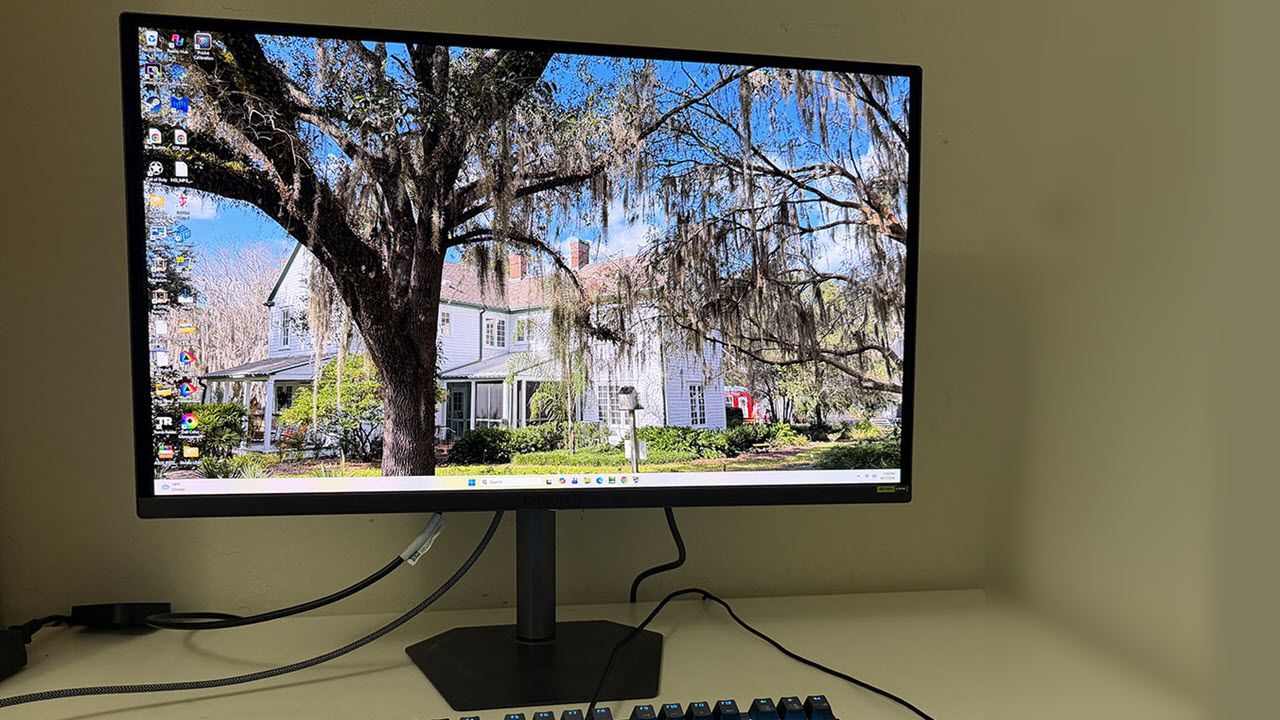
I have long said that choices are important, and nowhere is that better illustrated than in the best OLED gaming monitor category. Once an exotic and expensive technology, it is now much more affordable, thanks to a plethora of new models coming to market.
Gigabyte is certainly a leader in the price war with new models that deliver tremendous performance, image quality, and value. Its latest effort is a 27-inch QHD OLED model that refreshes at 280 Hz. It’s the MO27Q2A, and it leaves nothing out in its quest to be fast, beautiful, and packed with features. You get Adaptive-Sync with G-Sync and FreeSync certification, wide gamut color courtesy of Quantum Dot tech, HDR10, VESA DisplayHDR 400 True Black, USB ports with KVM, internal speakers and a better-than-average stand. Let’s take a look.
Gigabyte MO27Q2A Specs
Panel Type / Backlight | Quantum Dot Organic Light Emitting Diode (QD-OLED) |
Screen Size / Aspect Ratio | 27 inches / 16:9 |
Max Resolution and Refresh Rate | 2560x1440 @ 280 Hz |
FreeSync and G-Sync Compatible | |
Native Color Depth and Gamut | 10-bit / DCI-P3+ |
VESA DisplayHDR 400 True Black, HDR10 | |
Response Time (GTG) | 0.03ms |
Brightness (mfr) | 250 nits full field |
1,000 nits 3% window | |
Contrast | Unmeasurable |
Speakers | 2x 5w |
Video Inputs | 1x DisplayPort 1.4 |
2x HDMI 2.1, 1x USB-C (18w) | |
Audio | 3.5mm headphone output |
USB 3.2 | 1x up, 2x down |
Power Consumption | 29.1w, brightness @ 200 nits |
Panel Dimensions WxHxD w/base | 24 x 14.6-19.8 x 7.5 inches (610 x 371-503 x 190mm) |
Panel Thickness | 2.56 inches (65mm) |
Bezel Width | Top: 0.35 inch (9mm) |
Sides: 0.43 inch (11mm) | |
Bottom: 0.67 inch (17mm) | |
Weight | 13.42 pounds (6.1kg) |
Warranty | 3 years |
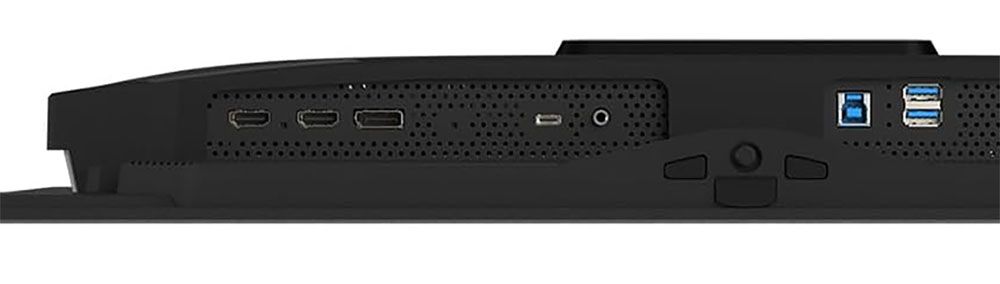
If there’s one thing that the MO27Q2A leaves out, it's LED lighting. There’s no colorful show to dazzle your opponents with. But nothing else has been sacrificed. There are HDMI 2.1 ports, DisplayPort 1.4 with DSC (Display Stream Compression), USB-C that supports video and 18 watts of power, plus USB Type-A and Type-B ports with KVM control. A pair of five-watt internal speakers delivers good audio, or you can use the 3.5mm headphone jack.
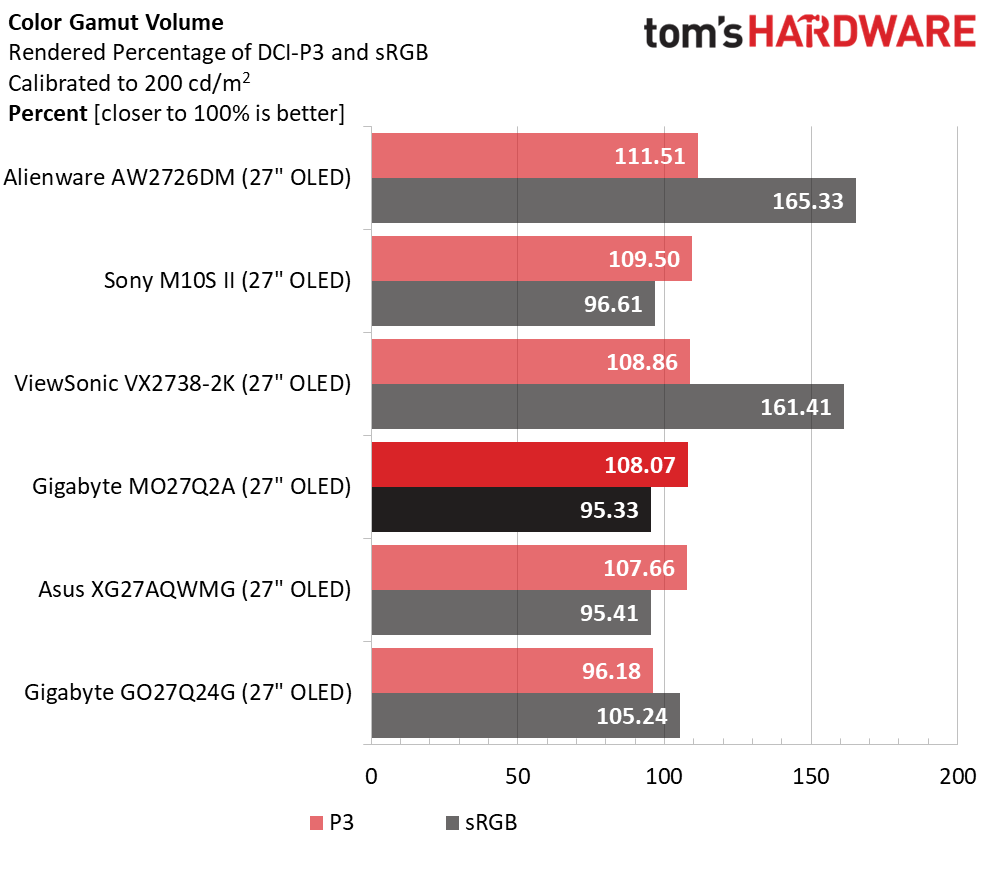
The screen is super colorful with over 108% coverage of DCI-P3 thanks to a Quantum Dot layer. Color is very accurate, so much so that I found calibration completely unnecessary. You get sRGB and Adobe RGB options as well. Brightness is solid at 250 nits for a full field and over 1,000 nits for a 3% window pattern. You can use variable brightness for SDR and HDR content to pump up small highlights for even more dynamic range.
High-performance gaming is the primary goal here, and for that, the MO27Q2A comes with a reliable 280 Hz refresh rate, Adaptive-Sync with certifications from Nvidia and AMD, and a host of Game Assist features like aiming points, sniper modes, flash suppression, timers, and a frame counter. Like all OLEDs, it has lightning-fast reflexes with super smooth motion rendering.
Gigabyte pays plenty of attention to panel care with a host of options like pixel refresh and logo detection. There’s extensive passive cooling (no fans) and AI control that tracks usage at the pixel level to keep everything in balance. The end result is longevity and reliability, which is backed by a three-year factory warranty that includes burn-in.
The MO27Q2A’s value is the most impressive part. At this writing, it sells for $399 online. It wasn’t long ago that you’d pay that for a 240 Hz QHD LCD. That category has dropped in cost as well, with some screens coming in around $200. But spending an extra $200 for an OLED seems like a no-brainer to me. Let’s see how the MO27Q2A fares in my tests.
Assembly and Accessories
Gigabyte offers a bit of fanfare on the MO27Q2A’s carton with colored graphics that set it apart from the plain brown wrappers more commonly seen at the big box store. A clamshell lid opens to reveal blocks of crumbly foam containing the panel, upright, and base, which assemble without tools. The power supply is internal, so you get a selection of IEC cords plus cables for HDMI, DisplayPort, and USB. A little clip goes on the stand to tidy up the wiring.
Product 360
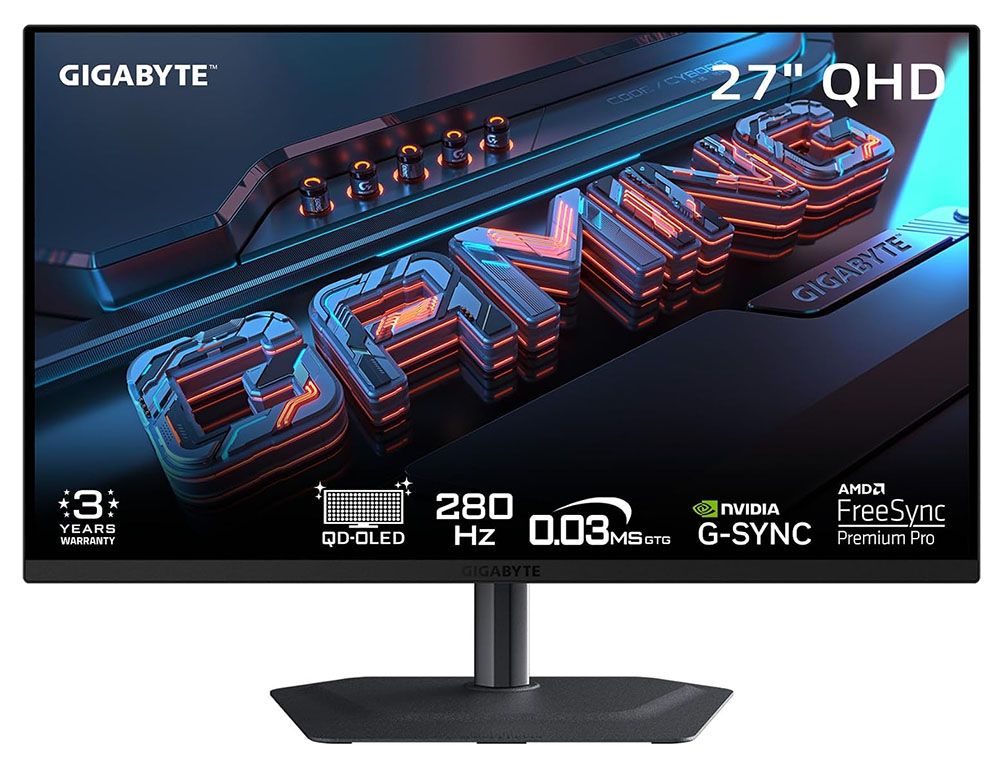
The panel is minimalist from the front with a thin flush bezel and a metal backing that wraps around the edges. A narrow trim strip crosses the bottom with a tiny Gigabyte logo in its center. The controls are under the center point and consist of a backlit joystick and two keys. One is the Tactical Switch, and it changes resolutions on the fly. More about that below.
The stand is above average in quality with all-metal construction and smooth ergonomics. It includes 5.2 inches of height range plus 5/21 degrees tilt, 15 degrees swivel, and a 90-degree portrait mode. There is no hint of wobble or play. It is one of the better stands I’ve encountered, and I’ve encountered many.
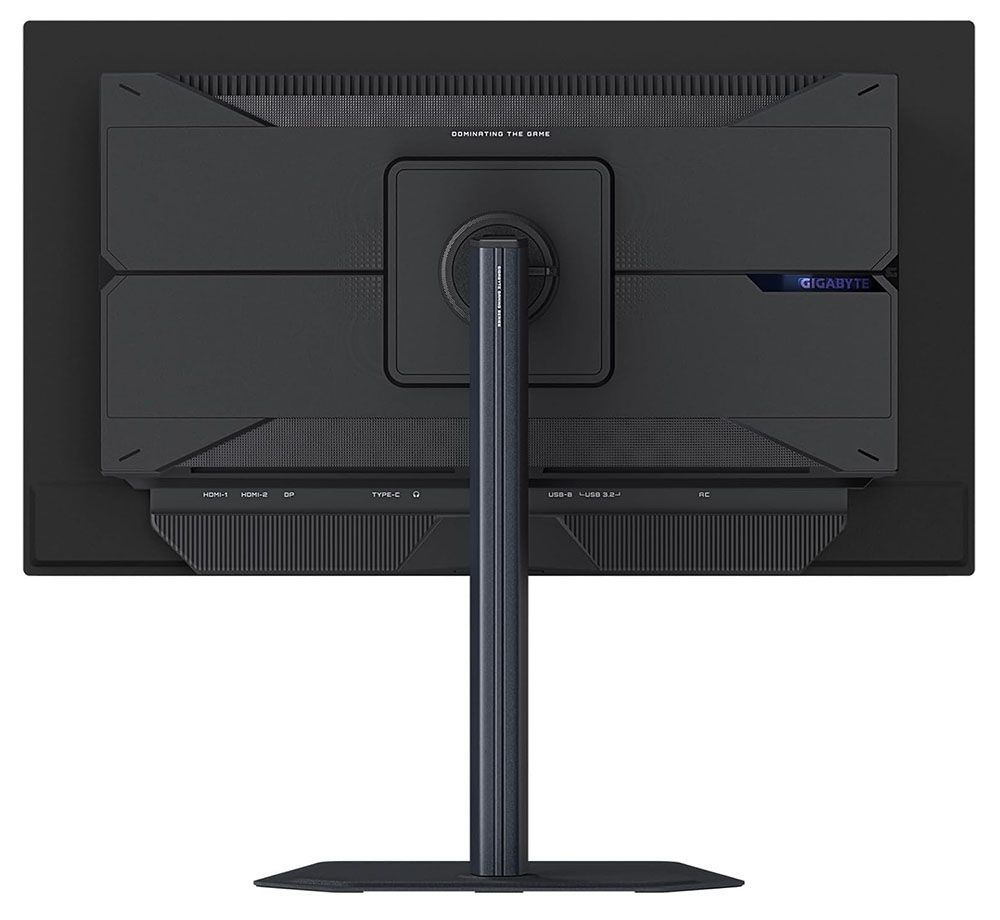
From the side, you can see the panel-on-bulge design that is shared by many OLEDs. Not only does this look cool, but it actually is cool. The MO27Q2A’s panel is backed by metal, which acts as a heat sink. The bulge is also well ventilated, enough so that no fans are needed. A graphene layer behind the OLED contributes to cooling and hence, longevity.
Underneath is a well-appointed I/O panel with two HDMI 2.1s, a DisplayPort 1.4 with DSC, a USB-C that supports video and 18 watts of power, and USB 3.2, one upstream and two down. They can be bound to different video inputs using the KVM feature in the OSD. You also get a 3.5mm headphone jack and a pair of internal speakers with five watts of amplification.
OSD Features
The MO27Q2A’s OSD presents complete information with signal status at the top and current settings shown at the bottom.
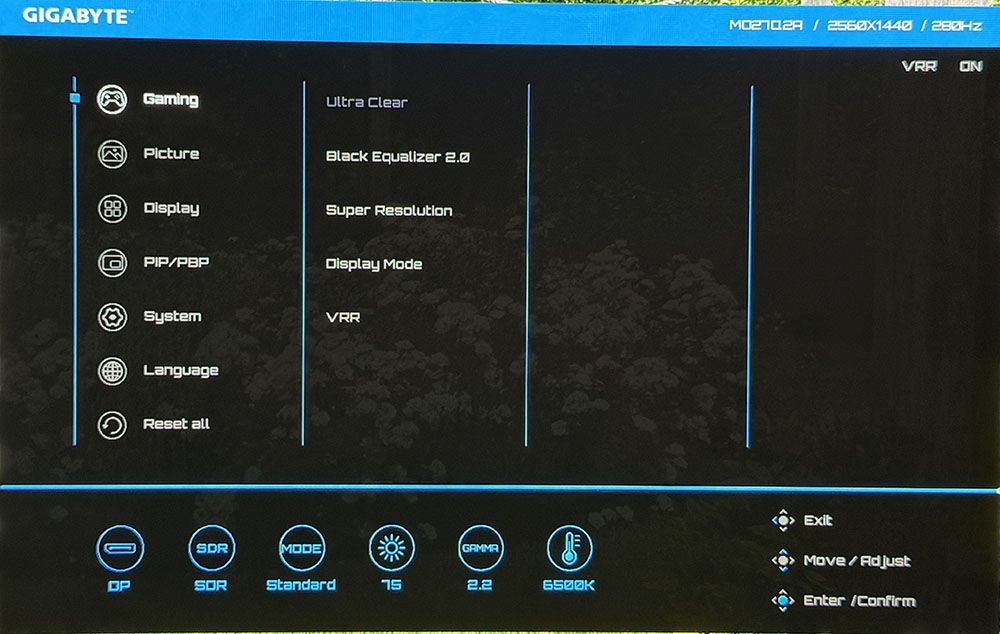
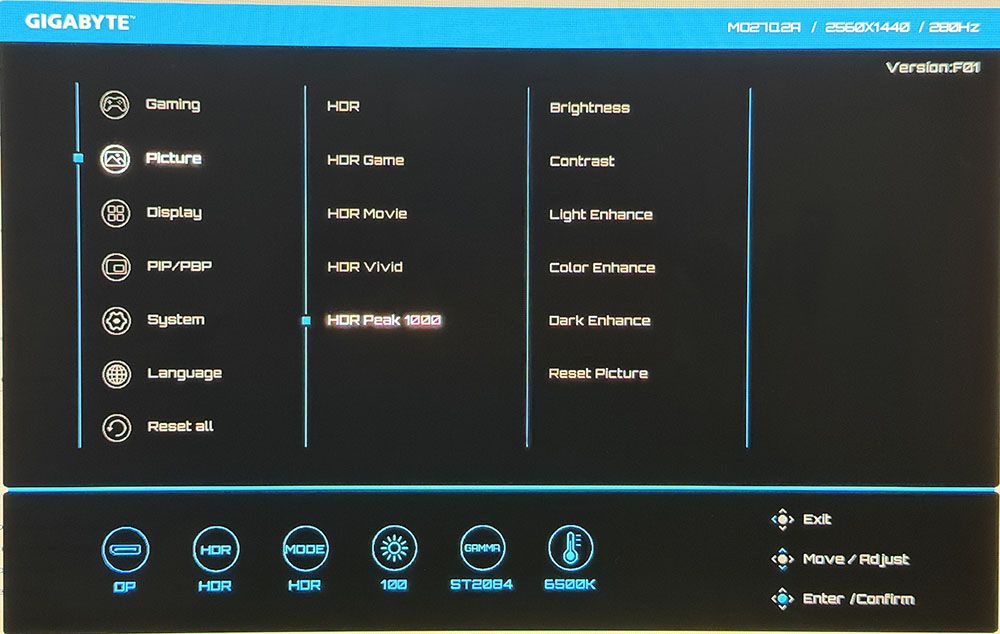
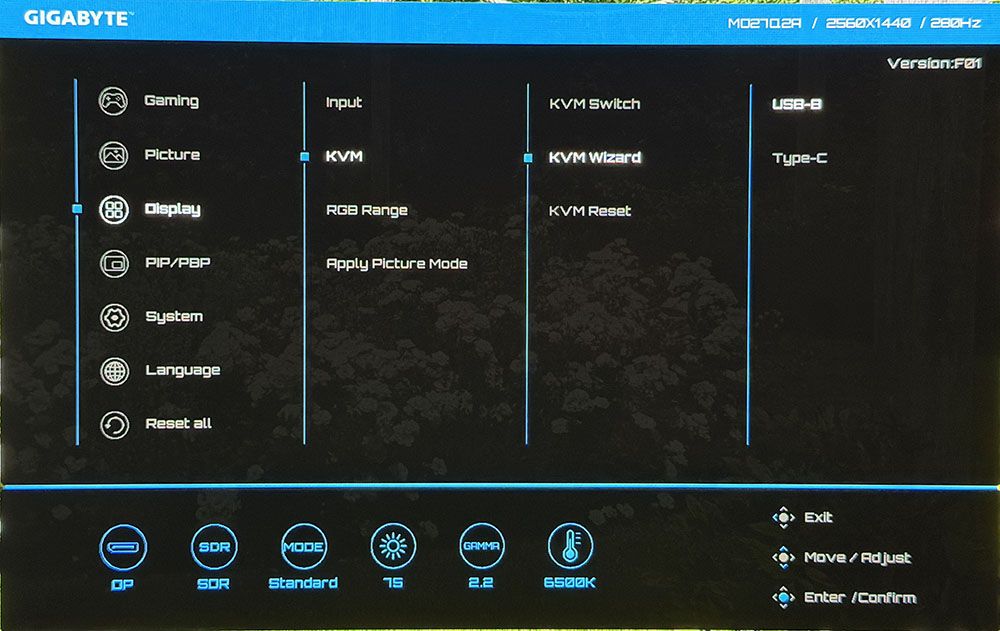
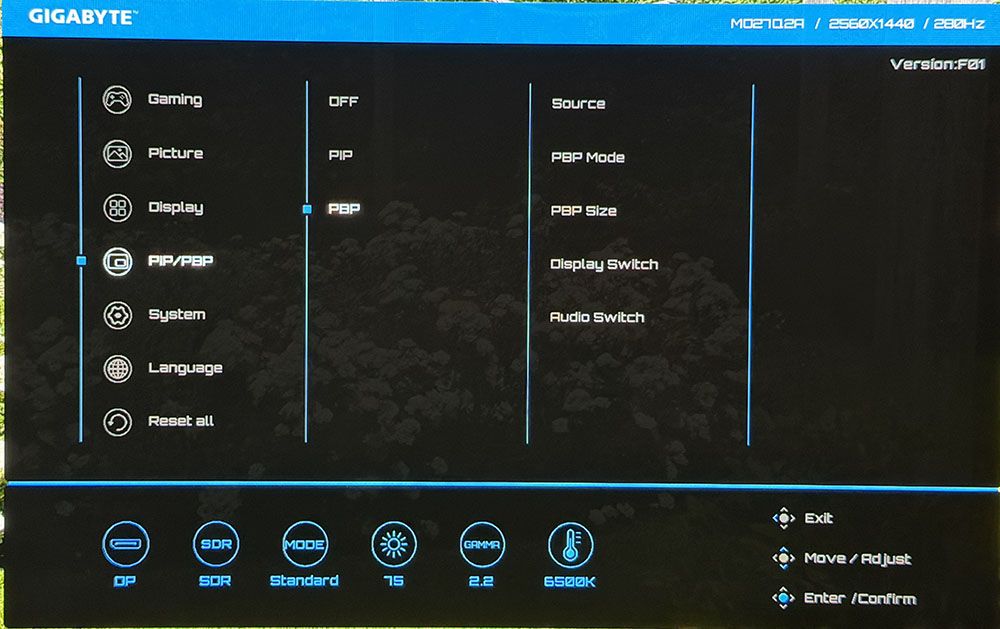
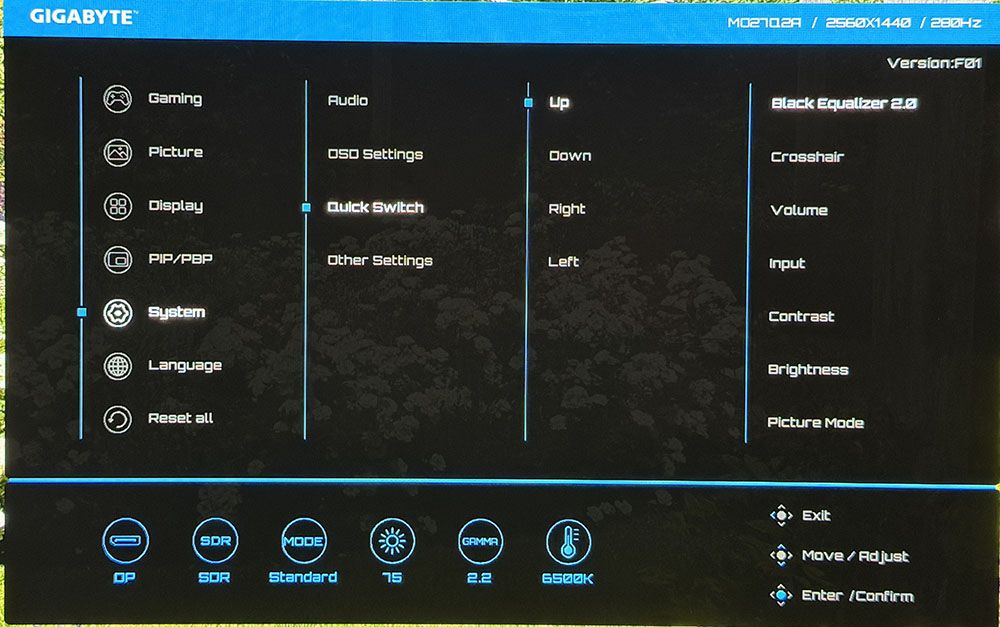
The Gaming menu includes a black frame insertion feature called Ultra Clear. It works at 280 or 120 Hz and is effective at removing motion blur. If you can run at 180fps or higher, you won’t need it. Other options include Black Equalizer, which increases shadow visibility, super resolution (edge enhancement, do not use), display mode for aspect ratio control, and a VRR toggle.
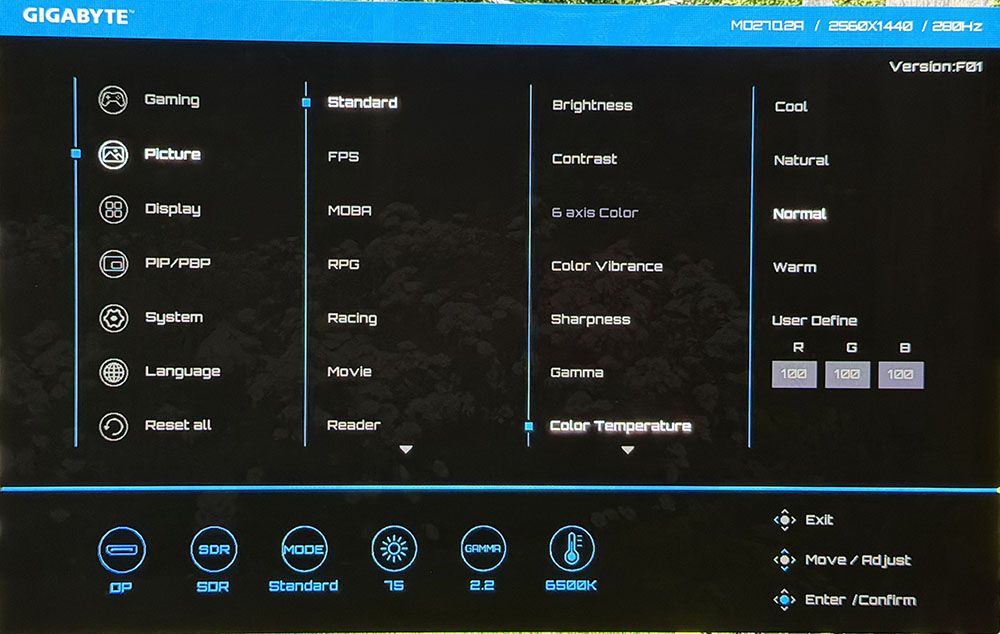
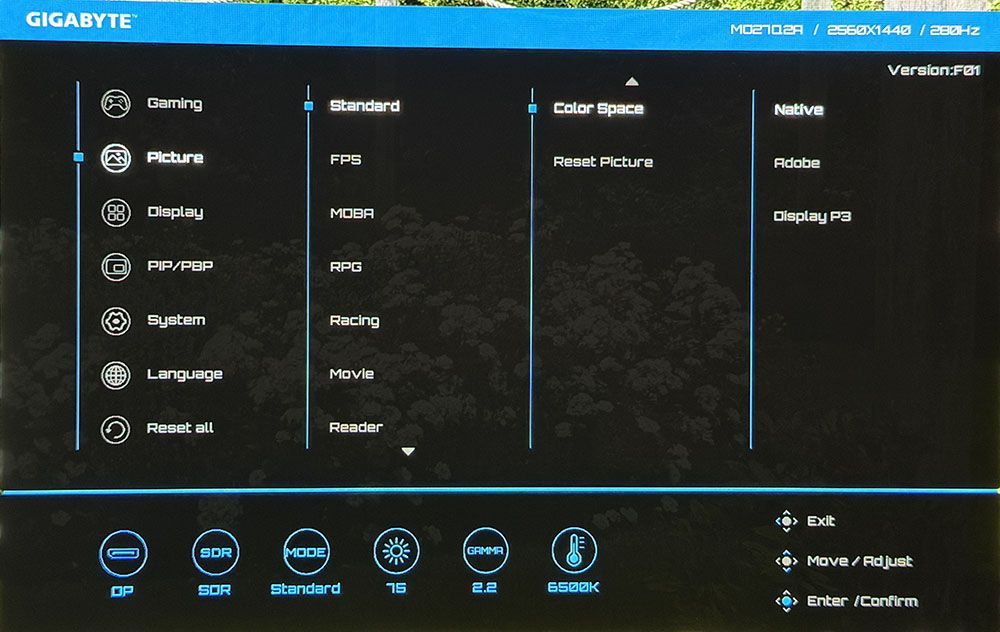
The MO27Q2A includes 10 picture modes mainly aimed at different game types. It comes out of the box in Eco, which limits brightness. Choose Standard to unlock the maximum light output. Within this mode, you can adjust color temp and gamma and choose a color space. My sample was nearly perfect out of the box, so good, in fact, that I could not improve it with calibration. If you want sRGB or Adobe RGB color, those choices are in the Color Space submenu. For sRGB, there’s an sRGB picture mode. HDR signals get their own five modes. Peak 1000 is the brightest and best choice there.
You can use the KVM Wizard to bind USB ports and video inputs. That way, one keyboard, mouse, and monitor can service multiple sources like a PC and a gaming console, for instance. You can also view two sources at once using the PIP/PBP options.
Quick Switch lets the user program the functions of the joystick directionals. It provides quick access to commonly used functions like brightness or crosshairs.
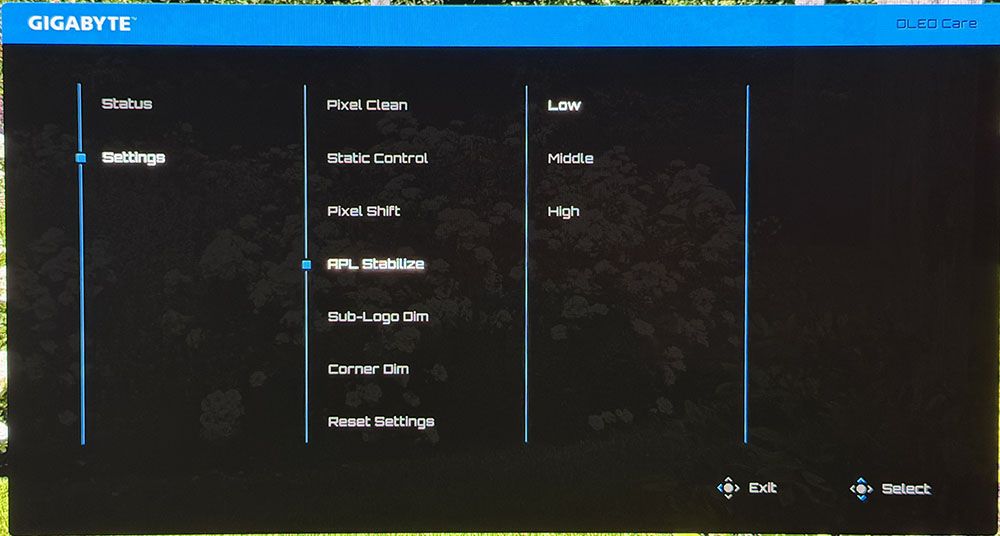
A separate screen comes up for the MO27Q2A’s OLED care options. This is where you’ll find APL Stabilize, which has two levels of variable brightness or a constant setting. Its terminology is counterintuitive because Low means off, while Middle and High modulate light output more aggressively. High has the most dynamic range, with 1,000 peaks possible in HDR mode. If it were up to me, APL Stabilize would be in the Picture menu and be called Variable Brightness. Additional care options include pixel orbiting, panel refresh, and dimming for logos and corners. You turn any or all of these off if you wish.
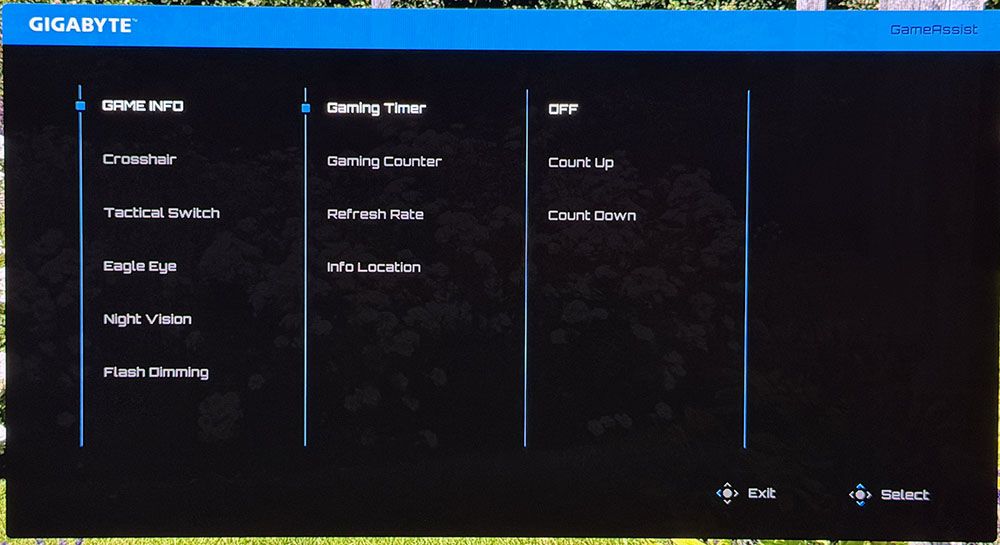
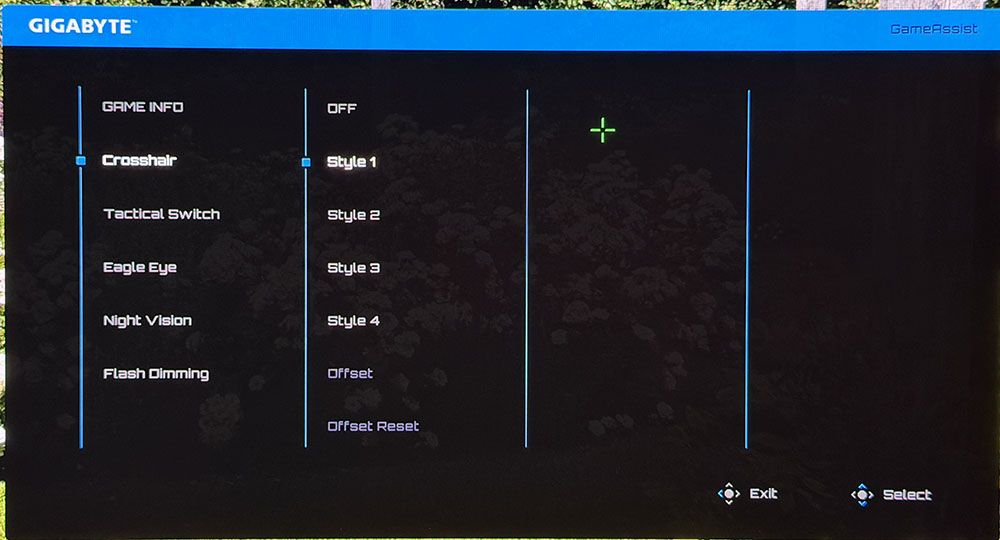
Press the joystick and click right for the Game Assist menu and its plethora of play aids. You get four crosshairs, a timer, stopwatch, refresh rate indicator, and positioning of the information window. Also included are sniper mode and night vision. Flash Dimming suppresses your weapon’s muzzle flash if that becomes a distraction.
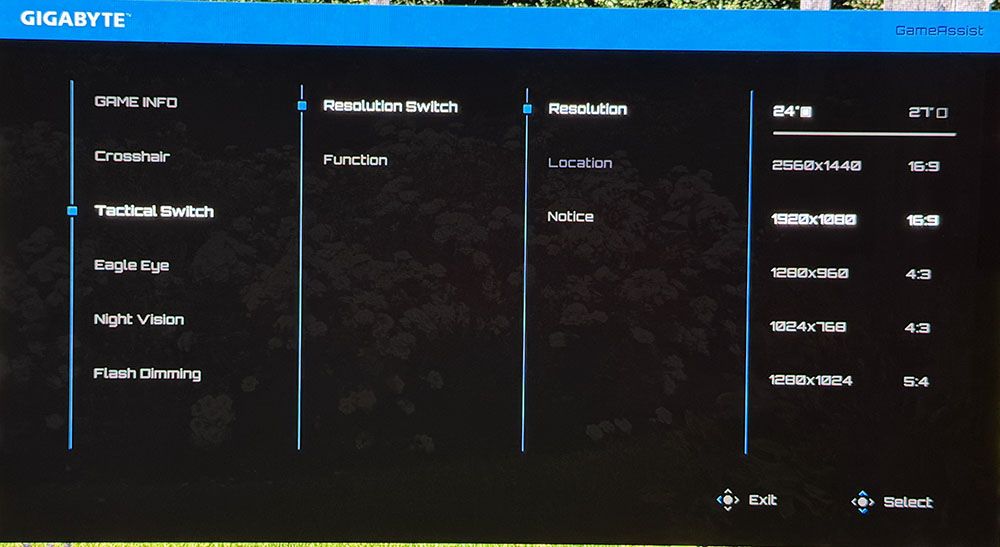
Gigabyte’s Tactical Switch is a unique feature that switches the MO27Q2A’s resolution on the fly. You can have FHD or HD in 16:9, 4:3, or 5:4 aspect ratios. The refresh rate remains at 280 Hz, but by shrinking the image, you get higher frame rates with no significant sharpness penalty.
Gigabyte MO27Q2A Calibration Settings
There isn’t much to the MO27Q2A’s calibration because it isn’t necessary. In fact, I could not improve my sample with calibration. It measures nearly perfect out of the box for D65, 2.2 gamma, and coverage of DCI-P3. The sRGB mode, which is also very accurate, is found in the picture mode list. For Adobe RGB, go to the Color Space sub-menu. For gaming and daily use, I settled on Standard mode, Native color space, and left everything else at default settings. My recommendations are below.
For HDR signals, HDR is the default mode, but I found the same excellent accuracy and high brightness in the Peak 1000 mode. It delivers the promised 1,000 nits for a 3% window, which in my tests equated to 445 nits for a 25% window pattern. You get a number of sliders for brightness and contrast, but they are not needed unless you want a different look for HDR content.
Picture Mode | Standard |
Brightness 200 nits | 75 (APL Stabilize Low) |
40 (APL Stabilize High) | |
Brightness 120 nits | 41 |
Brightness 100 nits | 33 |
Brightness 80 nits | 25 |
Brightness 50 nits | 13 (min. 22 nits) |
Contrast | 50 |
Gamma | 2.2 |
Color Temp | Normal |
Color Space | Native |
Gaming and Hands-on
A great way to evaluate a monitor’s HDR accuracy is by viewing static content that covers the full dynamic range of both color and neutral tones. Doom Eternal has such a screen in its HDR adjustment menu, and I use it for every review to verify detail rendering. The MO27Q2A showed every nuance in this torture test, which told me that it is very color accurate and tracks luminance correctly. In simple terms, you’ll see everything the game creators put in.
This gives gameplay a heightened sense of realism, especially in textures like stone, metal, and dirt. The MO27Q2A let me almost reach out and touch them. I had to remind myself that its resolution was QHD and Ultra HD because it rendered so finely. I also saw rich color that was perfectly balanced. You’ll see in the SDR and HDR tests that this is a seriously precise monitor.
Gameplay was up to the premium OLED standard with smooth motion that was completely free of blur. I had no trouble maintaining a constant 280fps. If you can’t hit that speed, Gigabyte includes Ultra Clear, which is a black frame insertion feature. It will remove motion blur at lower rates like 120 Hz. I noted that it was available at 280 Hz as well, which is unusual. It cuts brightness by around 40%, but you can partially compensate for that with the brightness slider. It operated artifact-free.
Another way to increase frame rates is with the Tactical Switch, which changes resolution and picture size on the fly. It doesn’t increase the refresh rate, but by shrinking the image, it maintains a favorable pixel map so that sharpness doesn’t take a huge hit.
Gameplay was addictive during my numerous frag fests. Input lag and response are super quick, which helped make my aim more precise. The MO27Q2A was so fast that it made me overconfident. I rushed into the melee rather than picking off enemies one by one. It was truly difficult to stop playing.
The MO27Q2A excels as an everyday screen with 109ppi pixel density in its 27-inch form factor. It’s significantly less expensive than an Ultra HD monitor if you can accept a small reduction in clarity. And that resolution is a sweet spot for frame rates. You won’t need a giga-hauler video card to achieve its full potential.
Accurate color out of the box meant I could rely on the MO27Q2A as a reference for graphics and photos. I found excellent results in my initial tests, and I could not improve upon them with adjustments. This monitor is pro-level for sure.
It’s impressive ergonomically too, with a solid all-metal stand and rugged panel construction. There are no missing features except for flashy LEDs. The internal speakers play loud and clear in the upper midrange, or you can plug in headphones. Users with a PC and console will appreciate the USB ports and KVM functions.
Takeaway: The MO27Q2A is a truly full-featured gaming monitor that can double as an everyday screen or a professional display. It games on par with the very best screens I’ve reviewed and delivers performance equal to more expensive OLEDs with higher refresh rates. It also matches those products in build quality with a solid stand and metal construction. For $399, you’ll be hard-pressed to find better.
MORE: Best Gaming Monitors
MORE: How We Test PC Monitors
MORE: How to Buy a PC Monitor
The 27-inch QHD 240 Hz category is replete with premium OLEDs that run as fast as 540 Hz. Is the MO27Q2A’s 280 Hz enough to compete? We’ll find out by comparing it to Sony’s M10S II, ViewSonic’s VX2738-2K, Gigabyte’s GO27Q24G, Alienware’s AW2726DM, and Asus’ XG27AQWMG.
Pixel Response and Input Lag
Click here to read up on our pixel response and input lag testing procedures.
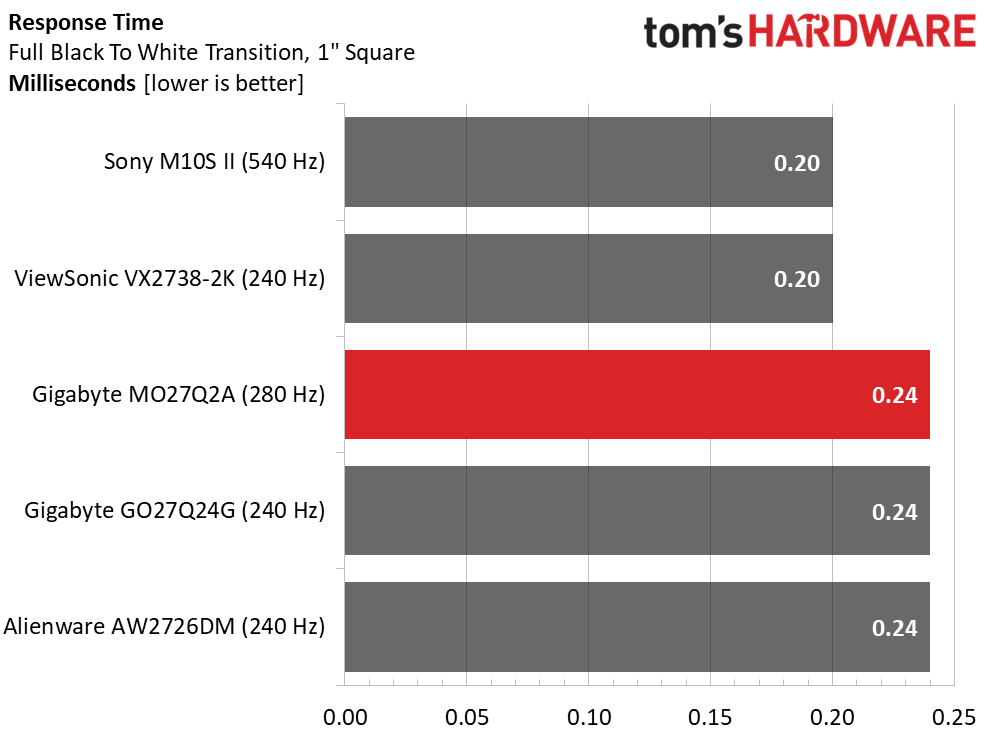
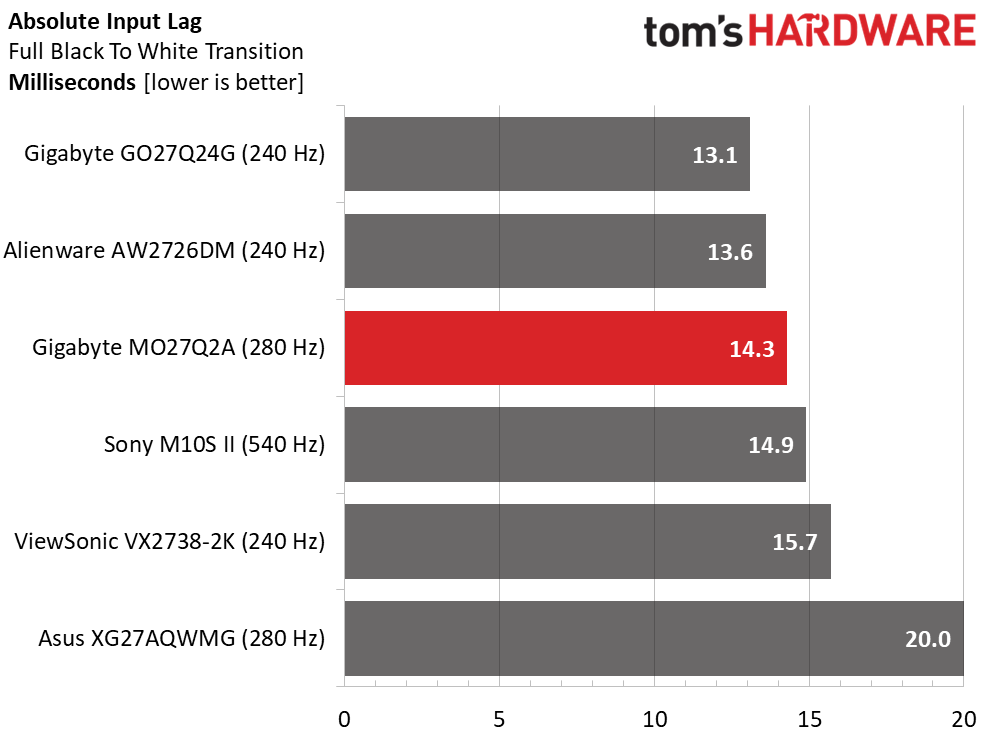
I didn’t have the Nvidia LDAT sensor when I tested the XG27AQWMG, so it is omitted from the response chart. The other screens are separated only by a whisker. Yes, the Sony’s 540 Hz puts it ahead of the MO27Q2A but only by 0.04ms, an imperceptible amount. Bottom line: all five displays operate with perfect motion resolution, and there is no visible difference between them.
The group is equally tight in the lag test except for the Asus, which comes in at 20 ms. Again, this is a tiny difference that almost no one will perceive. The MO27Q2A sits comfortably in third place with a very quick 14.3ms of control lag, averaged over 25 mouse clicks. If you’re looking for a competitive advantage, it’s well worth auditioning.
Test Takeaway: It’s hard to differentiate between OLED gaming monitors once the refresh rate passes 200 Hz. The MO27Q2A’s 280 Hz actually beats the 540 Hz Sony in the input lag test, but only by a hair. Like all the screens in the comparison, it is well qualified for competition. When you factor in the value quotient, it’s an even more compelling choice.
Viewing Angles
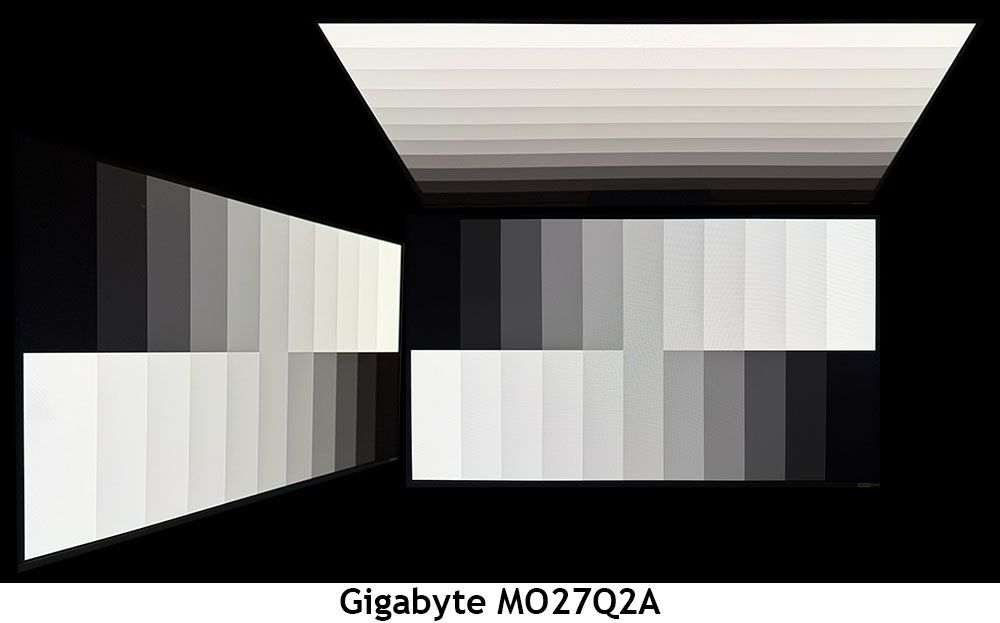
Gigabyte has found a secret sauce when it comes to QD-OLEDs and viewing angles. Most Quantum Dot monitors show a tint at 45 degrees to the sides thanks to the layer’s polarizing effect. The MO27Q2A eliminates this artifact with a perfect view. There is no change to color, gamma, or brightness. From the top, you can see a red tint and a reduction in brightness and gamma. Though a 27-inch screen is a bit small for sharing, the MO27Q2A can be enjoyed by two users
Screen Uniformity
To learn how we measure screen uniformity, click here.
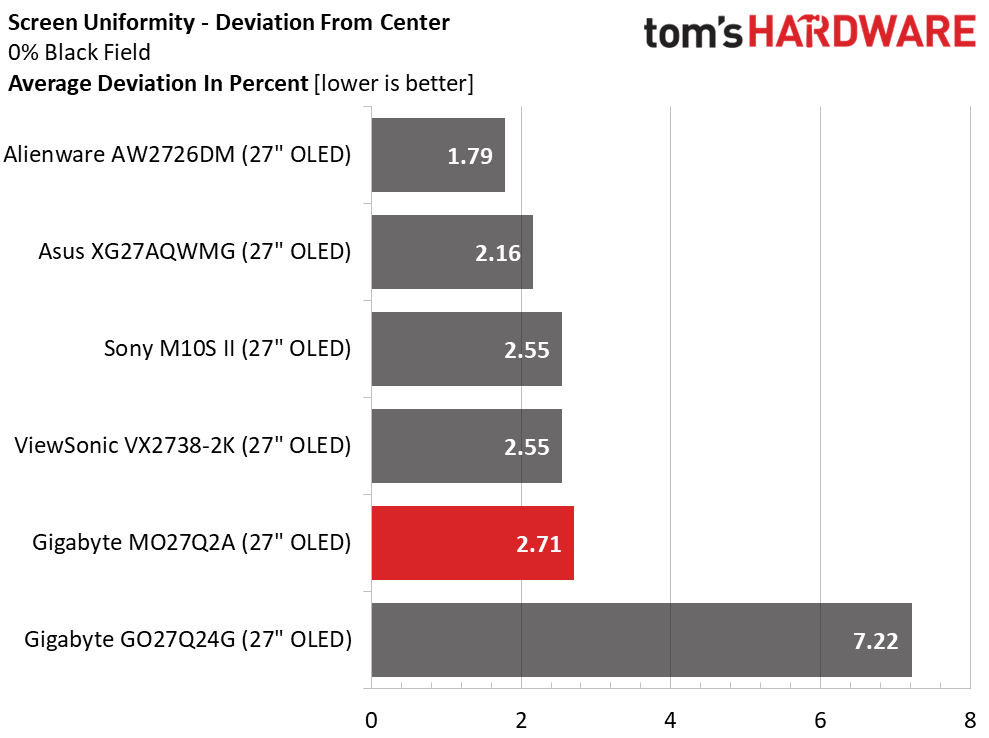
OLEDs continue to ace my uniformity test, and the MO27Q2A is one of the best. Its average deviation of 2.71% from the center zone is about as low as it gets. The naked eye cannot see values below 10%. There were no hotspots in any of the color or neutral field patterns I observed.
MORE: Best Gaming Monitors
MORE: How We Test PC Monitors
MORE: How to Buy a PC Monitor
To read about our monitor tests in-depth, please check out Display Testing Explained: How We Test PC Monitors. We cover brightness and contrast testing on page two.
Uncalibrated – Maximum Backlight Level
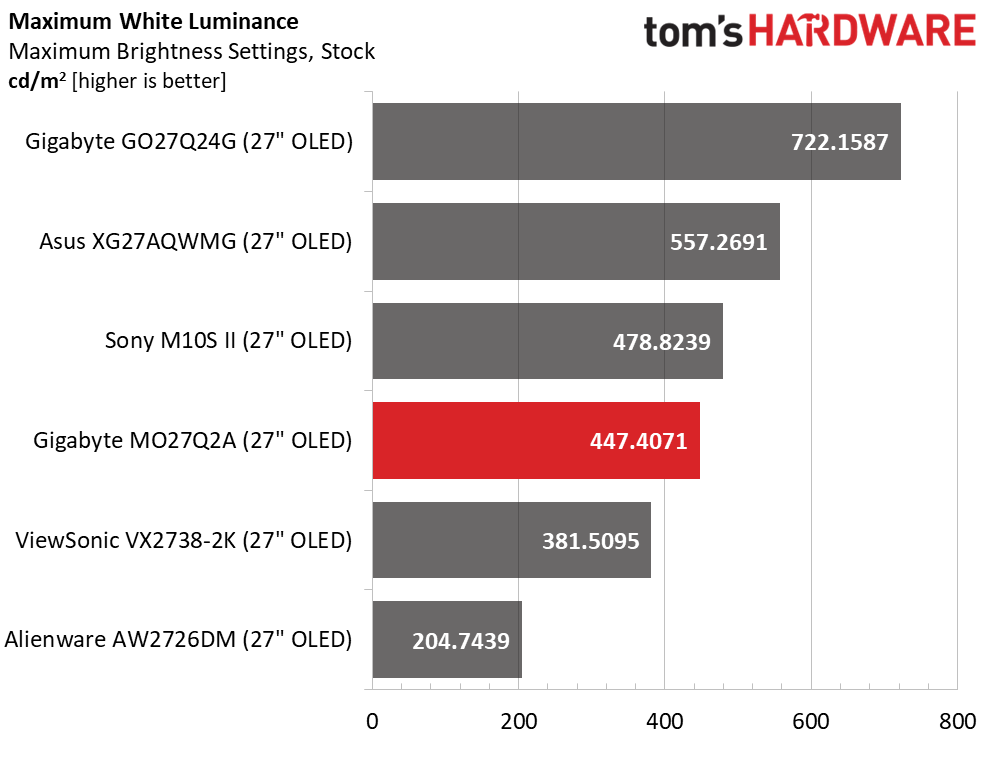
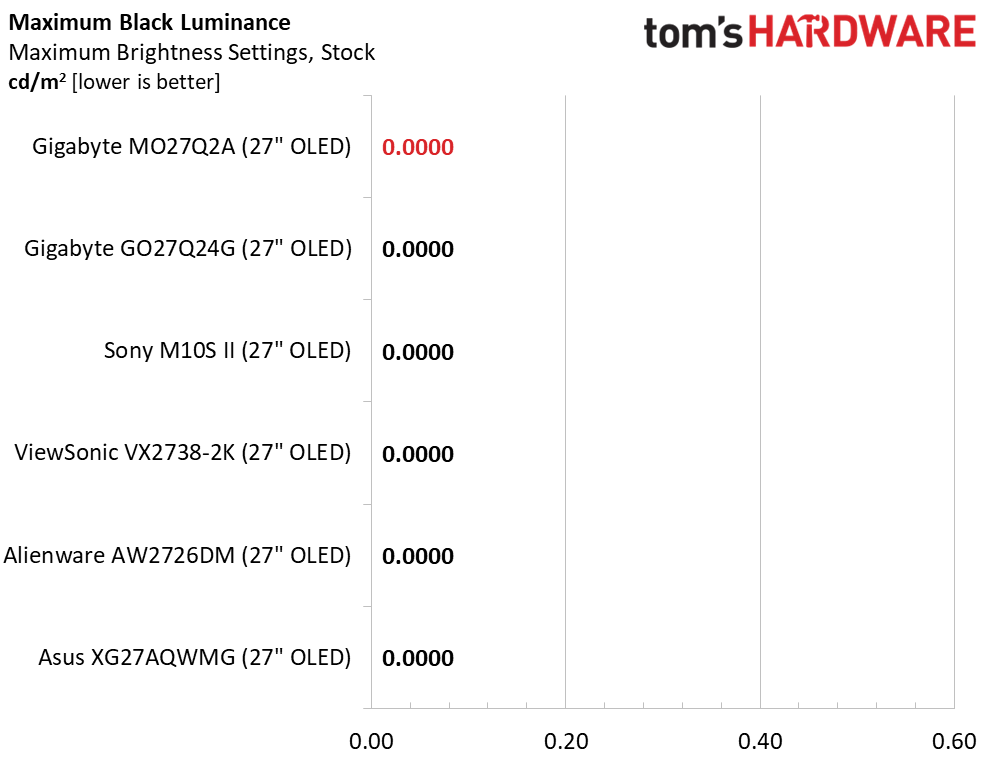
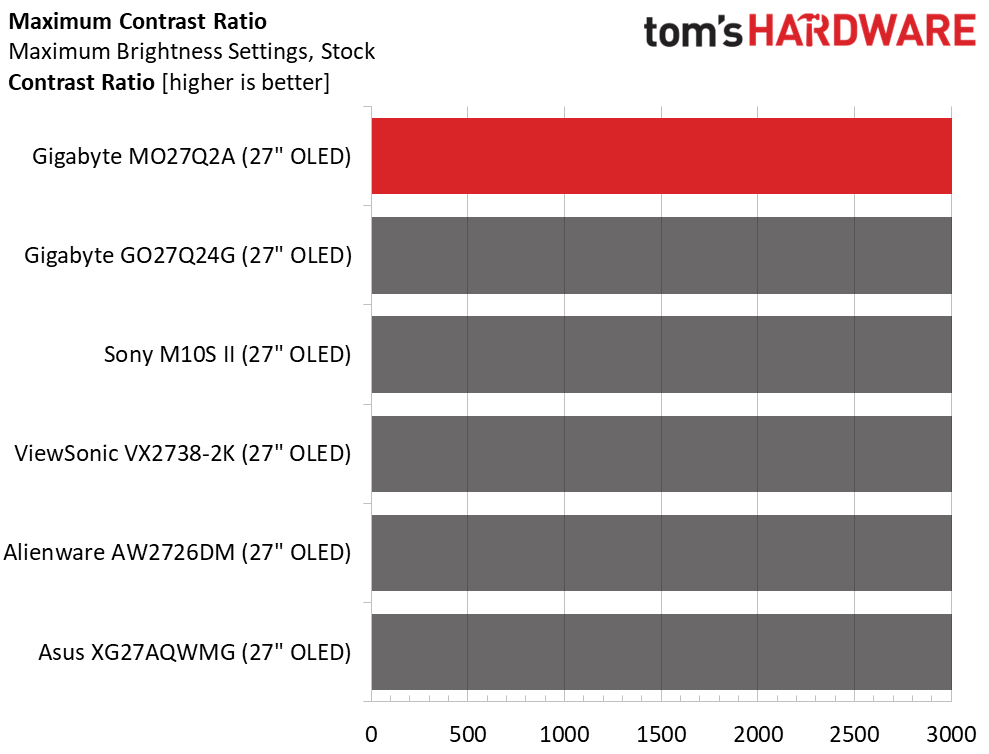
The MO27Q2A includes a variable brightness feature, which you’ll find in the OLED Care menu, separate from the main OSD. If you set it to Low, full field and 25% windows measure around 275 nits. When it’s on High, a window measures 447 nits, which puts it in the mix with other HDR400 monitors. It’s good that Gigabyte offers the choice to expand dynamic range for both SDR and HDR content. Black levels and contrast are unmeasurable in either case.
After Calibration to 200 nits
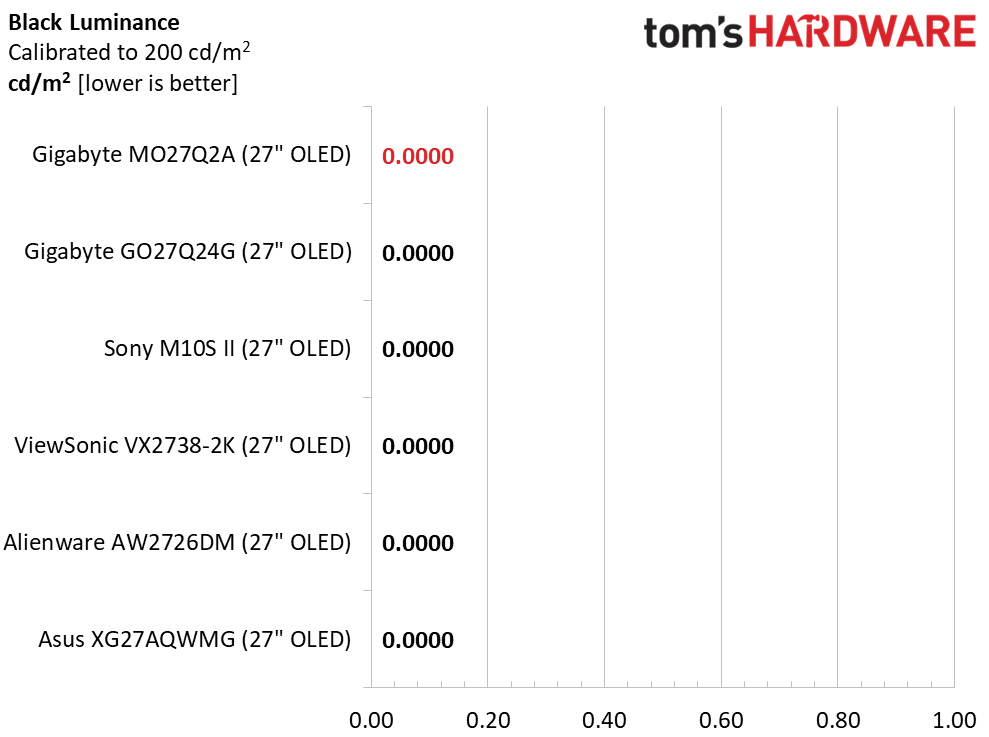
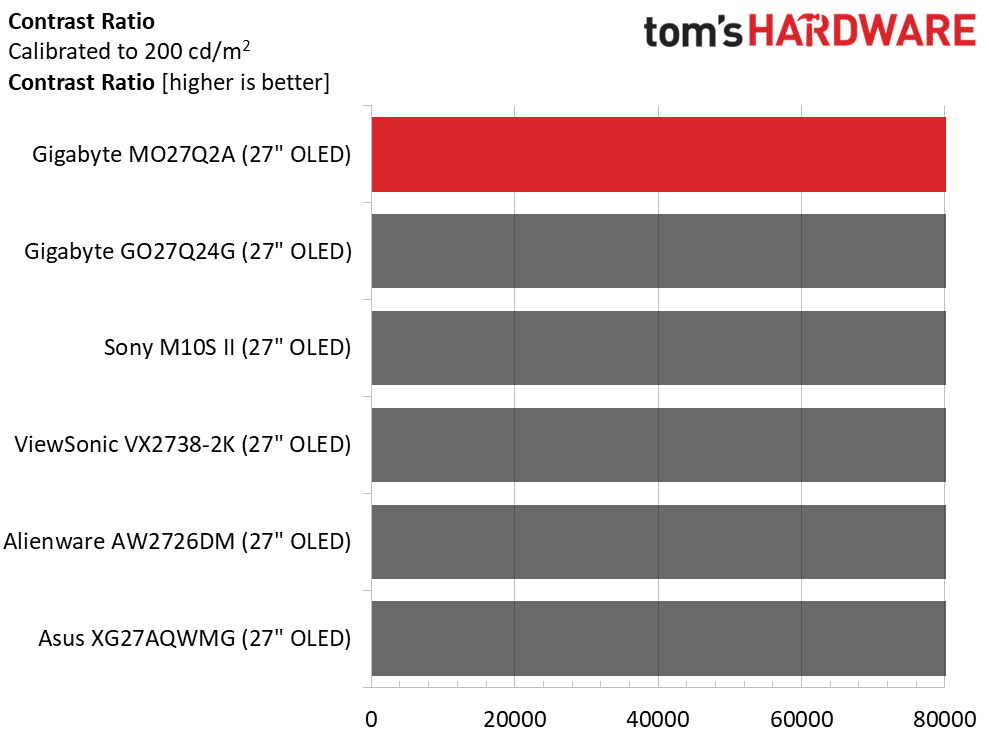
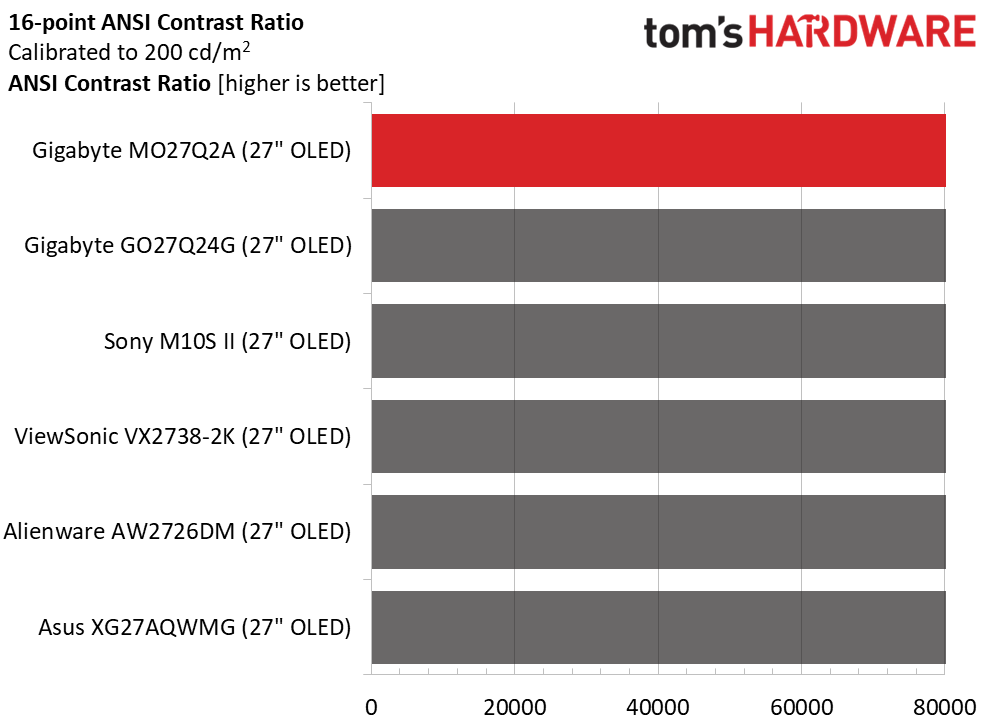
Calibration changes nothing except for the peak brightness. I set that to 200 nits for every review to level the playing field. Black levels and contrast cannot be measured. If you prefer variable brightness for SDR, set the brightness slider to 40. That will give you 200 nits from a 25% window pattern. The ANSI (intra-image) contrast also cannot be measured because the black squares are too dark for the meter.
Test Takeaway: The MO27Q2A delivers the same brightness and contrast as other HDR400 OLED displays. It has variable brightness for SDR and HDR, so you can broaden dynamic range for all content if you wish. It has two levels of aggressiveness, and it’s found in the OLED Care menu. The Low setting means it’s off, i.e., constant brightness.
MORE: Best Gaming Monitors
MORE: How We Test PC Monitors
MORE: How to Buy a PC Monitor
The three Gigabyte OLEDs I’ve reviewed recently all have superb out-of-the-box accuracy. But the MO27Q2A is the best of the bunch in its Standard mode. Read on to be impressed.
Grayscale and Gamma Tracking
Our grayscale and gamma tests use Calman calibration software from Portrait Displays. We describe our grayscale and gamma tests in detail here.
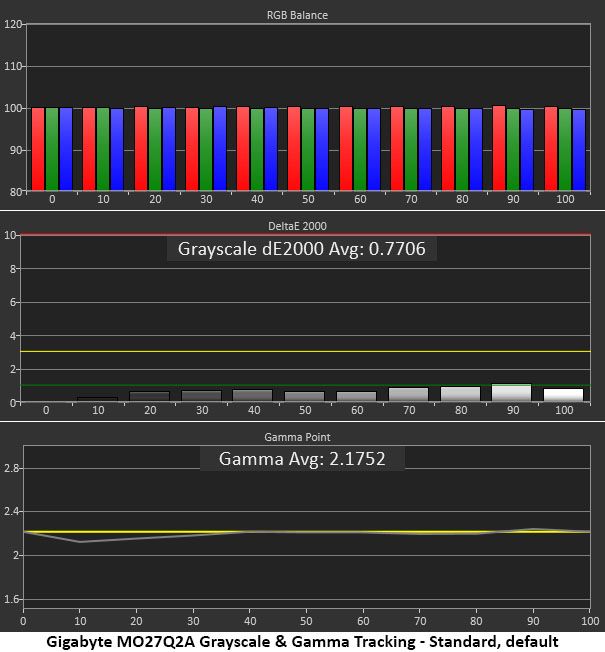
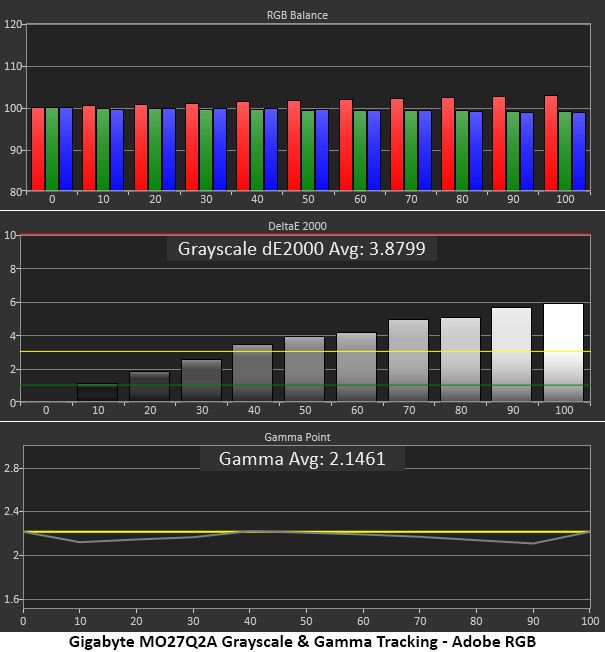
The first chart above shows the MO27Q2A’s default state once you switch it from Eco to Standard mode. I would be happy with this as a calibrated result from any monitor. All grayscale errors are below 1dE. Anything under 3dE is visually perfect. Gamma tracks right on the 2.2 reference except for the 10 and 20% brightness steps, which are slightly light from the meter’s perspective. This too is an invisible error. For out-of-the-box performance, it doesn’t get better than this. There is no post-calibration chart because I could not improve either gamma or grayscale tracking.
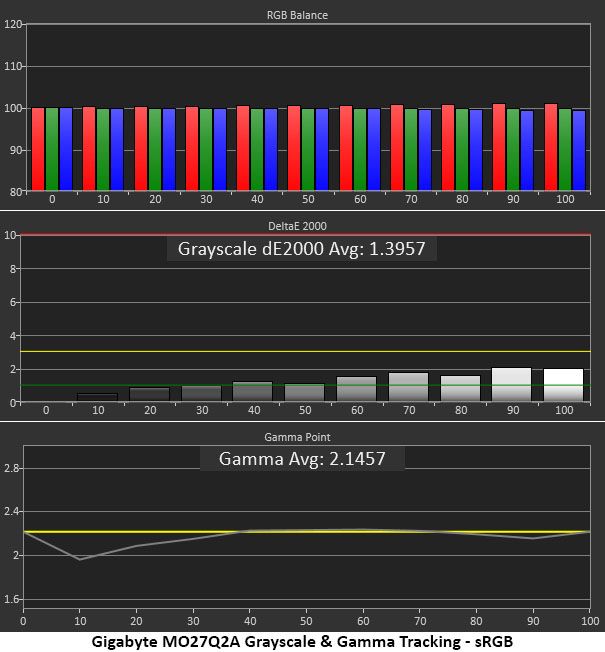
The MO27Q2A includes an sRGB mode and an Adobe RGB option in the color space menu. Neither can be calibrated, so you have to live with a few errors. sRGB has visually perfect grayscale but a gamma dip at 10%, too light. Adobe RGB runs a bit warm in tone, with red errors you can see at 40% and above. Gamma is a tad light at 10 and 90% as well.
Comparisons
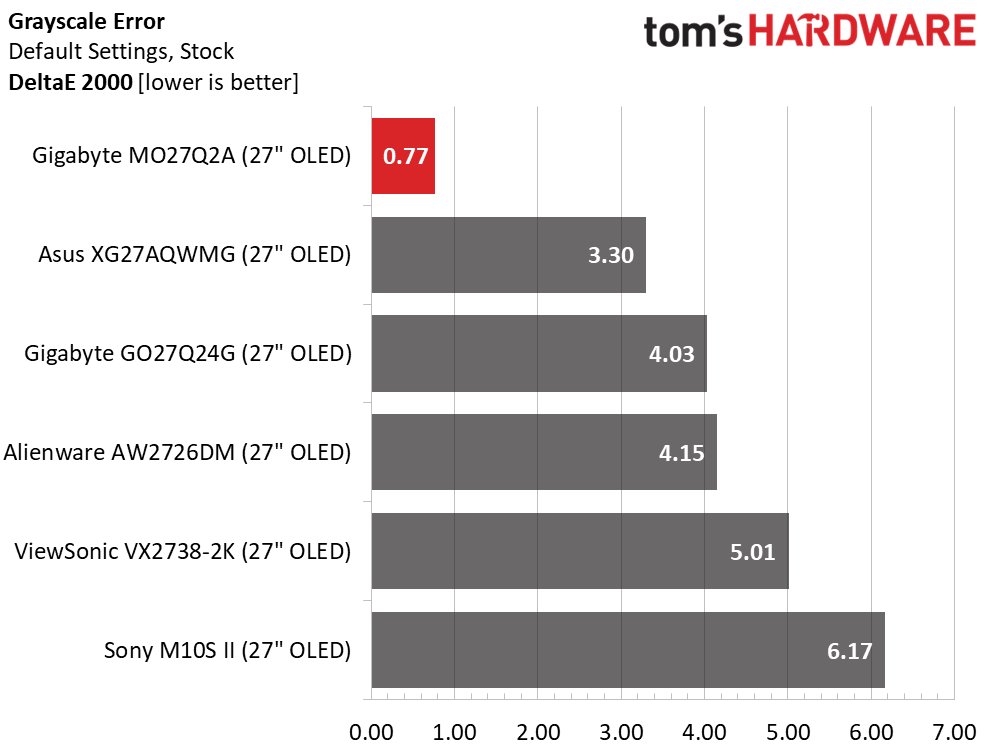
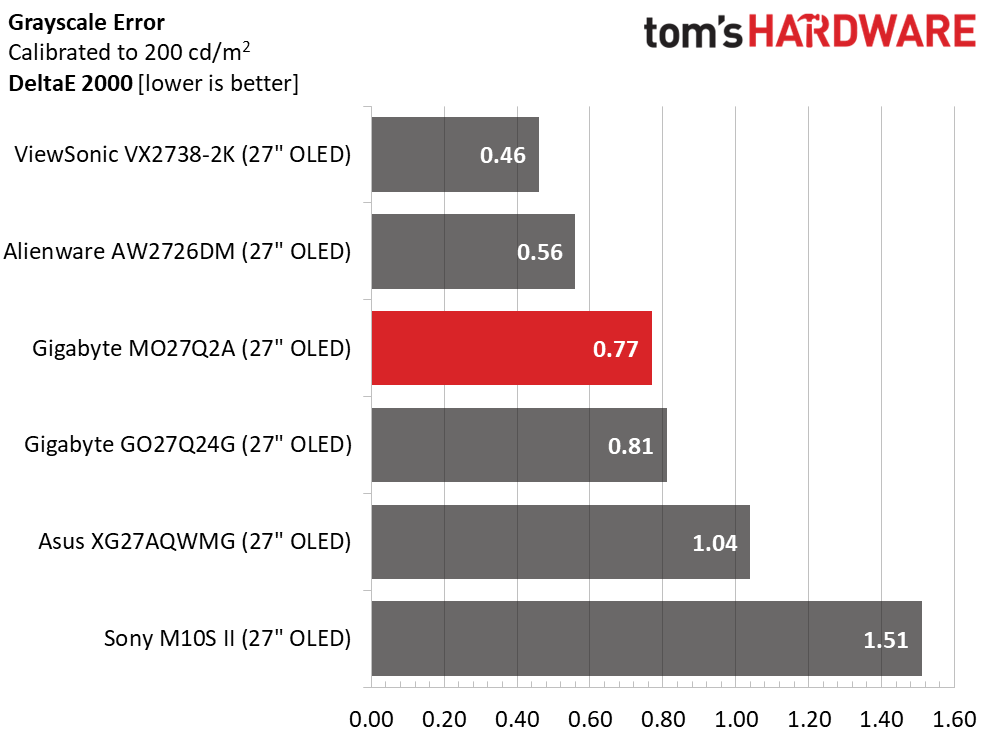
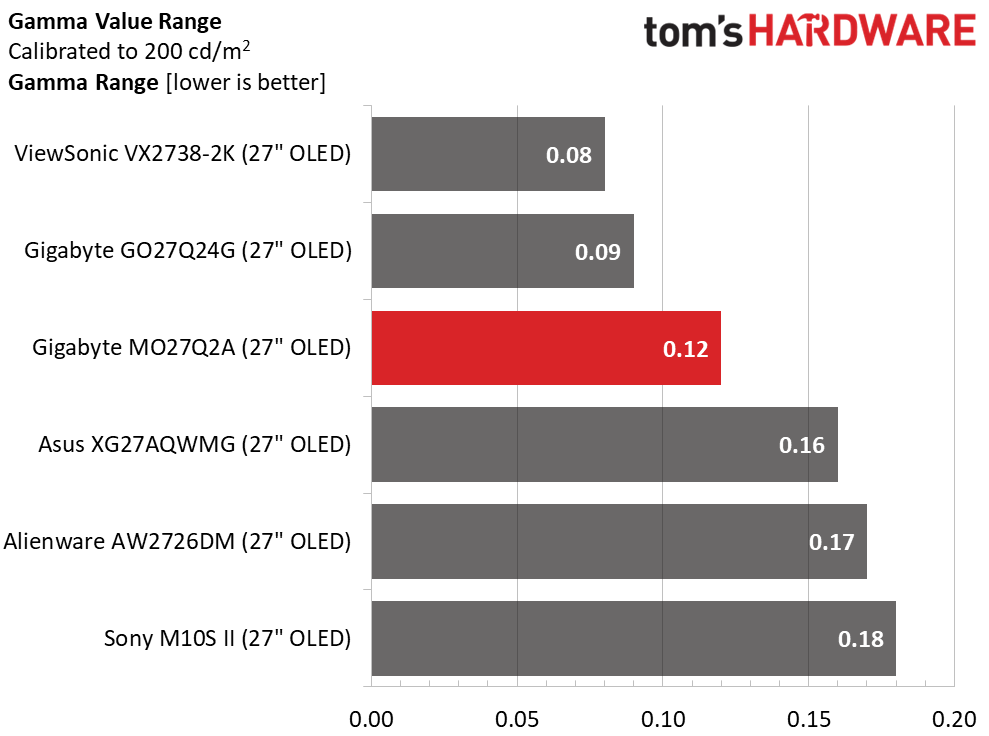
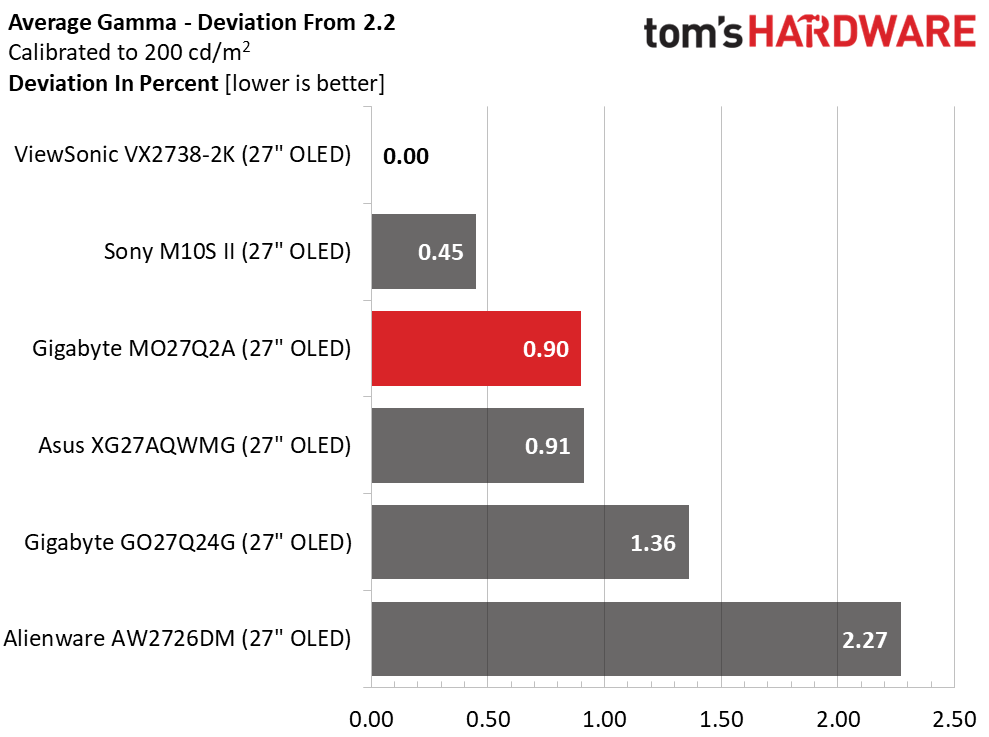
I charted the same result for the MO27Q2A on the before and after calibration charts because I could not do better than 0.77dE for grayscale tracking, nor could I make gamma any better. No matter, because it’s visually perfect as is. Just set the picture mode to Standard, set brightness to taste, and you’ll enjoy pro-level accuracy.
Color Gamut Accuracy
Our color gamut and volume testing use Portrait Displays’ Calman software. For details on our color gamut testing and volume calculations, click here.
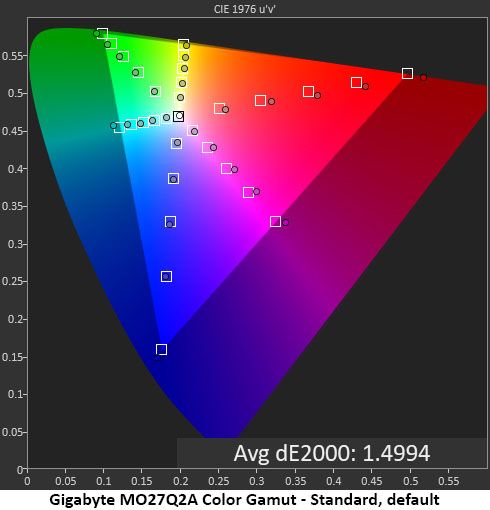
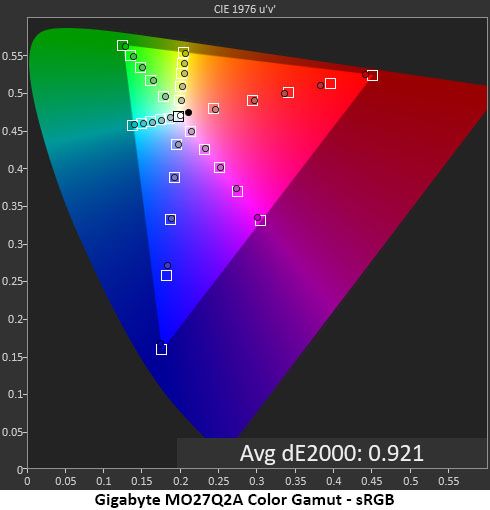
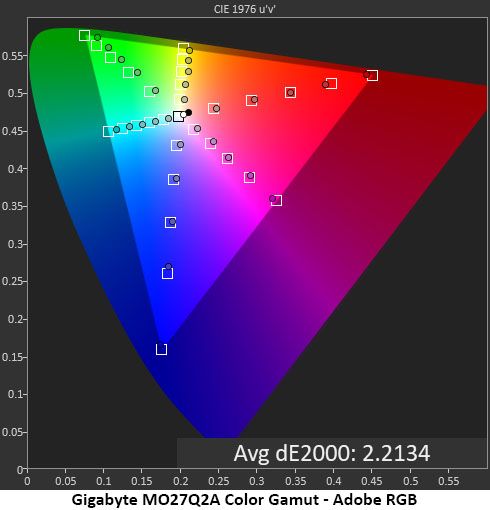
In the color test, the MO27Q2A makes full use of its Quantum Dot tech to provide a little extra impact in all areas of the gamut. Though oversaturated on the chart, the errors are minor enough to average just 1.50dE, a pro-level result. The sRGB chart shows a couple of undersaturated points in red, but again, the average error is super low at 0.92dE. Adobe RGB comes up short in green, which is typical of the OLEDs I’ve tested. True Adobe RGB monitors are a rarity because most LEDs and OLEDs don’t have enough green wavelength to fill that gamut.
Comparisons
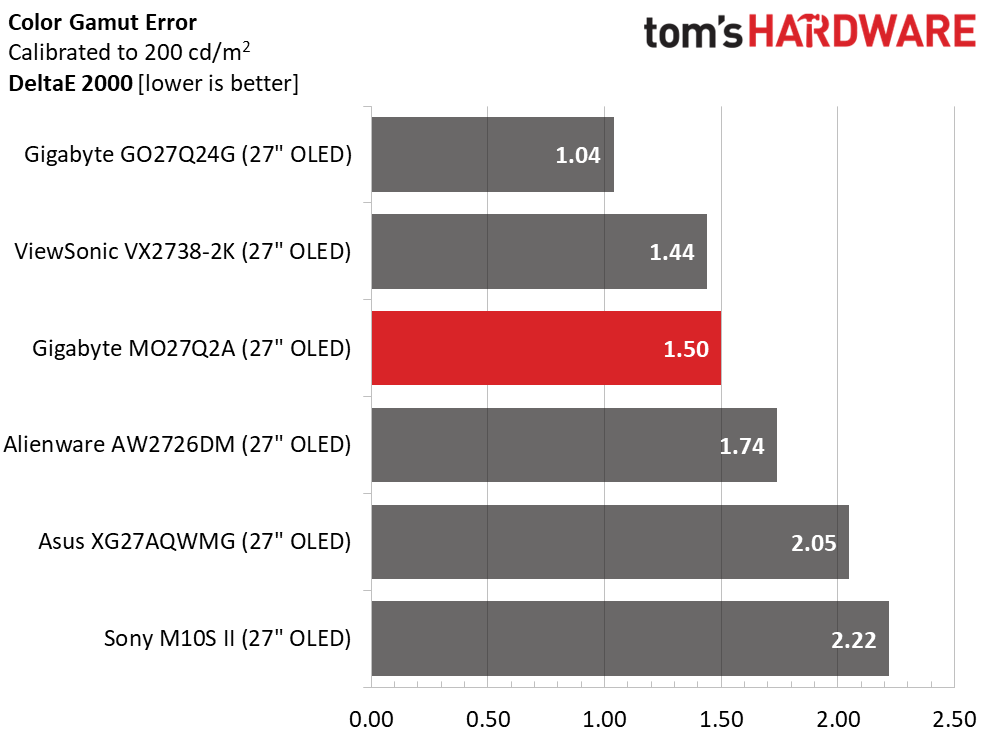
The MO27Q2A finishes third in the color comparison with a tiny 1.50dE average error. This is more impressive when you consider that I didn’t calibrate. I attempted it but could find no improvement from the options in the OSD. This is excellent performance.
In the volume test, the MO27Q2A isn’t quite the most colorful of the bunch, but it is right in the mix with other Quantum Dot screens. In a side-by-side comparison, only the GO27Q24G would look out of place. The Alienware would have a touch more red, and the others would look identical to the MO27Q2A. In the sRGB test, it comes up a tad short in the red primary.
Test Takeaway: The MO27Q2A is one of the most color-accurate OLEDs I’ve tested. It’s so good that I couldn’t improve it with calibration. Just set it to the Standard picture mode, and you’ll duplicate my results. sRGB and Adobe RGB gamuts are also available, and they measured very well, with only Adobe showing a slight lack of green. The MO27Q2A is qualified for color-critical applications.
MORE: Best Gaming Monitors
MORE: How We Test PC Monitors
MORE: How to Buy a PC Monitor
Our HDR benchmarking uses Portrait Displays’ Calman software. To learn about our HDR testing, see our breakdown of how we test PC monitors.
The MO27Q2A supports HDR10 content with an automatic switch and five specific picture modes. For the best and brightest picture, choose Peak 1000. That’s the mode I used for testing.
HDR Brightness and Contrast
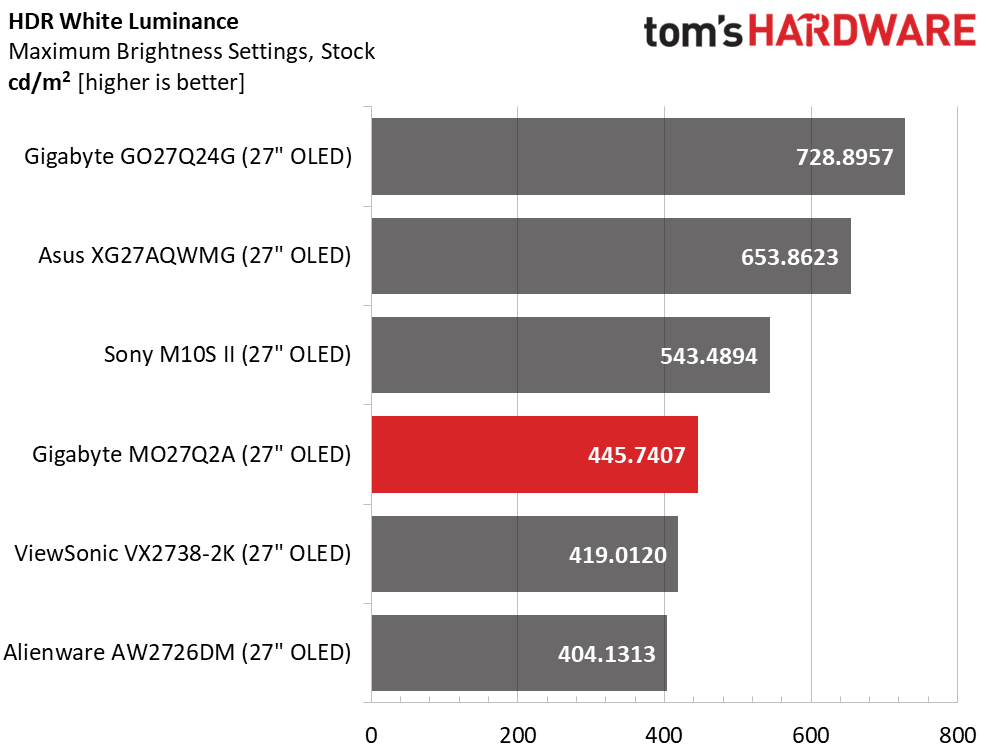
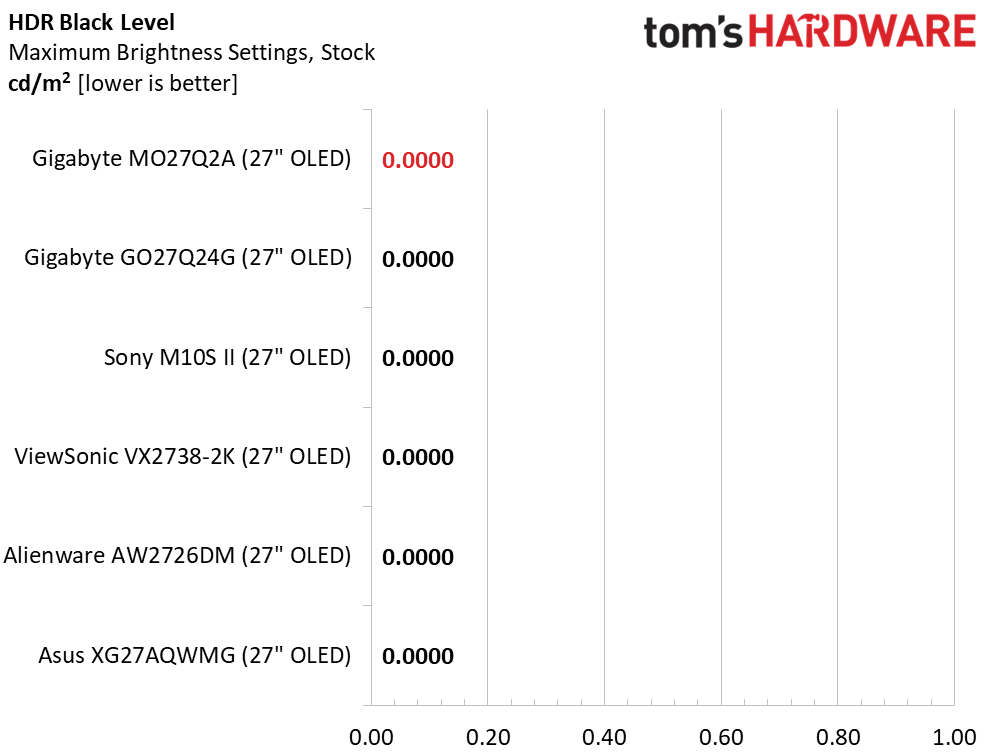
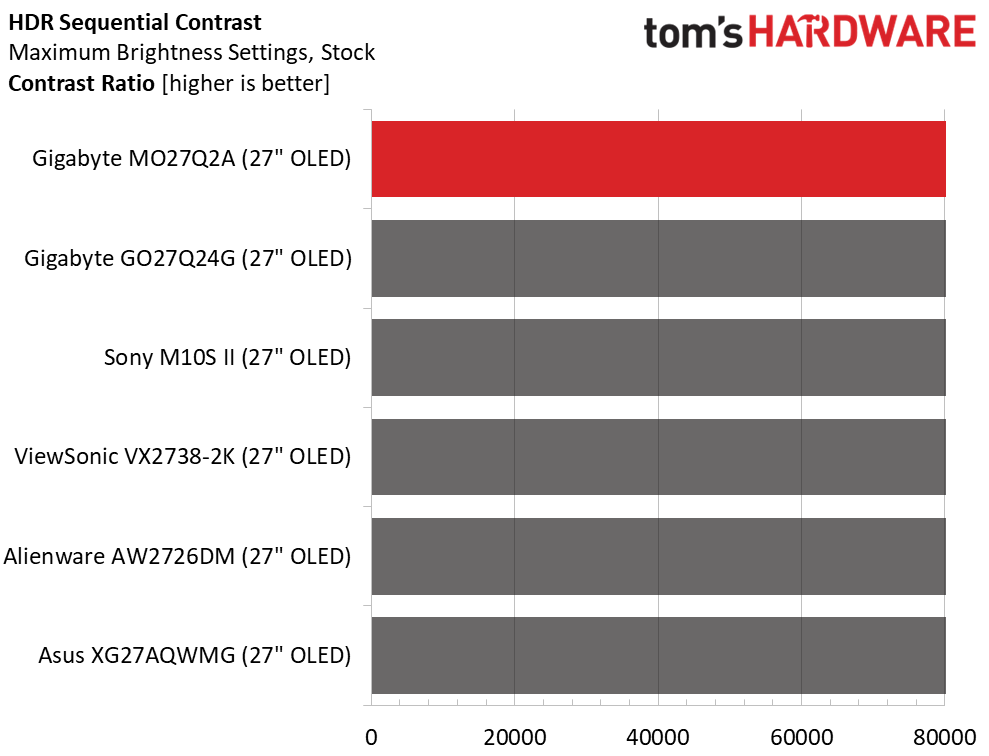
The MO27Q2A is certified for VESA DisplayHDR 400, and my sample exceeded that figure with a peak output of 445 nits measured from a 25% window pattern. Gigabyte claims 1,000 nits from a 3% window, and that is not in doubt. That means impactful HDR, though perhaps not as bright as the GO27Q24G, which peaks at 728 nits. Like all OLEDs, black levels and contrast could not be measured. I noted that in the HDR Peak 1000 mode, controls for brightness, black level, and color saturation were provided. Not many monitors let the user tweak HDR content.
Grayscale, EOTF and Color
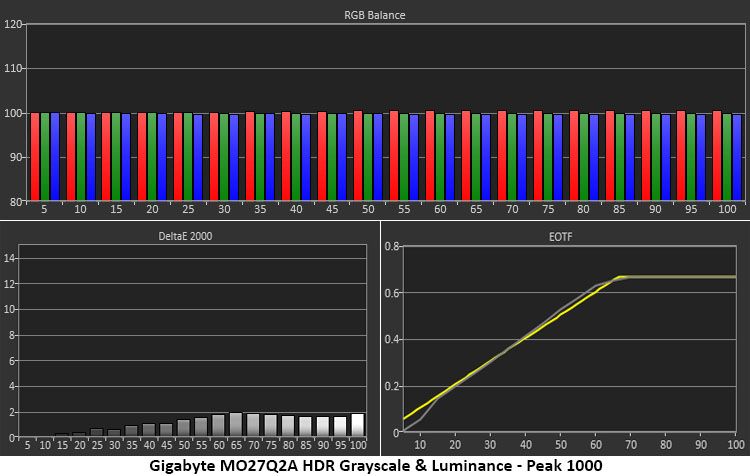
HDR color charts don’t get much better than the above. All grayscale errors are below 2 dE, which puts the MO27Q2A among the very best I’ve tested. The EOTF track starts a little dark, then matches the reference line up to the tone map transition at 65%. This is the correct point for the measured black and white thresholds. Some shadow detail might be a bit hard to see, but in the Peak 1000 mode, you can adjust the black level to compensate.
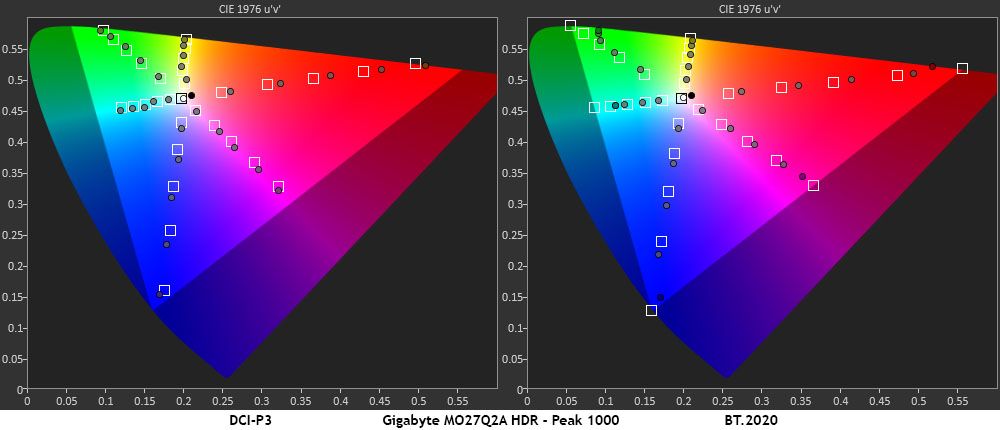
In the gamut test, the MO27Q2A fully renders the DCI-P3 color space with a little extra headroom. All points are slightly oversaturated, but since they’re linear, there is no loss of detail or clipping. Hue points are in line with their targets, which means color looks natural and balanced throughout. In the BT.2020 test, color runs out at 90% red, 80% green, and 95% blue. This is typical of the Quantum Dot OLEDs I’ve tested.
Test Takeaway: The MO27Q2A offers HDR color accuracy on par with its SDR performance and equal to the best professional and gaming monitors I’ve reviewed. It’s more colorful than non-Quantum Dot screens and equal to other QD-OLEDs. While some screens have higher peak brightness, the MO27Q2A meets its HDR400 certification and stands out by offering some adjustments in the Peak 1000 mode.
MORE: Best Gaming Monitors
MORE: How We Test PC Monitors
MORE: How to Buy a PC Monitor
With so many choices among OLED gaming monitors, the technology is no longer expensive or exotic. Though it still costs more than equivalent LCDs, the gap has shrunk significantly of late. And given OLED’s advantages in contrast and smoothness, it’s more than worth a few bucks more. The Gigabyte MO27Q2A is a prime example of how much is possible for the money.
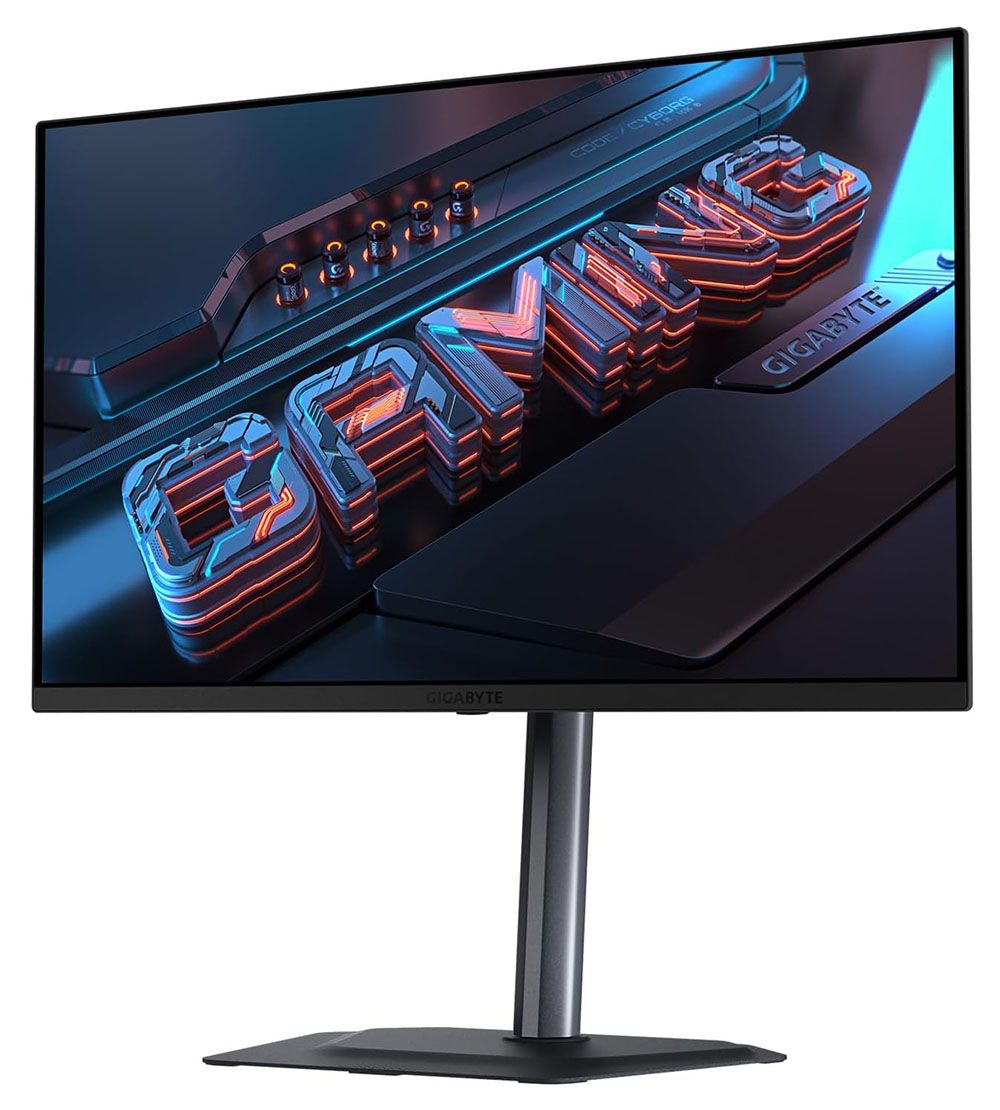
For $399 as I write this, you get a 27-inch Quantum Dot OLED with QHD resolution, 280 Hz, Adaptive-Sync HDR400, and wide gamut color. I could stop there, and it would be enough. But you also get the latest video interfaces, decent internal speakers, USB ports with KVM, and a premium stand. Build quality is also superb with mostly metal construction, effective cooling, and a three-year warranty that includes burn-in. If you really need LED lighting, it isn’t here. But that’s the only thing missing, if it is indeed a thing.
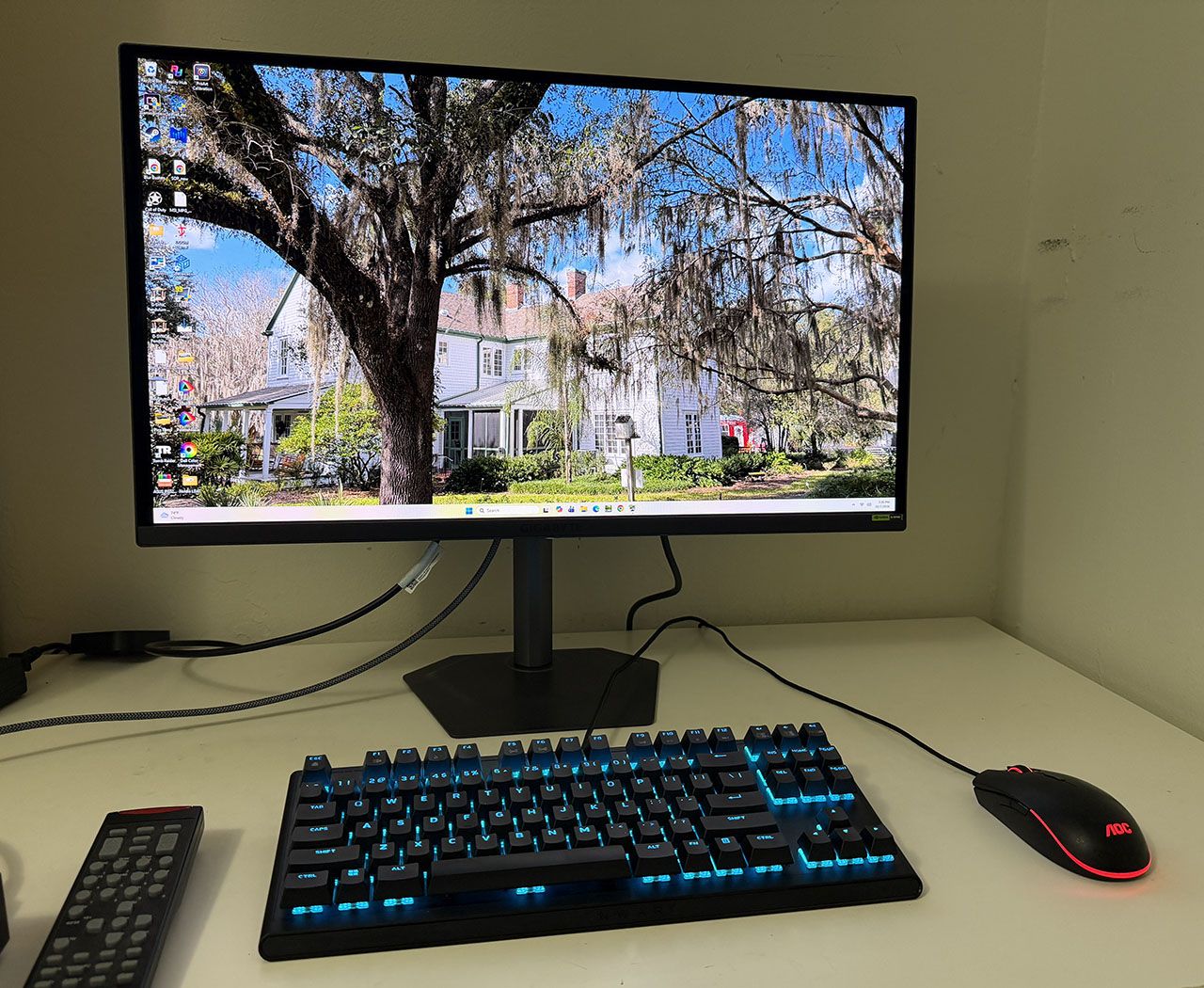
With smooth and responsive gaming performance and pro-level color accuracy, the Gigabyte MO27Q2A is a compelling choice for users who want to upgrade to the OLED experience. If you’re a professional gamer or a casual player, or someone who just wants a really nice 27-inch monitor, you should definitely check it out.
MORE: Best Gaming Monitors
MORE: How We Test PC Monitors
MORE: How to Buy a PC Monitor