Users of a knowledge-grounded application expect it to remember them, not only to search well. They ask follow-up questions that make sense only in the context of the previous turn. They expect an answer about a policy or a procedure to reflect what they told the application about themselves last month. And they still expect every answer to be grounded in the documents they are allowed to read, with citations. Whether the application is a customer support assistant, a document chat inside a SaaS product, or an internal assistant over company policies, the expectation is the same.
Meeting that expectation is hard, because the context that would sharpen a search lives outside the knowledge base. A user’s location, role, or product tier was often mentioned in an unrelated conversation weeks ago. To use it, the application has to store every conversation, extract durable facts from it, decide which facts matter for the current question, and inject them into the request. When many users share the application, every one of those steps also has to be isolated per user, and so does every document.
Amazon Bedrock Managed Knowledge Base and Amazon Bedrock AgentCore memory, a capability of Amazon Bedrock AgentCore, now take over these steps: storing each conversation, extracting facts from it, and bringing the relevant facts into the search. You turn this on by adding a memoryConfiguration to the AgenticRetrieveStream request, which makes AgentCore memory a retrieval source alongside your knowledge base. Within the same call, the service restores the conversation, and the planner decides on its own when a fact about the user would help. It retrieves that fact from long-term memory and uses it to compose the sub-queries it sends to the knowledge base. After generating the answer, the service saves the turn back to memory. The same request carries a userContext, so the knowledge base returns only the documents that the user’s access control lists (ACLs) allow. The integration is opt-in and backward compatible. Your application keeps only what is genuinely yours: authenticating the user and passing who they are.
This post shows how to build such an assistant for many users who share one knowledge base and one memory resource. Each user sees only the documents they may read, and each user’s memory stays private. The running example is an internal employee assistant for AnyCompany, a fictional company. Employees sign in with Amazon Cognito and ask questions over HR policies, IT guides, engineering runbooks, and sales plans. We show how to read the user’s identity from the Cognito ID token, how to pass it to AgenticRetrieveStream for document ACLs and for memory, how to design memory namespaces for many users, and how to read the trace to see when the planner used memory. Finally, we make AWS Identity and Access Management (IAM) enforce per-user memory isolation even when application code gets it wrong. If you deployed the application from Build multi-tenant agentic chat applications on enterprise data with Amazon Bedrock Managed Knowledge Base, this post replaces its “persist conversation history yourself” step.
Solution overview
AnyCompany keeps its documents in Amazon Simple Storage Service (Amazon S3). One managed knowledge base syncs them through an ACL-enabled Amazon S3 data source. A global ACL file in the same bucket says which employees may read each folder: everyone reads HR and IT, only engineers read the engineering runbooks, and only salespeople read the commission plan. One AgentCore memory resource is shared by every employee. Amazon Cognito authenticates employees, and its ID token supplies two claims: the sub (user ID) identifies the user’s memory, and the verified email identifies the user to the knowledge base’s ACL filter. Three test users sign in: two engineers, Maya and Liam, and one salesperson, Sofia. The trace excerpts in this post are taken from a run of the sample application in the GitHub repository.
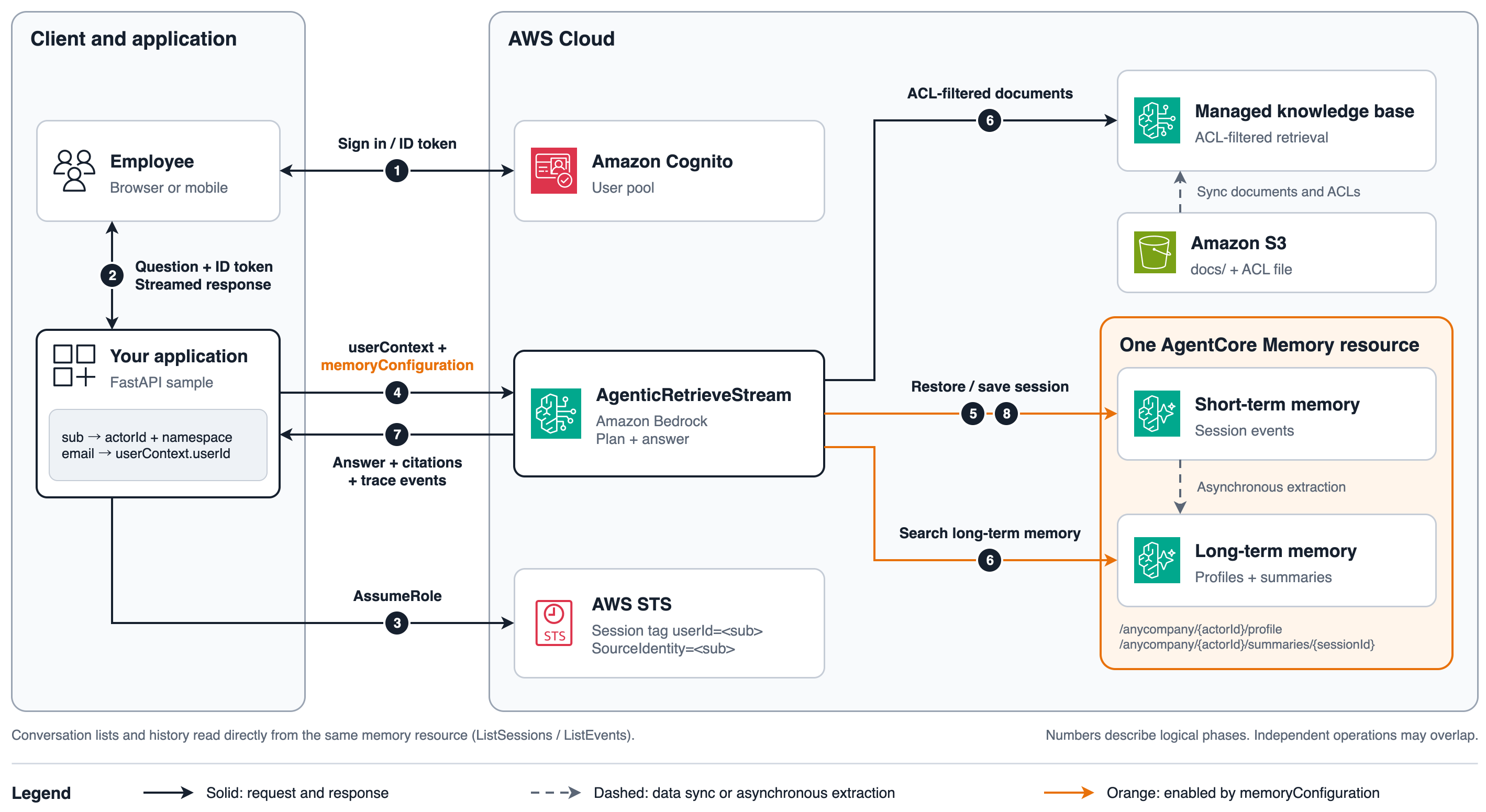
Figure 1: Architecture of the memory-aware employee assistant. The application authenticates the user and constructs the request (steps 1–4). Amazon Bedrock Managed Knowledge Base restores the session, retrieves information, returns an answer, and saves the exchange to AgentCore memory (steps 5–8). Short-term events and long-term records belong to the same memory resource.
- The employee signs in with Cognito and receives an ID token, a JSON Web Token (JWT) signed by the user pool.
- The application’s API validates the token — an Amazon API Gateway JWT authorizer in production, a small FastAPI service in the sample. Unauthenticated requests do not reach the handler.
- The handler reads two claims from the verified token:
subbecomes the memoryactorIdand namespace, andemailbecomes theuserContext.userId. The client body carries only{ question, sessionId? }. The handler then assumes the application’s IAM role for this user, with the session taguserId=<sub>. - The handler calls
AgenticRetrieveStreamwith the knowledge base as the retriever,userContext, and amemoryConfigurationbound to this user. - Managed Knowledge Base restores the conversation history from short-term memory (STM) in AgentCore memory for the actor and session identified by
sessionBinding. - Managed Knowledge Base retrieves from the knowledge base with ACL filtering based on
userContext. It can also retrieve the user’s configured long-term memory through speculative retrieval or memory searches selected by the planner. - Managed Knowledge Base streams a cited answer and trace events back to the handler. The handler records the traces with a correlation ID and forwards the answer and trace information to the UI.
- With
persistenceMode: DEFAULT, the service saves the question and generated answer to the session. AgentCore memory then extracts long-term records asynchronously according to the configured strategies.
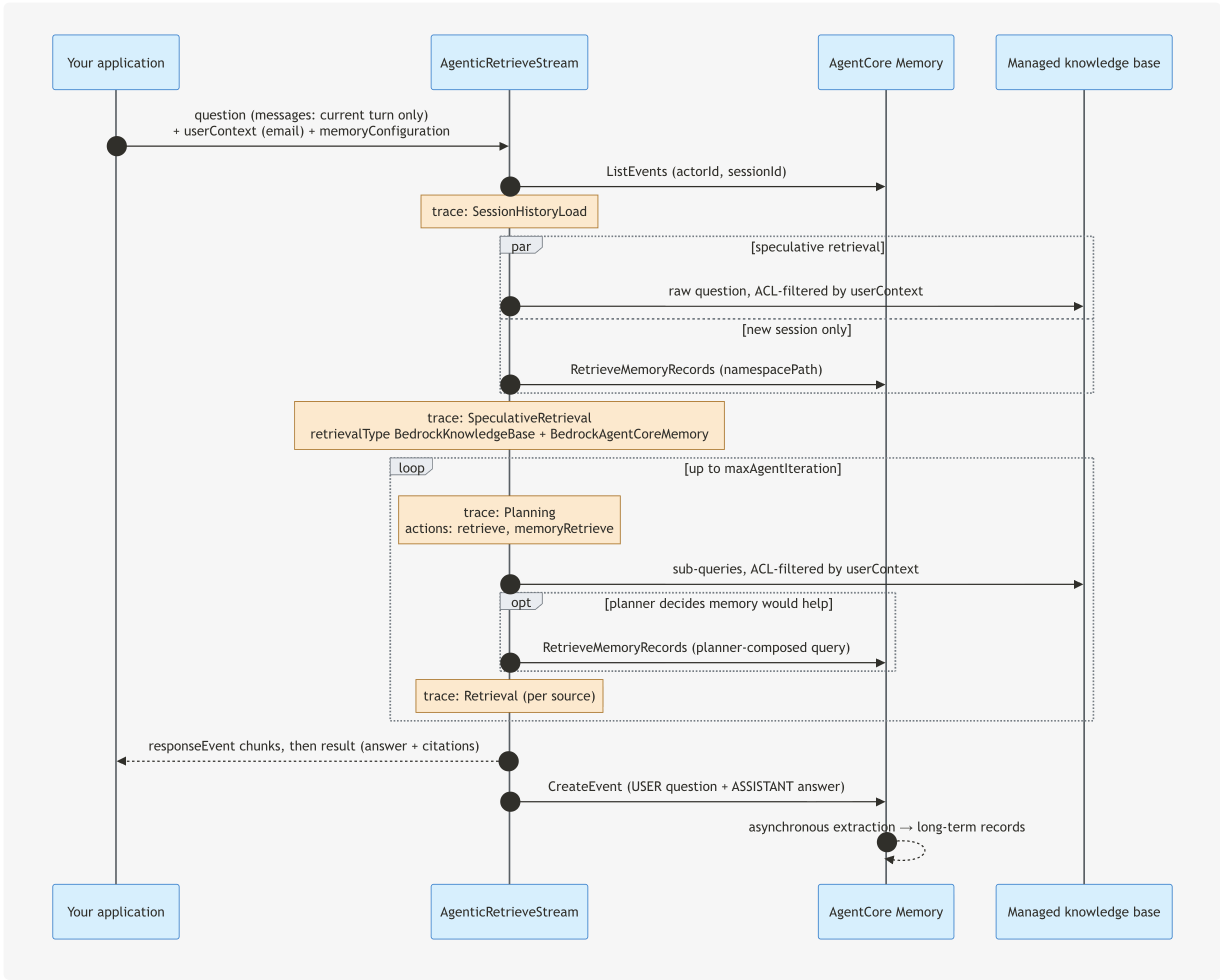
Figure 2: One AgenticRetrieveStream turn with userContext and memoryConfiguration. Everything between the first and last arrow is the service’s work.
Managed Knowledge Base owns ingestion, ACL filtering, indexing, ranking, planning, retrieval, and generation. With memoryConfiguration, it also owns session restore, memory search, and persistence. AgentCore memory owns storage, retention, encryption, and extraction. Your application owns authentication, the UI, and reading the user’s identity from the token. There is no conversation table: when the UI lists or reopens a conversation, it reads the same memory resource.
How identity maps to the request
Every value is derived by the application from the verified ID token. None comes from the request body.
| Request field | Derived from | What it scopes | Enforced by |
userContext.userId | ID token email (verified, immutable in the pool) | Which documents can be retrieved | Knowledge base ACL filtering |
memoryConfiguration.sessionBinding.actorId | ID token sub | Whose short-term memory is restored and written, and the {actorId} in long-term namespaces | AgentCore memory keying, plus an IAM condition |
memoryConfiguration.sessionBinding.sessionId | Generated by the application for a new conversation. Listed with ListSessions | Which conversation within that actor | Keyed under the actorId |
memoryConfiguration.retrievalConfigs[0].namespacePath | /anycompany/<sub> | Which long-term records the planner may search | IAM condition |
Two different claims do two different jobs. The knowledge base identifies users by email, because that is what the connected data source records in its ACLs. Memory needs an actorId that never changes and is never reused. The Cognito sub is both. An email address can be changed, or reassigned to a new employee after someone leaves, and that person would then inherit the old memory. You can use another stable user ID from your own user store as the actorId. What matters is that it never moves to a different person.
Prerequisites
- This walkthrough uses a managed knowledge base and an AgentCore memory resource in the US West (Oregon) Region (us-west-2). As described in the agentic retrieval documentation, the memory resource used with this integration must be in the same AWS account as the knowledge base and in the
ACTIVEstate. - Python 3.10 or later and Boto3 1.43.72 or later.
- Permission to create an S3 bucket, a Cognito user pool, IAM roles, a knowledge base, and a memory resource. The sample’s
infra/setup.pycreates all of these resources idempotently.
Solution walkthrough
The following steps create the knowledge base and its data source, set up the memory resource and Amazon Cognito, build the request, and read the trace to confirm the result.
Step 1: Create the knowledge base with an ACL-enabled data source
A managed knowledge base needs no vector store:
Configure the service role for your setup by following Create a service role for managed Amazon Bedrock Knowledge Bases, and pass its ARN in roleArn. For model access requirements, also review the prerequisites for managed and custom models.
Documents live in the bucket under docs/<folder>/. Amazon S3 has no permission system of its own to crawl, so you supply the ACLs in a global ACL file in the same bucket. Each entry maps an S3 prefix to the emails that may read it:
The sample’s file also gives everyone docs/it/. Then create the data source. For a managed knowledge base, every connector has the type MANAGED_KNOWLEDGE_BASE_CONNECTOR, and connectorParameters.type picks the source:
aclEnabled cannot be changed after the data source is created. CreateDataSource is asynchronous, so wait for the status AVAILABLE. Then call StartIngestionJob and wait for COMPLETE. The sync reads the documents and the ACL file and indexes each document with its ACL. In the sample, all 11 documents were scanned and indexed with 0 failures. A document that no ACL entry covers is not ingested, and a user whose email matches no entry receives no results from this data source.
The same model applies to connectors that crawl permissions from the source system, such as Microsoft SharePoint, Google Drive, and Atlassian Confluence. There, the permissions come from the source, groups are resolved from the source, and the knowledge base also checks each result against the source in real time. Your application code does not change: it still passes the user’s email in userContext. For the full list, see Access Control Lists awareness enablement.
Step 2: Create the memory resource and design namespaces
One memory resource serves every user. Per-user separation comes from {actorId} in the namespace templates, which AgentCore memory resolves from each event at extraction time. Two choices matter.
Strategies. The two strategies extract different things. The summary strategy summarizes each conversation, so it captures facts that a user mentions in passing, such as “I’m on a Mac in the Frankfurt office.” Those facts are what personalize a later answer about, say, PTO. The user-preference strategy extracts stated preferences into structured records (“Prefers short bullet-point answers without tables”, “Always deploys to eu-central-1 first”) and does not treat incidental mentions as preferences. Summaries give you “what we discussed.” Preferences give you “how this person wants to be answered.” Use both.
Layout. retrievalConfigs accepts one entry, so a single namespacePath must reach everything the planner should see for a user. Put {actorId} directly under the root: namespacePath: "/anycompany/<sub>" then covers the profile and every conversation summary. A layout such as /anycompany/profile/{actorId} and /anycompany/summaries/{actorId} would let one entry reach only one of them.
Wait for the memory to reach ACTIVE. Creating the memory does not need a user or actorId, so the order of Step 2 and Step 3 does not matter. Nothing is provisioned per user: a new Cognito user becomes a new actor the first time they ask a question.
Step 3: Set up Cognito and grant the application permissions
Create a user pool and an app client without a client secret. The email decides which documents a user may read, so make it required, verified, and not changeable by the user:
Mutable cannot be changed after the pool is created. With a mutable email, a signed-in user could change their email to a colleague’s address. If your users federate from Okta or Microsoft Entra ID, map the IdP’s email to this attribute so that it matches the email in your data source’s ACLs.
The sample enables USER_PASSWORD_AUTH so the local UI and tests can sign in directly. Production applications typically use Cognito managed login or AWS Amplify.
Set up an IAM role for the application. The backend assumes it once per user, with the session tag userId=<sub>, and every memory statement is conditioned on that tag. This is the complete policy the sample runs with:
ListEvents is required with sessionBinding, RetrieveMemoryRecords with retrievalConfigs, and CreateEvent when persistenceMode is DEFAULT. ListSessions and ListMemoryRecords are for the application’s own reads (conversation list and the “what memory knows about you” view), not for AgenticRetrieveStream. The role’s trust policy allows sts:AssumeRole, sts:TagSession, and sts:SetSourceIdentity from the backend’s own identity (an AWS Lambda execution role or an Amazon Elastic Container Service (Amazon ECS) task role in production). If the memory uses a customer managed key, add kms:Decrypt on that key.
Step 4: Read the user from the token, then build the request
Verify the ID token and read the two claims. Only the ID token carries email. The access token does not:
jwt.decode checks the signature, the issuer (your user pool), the expiry, and the audience (your app client). For details of the claims, see Understanding the identity (ID) token. With API Gateway, a JWT authorizer does the same checks and passes the claims to your handler.
Next, get the user’s AWS credentials. The backend assumes the application role for this user and caches the session until shortly before it expires:
Every call for this user, including the memory calls that agentic retrieval makes on the caller’s behalf, now runs as assumed-role/anycompany-assistant-app-role/user-<sub> and carries the tag that the policy in Step 3 checks.
Decide the sessionId. For a new conversation, the application generates one, such as "conv-" + uuid4().hex, and returns it to the client. To continue a conversation, the client sends it back. To show a user their conversations, call ListSessions with the user’s actorId:
You do not need your own table that maps users to sessions. Accepting a sessionId from the client is safe because short-term memory is keyed by (memoryId, actorId, sessionId), and the actorId comes from the token. If Liam sends Maya’s sessionId, it names a session inside Liam’s own space, which is empty. Agentic retrieval itself does not verify that the actorId, sessionId, or namespace you supply belong to the user who is asking, so they must never come from the client. Keep your own session table only if you need data that memory does not hold, such as conversation titles.
Then build the request:
Without userContext, an ACL-enabled data source returns no results at all. Compare the request with the stateless handler it replaces:
The query before the call and the write after it are gone, and messages has one element. Three rules come with sessionBinding, and each is enforced with a specific ValidationException. First, messages carries only the current question, so you choose one history source per request. Second, persistenceMode: DEFAULT (the default) writes the question and the generated answer as one event, so it requires generateResponse: true. Third, memoryId alone is invalid. persistenceMode: NONE restores history and writes nothing, for audit or replay views.
Step 5: Update the client contract and render history
The client sends { question, sessionId? }. On a new conversation, the application generates a sessionId and returns it as the first streamed frame. The client echoes it on later turns and omits it to start over.
Because the memory resource is yours, the application reads it directly to render a conversation:
Each persisted turn is exactly one event with two payloads: the user’s question and the final answer. The history therefore renders as a clean transcript and remains usable by other AgentCore memory clients.
Step 6: Verify from the trace
The trace tells you, per turn, what the knowledge base and memory did:
| Trace event | When it appears | What to look at |
SessionHistoryLoad | First event, whenever sessionBinding is set | _memory_event_count and _memory_message_count, both 0 on a new session |
SpeculativeRetrieval | Before planning | On a new session, retrievalMetadata also lists BedrockAgentCoreMemory. Memory items carry _memory_* metadata and no text. Knowledge base items carry _source_uri |
Planning | Each iteration | actions[].memoryRetrieve means the planner chose to search memory, with a query it composed |
Retrieval with retrievalType: BedrockAgentCoreMemory | Per planned memory action | _memory_record_count. A count of 0 is a normal result |
A memory event with status: FAILED | Memory unavailable or access denied | failures[].message. Memory is best-effort: the request continues and the answer is generated from the knowledge base |
The following runs show the behavior. Excerpts are verbatim, trimmed for length.
Document ACLs: Maya and Sofia, same question. “What is the weekly on-call stipend?” The on-call guide is in docs/engineering/. Maya’s retrieval included docs/engineering/oncall.md, and the answer was “500 USD or 450 EUR per week.” Sofia’s speculative retrieval and the planner’s follow-up sub-query returned only HR and sales chunks:
Her answer said that no on-call stipend is documented in the sources she can access. The application made no access decision. It passed userContext.userId: "sofia@example.com", and the knowledge base did the filtering. The reverse holds for the commission plan: Sofia gets the 12% accelerator, and Maya’s retrieval does not contain docs/sales/.
Turn 1: Maya, new conversation. “How do I set up the VPN on my laptop? I’m on a Mac in the Frankfurt office.”
The answer gives the Frankfurt gateway (vpn-fra.anycompany.example) and the macOS steps. Afterwards, ListEvents on the session shows one event with two payloads.
Turn 2: Maya, same conversation. “It keeps disconnecting every few minutes. What should I try?” The request carried only that sentence:
The planner sent retrieve("VPN disconnects every few minutes troubleshooting") and retrieve("Cisco Secure Client macOS frequent disconnect fix"). The answer resolved “it” and pointed at iCloud Private Relay, the macOS-specific cause in the guide. On a continued session, SpeculativeRetrieval queries only the knowledge base. The long-term memory lookup in that step happens on new sessions.
Turn 3: Maya, a new conversation, later. “How many days of PTO do I get per year, and do unused days carry over?” Her office decides the answer, and she never mentioned it in this conversation. Speculative retrieval searched long-term memory with the raw question and found one record:
Knowledge base and memory items share one retrievalResponse. Tell them apart by sourceRetriever.identifier or by the _memory_* keys. The record was the summary of her VPN conversation. That was enough: the planner went straight to the answer, which said “Since your memory indicates you’re based in the Frankfurt office … you get 30 days of PTO per year, granted in full on January 1, and any unused days must be used by March 31 of the following year.” A fact from an IT conversation personalized an HR answer.
Turn 4: Liam, new conversation, identical question. Same handler, same memory resource, a different token. Speculative retrieval found nothing about him, so the planner decided to search memory with its own query:
Liam received the table of all three offices and a request to say which one he is in. The application chooses where the planner may look. The planner decides whether to look and what to ask: a memoryRetrieve action appears only when the planner decides that another memory search would help. Reading Maya’s sessionId through the history endpoint with Liam’s token returned an empty list.
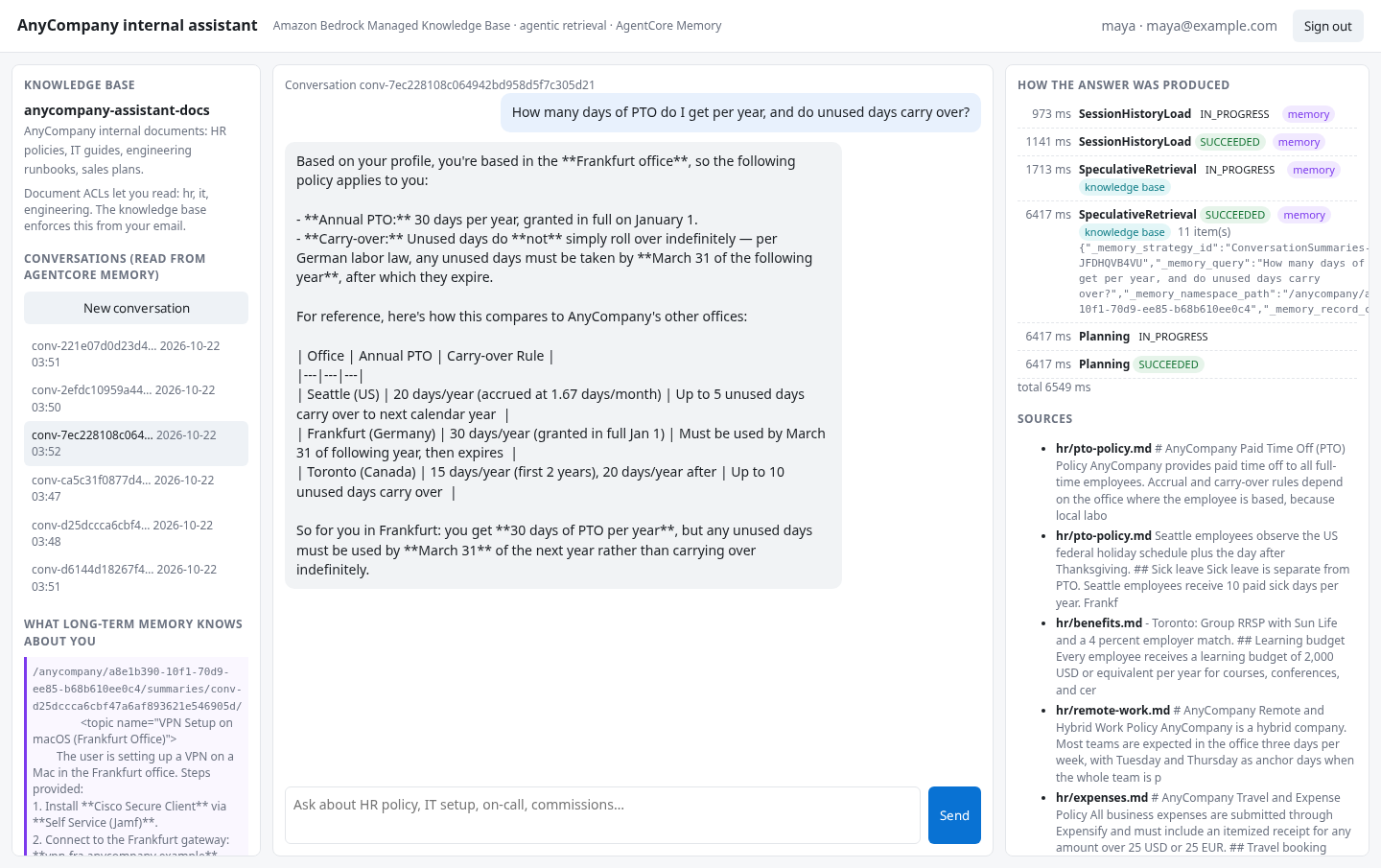 | 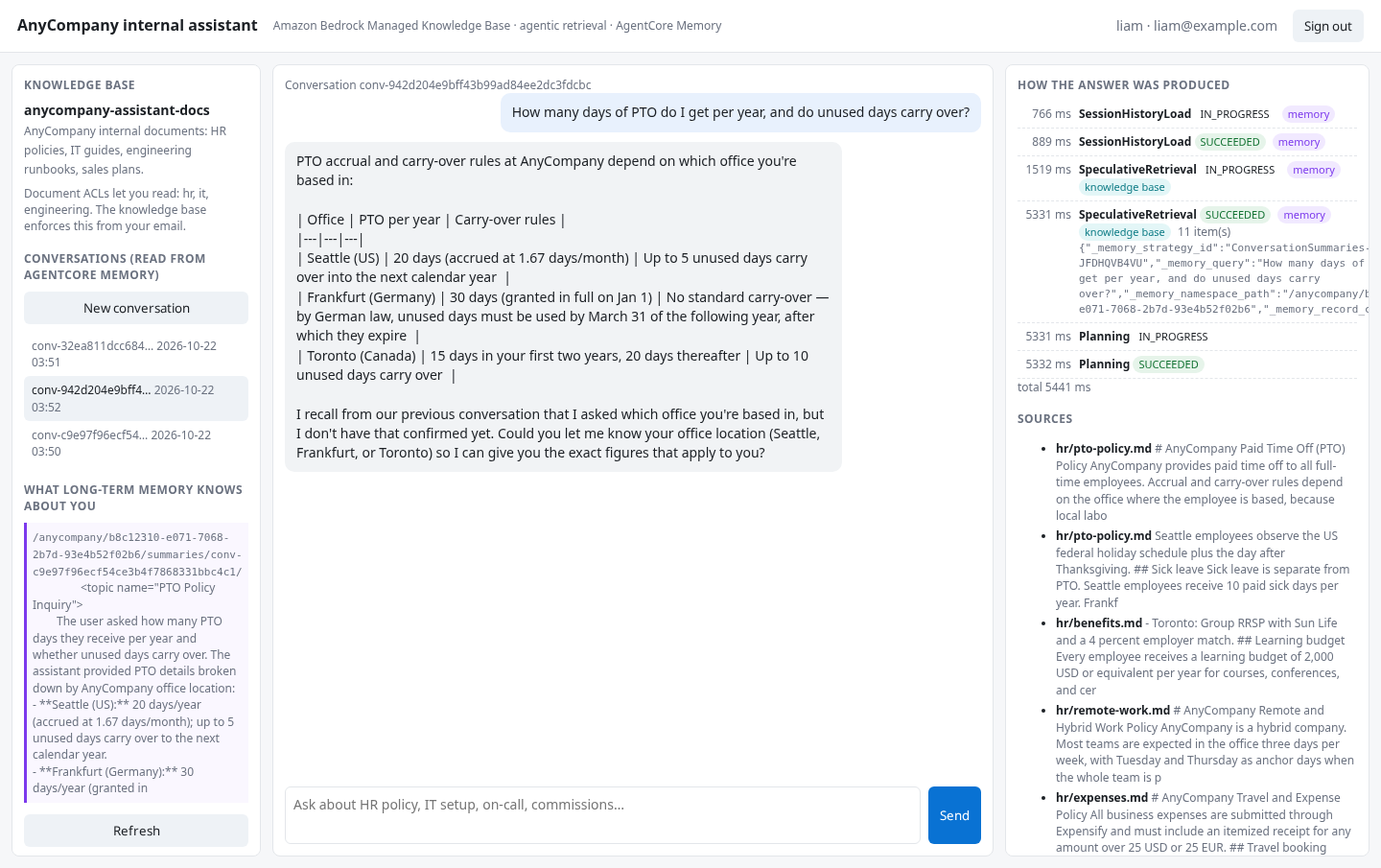 |
Figure 3: The same question from two users. Maya’s trace shows a memory hit and a Frankfurt-specific answer. Liam’s trace shows zero memory records and the generic table.
Long-term extraction is asynchronous and runs after the turn is persisted. In our run, the first record appeared 81 seconds after turn 2, but the timing is not a commitment. Design for eventual availability. A fact stated in this conversation is not guaranteed to be retrievable in the next one immediately. The sample polls ListMemoryRecords before running turn 3.
Security and multi-user isolation
In this walkthrough, the application authenticates. The knowledge base filters. ACL-aware retrieval is filtering, not authorization. Take the email only from a verified ID token with email_verified: true, make it immutable in the pool, and handle email reuse: if an address is reassigned to a different person, that person gets the old owner’s document access. The knowledge base fails closed: a document with no ACL, or an ACL error, means fewer results, not extra ones. If results are missing, check that the email matches the ACL entry.
Identity comes from the token (Step 4) for memory too: actorId and namespace come from the verified sub, never from the client.
IAM condition keys, as defense in depth. AgentCore memory exposes bedrock-agentcore:actorId on ListEvents, CreateEvent, and ListSessions, and bedrock-agentcore:namespacePath on RetrieveMemoryRecords and ListMemoryRecords. The memory calls that agentic retrieval makes during a request are authorized against the calling identity. That is why the caller’s policy must grant those actions, and why the conditions in Step 3 apply to them. With the session assumed for Maya, a request bound to Maya’s actorId proceeds normally. A request that binds Liam’s actorId is the bug that this policy guards against, and it is denied at every memory operation:
Nothing was written to Liam’s memory: his session count stayed at 0. The answer was still generated from the knowledge base. Because each user has their own role session, AWS also sees which user each call is for: the caller is assumed-role/anycompany-assistant-app-role/user-<sub> with SourceIdentity=<sub>, which the session holder cannot change.
Two further points. The memory is a customer-owned resource that other systems in your account may also write to. Treat its contents as input, and attach an Amazon Bedrock guardrail to the request through policyConfiguration. And plan the data lifecycle. Raw events expire per eventExpiryDuration, but extracted records do not. A user-deletion workflow therefore covers DeleteEvent for the actor’s sessions and DeleteMemoryRecord under the actor’s namespace.
Observability and failure behavior
Log the full trace with a correlation ID per turn. The planner’s sub-queries are as worth auditing as its final results. AWS/Bedrock/KnowledgeBases reports Invocations, ClientErrors, and TotalIterationCount for Operation=AgenticRetrieveStream. AWS/Bedrock-AgentCore reports Invocations, Latency, Errors, and UserErrors per memory operation, and InputTokenUsage/OutputTokenUsage per strategy for extraction. With Amazon CloudWatch Transaction Search enabled, AgentCore Observability, a capability of Amazon Bedrock AgentCore, shows a turn’s spans end to end.
Memory operations are best-effort by design. If a memory call fails or is denied, the request does not fail. The trace carries a FAILED memory event with the failure message, and the turn continues without that memory. The answer is generated from the knowledge base. Decide whether your UI surfaces that degraded state.
Considerations
- Use a stable
sessionIdfor the life of a conversation. The API accepts a fresh ID per request, but a fresh ID silently breaks continuity and produces one summary record per turn. - Use
namespacePathto reach all of a user’s long-term records.retrievalConfigsaccepts one entry with up to fivemetadataFilters.namespacematches by prefix andnamespacePathmatches by hierarchy, sonamespacePathfits per-user IDs under the root. Supply namespaces fully resolved, because a template such as/anycompany/{actorId}is rejected. - Expect only
USERandASSISTANTconversational events to be restored. Events with theTOOLorOTHERrole that other systems write are skipped. - Keep sending
messagesinstead ofsessionBindingwhen your application needs to control exactly which history each request carries. For example, your existing history store may be the system of record for conversations, or you may edit or redact history before sending it. WithsessionBinding, the service restores and persists the conversation for you. You can’t combine the two in one request. - A request can carry up to five knowledge bases. With more than one retriever, the planner routes each sub-query based on the knowledge base
description, so write it carefully. - Plan for latency and cost. The session restore adds on the order of 200 milliseconds. In our runs, a full turn with one knowledge base, ACLs, and memory took 4–10 seconds with the managed model. Planning iterations drive that time, not memory. These are observed figures, not service commitments. Agentic retrieval is priced per call plus underlying retrievals, and the memory operations made during the call are billed as AgentCore memory usage. For details, see Amazon Bedrock pricing and Amazon Bedrock AgentCore pricing.
Clean up
Run python infra/teardown.py in the sample to delete the knowledge base, the S3 bucket and its objects, the memory resource (including conversation history and long-term records), the Cognito user pool, and the IAM roles.
Conclusion
Amazon Bedrock Managed Knowledge Base already gave you the retrieval stack as a service. That stack covers ingestion, document ACLs, indexing, ranking, and the planning loop in AgenticRetrieveStream that turns a hard question into a cited answer. With memoryConfiguration, the same call now carries the conversation and the user’s history. For a multi-user application, that removed the conversation store, the history replay, and the extraction pipeline. What remained was a short list of responsibilities. Authenticate the user and read two claims from the ID token: pass the verified email as userContext so that the knowledge base filters documents, and use the sub as the actorId for one memory resource with {actorId}-rooted namespaces. Use IAM condition keys on a per-user role session as a second line of defense that holds through the agentic path.
To get started, deploy the sample from the GitHub repository. Then read the AgenticRetrieveStream API reference, Access Control Lists awareness enablement, and Use AgentCore memory with agentic retrieval. For the retrieval loop itself, see Agentic retrieval for Amazon Bedrock Managed Knowledge Base. For memory concepts, see Amazon Bedrock AgentCore memory: Building context-aware agents.


