If you’re looking for a CodeRabbit or Greptile alternative because PRs still ship bugs after a review bot has approved them, adding another reviewer is rarely the fix. What would help in this situation is running the change in a working app and checking what users actually see. That could mean reviewers with execution built in, tests your coding agent writes into your repo, or independent testing of the PR's preview deployment.
Your coding agent can open a PR in minutes, but checking that the change works for a user is still the slow part. This guide groups the alternatives by what each one verifies, gives each a fair "best for" assessment, and shows how to run a reviewer and a verifier on the same PR.
TL;DR
- CodeRabbit, Greptile, and most of their alternatives read your code.
- With TREX turned on, Greptile runs your branch in a sandbox it builds, which is a step beyond reading.
- Testing the deployed preview in a real browser lets an independent system, separate from the one that wrote the change, check what actually appears on screen and catch issues a code reviewer might miss.
- The strongest setup keeps a reviewer focused on the diff and adds a verifier to test the running product.
What Do CodeRabbit and Greptile Actually Check?
CodeRabbit reviews the diff with a large language model and runs linters and security scanners in a sandbox. It can also fix failing continuous integration (CI) checks and generate unit tests on request.
Greptile indexes your whole repository, so it can spot a change that breaks a caller three folders away. With TREX turned on, it starts your app in a sandbox built from an environment you configure, clicks through the affected flows, and posts what broke.
Both are worth having. Faros reports that many companies now run an AI review on 50% to 80% of their PRs, and heavy users see faster first reviews and lower change failure rates (a correlation, Faros notes). 👍
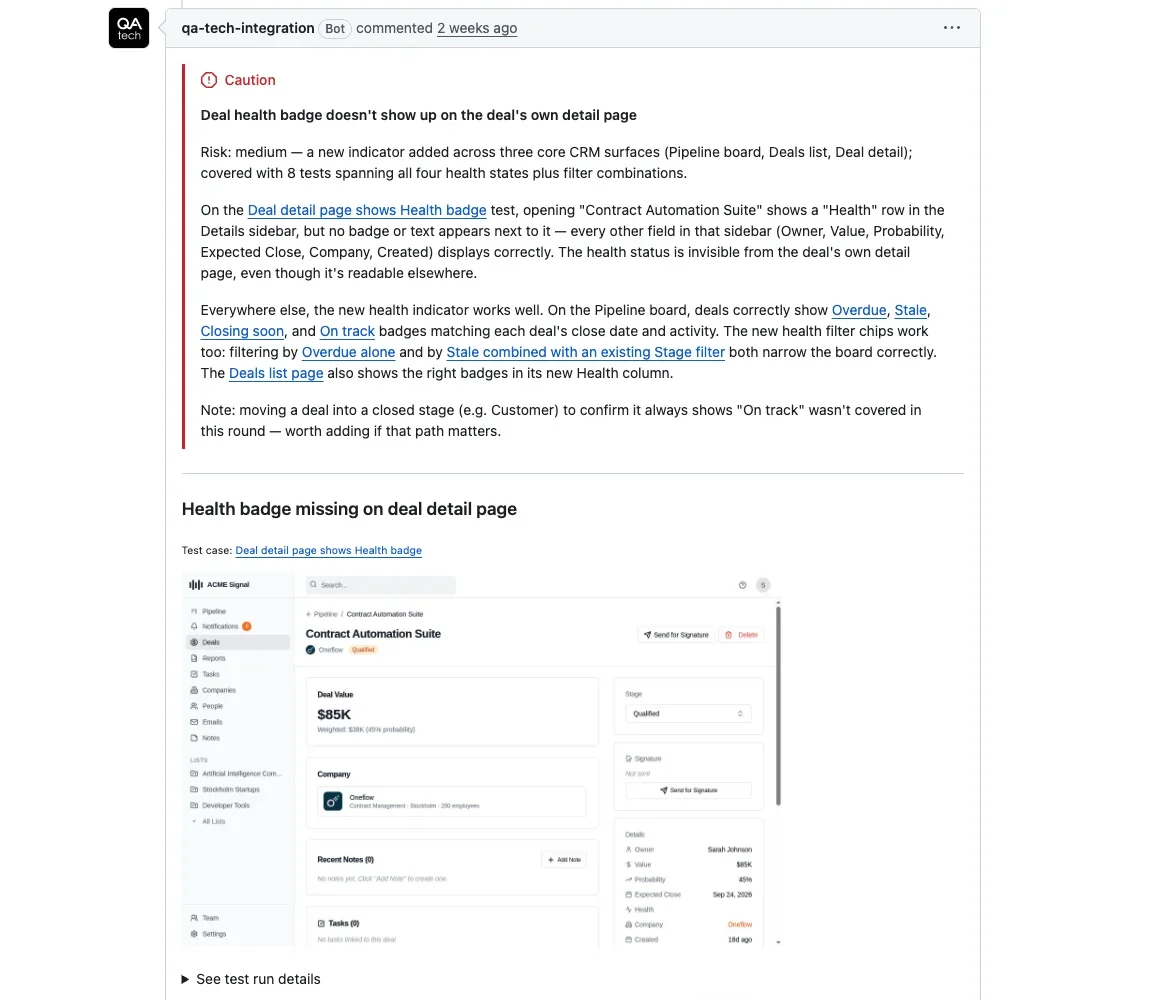
What a reviewer still can’t spot, though, is how the product runs in your real infrastructure. Take a PR that adds a health badge to a CRM. The badge works on the pipeline board and the deals list but is missing from the deal's own page. You only catch that when those screens load in a browser.
QA.tech documents this exact case in its demo CRM.
Why Is Code Review Not Enough for AI-Written Code?
AI coding agents can write solid code and plenty of unit tests. But, the real question is whether the running app still works for a user. The agent that wrote a change is a poor judge of that. When it misreads the ticket, it writes a test that reflects what’s been misread. Both the code and the test pass, but the feature still doesn’t do what was asked of it.
METR found evidence of this in practice. Maintainers reviewed AI-generated pull requests that had already passed a benchmark's automated tests, but roughly half wouldn’t have been merged.
Teams are also feeling the impact of this growing volume. In Faros' Q3 2026 data, time spent on quality assurance (QA) is up 300.6%, while PRs merged with no review at all rose by 76.3%.
Finally, AI makes an existing issue worse. Scripted regression suites frequently broke when UI changes affected existing tests, long before coding agents arrived. A Microsoft Research paper found that only about 15% of review comments pointed to a possible defect. QA.tech covers the full model in its guide to the four layers of verifying coding agent work.
What Are the Alternatives to CodeRabbit and Greptile?
Here are the main alternatives to CodeRabbit and Greptile, grouped by how they review and test code.
| Category | Examples | What it checks | Best for | Limits |
|---|---|---|---|---|
| Other diff reviewers | GitHub Copilot code review, Cursor Bugbot, Qodo Merge, Graphite | The diff and the surrounding code. | Fewer comments or a better fit with your editor and PR workflow. | Same as CodeRabbit: it reads code but doesn’t run the app. |
| Reviewers with execution | TREX runs your branch in a sandbox it builds. Vercel provides its own suggested patches against your build and tests. | Teams that want one vendor for review alongside a runtime signal. | A sandbox is not the same as your deployed preview. The reviewer picks flows unless you pin them. | |
| Agent-written tests in your repo | Momentic, browser tools such as ChromeDevTools MCP | Whatever your coding agent chooses to test. | A tight feedback loop while the agent builds. | The same agent writes the code and the test. Your team still needs to maintain the suite. |
| Independent testing on the PR preview | The deployed preview checked by a system that didn’t write the change. | Teams with a high release cadence and many agent PRs. | Needs a preview environment or staging and adds a second check to the PR. |
Within those categories:
- Copilot code review is the easy choice if you’re already paying for Copilot.
- Graphite is the way to go for teams that already work in stacked PRs.
- QA Wolf suits teams that want deterministic tests written as code or a managed team to maintain the suite.
- Momentic is a good fit for engineers who want test files versioned next to the code and have the time to maintain them.
For more comprehensive comparisons, see QA.tech's roundups of CodeRabbit alternatives, Greptile alternatives, and QA tools for coding agents.
Sandbox Tests vs. Testing the Deployed Preview
TREX builds its sandbox from a setup script that installs dependencies, runs migrations, and seeds data. Your environment variables are available only during that build, not while TREX runs its tests. Outbound network access can also be restricted.
That works for a lot of logic, but it’s weaker for flows that depend on things outside the repo, such as your real auth provider, your payment provider's test mode, feature flags served from your backend, or the email your onboarding flow sends.
For instance, take a redesigned onboarding flow that sends a verification email. In a sandbox, that email may never leave the machine. On a preview deployment, a QA agent can sign up, open the inbox, click the link, and confirm the account. ✨

Independence is another difference. With TREX, the product that reviews your diff also chooses and runs the flows, unless you pin them yourself. An independent verifier works from the ticket and user journeys.
How to Run a Reviewer and a Verifier on the Same PR
-
Keep your reviewer on the diff. It catches committed API keys, risky patterns, and style issues at low cost.
-
Get a preview environment on every PR. If that’s not possible yet, test staging right after the merge and post the result on the merged PR. QA.tech's PR testing docs support both approaches.
-
Pin a small critical-path regression set. Sign-up, checkout, and payment run on every PR and block the merge. Use exploratory testing and dynamic tests based on the diff for the rest rather than rebuilding your entire existing suite.
-
Define compliance-critical flows as explicit steps so journeys that must never drift are easy to spot when they fail, with full traces that help you investigate the matter.
-
Write acceptance criteria into the ticket or PR description since the verifier reads that context.
-
Make the verifier's check in branch protection a requirement, and keep the merge decision with a person who now has evidence in front of them.

QA agents take over the repetitive verification, while people remain in charge of the judgment, risk calls, and usability. For guidance on what belongs on the gate, see QA.tech's PR checklist and risk-based testing for pull requests.
When CodeRabbit or Greptile Alone Still Make Sense
A reviewer plus solid unit and integration tests are enough when:
-
There’s no user interface, as with libraries, software development kits (SDKs), and command-line tools.
-
You have no preview environments and don’t plan on adding them anytime soon. Greptile with TREX can give you some runtime feedback without these.
-
PR volume is low enough for a person to click through every change.
⚠️ Once agent PRs outnumber the people who can review them, the manual check is the first thing teams tend to skip.
Where QA.tech Fits
QA.tech is an AI testing platform that runs PR testing against each pull request's preview deployment. Its QA agents open the deployed app in a browser and work toward a user goal relying on what they can see on the screen, much like a real person would. That way, tests adapt when the UI changes. CodeRabbit and Greptile read the code, but this tool checks the product itself. That’s different from "self-healing," which usually means a broken locator got re-guessed (and here’s why that idea could be misleading).
On each PR, the agent reads the description, the linked Jira or Linear ticket, and the diff. It selects the existing tests that cover the change, writes new ones only where coverage is missing, and adjusts depth based on how many user flows the change can affect. The verdict is “pass,” “fail,” or "unable to verify." The last of the three means the tests never exercised your change, so you don’t get a false green. Failures come with the agent's step-by-step reasoning, screenshots, video, network activity, and console output.
QA.tech’s review of a pull request: a medium-risk change across three CRM surfaces, eight tests run, one failure showing the deal page missing its health badge.
A single test can cover the same user journey across web, native mobile, API, email and SMS, and voice. Before a PR exists, the Model Context Protocol (MCP) server lets Cursor, Claude Code or Codex start runs, read results, and open a tunnel so QA agents can test your localhost. It also integrates with Jira, Linear, Slack, GitHub, and GitLab, plus a custom API for other CI systems.
However, there are some trade-offs:
- The review gives no code-quality opinions (keep your code reviewer for that).
- Web tests run in a Chromium-based browser.
- The agent doesn’t clean up the test data it creates.
For a real-world example, see the case study on replacing 320 hours of manual testing with QA agents.
PR testing is included in the free trial, so you can connect a repo and get a review on your next pull request before talking to anyone. You can start now at https://app.qa.tech/auth/sign-up.
If your team ships more agent PRs than anyone can possibly click through, the PR testing overview explains how the setup works. (Your reviewer keeps its own comment thread, so the two don’t argue. ¯\(ツ)/¯)
FAQ
What’s the best alternative to CodeRabbit?
It depends on what your complaint is. Copilot code review or Cursor Bugbot are a good choice for less noise, Greptile for cross-file context, and PR testing for bugs that only show up when the app runs.
Does Greptile test my app?
With TREX enabled, Greptile runs your branch in a sandbox built from your setup script, not in your deployed preview.
Does CodeRabbit run my tests?
No. CodeRabbit runs linters and analysis tools and can generate unit tests, but it doesn’t open your running app during a review.
Can I use a code reviewer and PR testing together?
Yes. The reviewer covers the diff, while the verifier checks the deployed preview. Each posts its own result on the same PR.
Can a coding agent test its own work?
It can for quick feedback while it builds, but the final verdict should come from a system that didn’t write the change.
This article is paid content. HackerNoon’s editorial team has reviewed it for clarity and quality standards, but the views, claims, benchmarks, and comparisons expressed are solely those of the sponsor, and HackerNoon assumes no responsibility for third-party assertions contained in sponsored content.