Last month, TechRadar published an investigation highlighting 369 suspicious VPN extensions targeting Russian users. Since then, Google has removed all but seven of them.
Many of the purged extensions used throwaway, personal developer emails, had inadequate privacy policies and mimicked well-known brands, including ExpressVPN and Windscribe. Several had even been flagged in threat intelligence reports months before.
While the removal of these apps is a positive step, a quick look through the Web Store shows that there’s still work to be done.
Hundreds of shady VPN extensions removed
Our initial investigation flagged more than 350 extensions targeting Russian civilians, which had over 200,000 users combined.
VPNs have become a critical tool in Russia owing to heightened internet censorship and surveillance. Unfortunately, this also means they have become a prime target for groups looking to turn a quick profit.
We shared details of all the extensions included in our investigation with Google ahead of publication and, less than one month later, almost all of them have been removed from the Chrome Web Store.
Google did not respond to requests for comment to confirm whether the extensions were removed as a result of our investigation or as part of routine maintenance of the store.
Ongoing enforcement issues
Looking at the VPN and proxy Chrome extensions still live today, it's clear that many apps bearing all the same hallmarks of an untrustworthy operation remain.
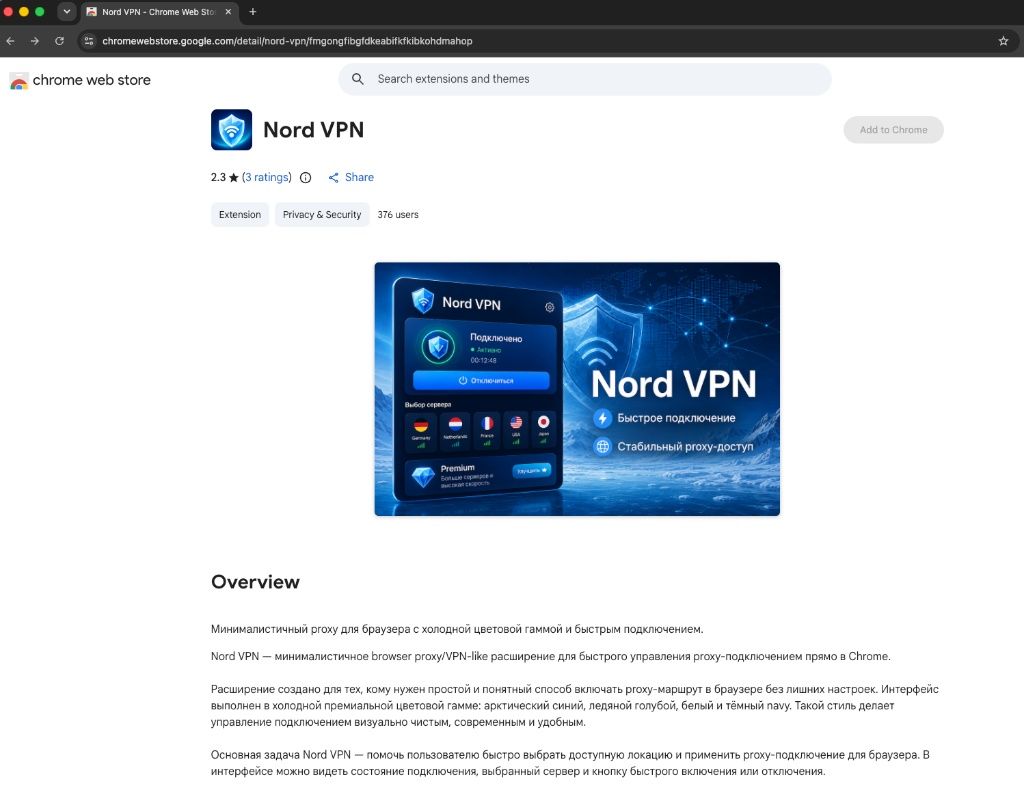
These include a Russian extension using the Nord brand name, extensions with thousands of downloads managed from personal email addresses, and others hosting privacy policies on anonymous sites.google.com domains.
We also found three active VPN extensions linked to an email address previously flagged as belonging to a threat actor. We inspected the source code of one of these apps and found comments suggesting it is deliberately avoiding standard permissions to slip past Google’s Manifest V3 security rules.
In the extension's source code, the developer explicitly notes that they “intentionally avoid” requesting host_permissions, webRequest, and other standard functions to maintain a "safe MV3 install flow".
While a proxy or VPN extension doesn’t necessarily need those permissions, notes on its compliance in its source code suggest it may have been structured in a way to immediately pass Google’s automated checks.
Either way, it’s clear that cleaning up the Chrome Web Store is no easy feat. As Rebecca Rosenberg, Head of Growth at Windscribe, previously told TechRadar: “It’s pretty much a game of whack-a-mole now, [a] copycat is pulled and two more pop up.”
We’ve shared details of some of the live extensions referenced in this article with Google and asked for more details on how the company is protecting users of its extension store. The company did not respond by the time of publication.
Are VPN extensions really worth it?
Even as Google removes hundreds of shady VPN extensions, the Web Store still contains apps that you would be better off avoiding. And the issue runs deeper than bad actors.
In fact, VPN extensions are, by their very nature, not the best tool if you’re looking to protect your privacy online.
Speaking to TechRadar, a senior technical expert at Russian digital security group RKS Global said: “A Chrome extension is not a VPN in the technical sense. It does not create a tunnel; it uses the browser's API to configure a proxy: HTTP, HTTPS or SOCKS. That is why it has limitations.”
This means that any other internet-connected activity on your device runs unencrypted and unprotected — including messaging apps, email apps, and anything else running outside your browser.
The RKS Global spokesperson also noted that “reliable anti-censorship protocols such as AmneziaWG, VLESS with Reality, or Shadowsocks cannot be implemented inside an extension”. So, choosing an extension to evade internet censorship in a highly monitored location such as Russia is rarely the best option.
That’s made worse by the fact that many of these shady extensions were, of course, never designed for censorship circumvention in the first place. Instead, they were built to turn a profit, with some actively harming your privacy rather than improving it.
The RKS Global spokesperson highlighted proxyware as one such example, where “a free ‘VPN’ extension turns the user's browser into an exit node of a residential proxy network”. In this scenario, a user’s home IP and bandwidth may be sold off to third parties for ad verification, web scraping and other unauthorized uses.
Open-source anti-censorship VPN provider AmneziaVPN told TechRadar that the number of extensions with “malicious functionality” had grown recently. The company said extensions that “steal VPN keys from various services” are “released every day” and that there are also “plugins that carry malicious code for surveillance or for stealing data”.
While it’s unclear whether the extensions recently purged by Google were capable of this, experts warn that aggressive censorship in Russia is pushing users directly into the path of scams.
“State policy in Russia, under which the genuine clients of circumvention apps have been purged from the stores and blocked while demand has remained, has provided the ground for the growth of fakes in the stores and of the murky schemes through which people have to install anti-censorship solutions,” RKS Global concluded.
For anyone looking to protect their traffic, the safest approach is to use a full, system-wide VPN. Or, if you need a standalone browser extension, avoid Chrome Web Store search results and download it via a direct link on a trusted provider's website.
While Google's latest purge shows it is willing to remove the worst offenders, sticking to verified sources is well worth the extra click.


