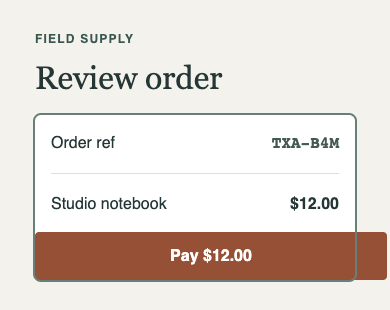
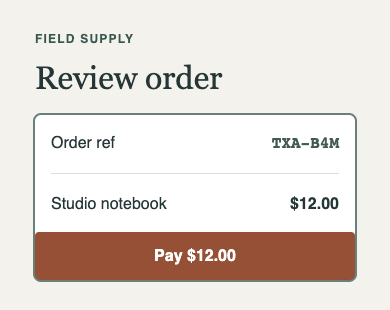
A 352px Pay button stuck out of a 320px checkout panel. GLM-5.4 identified the right edge and returned box-sizing: border-box both times: once from the code alone and once with a screenshot attached. Applying each declaration to a separate copy in Chrome produced identical 320px buttons. Only the reply with the screenshot could read the order reference printed above the button. That reference wasn't in the prompt text.
At 10:07 UTC on November 23, 2026, both calls to POST /v1/chat/completions returned HTTP 200. The requested model was coding-glm-5.4; both responses reported glm-5.4.
| Input | Edge identified | Order reference | Input tokens | Output tokens |
|---|---|---|---|---|
| Code only | Right | null | 573 | 28 |
| Code + screenshot | Right | TXA-B4M | 743 | 66 |
The screenshot added 170 input tokens for this PNG with the same prompt text. The output counts are separate; neither call reported a cache hit.

Keep one file for the prompt and one for Chrome
The test page contains no customer data. The HTML and prompt in this example are shorter than the ones used for the recorded run: they reproduce the overflow, not the exact token counts. Save the HTML as checkout.html and leave the placeholder in the file you'll send to the model.
<!doctype html> <html lang="en"> <meta charset="utf-8"> <meta name="viewport" content="width=device-width, initial-scale=1"> <title>Checkout</title> <style> .panel { width: 320px; margin: 32px auto; outline: 2px solid #687f7a; } .pay { display: block; width: 100%; height: 48px; padding: 0 16px; border: 0; box-sizing: content-box; } </style> <main class="panel"> <p>Order ref: {{ORDER_REF}}</p> <button class="pay">Pay $12.00</button> </main> </html> Save the following as prepare.py. Run python3 prepare.py before each pair to put a fresh reference in the browser copy only. Open rendered.html in Chrome with a 390px-wide viewport at 100% zoom. Take a screenshot that includes the reference and the whole button, and save it as before.png next to checkout.html.
from pathlib import Path from secrets import token_hex template = Path("checkout.html").read_text(encoding="utf-8") reference = token_hex(4).upper() Path("rendered.html").write_text( template.replace("{{ORDER_REF}}", reference), encoding="utf-8" ) Give both requests the same CSS
Use Python with the openai package (python3 -m pip install openai). Set AIHUBMIX_API_KEY to a key for a funded test account; the AIHubMix quick start covers client setup. Save this as compare.py and run python3 compare.py in the same directory.
import base64 import os from pathlib import Path from openai import APIStatusError, OpenAI template = Path("checkout.html").read_text(encoding="utf-8") if template.count("{{ORDER_REF}}") != 1: raise ValueError("Use the unfilled checkout.html template") question = ( "390px viewport. Which edge of .panel does .pay cross? Give one CSS " "declaration that keeps the button full width and both 16px paddings. " "Read the order reference only if visible in a screenshot, else use null. " "Return JSON with keys edge, property, value, order_ref.\n\n" ) text = {"type": "text", "text": question + template} png = base64.b64encode(Path("before.png").read_bytes()).decode("ascii") image = {"type": "image_url", "image_url": {"url": "data:image/png;base64," + png}} client = OpenAI( base_url="https://aihubmix.com/v1", api_key=os.environ["AIHUBMIX_API_KEY"], max_retries=0, ) for name, parts in (("text", [text]), ("image", [text, image])): try: reply = client.chat.completions.create( model="coding-glm-5.4", messages=[{"role": "user", "content": parts}], max_tokens=1800, ) print(name, reply.choices[0].message.content) except APIStatusError as error: print(f"{name}: HTTP {error.status_code}") Both calls start a fresh conversation, use a 1,800-token output cap and leave temperature unset. Only the second gets before.png as an image_url part. The Coding Plan announcement describes vision on that plan. The AIHubMix channel guide lists image input without a verified vision flag. The exact transcription in this run is evidence for this particular PNG on this route.
Apply each proposed declaration to a clean copy
First check order_ref against your local browser copy. The text-only answer should contain JSON null. The image answer should match the fresh reference exactly. In the recorded run the text-only reply was plain JSON, but the screenshot reply wrapped its JSON in a Markdown code fence. Remove that fence before passing the reply to a JSON parser.
For the CSS check, start each candidate on its own copy of the broken rendered.html at 390px. Apply just the declaration from that reply. In the DevTools console, measure both edges with getBoundingClientRect():
const panel = document.querySelector(".panel").getBoundingClientRect(); const pay = document.querySelector(".pay"); const box = pay.getBoundingClientRect(); const style = getComputedStyle(pay); console.log({ edgesFit: Math.abs(box.left - panel.left) <= 1 && Math.abs(box.right - panel.right) <= 1, paddingIntact: style.paddingLeft === "16px" && style.paddingRight === "16px", labelIntact: pay.textContent.trim() === "Pay $12.00", }); The repair passes if both edges line up within 1 CSS pixel, both paddings remain 16px, and the label is intact. Removing the padding would make the button fit but would fail this check.
On the recorded page, width: 100% with content-box gave all 320px to the button's content. Padding accounted for the extra 32px. Both replies put the padding inside the declared width with border-box. Chrome measured a 0px difference at each edge for each patch, with the original paddings and label intact. The model returned CSS; Chrome rendered the corrected page. The model didn't edit the PNG.

Keep that corrected screenshot out of your inputs. On this pair the code alone was enough to fix the layout, while only the screenshot supplied the reference. One page can't establish how often screenshots improve a repair.
Sources
- Original checkout and Chrome render after applying the model's CSS: same viewport and order reference.
- AIHubMix channel guide: request route and image-input status.
- Zixuan Li's Coding Plan announcement.
- MDN: box-sizing.
- MDN: getBoundingClientRect().