With Amazon EMR Serverless, you can run Apache Spark applications without provisioning or managing clusters. You submit jobs, EMR Serverless allocates the compute, scales it during execution, and releases it when the job finishes. There are no clusters to tune and no idle capacity to pay for. Since launch, customers have used EMR Serverless to run production extract, transform, and load (ETL) pipelines, machine learning (ML) feature engineering, and large-scale data transformations, replacing Spark clusters that required dedicated engineering effort to operate.
Customers also have workloads that aren’t time-sensitive. On EMR on EC2 or self-managed Spark clusters on EC2, teams use Amazon Elastic Compute Cloud (Amazon EC2) Spot Instances to run these workloads on spare compute capacity at a lower cost. For top EMR customers, EC2 Spot Instances are a key cost-optimization lever, with many running a portion of their workloads on spare capacity. For customers looking to modernize from clusters to serverless to lower their operational overhead, the absence of an equivalent option on EMR Serverless meant they could only move part of their platform. The time-sensitive workloads came over, but the cost-optimized workloads running on spare capacity stayed on EC2 Spot Instances. Spare capacity support on EMR Serverless has been one of the most requested features, with customers telling us it’s a prerequisite for full migration.
Today we are launching Amazon EMR Serverless Flex, a new execution option that runs Spark batch jobs on spare compute capacity at a fixed 60 percent discount compared to standard pricing. With Flex, EMR Serverless now offers two execution options: Standard for workloads that need predictable start times and dedicated resources, and Flex for workloads where cost matters more than execution-time predictability. Customers who previously split their Spark platforms between EMR Serverless and EMR on EC2 or self-managed clusters on Spot Instances can now consolidate onto a single serverless platform. Customers who didn’t consider EMR Serverless at all, because spare capacity support was missing, can now evaluate EMR Serverless as a full replacement for their cluster-based deployments.
Why Flex matters for your Spark platform
When we talk to customers running Spark at scale, we see a common pattern: two tiers of workloads with different cost and reliability requirements.
Time-sensitive production workloads – ETL pipelines that feed dashboards, ML models, and downstream applications on a schedule. These need fast startup, dedicated compute, and predictable completion times. On EMR Serverless, these run on the Standard execution option.
Non-urgent batch workloads – Pre-production validation, test and development runs, backfills, nightly batch transformations, one-time data loads, and recurring reports with generous processing windows. These jobs are cost-sensitive but time-flexible. They need to finish, but not on a strict deadline.
On EMR on EC2 or self-managed Spark clusters on EC2, customers often deploy non-urgent workloads on Spot Instances. But without a spare-capacity option on EMR Serverless, moving to serverless meant giving up the cost lever on non-urgent batch workloads.
What it takes to run Spark on spare capacity today
On EMR on EC2, running Spark on Spot Instances is a shared responsibility between the service and the customer.
What the EMR service provides: EMR on EC2 provides the infrastructure features for running workloads on spare capacity:
- Instance fleets with Spot allocation strategies (capacity-optimized) that spread capacity requests across instance types and Availability Zones.
- Graceful decommissioning that gives Spark time to migrate shuffle data and finish running tasks when a Spot Instance receives a 2-minute termination notice.
- Spark resilience enhancements (decommission-aware task scheduling, exclusion of decommissioning nodes, and shuffle block tracking) that help Spark recover from node loss without getting stuck on fetch failures.
What customers implement: Based on best practices that have evolved over the years, here’s what teams have built and maintained on top of the preceding EMR features:
- Instance fleet diversification – Select the right mix of instance types across instance variants (
m5,m5a,m5d,r5,r5a,r5d) that meet vCPU and memory requirements. Use the Spot Instance Advisor to target types with lower interruption rates. Configure allocation strategies and fallback behavior. - Multi-AZ placement – Launch clusters targeting multiple Availability Zones to tap into the capacity in the entire AWS Region.
- Driver protection with YARN node labels – Configure YARN node labels to pin the Spark driver to On-Demand core nodes, keeping it off Spot task nodes. If the driver lands on a Spot Instance and that instance is reclaimed, the entire job fails. Setting this up requires YARN label configuration, node-label expression settings in Spark, and ongoing validation.
- Configuring resilience and decommissioning settings – Tune decommissioning timeouts, understand how the Spark resilience enhancements work, and configure them correctly for each workload.
- Ongoing tuning and debugging – Monitor interruption rates by instance type, adjust fleet composition as Spot pricing shifts, debug capacity-related job failures, and maintain the configuration as EMR release versions change.
What Flex handles for you
EMR Serverless Flex applies all of these spare-capacity best practices on your behalf. You add one parameter to your job submission with no fleet configuration or YARN tuning. EMR Serverless takes on the responsibility of running your workloads on spare capacity:
- AZ selection – EMR Serverless evaluates spare capacity pools across Availability Zones in the AWS Region and places workers where capacity is most available.
- Instance diversification – EMR Serverless spreads executors across multiple instance types and generations so that reclamation of one instance type doesn’t hit all workers at once.
- Driver protection – The Spark driver runs on a dedicated Standard worker that isn’t subject to spare capacity reclamation. The driver holds job state (the directed acyclic graph, stage progress, and task assignments) so protecting it prevents job failure, without YARN node labels to configure.
- Decommission-aware scheduling and worker exclusion – When a Flex worker receives a 2-minute reclamation notice, EMR Serverless stops scheduling new tasks on that worker and excludes it from future assignments. The Spark resilience enhancements that EMR developed for handling node loss (decommission-aware task scheduling, proactive worker exclusion, and shuffle block tracking) are applied automatically.
- Automatic task retry – Spark’s built-in fault tolerance retries affected tasks on healthy Flex workers. The job continues without manual intervention.
- Shuffle offload with Serverless Storage (optional) – With EMR Serverless Storage, shuffle data is written to remote storage instead of local disk. When a reclaimed executor’s tasks are retried, the new executor reads the stored upstream shuffle output instead of recomputing it, reducing the fetch-failure problem for shuffle-heavy jobs.
All existing EMR Serverless capabilities (AWS Lake Formation fine-grained access control, AWS Graviton support, AWS Glue Data Catalog integration, and data source connectors) work the same with Flex jobs.
What happens when you run a Flex job
Here is the life cycle of a Flex job from submission to completion:
- Job submission – You submit a Spark job with Flex enabled. EMR Serverless accepts the job and begins acquiring spare compute capacity.
- Capacity acquisition – EMR Serverless selects an Availability Zone within the chosen Region where spare capacity is most available and requests workers across a diverse set of instance types and generations. The Spark driver starts on a dedicated Standard worker.
- Job execution – Executors run on Flex workers. The job proceeds as it would on Standard using the same Spark runtime and APIs.
- If capacity is reclaimed – When a Flex worker receives a reclamation notice, EMR Serverless excludes it and stops scheduling new tasks on it. Spark retries the affected tasks on healthy Flex workers. If you have Serverless Storage enabled, retried tasks read stored shuffle data instead of recomputing upstream stages. Billing for the reclaimed worker stops at reclamation.
- Completion – The job completes and results are written to the output location.
- Failure handling – If no executor joins the driver within 20 minutes of job start, the job fails. To recover from failures, resubmit the job using the best practices you apply to restart a failed job.
How Flex workers are billed
Flex workers are billed at a fixed 60 percent discount on vCPU-hours and memory GB-hours compared to Standard workers. The Spark driver runs on a Standard worker and is billed at the Standard rate. The discount is fixed and unlike EC2 Spot doesn’t fluctuate with supply and demand.
Each worker is billed for the time it was part of the job run, per second with a 1-minute minimum. When a Flex worker is reclaimed, billing for that worker stops. For example, if a 10-minute job runs 20 Flex workers and 3 of them are reclaimed after 5 minutes, you are billed for 17 workers at 10 minutes and 3 workers at 5 minutes.
Flex spend appears as separate line items in AWS Cost Explorer and on your bill, so you can distinguish Flex spend from Standard spend. Flex also works with job-level cost allocation tags, so you can continue attributing costs by team or project. For pricing details, see Amazon EMR pricing.
Flex in practice: Resilience and cost
We ran a 103-query decision-support benchmark (derived from TPC-DS 1 TB and 3 TB scale factor) on Spark to compare Flex and Standard at two data scales. Both runs used the same queries, worker configuration, and release label (emr-7.14.0).
| Scale factor | Execution | Queries completed | Wall-clock time | Estimated cost | Total executors used | Executors reclaimed | Task failures |
| 1 TB | Standard | 103 of 103 | 11.5 min | $5.68 | 12 | 0 | 0 |
| Flex | 103 of 103 | 12.3 min | $2.07 (64% savings) | 15 | 1 | 0 | |
| 3 TB | Standard | 103 of 103 | 12.4 min | $6.29 | 12 | 0 | 0 |
| Flex | 103 of 103 | 16.1 min | $2.32 (63% savings) | 21 | 1 | 0 |
Resilience: In each Flex run, we observed one executor reclaimed mid-job. EMR Serverless excluded the reclaimed worker, and Spark retried the affected tasks on healthy executors. All 103 queries completed in both runs, with zero job resubmissions.
Cost: For this benchmark, we saw Flex reduce estimated cost by about 63 percent at both data scales, from $5.68 to $2.07 at 1 TB, and from $6.29 to $2.32 at 3 TB.
Note: The actual savings and frequency of reclamations will vary by workload, Region, and available spare capacity at the time of execution. We recommend running your own workloads on both Flex and Standard to establish a baseline. This workload is derived from the TPC-DS Benchmark and isn’t comparable to published TPC-DS Benchmark results, as this implementation doesn’t comply with all requirements of the TPC-DS Benchmark.
Runtime tradeoff – The 1 TB Flex run took 7 percent longer than Standard. The 3 TB run took 30 percent longer. The gap widened at larger scale because the reclaimed executor’s tasks needed more time to recompute. Flex jobs can also take longer to start if spare capacity isn’t immediately available. Flex works well for any job where the completion deadline is flexible, including short jobs. A job that runs in 10 minutes on Standard and 12 minutes on Flex is a good candidate if it doesn’t have a strict service level agreement (SLA).
Getting the best results from Flex
Three practices we recommend to get the most from Flex:
Avoid top-of-the-hour peaks
We observe that spare capacity availability drops when many jobs start simultaneously at the top of each hour. Shifting your job start times by even a few minutes (for example, submitting at 9:20 instead of 9:00) reduces contention for spare capacity and improves the chance of a fast start.
Run outside business hours when possible
Spare capacity is most available when overall compute demand is lower. We see the best availability when customers schedule non-urgent workloads to run after 6:00 PM in the Region, or on weekends, giving Flex jobs access to deeper capacity pools with fewer interruptions.
Use Serverless Storage
EMR Serverless Storage writes shuffle data to remote storage, so retried tasks read stored intermediate results instead of recomputing upstream stages. This reduces the runtime cost of interruptions on shuffle-heavy jobs and adds another layer of resilience.
Getting started
Flex is a job-run setting. You create your EMR Serverless application as usual and add one parameter when submitting a job:
In EMR Studio, select the Enable Flex execution checkbox when submitting a job, as shown in the following screenshot:
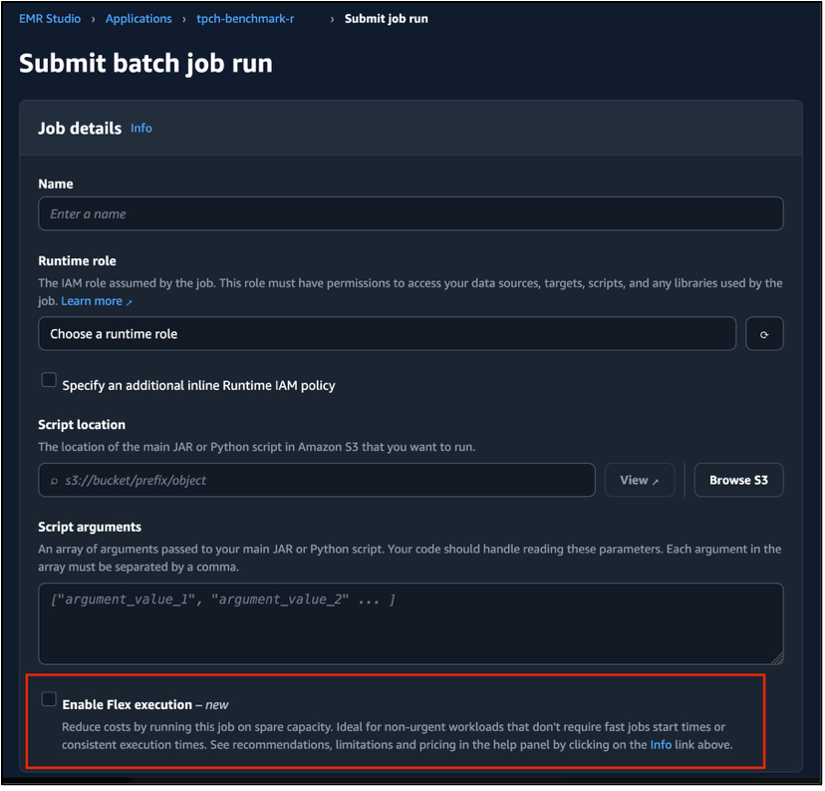
Figure 1: Enable Flex execution checkbox in the EMR Studio job submission form
You can run Flex and Standard jobs on the same application. For step-by-step instructions, see the Amazon EMR Serverless User Guide.
Conclusion
In this post, we shared how Amazon EMR Serverless Flex runs non-urgent Spark batch jobs on spare compute capacity with built-in resilience features, closing a gap that previously blocked customers from modernizing their entire Spark platforms onto EMR Serverless.
To get started, pick a non-critical job, submit it with --flex-execution '{"enabled": true}' and compare the cost and runtime against your Standard baseline. For detailed implementation information, see Running EMR Serverless jobs on spare capacity with Flex.


