Analytical queries often repeat the same expensive joins and aggregations, and materialized views (MVs) in Amazon Redshift optimize that pattern. An MV pre-computes and stores a query’s result, so the expensive work happens at refresh time instead of on every read. A query that would otherwise scan and aggregate large tables becomes a fast lookup of the stored result.
That speed has a running cost. Every MV consumes storage, and every refresh consumes compute, whether or not a query ever reads the result. A well-used MV repays that cost many times over. An MV that refreshes constantly but is not read costs more than it saves. So does one that fully recomputes a hundred million rows to serve a handful of queries.
As MVs become more popular in your organization, it can be challenging to keep track of which MVs are worth the maintenance costs. This post introduces a diagnostic view, v_mv_health, that reports each MV’s refresh eligibility, staleness, refresh cost, dependencies, and query activity. A companion stored procedure, sp_populate_mv_definitions(), creates and fills a table, mv_definitions, holding the one signal a view cannot compute. It reads each MV’s definition and flags the SQL constructs that block incremental refresh. Join the two for a single result set that covers these signals. Once deployed, the view and procedure give you the data to make MV health part of your regular operational review.
Solution overview
The following diagram shows how the two components fit together.
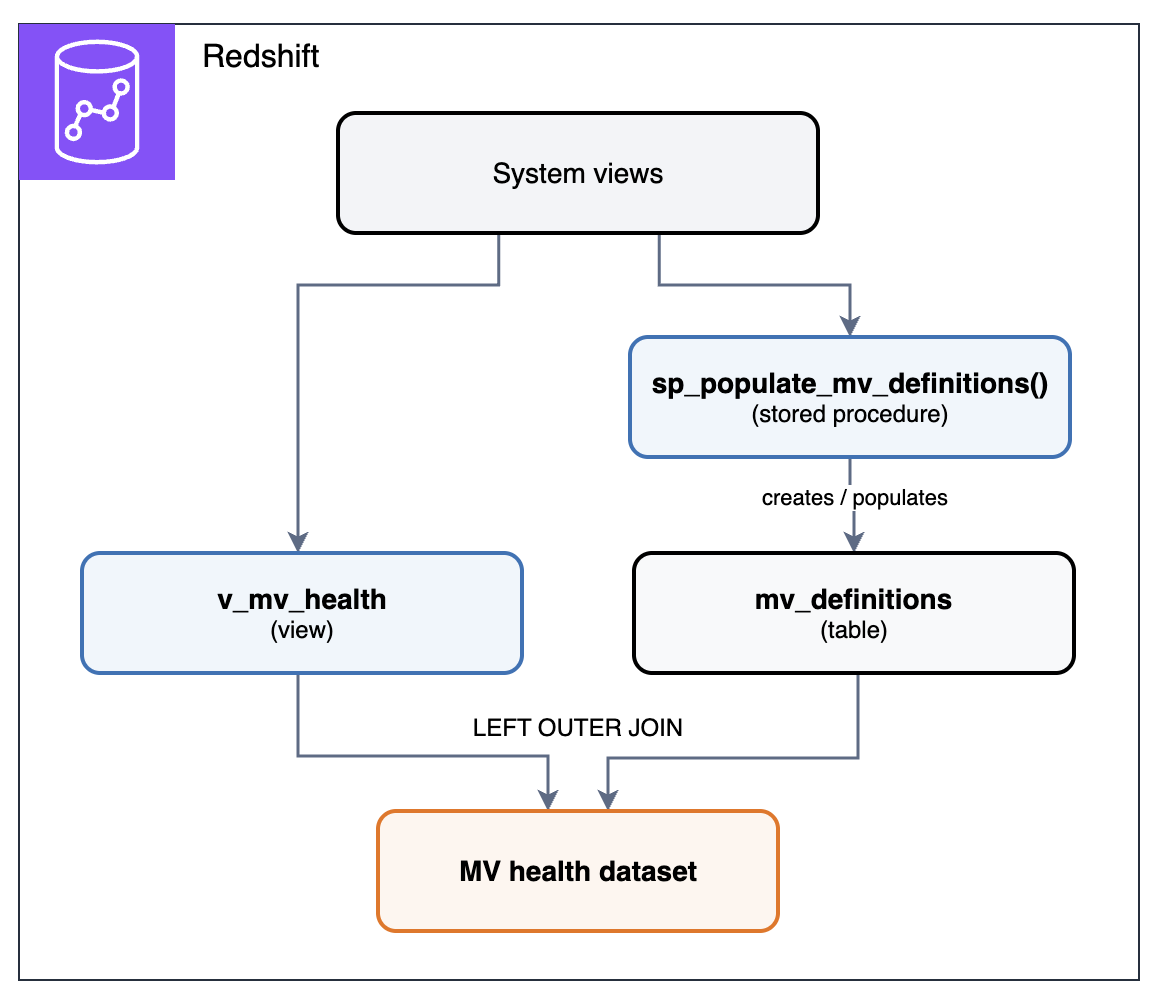
Figure 1: How the v_mv_health view and sp_populate_mv_definitions procedure combine into the MV health dataset
Both components read from Amazon Redshift system views. The v_mv_health view reads them directly each time you query it. The sp_populate_mv_definitions() procedure reads each MV’s definition, flags constructs that block incremental refresh, and writes the results to the mv_definitions table each time it runs. Joining v_mv_health with mv_definitions produces the MV health dataset, a single result set with one row per MV.
Prerequisites
The diagnostic view and procedure require:
- An Amazon Redshift provisioned cluster or an Amazon Redshift Serverless workgroup with one or more MVs.
sys:superuserrole, or thesys:monitorrole, so the view can read activity in the cluster or workgroup. Without it, the refresh and query activity the view reports covers only your own sessions. Grant it withGRANT ROLE sys:monitor TO <username>;(for an IAM identity, use theIAMR:role-nameform). For the full list of system-defined roles, refer to Amazon Redshift system-defined roles.- For a non-superuser (such as a
sys:monitoruser),USAGEon each schema that contains MVs, becauseSVV_MV_INFOonly returns MVs in schemas the user can access. Grant it withGRANT USAGE ON SCHEMA <schema> TO <username>;.
The diagnostic view
Amazon Redshift already exposes the signals, but each lives in a different system view:
- State and staleness: SVV_MV_INFO (current state, staleness, autorefresh setting, and interval).
- Dependencies: SVV_MV_DEPENDENCY (MV-on-MV relationships).
- Refresh history: SYS_MV_REFRESH_HISTORY (refresh activity, method, duration).
- Query activity: SYS_QUERY_DETAIL and SYS_QUERY_HISTORY (which MVs are actually being read, including through automatic query rewriting).
The v_mv_health view joins them into a single row per MV: state, staleness, autorefresh interval, refresh cost, query activity, dependency depth, and whether parent MVs in a chain are stale. The definition for the v_mv_health view is available in the amazon-redshift-utils GitHub repository.
The stored procedure
One signal the view can’t provide is the MV’s definition text. The sp_populate_mv_definitions() procedure iterates through each MV and extracts its definition into the mv_definitions table, created automatically if it doesn’t exist. It then scans each definition for SQL constructs covered in Refresh eligibility. The definition for the sp_populate_mv_definitions() procedure is available in the amazon-redshift-udfs GitHub repository.
The procedure uses a two-phase approach: it stages the MV object IDs into a temporary table first, then walks that local table one row at a time. It executes the pg_get_viewdef() function, which operates on one view at a time. Results are collected in a second temporary table and then replace the contents of mv_definitions in a single transaction, so each run reflects the current state of your MVs. Amazon Redshift drops the temporary tables automatically at the end of the session, so no manual cleanup is needed.
Run the procedure, then join the v_mv_health view to the mv_definitions table it populated:
Both objects use the same SQL on provisioned clusters and serverless workgroups. They report the MVs in their own database, so create them in each database that contains MVs.
Note: The view uses a 7-day lookback window because SYS_MV_REFRESH_HISTORY, SYS_QUERY_DETAIL, and SYS_QUERY_HISTORY retain 7 days of data by default. Amazon Redshift can retain system table data beyond 7 days by automatically replicating it to Amazon S3 Tables, a capability of Amazon Simple Storage Service (Amazon S3). Long-term retention supports SYS_QUERY_HISTORY and SYS_QUERY_DETAIL, so you can extend the query-activity signals by pointing the view’s queries on them at the retained tables. At the time of writing, SYS_MV_REFRESH_HISTORY is not among the retained system tables, so the refresh-cost columns remain limited to the 7-day in-cluster window unless you capture that history yourself.
What the output tells you
The joined output returns one row per MV:
| Column | What it means |
mv_database | Database containing the MV |
mv_schema | Schema containing the MV |
mv_name | MV name |
state | 1 (incremental), 0 (full_recompute), 101-105 (broken). Refer to SVV_MV_INFO |
state_label | incremental, full_recompute, or broken with its cause (for example, broken:column_renamed) |
is_stale | Whether MV data is out of date relative to base tables; NULL for MVs on external tables other than Iceberg. |
is_autorefresh | Whether automatic refresh is turned on |
autorefresh_interval_sec | Autorefresh interval in seconds; NULL when autorefresh is off |
is_default_autorefresh_interval | Whether the MV uses the cluster or workgroup default interval rather than its own. false when autorefresh is off |
is_autorewrite_eligible | Whether the optimizer can transparently rewrite queries to use this MV |
refresh_count | Refresh attempts in the last 7 days, including failed refreshes and refreshes that found the MV already up to date |
query_count | Queries that read the MV in the last 7 days, including queries served through automatic query rewriting. Refreshes are excluded; NULL if the MV’s storage table can’t be found in the catalog |
recompute_to_query_ratio | Full-recompute refreshes (not incremental) ÷ queries. High values indicate refresh cost may exceed benefit; NULL when query_count is 0 or NULL |
avg_refresh_sec | Average refresh duration in seconds |
last_refresh_status | Status message from the most recent refresh, such as incremental, full recompute, or already up to date |
mv_rows | Row count of the MV, for gauging refresh cost against usage |
chain_depth | Depth in a dependency chain (0 = no MV dependencies) |
mv_dependencies | Parent MVs the MV depends on; NULL if it has no parent MVs |
stale_ancestors | Parent MVs in the chain that are currently stale; NULL if no parent MV is stale |
pct_of_total_query_time | Refresh time as a percentage of total query time on the cluster or workgroup |
incremental_blocker_hint | SQL constructs preventing incremental refresh, evaluated only for state 0 MVs (none otherwise, unidentified when no known construct matches). From mv_definitions |
Refresh eligibility
Amazon Redshift refreshes an MV in one of two ways. In an incremental refresh, Amazon Redshift identifies the changes to the data in the base tables since the last refresh and updates the data in the MV. In a full recompute, it reruns the MV definition, replacing the data in the MV. Amazon Redshift automatically chooses the method based on the query that defines the MV.
Each MV in Amazon Redshift falls into one of three states:
- Full recompute (state 0): The entire MV is rebuilt from scratch on every refresh.
- Incremental (state 1): Only changed rows are processed on refresh.
- Broken (state 101-105): The MV cannot refresh at all and must be dropped and recreated.
The state column tells you which category each MV falls into. An MV’s state depends on its definition, not its size. Its size (mv_rows) determines how much that state costs. An incremental refresh on a 100-million-row table might process 50 changed rows, while a full recompute scans all 100 million regardless of how few changed.
Note: A state 1 MV can still occasionally fully recompute, for example after a VACUUM with the FORCE option on a base table while the MV is out of date, or when the MV hasn’t been refreshed for an extended period. These show up as full recomputes in recompute_to_query_ratio even though the state is 1. If you need VACUUM FORCE, run it straight after refreshing the dependent MVs.
Certain SQL constructs block incremental refresh. The incremental_blocker_hint column identifies which constructs are preventing incremental eligibility. If any of the following appear in the MV definition, the MV cannot refresh incrementally and falls back to a full recompute on every refresh:
- Distinct:
SELECT DISTINCT,COUNT(DISTINCT ...). - Outer joins:
LEFT,RIGHT, orFULL OUTER JOIN. - Window functions: anything with an
OVER()clause (ROW_NUMBER,RANK,SUM,NTILE, and so on). - Subqueries: in the
WHEREclause orSELECTlist (subqueries in theFROMclause are fine). - Mutable functions:
GETDATE(),SYSDATE,RANDOM(),CURRENT_DATE. - Set operations:
UNION,INTERSECT,EXCEPT,MINUS. - Ordered and holistic aggregates:
MEDIAN,PERCENTILE_CONT,PERCENTILE_DISC,LISTAGG,APPROXIMATE COUNT,APPROXIMATE PERCENTILE.
An MV may trip more than one of these at once, and incremental_blocker_hint lists each one it finds.
Note: incremental_blocker_hint is a heuristic text scan of the MV definition, not a semantic parse, and is evaluated only for MVs in state 0. The other MVs show none. It matches whole-word SQL keywords, so it won’t trip on names like distinct_count, but a keyword inside a string literal (for example, WHERE status = 'union') can still produce a false positive. Treat it as guidance and verify by inspecting the definition.
OUTER JOIN is a frequent blocker. Outer joins (FULL, LEFT, and RIGHT) are a legitimate and important SQL pattern, but they prevent incremental refresh in MVs. If you need incremental eligibility, you have options: if the join always produces a match (no NULLs in the result), rewriting as INNER JOIN restores incremental refresh with no change to output. If the outer join is genuinely needed, consider handling the unmatched rows upstream. For example, pre-joining in an ETL step, or using a regular view for the outer join while keeping the MV incremental on the inner-joined subset.
For the full list of incremental refresh limitations, refer to Refreshing a materialized view in the Amazon Redshift documentation.
Refresh cost
Every refresh consumes compute resources. The pct_of_total_query_time column shows what share of total query time is spent refreshing each MV, and avg_refresh_sec identifies individual MVs with unusually long refresh times. There is no universal threshold, because what counts as expensive depends on the cluster. Start with the MVs that rank highest on pct_of_total_query_time: those in the highest decile of refresh cost, and those whose cost looks large relative to the queries they serve.
The net-negative MV. An MV that refreshes frequently but is never queried consumes resources without delivering value: refresh_count > 0 with query_count = 0. If is_autorefresh = true and query_count = 0, consider dropping the MV. If it’s still needed occasionally, lengthen its autorefresh interval or switch it to manual refresh on demand.
Refresh-to-query ratio. Even when queried, the refresh cost may exceed the benefit. If an MV fully recomputes many times for every query that reads it, the caching isn’t paying for itself. The recompute_to_query_ratio column flags this. Consider lengthening the autorefresh interval or scheduling refreshes to match how often the MV is read, or dropping the MV entirely.
Note: Amazon Redshift supports creating an MV on a consumer warehouse over data-shared base tables or directly refreshing an MV from a remote warehouse. This isolates the compute and minimizes cluster disruption, whether the refresh is full or incremental.
Dependencies and staleness
Amazon Redshift supports MVs that reference other MVs, known as nested MVs. Nested MVs can be refreshed together, in dependency order, using REFRESH ... CASCADE (refer to Harnessing the power of nested materialized views and exploring cascading refresh). The chain_depth column shows how deep each MV sits in a dependency tree, and mv_dependencies lists its parent MVs.
Staleness propagates one hop at a time. The is_stale column reports whether an MV’s data is behind its base tables. When base table data changes, the immediate dependent MV is marked is_stale = true. Downstream MVs remain is_stale = false until their direct parent is refreshed. At that point they become stale in turn. For deeper chains, is_stale = false on a downstream MV indicates freshness relative to its immediate parent, not the original base table. The stale_ancestors column walks the full chain and reports which parent MVs are currently stale.
CASCADE refresh solves propagation but requires explicit invocation. REFRESH MATERIALIZED VIEW mv_name CASCADE refreshes the entire chain in topological order (parent MVs first). It is not automatic and autorefresh does not cascade, so run it at your required freshness interval, for example on a schedule with Amazon EventBridge and the Amazon Redshift Data API, or as the final step of the ETL job that loads the base tables. Refer to the Autorefresh section for details on when AUTO REFRESH YES is supported.
Note: CASCADE is supported only for chains built on local tables, data-shared tables, local MVs, and streaming MVs. It doesn’t extend to MVs on Amazon Redshift Spectrum sources or to MVs shared from another warehouse, which must be refreshed individually in dependency order. Each additional level in a dependency chain adds refresh latency and widens the window where downstream MVs serve data that hasn’t caught up. Keep chains shallow, and weigh that lag against the benefit the chain provides.
Refreshing materialized views on external tables
MVs can cache results from external tables stored in Amazon S3, so each query reads the stored result instead of re-scanning the same Amazon S3 files. Refresh behavior depends on two factors:
- Data storage format: a standard file type (Parquet, CSV, Avro) or an open table format (Apache Iceberg, Hudi, Delta Lake). When new files appear in Amazon S3, MVs on standard file types and Iceberg refresh incrementally, whether or not they aggregate. Hudi and Delta Lake don’t support incremental refresh.
- Aggregation: whether the MV aggregates (
GROUP BY,SUM,COUNT). When a file is deleted or overwritten, a non-aggregating MV stays incremental, but an aggregating MV must fully recompute, because aggregates can’t be undone without re-reading the remaining data. Thelast_refresh_statuscolumn reports this as “A full recompute was successfully completed as a data file was deleted.”
Apache Iceberg supports incremental refresh in more cases than the other formats. Iceberg’s metadata layer tracks row-level changes (inserts, deletes, updates, compaction), so aggregating MVs stay incremental even when rows are removed. Iceberg is the only data lake format that accepts AUTO REFRESH YES. For MVs over data lake sources where incremental refresh matters, Iceberg is the strongest fit (refer to materialized views on external data lake tables). For a deeper treatment of how incremental refresh works across data lake table formats, refer to Incremental refresh for Amazon Redshift materialized views on data lake tables.
Note: An incrementally refreshable materialized view on Iceberg tables may fall back to a full recompute if that is expected to perform better, or if it joins multiple base tables and more than one of them has been updated since the last refresh.
The following table summarizes the refresh method each source format uses for file additions and deletions, and whether it supports autorefresh:
| Source format | On file addition | On file deletion, non-aggregating MV | On file deletion, aggregating MV | Autorefresh |
| Apache Iceberg | Incremental | Incremental | Incremental | Supported |
| Parquet / CSV / Avro | Incremental | Incremental | Full recompute | Not supported |
| Hudi / Delta Lake | Full recompute | Full recompute | Full recompute | Not supported |
Note: On Iceberg tables, an aggregating MV falls back to a full recompute if a snapshot it needs has been expired. Expire snapshots only after refreshing the MVs that depend on the table, and if you use AWS Glue Data Catalog snapshot retention, keep the retention period longer than the interval between MV refreshes. Refresh after compaction stays incremental but processes more data, so plan for a longer refresh.
On Amazon Redshift RG instances and Serverless, external table queries run through an integrated query engine rather than Amazon Redshift Spectrum, which can reduce MV refresh times on Iceberg data. No configuration change is required.
Autorefresh
Autorefresh keeps MVs current without manual scheduling. The is_autorefresh column shows which MVs have it turned on, and autorefresh_interval_sec shows how often Amazon Redshift checks each one for staleness. An autorefresh runs only when the MV is stale, with the same priority as other user queries. On provisioned clusters, autorefresh queries run in your workload management (WLM) queues alongside your workload and appear in STL_QUERY. On Amazon Redshift Serverless, they consume Redshift Processing Units (RPUs) like any other query. On both, SYS_MV_REFRESH_HISTORY is where you see autorefresh activity, because it doesn’t appear in SYS_QUERY_HISTORY.
Autorefresh on high-churn tables generates constant refresh activity. Some base tables change frequently through streaming ingestion, AWS Database Migration Service (AWS DMS) replication, or zero-ETL. On those tables the MV is almost always stale, so autorefresh runs at every interval (5 minutes by default). The refresh_count column quantifies this. The worst case is autorefresh on a state 0 MV. Every refresh is a full recompute, so at the default interval that’s a full rebuild of the MV every 5 minutes. If the MV doesn’t need to be that current, keep autorefresh on but lengthen the interval (minimum 60 seconds) to match how often the results are queried: ALTER MATERIALIZED VIEW mv_name AUTO REFRESH YES INTERVAL <seconds>. To change the default for every MV on the cluster or workgroup, use ALTER SYSTEM SET default_mv_auto_refresh_interval = <seconds>. For details, refer to ALTER MATERIALIZED VIEW and ALTER SYSTEM. Custom intervals aren’t supported on streaming MVs.
Autorefresh does not cascade. It refreshes only the configured MV, not its dependents. AUTO REFRESH YES is rejected at creation time on nested MVs and on external tables other than Iceberg, returning an error rather than being silently ignored. On a nested MV the message is “Auto-refresh is not supported for materialized views defined on other materialized views.” It is supported on local single-level MVs over Iceberg or datashare tables, but not on an MV that combines both.
Broken materialized views
An MV becomes permanently broken when the definition of its base table changes in certain ways. The state column shows values 101-105 for broken MVs, with a label indicating the cause (refer to SVV_MV_INFO for the full state code reference).
Renaming an object that an MV depends on is not blocked, and it leaves the MV unable to refresh. A rename of a column, table, or schema completes without an error and moves the MVs that reference it to a broken state (103-105). Once broken, an MV cannot be refreshed, and renaming the object back does not restore it. The fix is to DROP and CREATE the MV.
Dropping a column that an MV uses, or changing its data type, is rejected. Amazon Redshift returns an error and the MV stays healthy.
Identify affected MVs before you alter a base table or column. SVV_MV_DEPENDENCY only shows MV-on-MV relationships, not base-table dependents. Before you make such a change, use the v_view_table_column_dependency view in the amazon-redshift-utils GitHub repository to identify the dependent MVs and the specific columns they rely on.
Automatic query rewriting
Amazon Redshift can rewrite a query on base tables to read from an MV, even when the query doesn’t name it (refer to Automatic query rewriting to use materialized views). The query_count column includes these reads. The is_autorewrite_eligible column shows whether the MV’s definition allows rewriting.
Eligible doesn’t mean used. Amazon Redshift skips a stale MV until its next refresh, even though the flag stays true. The flag also reads true for nested and broken MVs, which aren’t used. To confirm a specific query was rewritten, run EXPLAIN on it. In a rewritten plan, the base tables the MV covers no longer appear. In their place is a scan of an internal table that holds the MV’s results.
Should this be a materialized view?
Not every cached result benefits from being an MV. The following characteristics indicate when an MV is a strong fit and when an alternative is likely better:
| Favors a materialized view | Points to an alternative |
| Analytical queries from dashboards and analysts | Application lookups serving thousands of concurrent requests |
| Multiple users or queries read the result | The result is read once or rarely |
| The query scans a large table but returns few rows | The query returns most of the rows it scans |
| Query latency is unacceptable without pre-computation | A regular view already meets the latency requirement |
| Readers can tolerate data that is a refresh interval old | Readers need sub-minute freshness |
When your workload matches the right-hand column, a different approach usually fits better: a regular view when the query is already fast enough, in-stream transformation when readers need sub-minute freshness, and an in-memory cache such as Amazon ElastiCache for application lookups at high concurrency.
Putting it together
Deploy the diagnostic view and stored procedure. Run them periodically. Weekly is sufficient for most clusters. Focus on:
- State 0 MVs with high refresh cost: Check
incremental_blocker_hint. If it names an SQL construct, refactor it (for example,OUTER JOINtoINNER JOIN). If it readsunidentified, confirm the full recompute is justified. - MVs with
query_count = 0: Consider dropping them. - Deep chains with stale ancestors: Refresh with
REFRESH ... CASCADEto bring the chain current, and flatten chains that are deeper than they need to be. - Broken MVs (state 101-105): Drop and recreate.
- Autorefresh MVs on high-churn tables: Compare
refresh_countagainstquery_count. When refreshes far outnumber reads, lengthen the autorefresh interval to match how often the results are actually queried.
The goal is MVs whose refresh cost is repaid by the queries they accelerate.
Automate the review. Rather than running the diagnostic by hand, schedule it. v_mv_health is consistently current because it reads the system views each time you query it, so only the procedure needs a schedule. For a basic setup, run CALL sp_populate_mv_definitions(); on a cadence with Amazon EventBridge and the Amazon Redshift Data API. For alerting or dashboards, refer to Building an event-driven application with AWS Lambda and the Amazon Redshift Data API, which uses Amazon EventBridge and AWS Lambda to run a stored procedure on a schedule.
Cleaning up
The diagnostic objects are lightweight (a view, a stored procedure, and a small definitions table), but if you no longer need them, remove them with:
Summary
In this post, we showed how to check the health of the MVs in an Amazon Redshift database from a single result set. The v_mv_health view and the sp_populate_mv_definitions() procedure surface the signals that matter. Together they cover refresh eligibility, cost, staleness, dependencies, broken states, and autorefresh behavior. Call the procedure, join its output to the view, and you can see which MVs need attention first.
With v_mv_health and sp_populate_mv_definitions() deployed in each database that contains MVs, you can make MV health a routine part of your operational reviews.
Next steps. The v_mv_health and v_view_table_column_dependency views are available in the amazon-redshift-utils GitHub repository, and the sp_populate_mv_definitions() procedure is available in the amazon-redshift-udfs GitHub repository. To go deeper on the topics this post touched, see Harnessing the power of nested materialized views and exploring cascading refresh and Incremental refresh for Amazon Redshift materialized views on data lake tables.